
My Streaming Android App with Admin Panel (Android 13 Support)

Description


My Streaming is an Android Mobile application, which runs the online streaming Video. You can watch any Live HTTP Video Streaming URL that can easily run on your Android devices. This Streaming application runs these formats (.m3u8, mp4, and hls) and Youtube, embedded videos (like DailyMotion, Open Load, Vimeo, and Very Stream). We can handle unlimited categories, channels by category from admin panel(PHP code) and show into Android application.
This app uses PHP Server as the backend part, there is an admin panel with PHP framework. The source code is very easy to understand, customize, and re-skin the app for personal use.
 Username: admin
Password: admin
Username: admin
Password: admin

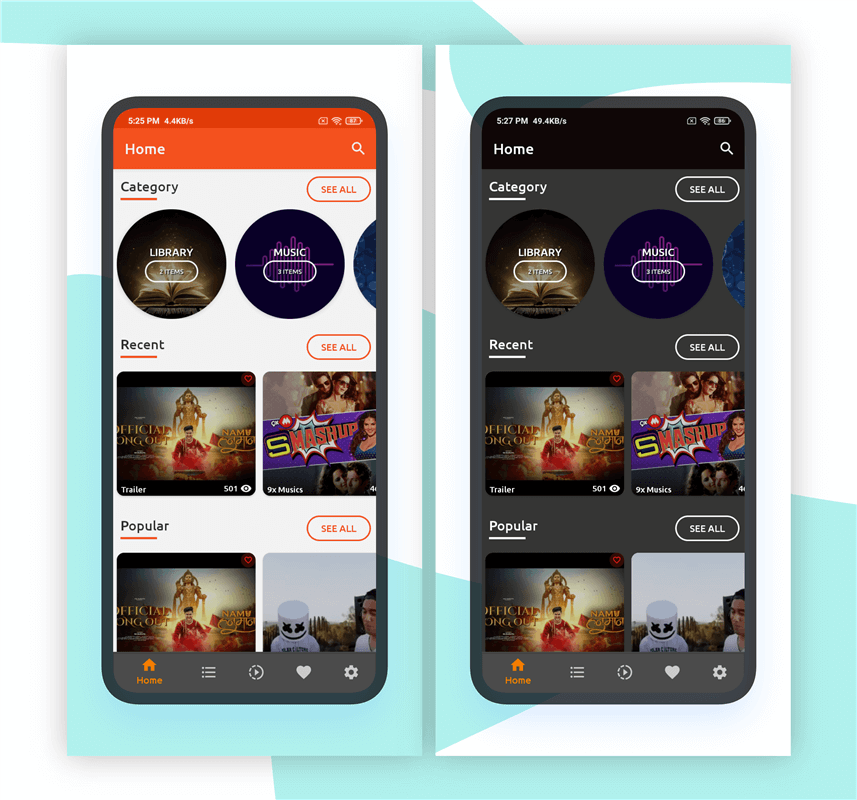
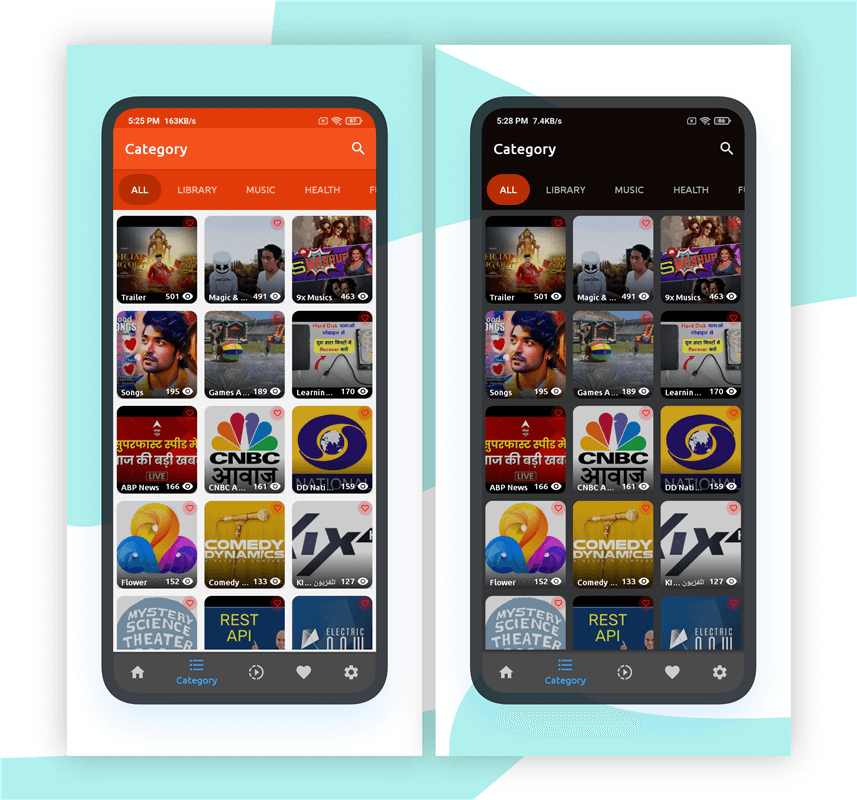
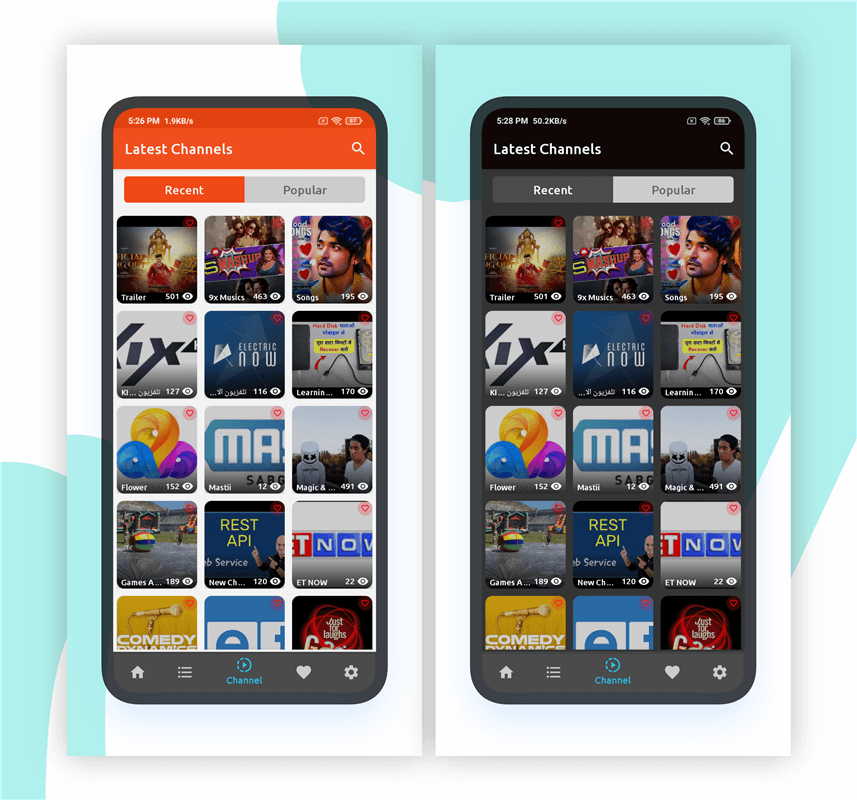
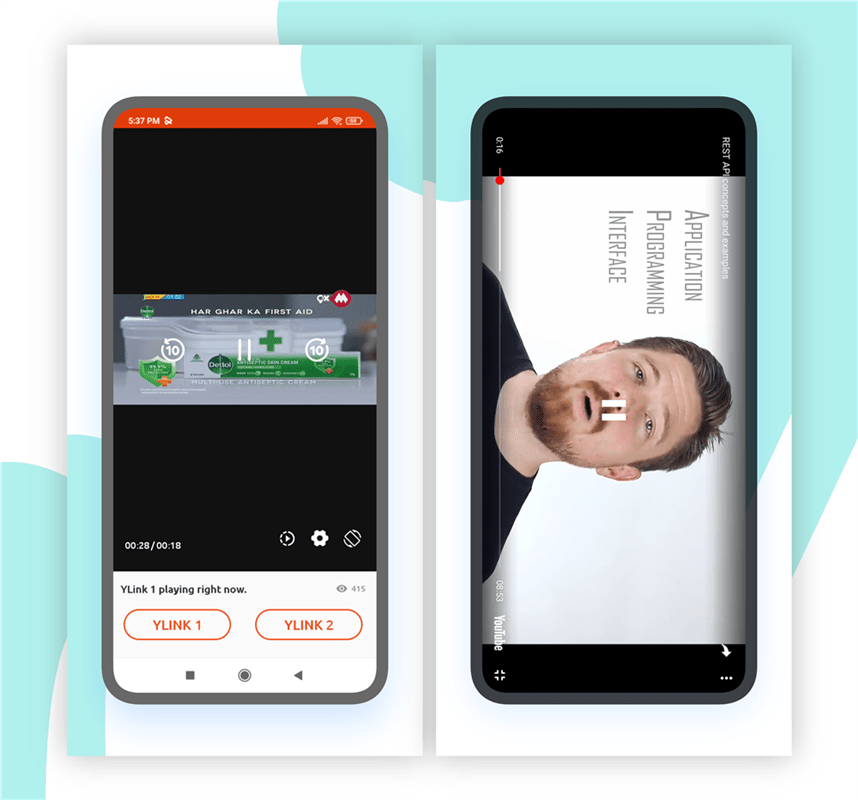
Features
Native Android App
- Login / Register as new user(Can disabled from Admin if not needed)
- Bottom Menu to traverse easily between different screens
- Auto update / force update to download latest version from play store
- Show main categories and no of count for channels for particual category
- Show Category wise channels
- Show Channels by Latest (Last added channel display first and so on)
- Show Channels by Popular (Maximum viewed items first and so on)
- Detail description for specific channels with users view count.
- Animation for play button to identify to view live video
- Live Streaming Supported (m3u8, hls, mp4, etc)
- Playing channel to external MXPlayer easily
- Embedded Player Supported (DailyMotion, Open Load, Vimeo, Very Stream)
- Youtube Player Supported
- Play link1 and link2 (Provide alternate link if any one is broken)
- Adjust volumn up/down from right side to swipe up/down while playing video in device.
- Adjust screen brightness from left side to swipe up/down while playing video in device.
- Swipe down to refresh from top on Category, Recent Channels, individual channel screen.
- Auto load next page when at last item.
- Search channels by name
- User can make Favorite Channels
- Favorite Section to see all channels
- Firebase Push notification
- Google Banner/Interstitial Ads show (If Inactive from Admin Panel to don’t show in Android app)
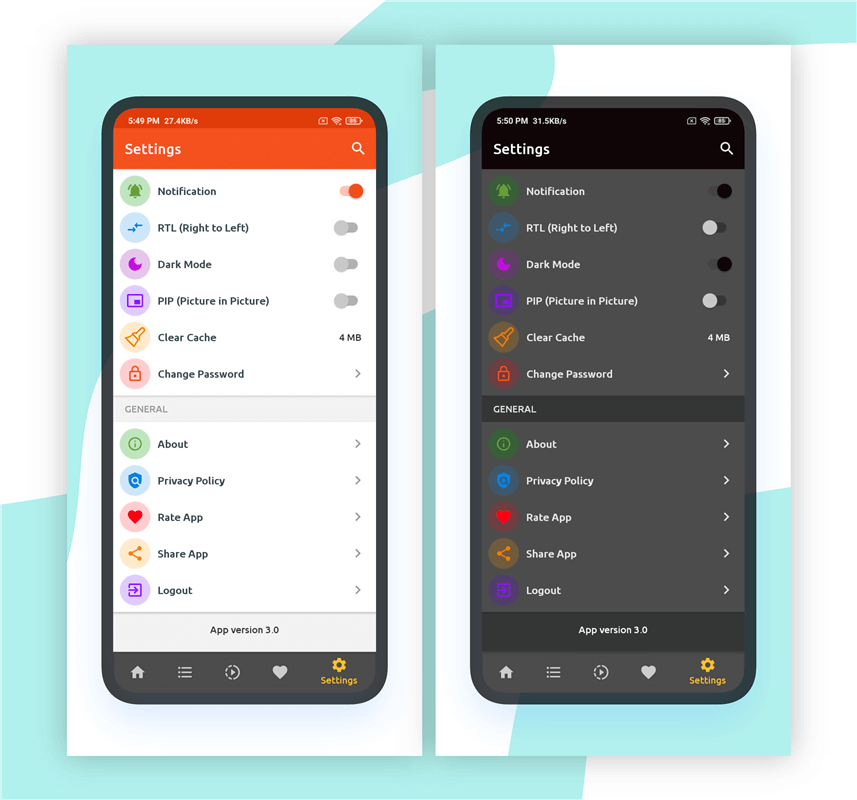
- Setting menu:
- Notification On/Off option
- RTL Support On/Off option
- PIP Mode On/Off option
- Dark Mode On/Off option
- Cache option
- Change Password
- Rate App
- Share App to outside (via Whatsapp, other social media)
- About app (It fetch data from server, update in admin panel and reflect changes here)
- Privacy Policy (Update from server)
- Logout
- Exit app to press twice from category screen.
Admin Panel
- Attractive Dashboard Panel
- Only Super Admin user can access Admin Panel
- RTL Supported for admin panel too
- List of Registered Users
- List of Categories
- Active / Inactive category – (Inactive category will not display on Android app)
- List of Channels
- Active / Inactive channels – (Inactive channels will not display on Android app)
- Click image to make it bigger for better view
- Select option at right side to hide/show columns.
- Search items within page.
- User-Agent supported for secure your channel(Optional)
- Login/Register Screen On/Off.
- Channels Display as Grid On/Off option for Android App.
- Replace the Channel Link path easily
- Push notification send title, body and image if its available.
- Setting Menu to handle App related information
- Auto update / force update to download latest version from play store or Direct server APK Link
- Google Banner Ads Show/Hide Option (Based on option set from Admin, it show/hide in Android app)
- Google Interstitial Ads Show/Hide Option (Based on option selected Android app show/hide)
- Manage Privacy Policy content from admin panel
New Updates (Changelogs)
Version 6.0 (20 January 2026)
-  Android Studio Otter 3 (2025.2.3)
-  Gradle catalog and dependencies
-  Support 16KB memory
-  Media3 Library for Live Streaming m3u8 format
-  ExoPlayer improvement
-  PIP Mode
-  Unwanted code
-  Improve performance
Version 5.0 (08 April 2025)
-  Android Studio Ladybug | 2024.2.2 Patch 2
-  Gradle catalog and dependencies
-  Dialog to Bottom Dialog
-  Notification related code
-  API responses
-  YouTube library
-  unwanted code and comments and improve performance
-  Admin Panel for Notification setting -> Upload JSON
-  Push notification logic to latest version
Version 3.0 (18 August 2023)
-  Embedded Video support fullscreen
-  YouTube Playlist supported
-  Channel update issue fixed
-  Minor UI improvement
-  YouTube SDK Key from Admin Panel
Version 2.0 (23 February 2023)
-  Attractive Android UI
-  YouTube Playlist supported
-  Fullscreen Embedded player supported
-  Native Ads and TEST Ads
-  Dark Mode, Cache option, etc
-  Fixed the bugs and improve performance
Version 1.5 (02 April 2022)
-  Bottom tab UI Color
-  Replace the player with the latest Exo Player(given by Google itself)
-  Added forward/backward of live streaming for 10 seconds
-  Select appropriate resolution based on streaming live URL
-  Increase/decrease speed
Version 1.4 (09 May, 2020)
-  Admin Panel: Added a new feature to replace the link path.
-  Admin Panel: RTL Supported from Setting Menu
-  Admin Panel: YouTube Key Manage from Setting Menu
-  Android: Convert code into AndroidX
-  Android: PIP(Picture In Picture) Mode On/Off (Only for Streaming Type Channels)
-  Android: The bottom menu can be changed easily
-  Android: Playing channel to external MXPlayer easily
-  Android: Mandatory login issue.
-  Android: 64-bit build issue.
Version 1.3 (08 Jan, 2020)
-  Admin Panel : Auto Update(Force Update) setting added
-  Android: Auto-update popup shows if the current play store version is higher than the installed app version
-  Android: RTL Support (On/Off)
-  Android: Solved minor bugs for Favorite tab not shown youtube image, pagination issue solved
Version 1.2 (04 Jan, 2020)
-  Android + Admin : User agent support added(It is Optional field)
-  Admin Panel: Mandatory Login set Enabled/Disabled from Admin Panel
-  Admin Panel: Enable/Disable Grid for Channels from Admin Panel.
-  Android: Show grid view if set TRUE from Admin Panel
Version 1.1 (27 Dec, 2019)
-  Android: Youtube Player Supported
-  Android: Embedded Player supported (i.e: DailyMotion, Open Load, Vimeo, Very Stream)
-  Admin Panel: Youtube and Embedded Player selection
-  Admin Panel: Display a particular channel type on the Channels list
-  Admin Panel : Youtube Image automatically fetch based on Youtube Link, if Channel Type selection as YouTube.
Version 1.0 (20 Dec, 2019)
- Initial version
| Type | Android App |
|---|---|
| Author | bytesbee |
| Category | Mobile / Android / Audio Video |
| Price | $24 |
| Sales | 57 |
| Rating | 4.50 from 8 ratings |
| Published | Dec 19, 2019 |
| Last Update | Jan 26, 2026 |
| Compatible Software | Android 15.0, Android 12.0, Android 11.0, Android 10.0, Android 9.0 |
| Mobile Files Included | .apk, .dex, .db, .java, .xml, Layered PNG, JavaScript JS, CSS, PHP, HTML |
Categories
Tags
External listing. code.market does not sell this product and does not process payment for it. Pricing, payment, delivery, licensing, refunds, and support are handled by the third-party merchant on its own website. We may earn an affiliate commission from a referral. Details.
Products of the Week.
Submit🥇

STOP GUESSING WHAT TO POST
AI that learns your brand voice and builds a month of consistent, on-brand social content: carousels, posts and hooks that sound like you, not like everyone else's AI.
SaaS · 4,286 views · 38 clicksSaaS · Week 45 · 4,286 views · 38 clicks
🥈

Conversational Backlinks for Busy Founders
Place Backlink Relevant Conversation for your domain across Forums and Conversations
Website · 41,997 views · 223 clicksWebsite · Week 45 · 41,997 views · 223 clicks
🥉

upvote.club
Free Social Media Engagement that Helps Boost Your Content. Upvote Club supports 19 social networks with 100+ engagement actions in one dashboard. Add links to your posts and get free engagement from real users.
SaaS · 40,038 views · 117 clicksSaaS · Week 45 · 40,038 views · 117 clicks
#4

Substack Posting API
Onboard your Agent to Substack. Write Publish on Substack via API
SaaS · 59,048 views · 198 clicksSaaS · Week 45 · 59,048 views · 198 clicks
#5

Seenshot App
Free, Fast, MacOS Screenshot app. Make Screenshot cmd+shift+2 and send it via link
Desktop App · 28,422 views · 122 clicksDesktop App · Week 45 · 28,422 views · 122 clicks
#6

Hand-Placed Backlinks $9.99 per link. Flat rate.
Buy hand-placed forum, Q-A and directory backlinks. Flat $9.99 per link, no subscriptions — you only pay for approved listings.
Website · 4,257 views · 19 clicksWebsite · Week 45 · 4,257 views · 19 clicks
#7

Free Invoice Generator - PDF Invoices in Your Browser, No Sign-Up
A free invoice maker for freelancers and small businesses: fill in the invoice, check the live preview, and download a PDF that looks exactly like it. Any currency, tax per item, three templates, no sign-up, and nothing leaves your device.
2,934 views · 17 clicksWeek 45 · 2,934 views · 17 clicks
#8

Merge PDF Files Free - Combine PDFs in Your Browser, No Upload
A free PDF merger for office workers, students, and freelancers: combine PDFs and images into one file in the browser, reorder files and pages, pick page ranges, keep bookmarks, and open password-protected PDFs. Nothing is uploaded, no sign-up, no watermark.
2,710 views · 13 clicksWeek 45 · 2,710 views · 13 clicks