
My First Calendar - iOS Educational App for Kids | SwiftUI Template
Description
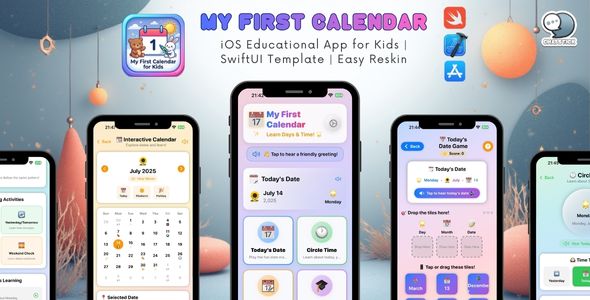
My First Calendar – iOS Educational App for Kids (SwiftUI Template)
Complete iOS calendar-learning app with games, quizzes, and audio narration • Fully customizable • iPhone + iPad
Transform calendar learning into an adventure!
My First Calendar is a comprehensive, production-ready iOS app template designed to engage children in
learning about calendars, days of the week, months, and time concepts through interactive games and activities.
Built with SwiftUI and modern iOS development practices, this template is ideal for developers,
entrepreneurs, and educators who want to launch a professional educational calendar app quickly.
Key Features
Interactive Learning Modes
- Today’s Date Game — fun drag-and-drop gameplay to learn the current date
- ⭕ Circle Time — visual learning for days of the week and months
- Interactive Calendar — explore dates with special days and holidays
- Learn & Quiz — structured lessons with comprehension quizzes
- Progress Tracking — stars, streaks, levels, and achievement badges
Audio & Accessibility
- Text-to-Speech Narration — all content can be spoken aloud
- Sound Effects — engaging audio feedback and reinforcement
- ♿ VoiceOver Support — accessibility-first implementation
- Multi-language Ready — localization-friendly structure
Customization Features
- Complete AppConfig System — centralized configuration file
- Customizable Colors — theme customization in minutes
- ✏️ Editable Content — update days, months, messages, and learning text
- Adjustable Difficulty — configure game settings for different age levels
- ️ Feature Toggles — enable/disable modules based on your needs
Educational Content
- 365+ Special Days Database — holidays, observances, and fun days
- 14 Learning Topics — comprehensive calendar education curriculum
- ❓ Interactive Quizzes — kid-friendly knowledge checks
- Positive Reinforcement — encouraging messages and rewards
Teacher & Parent Features
- Teacher Mode — lock dates for classroom use
- Progress Reports — track learning achievements
- ⚙️ Parental Controls — customize settings and difficulty
- Daily Goals — set learning objectives
What Makes This Template Special?
1) Production-Ready Code
- ✅ Clean, well-documented Swift code
- ✅ MVVM architecture for maintainability
- ✅ No third-party dependencies
- ✅ Optimized for performance
2) Easy Customization
- ✅
AppConfig.swift— single file for core settings - ✅ Comprehensive documentation
- ✅ Step-by-step reskin manual
- ✅ No coding required for basic changes
3) Professional Design
- ✅ Modern, child-friendly UI
- ✅ Smooth animations
- ✅ Responsive layouts for all devices
- ✅ Dark mode compatible
4) Complete Documentation
- ✅ Installation guide
- ✅ Detailed reskin manual
- ✅ Code comments throughout
- ✅ Troubleshooting guide
Technical Specifications
| Platform | iOS 16.0+ |
| Language | Swift 5.9+ |
| Framework | SwiftUI |
| Architecture | MVVM |
| Devices | iPhone & iPad (Universal) |
| Orientations | Portrait & Landscape |
| Dependencies | None (100% native) |
| Persistence | Core Data included |
| Xcode | 15.0+ required |
What’s Included?
Source Code
- ✅ Complete Xcode project
- ✅ All Swift source files
- ✅ Assets and resources
- ✅ Core Data model
- ✅ No encrypted or obfuscated code
Documentation
- ✅ RESKIN_MANUAL.md — complete customization guide
- ✅ INSTALLATION_GUIDE.md — quick start instructions
- ✅ README.md — project overview
- ✅ Inline code comments — every function documented
Configuration
- ✅
AppConfig.swift— centralized settings file - ✅ Pre-configured app icon slots
- ✅ Launch screen template
- ✅ Sample content and data
Bonus Content
- ✅ 365+ special days database
- ✅ Multiple encouragement phrases
- ✅ Educational quiz questions
- ✅ Learning topics and lessons
Perfect For
- iOS Developers — launch an educational app quickly
- Educators — create custom learning tools
- Entrepreneurs — start an ed-tech business
- Schools — branded calendar app for students
- Parents — personalized learning for kids
Quick Start (3 Easy Steps!)
- Open the project in Xcode
- Customize
AppConfig.swiftwith your branding - Build and submit to the App Store
No complex setup. No dependencies to install. No configuration headaches.
Screenshot Suggestions
For your CodeCanyon listing, include 8–10 screenshots showing:
- Home screen with navigation
- Today’s Date game in action
- Circle Time learning interface
- Interactive calendar view
- Quiz question screen
- Progress tracking dashboard
- Settings panel
- Special days highlighted in the calendar
Demo Video (Recommended)
Include a 30–60 second video showing:
- App launch and home screen
- Playing one game mode
- Audio narration feature
- Calendar interaction
- Quiz functionality
- Settings customization
Feature List (Detailed)
Games & Activities
- Today’s Date matching game
- Days of the week learning
- Months of the year exploration
- Yesterday / Today / Tomorrow concepts
- Weekend countdown
- Special days discovery
Learning Content
- 7 days of the week
- 12 months of the year
- Date formatting
- Calendar navigation
- Time concepts
- Special occasions
Progress System
- Star rewards
- Daily streaks
- Level progression
- Achievement badges
- Perfect score tracking
- Learning statistics
Customization Options
- App name and tagline
- Color schemes
- Font sizes
- Audio settings
- Difficulty levels
- Feature toggles
Settings & Controls
- Voice narration on/off
- Sound effects control
- Auto-play audio
- Text size adjustment
- High contrast mode
- Show/hide hints
- Daily goal setting
- Teacher mode lock
Customization Examples
Change App Name
// In AppConfig.swift
static let appName = "Your App Name"
static let appTagline = "Your Tagline"
Modify Colors
// In AppConfig.swift
static let primaryBlue = Color.blue
static let primaryPurple = Color.purple
Add a Custom Special Day
// In CalendarModels.swift
SpecialDay(
    month: 3,
    day: 15,
    name: "Your Special Day",
    emoji: "",
    description: "Description here",
    category: .fun,
    isHoliday: false
)
Use Cases
White Label Educational App
- Rebrand for your company
- Publish on the App Store
- Offer to schools and parents
School-Specific App
- Add school holidays
- Customize branding
- Optional school calendar alignment
Language Learning Tool
- Translate to any language
- Learn days/months in a new language
- Cultural calendar education
Special Needs Education
- Adjust difficulty levels
- Customize for individual needs
- Visual + audio learning support
Localization Ready
Designed to translate easily:
- Text stored in configurable files
- Multi-language audio support (device-dependent)
- RTL-ready structure (depending on your content)
- Date formatting localization support
Supported speech languages (examples): English, Spanish, French, German, Italian, Portuguese, Japanese, Chinese, Korean, Arabic, and more.
Device Compatibility
iPhones
- iPhone 15 series
- iPhone 14 series
- iPhone 13 series
- iPhone 12 series
- iPhone 11 series
- iPhone SE (2nd & 3rd gen)
iPads
- iPad Pro (all sizes)
- iPad Air (all generations)
- iPad (9th gen and later)
- iPad mini (5th gen and later)
Optimized for all screen sizes.
Learning Outcomes
Children using this app will learn:
- ✅ Days of the week in order
- ✅ Months of the year
- ✅ How to read a calendar
- ✅ Yesterday / Today / Tomorrow concepts
- ✅ Weekdays vs. weekends
- ✅ Special days and holidays
- ✅ Date formatting basics
- ✅ Intro time management concepts
️ Technical Highlights
Code Quality
- MVVM architecture pattern
- Separation of concerns
- Reusable components
- Protocol-oriented design
- Memory-efficient (no retain cycles)
Performance
- Smooth animations
- Optimized asset loading
- Efficient Core Data usage
- Minimal battery impact
- Fast launch time
Best Practices
- SwiftUI lifecycle
- Combine-ready structure
- Async/await-ready patterns
- Modern Swift features
- Accessibility-first approach
Support & Services
Included Support
- Email support for setup questions
- Documentation and guides
- Code comments for understanding
Additional Services Available
Need help customizing or launching your app? We offer professional services:
- Custom Graphic Design — app icon, illustrations, UI/UX redesign
- Advanced Customization — new features, integrations, custom game modes
- App Store Upload Service — submission, ASO, screenshots, description writing
- Professional Localization — translation, native review, cultural adaptation
- Marketing Materials — promo screenshots, app preview videos, copywriting
Contact Us
choochai.t@chatstickmarket.com
www.chatstickmarket.com
We respond within 24 hours.
❓ FAQ
<dl> <dt>Q: Do I need coding experience?</dt> <dd>A: Basic customization (name, colors, content) requires no coding. Advanced changes may require Swift knowledge.</dd> <dt>Q: Can I resell this template?</dt> <dd>A: You can sell apps built with this template, but you cannot resell or redistribute the template itself.</dd> <dt>Q: Is this a complete app?</dt> <dd>A: Yes. It’s production-ready and can be submitted to the App Store after customization.</dd> <dt>Q: Are there any hidden costs?</dt> <dd>A: No. The template is a one-time purchase. You only need an Apple Developer account ($99/year) to publish.</dd> <dt>Q: Can I request new features?</dt> <dd>A: Yes. Contact us for custom development services.</dd> <dt>Q: Is the code obfuscated?</dt> <dd>A: No. The code is clean, readable, and well-documented.</dd> <dt>Q: Does it work on iPad?</dt> <dd>A: Yes. It’s a universal app optimized for both iPhone and iPad.</dd> <dt>Q: Can I change the language?</dt> <dd>A: Yes. It’s localization-ready and designed to support multiple languages.</dd> <dt>Q: Is there a refund policy?</dt> <dd>A: Please review CodeCanyon’s refund policy. We provide support to help resolve issues.</dd> <dt>Q: How do I get updates?</dt> <dd>A: Updates are provided through CodeCanyon. You’ll be notified when new versions are released.</dd> </dl>Version History
- Version 1.0 (Current) — initial release
- Complete feature set
- Full documentation included
- iOS 16+ support
Why Choose This Template?
- ✅ Save months of development — ready to customize and launch
- ✅ Professional quality — production-ready code
- ✅ Easy customization — no complex setup required
- ✅ Complete documentation — step-by-step guides
- ✅ Ongoing support — we’re here to help
- ✅ Great value — everything included, no hidden costs
License
- ✅ Use in unlimited personal projects
- ✅ Use in unlimited commercial projects
- ✅ Modify and customize as needed
- ❌ Cannot resell or redistribute the template
- ❌ Cannot claim the template as your original work
Full license details are provided on CodeCanyon.
Get Started Today!
Transform calendar learning for children with this complete, customizable iOS app template. Perfect for launching your first educational app, creating a branded learning tool, building a portfolio piece, or starting an ed-tech business.
Purchase Now & Start Customizing
Questions Before Purchase?
Email: choochai.t@chatstickmarket.com
Website: www.chatstickmarket.com
We’re happy to answer any questions about the template or our services.
Thank You
Thank you for considering My First Calendar. We’re confident this template will help you create an educational app that children will love. For any questions or custom services, feel free to reach out anytime.
choochai.t@chatstickmarket.com
www.chatstickmarket.com
Happy developing!
| Type | iOS App |
|---|---|
| Author | pooccm |
| Price | $29 |
| Sales | 1 |
| Rating | 0 (0) |
| Published | Dec 22, 2025 |
| Last Update | Dec 22, 2025 |
| Compatible Software | iOS 15, Other |
| Compatible With | Swift |
| Mobile Files Included | .h, .m, .pch, .xib/.nib |
| Video Preview Resolution | 1080x1920 |
Categories
Tags
External listing. code.market does not sell this product and does not process payment for it. Pricing, payment, delivery, licensing, refunds, and support are handled by the third-party merchant on its own website. We may earn an affiliate commission from a referral. Details.
Products of the Week.
Submit🥇

STOP GUESSING WHAT TO POST
AI that learns your brand voice and builds a month of consistent, on-brand social content: carousels, posts and hooks that sound like you, not like everyone else's AI.
SaaS · 7,395 views · 67 clicksSaaS · Week 46 · 7,395 views · 67 clicks
🥈

Conversational Backlinks for Busy Founders
Place Backlink Relevant Conversation for your domain across Forums and Conversations
Website · 46,694 views · 232 clicksWebsite · Week 46 · 46,694 views · 232 clicks
🥉

upvote.club
Free Social Media Engagement that Helps Boost Your Content. Upvote Club supports 19 social networks with 100+ engagement actions in one dashboard. Add links to your posts and get free engagement from real users.
SaaS · 44,630 views · 127 clicksSaaS · Week 46 · 44,630 views · 127 clicks
#4

Substack Posting API
Onboard your Agent to Substack. Write Publish on Substack via API
SaaS · 63,516 views · 206 clicksSaaS · Week 46 · 63,516 views · 206 clicks
#5

Seenshot App
Free, Fast, MacOS Screenshot app. Make Screenshot cmd+shift+2 and send it via link
Desktop App · 32,765 views · 127 clicksDesktop App · Week 46 · 32,765 views · 127 clicks
#6

Hand-Placed Backlinks $9.99 per link. Flat rate.
Buy hand-placed forum, Q-A and directory backlinks. Flat $9.99 per link, no subscriptions — you only pay for approved listings.
Website · 8,382 views · 19 clicksWebsite · Week 46 · 8,382 views · 19 clicks
#7

Free Invoice Generator - PDF Invoices in Your Browser, No Sign-Up
A free invoice maker for freelancers and small businesses: fill in the invoice, check the live preview, and download a PDF that looks exactly like it. Any currency, tax per item, three templates, no sign-up, and nothing leaves your device.
7,011 views · 29 clicksWeek 46 · 7,011 views · 29 clicks
#8

Merge PDF Files Free - Combine PDFs in Your Browser, No Upload
A free PDF merger for office workers, students, and freelancers: combine PDFs and images into one file in the browser, reorder files and pages, pick page ranges, keep bookmarks, and open password-protected PDFs. Nothing is uploaded, no sign-up, no watermark.
6,486 views · 18 clicksWeek 46 · 6,486 views · 18 clicks