
MTMedia | 1 Click Automated Web Recording and Product Screenshot Suite for Windows and macOS
Description
Stop rebuilding screenshots and demo media every time your web product changes.
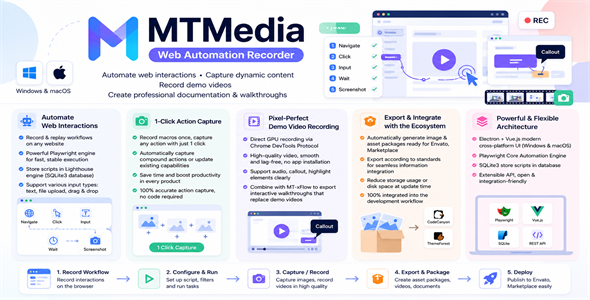
MTMedia is a modern cross-platform desktop automation and media production suite for Windows and macOS, built specifically for software developers, product authors, UI/UX designers, and QA teams.
Configure your web workflow once, then reuse it to automatically capture high-resolution product screenshots, inspect responsive UI screens, apply interactive annotations, and record smooth feature demo videos whenever your product is updated.
Featured Showcase & Up-to-Date Documentation Discover live screenshot showcases and complete documentation updated continuously with MTMedia across our product ecosystem:
- PolyUtilities for Perfex CRM
- WooSync for Perfex CRM
- PolyCMS – CMS & Website Builder Module
- Data Builder for Perfex CRM
- FlexiNote – Notes & Sticky Notes
- 1-Click Bulk Screenshots: Automatically navigate and capture dozens or hundreds of views across plugins, themes, SaaS dashboards, and web applications in seconds.
- Visual UI and QA Matrix: Review layouts, typography, spacing, color schemes, forms, and responsive states from a single organized gallery to catch visual regressions early.
- Live In-Browser Annotation Studio: Inject intuitive visual annotations directly onto your live web application, including notes, Bezier callout arrows, numbered highlight frames, neon glow borders, and copyright watermarks.
- Automated Interaction Demo Videos: Replay realistic browser interactions with natural curved cursor movements, smooth scrolling, and export Full HD / 2K MP4 demo videos.
- Multi-Project and Multi-Language: Seamlessly manage multiple software products from one unified desktop dashboard, featuring full 4-language support (English, Vietnamese, Russian, Chinese).
- Operating System:
- Windows: Windows 10 or Windows 11 (64-bit)
- macOS: macOS 12 (Monterey) or higher (Native support for Apple Silicon M1, M2, M3, M4)
- Hardware:
- Processor: Minimum Dual-Core 2.0 GHz (Quad-Core 2.5 GHz or higher recommended for fast video rendering)
- RAM: Minimum 4 GB RAM (8 GB or higher recommended)
- Disk Space: Minimum 500 MB free storage for installation; additional storage recommended for exported media assets and videos
- Browser Environment:
- MTMedia uses its integrated Chromium-based automation environment. A separate browser installation is not required.
- Standard internet or local network connection for navigating target web applications
- Windows Package:
MTMedia-Setup-windows-vX.X.X.zipcontaining the full Windows installer (.exe setup) for Windows 10 and Windows 11 (64-bit). - macOS Package (Apple Silicon):
MTMedia-vX.X.X-macos-arm64.dmg.zipcontaining the native Apple Silicon disk image (.dmg) for macOS (M1, M2, M3, M4). - Documentation Folder: Complete uncompressed offline HTML documentation folder (
documentation/index.html) with step-by-step setup instructions, feature guides, and workflow tutorials. - Third-Party Licenses:
THIRD-PARTY-LICENSES.txtcertifying 100% commercial-friendly, royalty-free open-source software licenses (Apache-2.0, MIT, BSD).
Try before you buy! Download the free version now to experience the speed and automation firsthand:
Windows: Download Free Version for Windows
macOS: Download Free Version for macOS
Why Choose MTMedia?
Technical Requirements
What Is Included in the Download Package?
The main download package (MTMedia-vX.X.X.zip) is neatly organized and includes:
No Hidden Costs / One-Time Purchase
MTMedia is a standalone desktop application. All core features operate locally with zero mandatory third-party subscriptions or external API costs. You buy once and use freely without ongoing usage fees.
| Author | polyxgo |
|---|---|
| Price | $39 |
| Sales | 1 |
| Rating | 0 (0) |
| Published | Sep 28, 2026 |
| Last Update | Oct 9, 2026 |
| Application Runtime | Native |
| High Resolution | No |
| Operating System Versions | Windows 11, Windows 10, macOS 15, macOS 14, macOS 13, macOS 12 |
Categories
Tags
External listing. code.market does not sell this product and does not process payment for it. Pricing, payment, delivery, licensing, refunds, and support are handled by the third-party merchant on its own website. We may earn an affiliate commission from a referral. Details.
Products of the Week.
Submit🥇

STOP GUESSING WHAT TO POST
AI that learns your brand voice and builds a month of consistent, on-brand social content: carousels, posts and hooks that sound like you, not like everyone else's AI.
SaaS · 7,369 views · 67 clicksSaaS · Week 46 · 7,369 views · 67 clicks
🥈

Conversational Backlinks for Busy Founders
Place Backlink Relevant Conversation for your domain across Forums and Conversations
Website · 46,653 views · 232 clicksWebsite · Week 46 · 46,653 views · 232 clicks
🥉

upvote.club
Free Social Media Engagement that Helps Boost Your Content. Upvote Club supports 19 social networks with 100+ engagement actions in one dashboard. Add links to your posts and get free engagement from real users.
SaaS · 44,593 views · 127 clicksSaaS · Week 46 · 44,593 views · 127 clicks
#4

Substack Posting API
Onboard your Agent to Substack. Write Publish on Substack via API
SaaS · 63,480 views · 206 clicksSaaS · Week 46 · 63,480 views · 206 clicks
#5

Seenshot App
Free, Fast, MacOS Screenshot app. Make Screenshot cmd+shift+2 and send it via link
Desktop App · 32,730 views · 127 clicksDesktop App · Week 46 · 32,730 views · 127 clicks
#6

Hand-Placed Backlinks $9.99 per link. Flat rate.
Buy hand-placed forum, Q-A and directory backlinks. Flat $9.99 per link, no subscriptions — you only pay for approved listings.
Website · 8,349 views · 19 clicksWebsite · Week 46 · 8,349 views · 19 clicks
#7

Free Invoice Generator - PDF Invoices in Your Browser, No Sign-Up
A free invoice maker for freelancers and small businesses: fill in the invoice, check the live preview, and download a PDF that looks exactly like it. Any currency, tax per item, three templates, no sign-up, and nothing leaves your device.
6,977 views · 29 clicksWeek 46 · 6,977 views · 29 clicks
#8

Merge PDF Files Free - Combine PDFs in Your Browser, No Upload
A free PDF merger for office workers, students, and freelancers: combine PDFs and images into one file in the browser, reorder files and pages, pick page ranges, keep bookmarks, and open password-protected PDFs. Nothing is uploaded, no sign-up, no watermark.
6,458 views · 18 clicksWeek 46 · 6,458 views · 18 clicks