
MSE University - Multipurpose WordPress Theme
Description
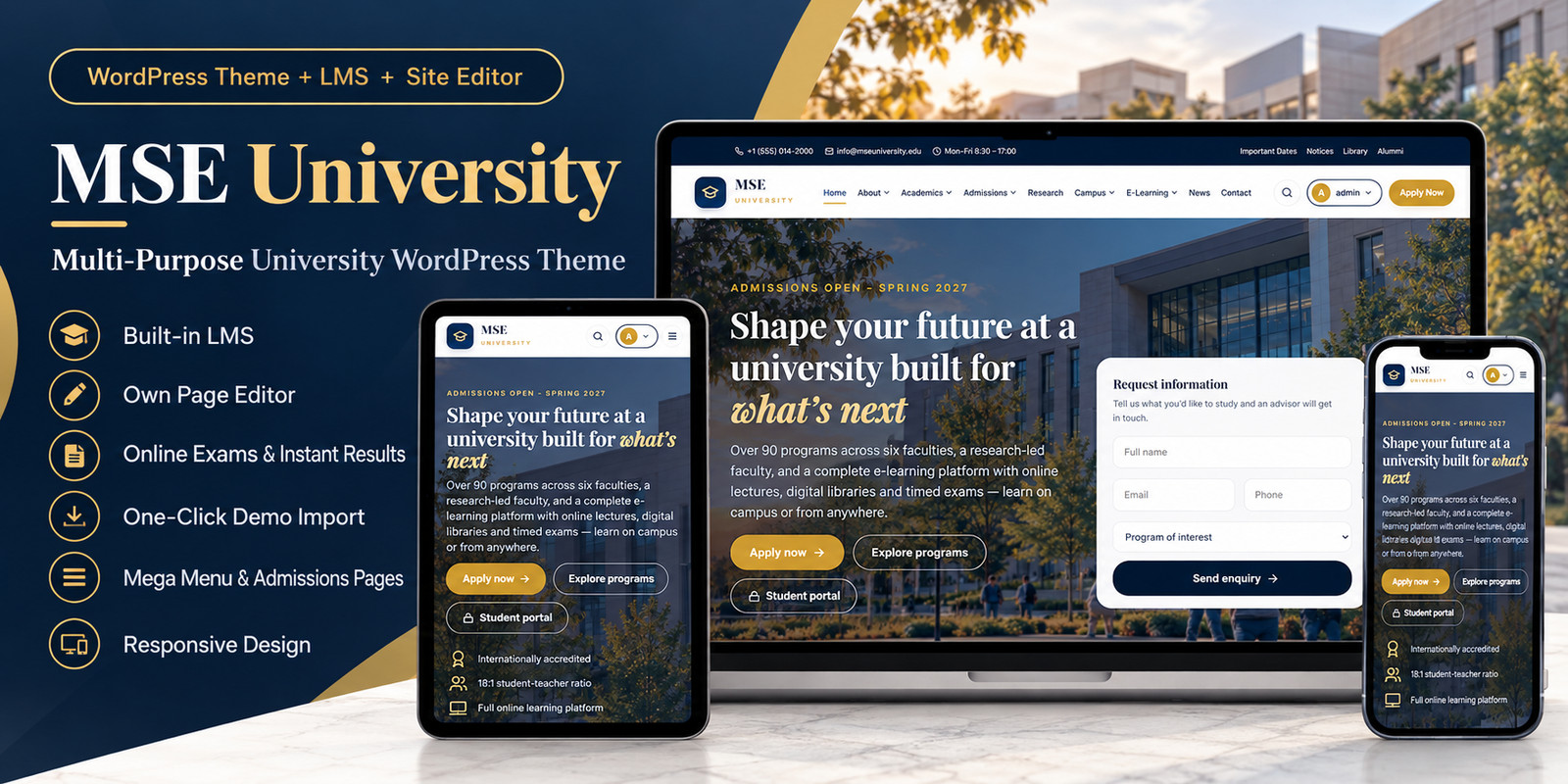
MSE University is a premium, multi-purpose education WordPress theme designed for universities, colleges, institutes, academies, and higher education websites. It combines an elegant, responsive institutional website with a dedicated Learning Management System (LMS) and a companion MSE Site Editor plugin. Create engaging academic websites, showcase degree programs, manage faculty profiles, process admission enquiries, publish educational content, deliver online lectures, and conduct timed online examinations from one integrated WordPress environment.
A Complete University Website Solution
MSE University includes carefully designed page templates covering essential academic and institutional requirements:
- Homepage with premium visual sections and enquiry form
- About University, mission, vision, history, and leadership
- Academic programs and degree catalogue
- Faculties and academic staff profiles
- Admissions, eligibility, scholarships, fees, and applications
- Research centers and academic opportunities
- Campus facilities, student housing, and campus life
- Online learning and course management
- News, announcements, and university events
- Contact information and enquiry forms
Integrated Learning Management System
The included MSE LMS companion plugin provides tools for managing digital education. Students can access learning resources, view lectures, follow their academic progress, and participate in online assessments through a dedicated learning interface. The LMS supports educational materials including videos, PDF documents, and Word documents.
Online Examination and MCQ System
Create timed multiple-choice examinations with question navigation, answer selection, question flagging, and automatic scoring. The system also includes bulk question-import functionality to simplify preparing assessments. Supported import formats include CSV, Excel, Word, and PDF, subject to the documented import requirements.
Dedicated MSE Site Editor
The included MSE Site Editor plugin enables administrators to manage pages and website sections through an editing interface. Update page content and selected visual elements without rebuilding the website from scratch.
Academic Program and Faculty Management
Organize undergraduate, postgraduate, doctoral, and diploma programs through structured academic listings. Manage staff profiles, academic specializations, and institutional information using WordPress administration features.
Premium Responsive Design
MSE University features a professional navy-and-gold visual identity, refined typography, well-organized navigation, and responsive layouts. The theme is designed to adapt across desktop, tablet, and mobile screens.
One-Click Demo Content Import
Get started faster with included demo content for major website pages, academic listings, faculty profiles, menus, news, and other sample material. The demo provides a starting point that can be personalized for an individual educational institution.
Included in the Package
- MSE University WordPress theme
- MSE LMS companion plugin
- MSE Site Editor companion plugin
- Demo content importer
- HTML and PDF user documentation
- Sample MCQ import files
- Image licensing and attribution records
- Original illustrative university imagery
- Preview graphics and product screenshots
Image Licensing and Attribution
The university scenes included in the theme are original AI-generated demonstration visuals created for this product. They are not presented as photographs of a real university. The package includes a detailed image manifest, licensing statements, redistribution information, and third-party software attribution.
Important Notice
The institution, academic information, statistics, faculty members, admissions details, and other sample content are fictional demonstrations. Replace these details with accurate institutional information before publishing a live university website. MSE University brings institutional website design, academic content management, online learning, and examinations together in one WordPress theme package.
Features
- Premium responsive university WordPress theme
- Built-in Learning Management System (LMS)
- Dedicated MSE Site Editor plugin
- Online courses and lecture management
- Video, PDF, and Word learning materials
- Timed online MCQ examinations
- Automatic exam scoring and results
- Bulk MCQ import from supported file formats
- Student, teacher, and administrator roles
- Student learning dashboard
- Academic program catalogue and filtering
- Faculty and staff profile management
- Online admissions and enquiry forms
- One-click demo content importer
- Academic mega-menu navigation
- News, events, and research pages
- Campus facilities and student-life pages
- WordPress Customizer settings
- Desktop, tablet, and mobile layouts
- Original university demo imagery
- HTML and PDF documentation
- Image licensing and attribution records
- Two included companion plugins
Requirements
Technical requirements
- Self-hosted WordPress installation
- PHP 8.0 or newer recommended, subject to compatibility testing
- MySQL or MariaDB compatible with the installed WordPress version
- HTTPS-enabled hosting recommended
- Standard WordPress hosting with sufficient storage and memory
- Administrator access to install themes and plugins
- Modern web browser for administration and student use
Included companion plugins
- MSE LMS — required for the learning management and examination features
- MSE Site Editor — required for the dedicated page editing features
Additional notes
- No premium third-party page builder licence is required for the included MSE Site Editor.
- Uploaded educational videos and documents require sufficient hosting storage.
- Email delivery depends on the hosting provider's mail configuration. SMTP configuration may be necessary.
- Compatibility with specific WordPress and PHP versions should be confirmed against the release's tested environment.
Instructions
Step 1: Extract the downloaded package
Download and extract the complete MSE University package on your computer. Locate the following files:
1-Theme/mse-university.zip2-Plugins/mse-lms.zip2-Plugins/mse-theme-editor.zip
Step 2: Install the WordPress theme
- Log in to your WordPress administration dashboard.
- Navigate to Appearance → Themes → Add New → Upload Theme.
- Upload
mse-university.zip. - Click Install Now.
- Activate MSE University.
Step 3: Install the companion plugins
- Navigate to Plugins → Add New → Upload Plugin.
- Upload and activate
mse-lms.zip. - Upload and activate
mse-theme-editor.zip.
Step 4: Import the demo
- Navigate to Appearance → MSE Demo Import.
- Click Import Demo Content.
- Wait for the import process to finish.
- Review the generated pages, academic programs, faculty profiles, and navigation menus.
Step 5: Configure your university website
- Open Appearance → Customize.
- Update the university name, logo, colors, contact information, and homepage settings.
- Replace fictional demo details with your institution's real information.
- Update the academic programs, faculty profiles, admissions details, and university policies.
Step 6: Manage LMS content
- Open the LMS administration interface.
- Create courses and organize learning materials.
- Add lectures, documents, and examinations.
- Configure student and instructor access.
- Test the learning dashboard and examinations before admitting students.
Step 7: Customize pages
Use the included MSE Site Editor and standard WordPress editing tools to update content and supported sections.
Step 8: Final website checks
Before launching your website, verify:
- Navigation and mobile menus
- Forms and email notifications
- Admissions and enrolment information
- Student login and access permissions
- Course content and exam results
- Mobile and tablet responsiveness
- Correct university branding
- Appropriate legal and privacy information
For additional guidance, refer to the included HTML and PDF documentation.
| Author | muhammadshahidsharif |
|---|---|
| Category | Themes / WordPress |
| Price | $25 |
| Extended License | $75 |
| First Release | Oct 21, 2026 |
| Last Update | Oct 21, 2026 |
| Supported cms | WordPress 6.7, WordPress 6.8, WordPress 6.9, WordPress 7.0, WordPress 7.1 |
| Files included | .php, .css, .html, .json, .md, JavaScript .js |
Categories
Tags
External listing. code.market does not sell this product and does not process payment for it. Pricing, payment, delivery, licensing, refunds, and support are handled by the third-party merchant on its own website. We may earn an affiliate commission from a referral. Details.
Products of the Week.
Submit🥇

Actionbook
It works inside the user's own browser with the accounts already signed in. The user describes the result they need, and the agent reads, clicks and types through the pages, then delivers a dashboard or report where each data links back to its source.
Other · 623 views · 9 clicksOther · Week 44 · 623 views · 9 clicks
🥈

Free social media tools for creators & solofounders
295 free tools for growing your social media: write, plan, grow on local AI models, 100% free forever, No sign-up required, No trial. Write, check and measure posts on LinkedIn, Instagram, TikTok, X, YouTube, Reddit, Product Hunt and more: a free social media scheduler for 17 networks, engagement rate calculators, character counters, best time to post, hook generators and follower growth calculators. No login anywhere, no API or credit usage.
589 views · 6 clicksWeek 44 · 589 views · 6 clicks
🥉

STOP GUESSING WHAT TO POST
AI that learns your brand voice and builds a month of consistent, on-brand social content: carousels, posts and hooks that sound like you, not like everyone else's AI.
SaaS · 1,845 views · 19 clicksSaaS · Week 44 · 1,845 views · 19 clicks
#4

Hand-Placed Backlinks $9.99 per link. Flat rate.
Buy hand-placed forum, Q-A and directory backlinks. Flat $9.99 per link, no subscriptions — you only pay for approved listings.
Website · 1,799 views · 17 clicksWebsite · Week 44 · 1,799 views · 17 clicks
#5

Conversational Backlinks for Busy Founders
Place Backlink Relevant Conversation for your domain across Forums and Conversations
39,261 views · 210 clicksWeek 44 · 39,261 views · 210 clicks
#6

Free Invoice Generator - PDF Invoices in Your Browser, No Sign-Up
A free invoice maker for freelancers and small businesses: fill in the invoice, check the live preview, and download a PDF that looks exactly like it. Any currency, tax per item, three templates, no sign-up, and nothing leaves your device.
549 views · 11 clicksWeek 44 · 549 views · 11 clicks
#7

Merge PDF Files Free - Combine PDFs in Your Browser, No Upload
A free PDF merger for office workers, students, and freelancers: combine PDFs and images into one file in the browser, reorder files and pages, pick page ranges, keep bookmarks, and open password-protected PDFs. Nothing is uploaded, no sign-up, no watermark.
491 views · 3 clicksWeek 44 · 491 views · 3 clicks