
MP4 to MP3 Converter | Flutter Mobile App
Description
MP4 to MP3 Converter with AdMob — Flutter App (Android & iOS)
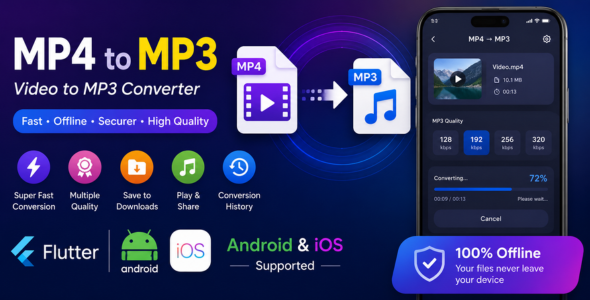
A complete, ready-to-publish Flutter source code that lets users pick any video from their phone and instantly convert it to a high-quality MP3 audio file — 100% offline, no internet required for conversion.
Powered by FFmpeg, monetized with Google AdMob (Banner + Interstitial ads), designed with Material 3, and built with clean Riverpod architecture. Just swap in your AdMob App ID, change the package name, add your keystore, and ship to the Play Store or App Store.
Who Is This For?
- Developers who want to launch a monetized audio utility app fast without building from scratch
- Freelancers looking for a solid, well-structured Flutter codebase with ads already wired up
- Studios wanting a privacy-first, offline app with built-in Google AdMob revenue from day one
✅ Key Features
Core Conversion
- Convert any MP4 (or any video) to MP3 — powered by FFmpeg Kit
- Selectable bitrates: 96 kbps, 128 kbps, 192 kbps, 256 kbps, 320 kbps
- Real-time conversion progress bar with live percentage
- Cancel conversion at any time mid-process
- Detects and alerts if the selected video has no audio stream
Google AdMob Monetization
- Banner Ad — displayed persistently at the bottom of the main screen
- Interstitial Ad — shown after each successful conversion for maximum revenue
- Ads load and pre-cache in the background using a singleton
AdService - Graceful fallback — if an ad fails to load, the app continues working without any crash or freeze
- Auto-reloads the next interstitial immediately after one is dismissed or fails to show
- Just replace the two test Ad Unit IDs in
lib/services/ad_service.dartwith your own live IDs
Smart File Management
- Save to custom folder — user picks via Android Storage Access Framework
- Fallback to Downloads folder if no custom folder is set
- Automatic duplicate file handling (e.g. “song (1).mp3”, “song (2).mp3”)
- Persistent folder permission across app restarts
Conversion History
- Every converted file is automatically saved to a history list
- Shows file name, duration, bitrate, file size and conversion date
- Play converted MP3 directly in the app with a built-in audio player
- Share or open files with any external app (music players, cloud storage, etc.)
- Delete individual records or clear all history with one tap
⚙️ Settings & Customization
- Change default save location from the Settings tab
- Reset save location to the default Downloads folder
- Toggle Dark / Light mode — manual override from the AppBar
- Single seed color in
main.dartcontrols the full Material 3 theme
Design & Architecture
- Material 3 design system with adaptive dark and light themes
- State management with Flutter Riverpod 2.x
- Clean separation:
screens/,services/,widgets/,providers/,models/ - History persisted locally using SharedPreferences
- No external backend, no Firebase required
What Is Included
- ✅ Full Flutter source code (Android + iOS)
- ✅ Google AdMob fully integrated — Banner & Interstitial ads ready to go
- ✅
AdServicesingleton — clean, reusable ad management class - ✅ Native Android Kotlin code (
MainActivity.kt) for file saving - ✅ Custom folder picker using Android Storage Access Framework
- ✅ Complete
documentation.htmlwith step-by-step setup guide - ✅ AdMob setup section in documentation — how to swap test IDs for live IDs
- ✅
key.properties.exampletemplate for Android signing - ✅ App icon asset (1024×1024 PNG) ready for
flutter_launcher_icons - ✅
.gitignorepre-configured to exclude keystore and signing files - ✅
flutter analyzepasses with zero issues
️ Technical Specifications
- Framework: Flutter 3.x / Dart 3.x
- State Management: Flutter Riverpod 2.6
- Audio Engine: ffmpeg_kit_flutter_new_audio 2.5
- Ads SDK: google_mobile_ads (latest)
- Ad Formats: Banner Ad + Interstitial Ad
- Android min SDK: 24 (Android 7.0 Nougat and above)
- Android compileSdk: 36
- iOS minimum target: iOS 14 and above
- Package name:
com.smallburnstudios.mp4tomp3(fully customizable) - Design system: Material You / Material 3
Documentation Covers
- Introduction & feature overview
- System requirements (Flutter SDK, Android Studio, Xcode, JDK 17)
- Folder structure map
- How to replace test AdMob IDs with your live Ad Unit IDs
- How to register your app in AdMob and get an App ID
- How to change the package name / Application ID
- How to change the app name (Android + iOS)
- How to change the app icon (with
flutter_launcher_icons) - How to change the app theme color (single line change)
- Android — Generate a release keystore
- Android — Create
key.properties - Android — Update
build.gradle.ktswith release signing - Build release APK / AAB
- iOS — Change Bundle ID
- iOS — Signing & Provisioning Profiles
- Troubleshooting common errors
- Changelog (starting v1.0)
- Support contact
Easy to Customize
- Swap AdMob IDs: Two constants in
lib/services/ad_service.dart - Change app color: One line in
lib/main.dart - Change package name: Two fields in
build.gradle.kts+ rename Kotlin folder - Change app name: One line in
AndroidManifest.xml+ one line inInfo.plist - Change app icon: Replace
assets/icon/icon.pngand run one command
Privacy & Security
- All conversions happen entirely on the user’s device — no files are ever uploaded
- No analytics, no crash reporting, no user tracking beyond what AdMob collects
- AdMob follows Google’s own privacy policy and complies with GDPR / CCPA guidelines
- Keystore and signing credentials are excluded from Git by default
Changelog
v2.0.0 — August 2026 (AdMob Release)
- Added Google AdMob integration — Banner Ad on main screen, Interstitial Ad after each conversion
- Added
AdServicesingleton for clean, centralized ad lifecycle management - Interstitial ad pre-caches on app start and auto-reloads after dismissal
- Updated documentation with AdMob setup guide (App ID + Ad Unit IDs)
v1.0.0 — August 2026 (Initial Release)
- First release of MP4 to MP3 Converter
- FFmpeg-powered audio extraction from any MP4 video file
- Custom output folder selection using Android Storage Access Framework
- Full conversion history screen with file details and quick actions
- Share and open converted MP3 files directly from the app
- Material 3 design with dark and light theme support
- About dialog with app information and feature list
- Supports Android 7.0 and above (API level 24+)
- Supports iOS 14 and above
Support
We aim to reply within 24 to 48 hours. Use the Comments section on the item page, or email us directly. Please include your purchase code in your message.
© 2026 TechArt Studios · MP4 to MP3 Converter
| Type | Flutter App |
|---|---|
| Author | TechArt_Studio |
| Price | $20 |
| Sales | 0 |
| Rating | 0 (0) |
| Published | Aug 27, 2026 |
| Last Update | Aug 27, 2026 |
| Compatible Software | Flutter 3.x, Flutter 2.x |
| Demo Url | https://drive.google.com/file/d/1VxcEMixfQAU9741oWZy7oZBtRjRBl0RP/view?usp=sharing |
| Mobile Files Included | Dart, YAML, HTML |
Categories
Tags
External listing. code.market does not sell this product and does not process payment for it. Pricing, payment, delivery, licensing, refunds, and support are handled by the third-party merchant on its own website. We may earn an affiliate commission from a referral. Details.
Products of the Week.
Submit🥇

Perceptle
Perceptle is a daily browser-based game that challenges you to test your sensory intuition through five quick estimation and rhythm-based rounds.
Other · 1 views · 0 clicksOther · Week 47 · 1 views · 0 clicks
🥈

Free LinkedIn Likes From Real
Get free LinkedIn likes on your posts from real members who react by hand. No
SaaS · 124 views · 2 clicksSaaS · Week 47 · 124 views · 2 clicks
🥉

STOP GUESSING WHAT TO POST
AI that learns your brand voice and builds a month of consistent, on-brand social content: carousels, posts and hooks that sound like you, not like everyone else's AI.
SaaS · 7,686 views · 71 clicksSaaS · Week 47 · 7,686 views · 71 clicks
#4

aaas.market
407 reliable micro tools for solo founders, marketers and creators. They work in your browser
SaaS · 122 views · 0 clicksSaaS · Week 47 · 122 views · 0 clicks