
MP Breaking - GeneratePress Breaking News Theme
Description
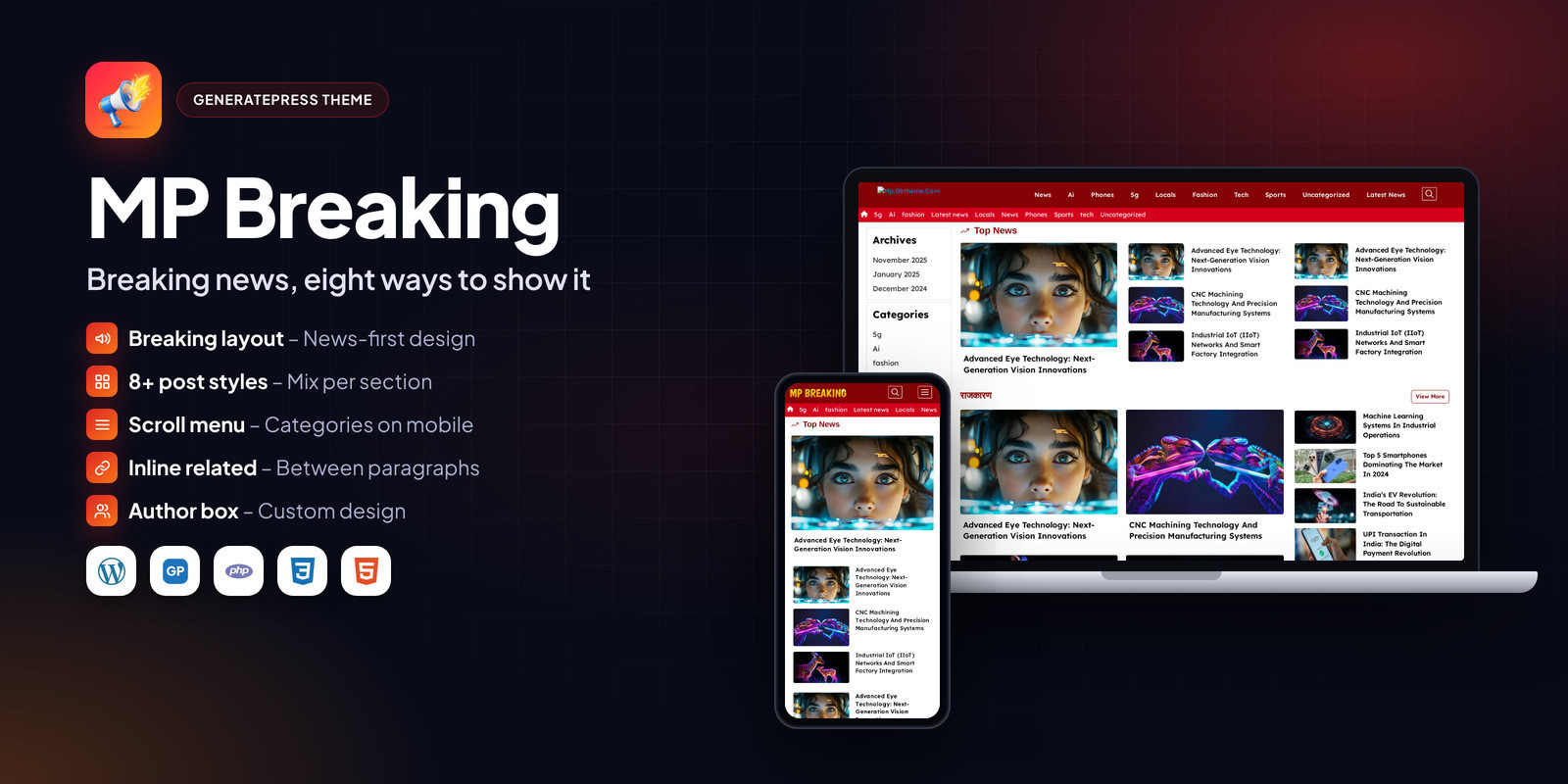
MP Breaking is a news and media design for GeneratePress Premium and GenerateBlocks Pro. It shows posts in more than eight layouts, so every homepage section can look different.
Below the header there is a scrollable category menu for mobile, plus a separate mobile menu, a custom author box, automatic related posts and inline related posts placed between paragraphs. The default colour is red and can be changed to any brand colour.
It targets 90+ PageSpeed and is fully responsive.
Who it is for
- Breaking news portals
- Media and entertainment news
- State and local news blogs
What is in the download
- GeneratePress customizer .json
- Elements and demo content .xml
- Child theme / custom CSS
- HTML documentation
- Licence and changelog
Good to know
- Requires GeneratePress (free) and GP Premium. GP Premium is not included and must be bought by the buyer from GeneratePress.
- Images and articles in the live demo are for preview only and are not part of the download.
Features
Layouts
- 8+ post display styles
- Custom home, category and sidebar designs
- Red default colour, easy to change
Navigation
- Scrollable category menu below the header
- Mobile menu
- Custom footer with social links and about block
Posts
- Custom author box
- Automatic related posts
- Inline related posts between paragraphs
- Breadcrumbs via Rank Math
Requirements
- WordPress 6.0 or newer
- GeneratePress theme (free, from WordPress.org)
- GP Premium plugin (bought separately from GeneratePress)
- GenerateBlocks (free), and GenerateBlocks Pro where the documentation says so
- PHP 7.4 or newer
- GenerateBlocks Pro
- Rank Math (free) for breadcrumbs
- Ad Inserter (free) for inline related posts
Instructions
- Install and activate the free GeneratePress theme from Appearance > Themes > Add New.
- Install GP Premium and activate the Elements, Blog, Colors and Typography modules.
- Install GenerateBlocks (and GenerateBlocks Pro if the documentation lists it).
- Go to Appearance > GeneratePress > Import / Export and import the customizer .json file from the package.
- Import the elements and demo content with Tools > Import > WordPress using the .xml file.
- Set your homepage under Settings > Reading and assign the menus.
- Change the logo, colours and fonts in the Customizer.
The Documentation folder inside the download has the same steps with screenshots, plus answers to common questions.
| Author | wbthemes |
|---|---|
| Category | Themes / WordPress / News |
| Price | $25 |
| Extended License | $75 |
| First Release | Oct 15, 2026 |
| Last Update | Oct 15, 2026 |
| Supported cms | WordPress 5.9, WordPress 6.0, WordPress 6.1, WordPress 6.2, WordPress 6.3, WordPress 6.4, WordPress 6.5, WordPress 6.6, WordPress 6.7, WordPress 6.8, WordPress 6.9, WordPress 7.0, WordPress 7.1 |
| Files included | .php, .css, .html, .json, .md, .xml |
Categories
Tags
External listing. code.market does not sell this product and does not process payment for it. Pricing, payment, delivery, licensing, refunds, and support are handled by the third-party merchant on its own website. We may earn an affiliate commission from a referral. Details.
Products of the Week.
Submit🥇

Actionbook
It works inside the user's own browser with the accounts already signed in. The user describes the result they need, and the agent reads, clicks and types through the pages, then delivers a dashboard or report where each data links back to its source.
Other · 698 views · 9 clicksOther · Week 44 · 698 views · 9 clicks
🥈

Free social media tools for creators & solofounders
295 free tools for growing your social media: write, plan, grow on local AI models, 100% free forever, No sign-up required, No trial. Write, check and measure posts on LinkedIn, Instagram, TikTok, X, YouTube, Reddit, Product Hunt and more: a free social media scheduler for 17 networks, engagement rate calculators, character counters, best time to post, hook generators and follower growth calculators. No login anywhere, no API or credit usage.
668 views · 6 clicksWeek 44 · 668 views · 6 clicks
🥉

STOP GUESSING WHAT TO POST
AI that learns your brand voice and builds a month of consistent, on-brand social content: carousels, posts and hooks that sound like you, not like everyone else's AI.
SaaS · 1,918 views · 21 clicksSaaS · Week 44 · 1,918 views · 21 clicks
#4

Hand-Placed Backlinks $9.99 per link. Flat rate.
Buy hand-placed forum, Q-A and directory backlinks. Flat $9.99 per link, no subscriptions — you only pay for approved listings.
Website · 1,869 views · 17 clicksWebsite · Week 44 · 1,869 views · 17 clicks
#5

Conversational Backlinks for Busy Founders
Place Backlink Relevant Conversation for your domain across Forums and Conversations
39,326 views · 210 clicksWeek 44 · 39,326 views · 210 clicks
#6

Free Invoice Generator - PDF Invoices in Your Browser, No Sign-Up
A free invoice maker for freelancers and small businesses: fill in the invoice, check the live preview, and download a PDF that looks exactly like it. Any currency, tax per item, three templates, no sign-up, and nothing leaves your device.
607 views · 11 clicksWeek 44 · 607 views · 11 clicks
#7

Merge PDF Files Free - Combine PDFs in Your Browser, No Upload
A free PDF merger for office workers, students, and freelancers: combine PDFs and images into one file in the browser, reorder files and pages, pick page ranges, keep bookmarks, and open password-protected PDFs. Nothing is uploaded, no sign-up, no watermark.
548 views · 4 clicksWeek 44 · 548 views · 4 clicks