
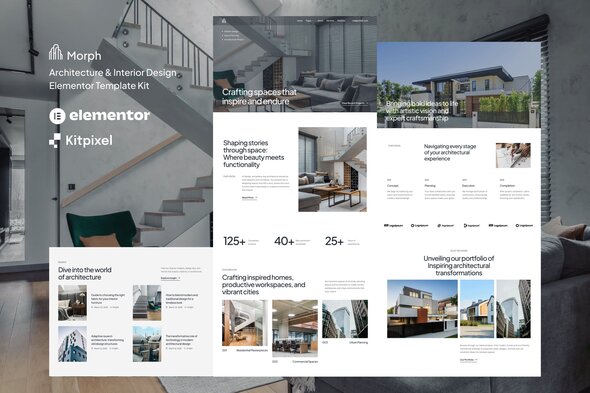
Morph - Architecture & Interior Design Elementor Template Kit
Description



Morph is an Elementor Template Kit for quickly and easily creating Architecture & Interior Design website using the Elementor Page Builder plugin for WordPress. Suitable for Interior Design Agency, Architecture Services, Renovation Services, Furniture Expert, House Design Agency, Building Company, Interior Design Studio, etc. Style your WordPress website with this creative and modern web design style template kit to bring a modern feel to your blog.
This is not a WordPress theme. Template Kits contain page content for Elementor page builder. This kit has been optimized for use with the free Hello Elementor theme but may be used with most themes that support Elementor.
Features:
- 18+ Templates
- True no-code customization with drag and drop visual builder
- Customize fonts and colors in one place or fine-tune on individual elements
- Clean and Minimal Design
- Fast-loading
- Works with most Elementor themes
- Responsive Design
Templates:
- 3 Homepages
- About
- Services
- Portfolio
- Single Project
- Contact
- Plan
- FAQs
- Awards
- Team
- Coming Soon
- Blog
- Post
- Header
- Footer
- Contact Form
- Global Style
Plugins (installed with kit)
- ElementsKit Lite
- Metform
How to Use Template Kits:
This is not a WordPress Theme. Template kits contain the design data for Elementor only and are installed using the envato Elements plugin for WordPress or directly through Elementor.
Elementor Template Kits use the Envato Elements plugin to install.
Detailed Guide:
For further support, go to Elementor > Get Help in WordPress menu.
Setup Global Header and Footer in ElementsKit Lite Header Footer Builder Plugin If you have Elementor Pro, headers and footers may be customized under Theme Builder.
- Import the header and footer template
- Go to ElementsKit Lite > Header Footer and click Add New button
- Give it a title and select Header, Display on Entire Site and click Publish
- Click Edit with Elementor
- Click the gray folder icon to access My Templates tab and select the header template to import and Update.
- Repeat for Footer
Images
This Template Kit uses demo images from Envato Elements. You will need to license these images from Envato Elements to use them on your website, or you can substitute them with your own.
| Type | Elementor Template Kit |
|---|---|
| Author | kitpixel |
| Category | Template Kits / Elementor / Real Estate Construction |
| Price | $24 |
| Sales | 30 |
| Published | Mar 31, 2025 |
| Last Update | Aug 9, 2026 |
| Template Kit Certified | No |
| Template Kit Software Version | Elementor 3.10.x |
| Template Kit Type | Envato Template Kit |
| Key Features | Modern website template for Architecture, Powered by free Elementor builder, Responsive and fast loading |
Categories
Tags
External listing. code.market does not sell this product and does not process payment for it. Pricing, payment, delivery, licensing, refunds, and support are handled by the third-party merchant on its own website. We may earn an affiliate commission from a referral. Details.
Products of the Week.
Submit🥇

Perceptle
Perceptle is a daily browser-based game that challenges you to test your sensory intuition through five quick estimation and rhythm-based rounds.
Other · 1 views · 0 clicksOther · Week 47 · 1 views · 0 clicks
🥈

Free LinkedIn Likes From Real
Get free LinkedIn likes on your posts from real members who react by hand. No
SaaS · 124 views · 2 clicksSaaS · Week 47 · 124 views · 2 clicks
🥉

STOP GUESSING WHAT TO POST
AI that learns your brand voice and builds a month of consistent, on-brand social content: carousels, posts and hooks that sound like you, not like everyone else's AI.
SaaS · 7,686 views · 71 clicksSaaS · Week 47 · 7,686 views · 71 clicks
#4

aaas.market
407 reliable micro tools for solo founders, marketers and creators. They work in your browser
SaaS · 122 views · 0 clicksSaaS · Week 47 · 122 views · 0 clicks