
Modo | Task Organizer With Natural Language Capture, Eisenhower Matrix and Focus Timer - SwiftUI
Description
Modo – Task Organizer and Planner
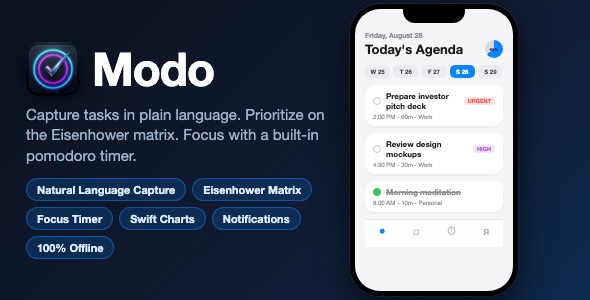
Modo is a 100% offline task organizer built entirely in SwiftUI with SwiftData. Capture tasks with natural language shortcuts, sort your life on an Eisenhower matrix and get real work done with a built-in pomodoro focus timer – no account, no backend, no tracking.
Demo Instructions
No login and no demo credentials are required. Modo is a fully offline app with no backend and no account system – all data is stored locally on device with SwiftData. Simply run the app in the iOS Simulator or on a device and start adding tasks.
Everything the App Does
- Day agenda grouped into a Scheduled Timeline and a Task Queue
- 7-day rolling calendar strip for fast date switching
- Animated circular completion-progress ring with live percentage
- Natural language quick capture: “Review proposal tomorrow at 3pm #work !high ~45m”
- Priority tokens (!urgent / !p1 / !high / !low), #tags, ~30m / ~1h durations, today / tomorrow / at 3pm dates
- Live parsed-token chips that update as you type
- Inline project category picker when capturing tasks
- Full task editor: title, notes, priority, Urgent / Important flags, due date, scheduled time, duration, project
- Custom project categories with icon picker and task counts
- Searchable task and notes search
- Eisenhower Matrix 2×2 smart view (Do First / Schedule / Delegate / Don’t Do)
- Smart filters: High and Urgent Priority, Quick Wins (under 20 min)
- Pomodoro focus timer: 15 / 25 / 45 / 60 minute sessions and 3 / 5 / 10 minute breaks
- Attach focus sessions to any pending task, logged to SwiftData
- Background-safe timing based on target end dates
- Local notifications for task reminders and focus completion
- Swift Charts 7-day task-completion bar chart
- Metric cards for completed tasks and total focus minutes
- CSV export of all tasks via the native share sheet
- Haptic feedback and system sounds on key actions
- Dark mode support and polished empty states
- Seeded default projects (Work, Personal) on first launch
Technology
- Swift 5 / SwiftUI, iOS 17.0 minimum
- SwiftData persistence (TaskItem, ProjectCategory, TagItem, FocusLog)
- Swift Charts for analytics
- UserNotifications for local reminders
- UIKit haptics + AudioToolbox system sounds
- Zero third-party dependencies – single clean target
What the Buyer Gets
- Complete Xcode project source code (SwiftUI + SwiftData)
- App icon asset and asset catalog
- Illustrated buyer documentation: setup, re-skinning, customization and App Store submission
- Clean, commented codebase with no external packages
Development Disclosure
Portions of this template’s source code were developed with AI-assisted tools and were reviewed, tested and finalized by the seller.
Please note: this item is template source code, not a finished App Store product. You need a Mac with Xcode 16 or later and basic Xcode knowledge to build, customize and publish it.
| Type | iOS App |
|---|---|
| Author | mefjudevllc |
| Price | $14 |
| Sales | 0 |
| Rating | 0 (0) |
| Published | Sep 8, 2026 |
| Last Update | Sep 8, 2026 |
| Compatible Software | Other |
| Compatible With | Swift |
| Mobile Files Included | .h |
Categories
Tags
External listing. code.market does not sell this product and does not process payment for it. Pricing, payment, delivery, licensing, refunds, and support are handled by the third-party merchant on its own website. We may earn an affiliate commission from a referral. Details.