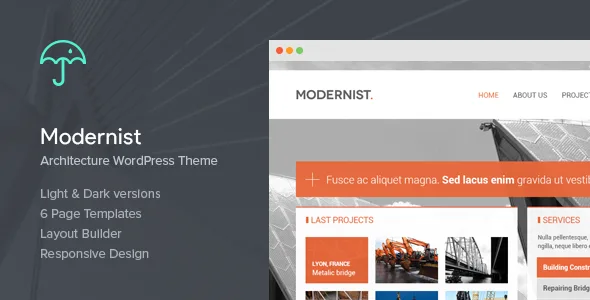
Modernist - Architecture&Engineer Wordpress Theme
Description



About Modernist
Now with Layout Builder – Complete Control


Note : updating to Modernist to 1.3.1 can cause boxes to get hidden so go back to all page’s and enable desired boxes.
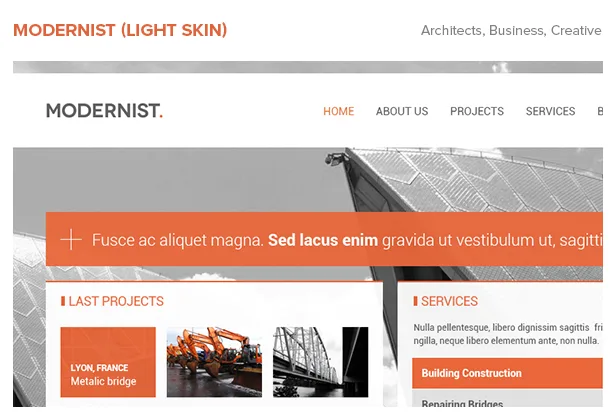
Modernist is a beautiful wordpress theme made for people who need a great presentation of their work/company. We tried to bring something different on the market. High quality theme, that can be adapted easily for lot of work fields. Light Skin: Dedicated for creative fields, architecture, design, photography, inspiration, agencies, freelancers.
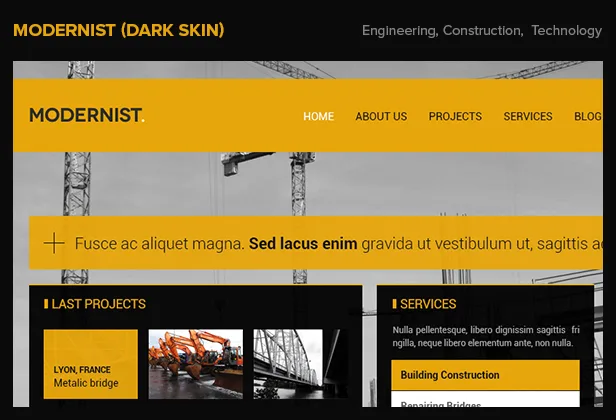
Dark Skin: For architects, engineers, construction fields, building companies etc.
Theme Features
WordPress 3+ Ready (Including 3.5) Umbrella ThemeOptions Responsive Design. For Tablets and Mobile HTML5 and CSS3 SEO Optimized 6 page templates 8 Shortcodes 2 Custom Post Type’s Built In Contact Form Tested and working in All major browsers Rich Menu Social Media Friendly No plugin needed Used jQuery no conflict mode 22+ PSD files included Color picker costumization 2 Default skins (dark & light)Umbrella Theme Options: Very comfortable theme panel, easily to fill it with your content, text, photos, videos. This theme contains a lot of fresh/needed widgets for creative fields. Everything is internal, we haven’t used any special plugins.
<img src=" />Pages/widgets – designed/included: Homepage (last projects, services, blogposts) About (about, career, testmonials, staff) Blog (posts, singlepost, comments). Partners (description bar, logos & text) Projects (works, single work) Services (accordation mode) Contact (contact form, maps, contact info) Shortcodes (tabs, blockquote, toogles, notification bars, headings, lists, buttons).
Footer (contact info, bloroll, twitter feed).
Changelog
2.4.4
    WordPress 4.8 Compatibility
2.4.3
    Fixed: Google Maps (Contact > Location)
    Fixed: Blog Roll Widget
    Fixed: Header Social Media won't hide
    Added field for Linked In
    header.php
    googlemap/locationfield.php
    includes/customfields.php

2.4.2
    Minor Bug Fix
    header.php
    scripts/jquery.jscrollpane.min.js
    scripts/jquery.mousewheel.js
    scripts/jquery.twitterfeed.js
    scripts/script.js
    style.css
    style/anim.css
    style/dark.css
    style/global.css
    style/jquery.jscrollpane.css
    style/responsive.css

2.3    Fixed Blog Image Float and Width
    scripts/script.js
    single-post.php
    style.css

2.2.1 Fixed Next Project Links (Limited to 10)
    single-project_post.php
    style/dark.css
    style/global.css

2.2 Minor Bug Fix
    Search Page Included
    search.php
    style.css
    style/dark.css
    style/global.css
    style/responsive.css

2.1 Fixed Pagination
    style.css
    style/dark.css
    style/global.css
    template-blog.php

2.0.3    Minor Bug Fix
        scripts/script.js
        style.css

2.0.2 Fixed some CSS Issues
        scripts/script.js
        style.css
        style/global.css

2.0.1    Fixed Slider navigation
    style.css
    scripts/script.js

2.0 Rewriten Responsive for iPad from scratch

1.8.2 Minor Bug Fix

1.6.3 Added feature to chose individual image for each Projects and Posts

1.6 Services on home now will navigate to Services page and open the Service Accordion
1.6 Added Google Map UI on Back-end and Google Map v3 API with marker
1.6 Fixed Minor Bugs

1.4 Added Layout Builder
1.4 Fixed Color Picker Issue on Service's Responsive Accordion

1.3.1 All Boxes are chosable
1.3.1 Color Picker Issue Fixed

1.3 Language Fix
1.3 Drop-down menu fix
1.3 Minor bug fix
1.3 Fixed Responsive on dark skin
1.3 Added Category template
1.3 Added Project Category Template
1.3 Added second level Menu's
1.3 Added kinetik option, you can make the Menu dragable if the content does not fit within
1.3 Fixed the logo position, if it is smaller it get's centered
1.3 Added Youtube and Vimeo support on Project's page
1.3 Linked Services on home page with Services Page

1.2 Fixed Wordpress native Widgets
1.2 If menu is wider that it becomes dragable
1.2 Images on projects single page are fixed

1.1 Fixed Accordion for Safari
1.1 Made Accordion smoother
1.1 Mobile Menu Drop Down on Click Event (not Hover).
SourceCategories
Tags
External listing. code.market does not sell this product and does not process payment for it. Pricing, payment, delivery, licensing, refunds, and support are handled by the third-party merchant on its own website. We may earn an affiliate commission from a referral. Details.
Products of the Week.
Submit🥇

STOP GUESSING WHAT TO POST
AI that learns your brand voice and builds a month of consistent, on-brand social content: carousels, posts and hooks that sound like you, not like everyone else's AI.
SaaS · 6,579 views · 61 clicksSaaS · Week 46 · 6,579 views · 61 clicks
🥈

Conversational Backlinks for Busy Founders
Place Backlink Relevant Conversation for your domain across Forums and Conversations
Website · 45,547 views · 229 clicksWebsite · Week 46 · 45,547 views · 229 clicks
🥉

upvote.club
Free Social Media Engagement that Helps Boost Your Content. Upvote Club supports 19 social networks with 100+ engagement actions in one dashboard. Add links to your posts and get free engagement from real users.
SaaS · 43,535 views · 124 clicksSaaS · Week 46 · 43,535 views · 124 clicks
#4

Substack Posting API
Onboard your Agent to Substack. Write Publish on Substack via API
SaaS · 62,467 views · 204 clicksSaaS · Week 46 · 62,467 views · 204 clicks
#5

Seenshot App
Free, Fast, MacOS Screenshot app. Make Screenshot cmd+shift+2 and send it via link
Desktop App · 31,717 views · 125 clicksDesktop App · Week 46 · 31,717 views · 125 clicks
#6

Hand-Placed Backlinks $9.99 per link. Flat rate.
Buy hand-placed forum, Q-A and directory backlinks. Flat $9.99 per link, no subscriptions — you only pay for approved listings.
Website · 7,412 views · 19 clicksWebsite · Week 46 · 7,412 views · 19 clicks
#7

Free Invoice Generator - PDF Invoices in Your Browser, No Sign-Up
A free invoice maker for freelancers and small businesses: fill in the invoice, check the live preview, and download a PDF that looks exactly like it. Any currency, tax per item, three templates, no sign-up, and nothing leaves your device.
6,030 views · 20 clicksWeek 46 · 6,030 views · 20 clicks
#8

Merge PDF Files Free - Combine PDFs in Your Browser, No Upload
A free PDF merger for office workers, students, and freelancers: combine PDFs and images into one file in the browser, reorder files and pages, pick page ranges, keep bookmarks, and open password-protected PDFs. Nothing is uploaded, no sign-up, no watermark.
5,573 views · 16 clicksWeek 46 · 5,573 views · 16 clicks