
Modern Invoice And Receipt Generator

Description
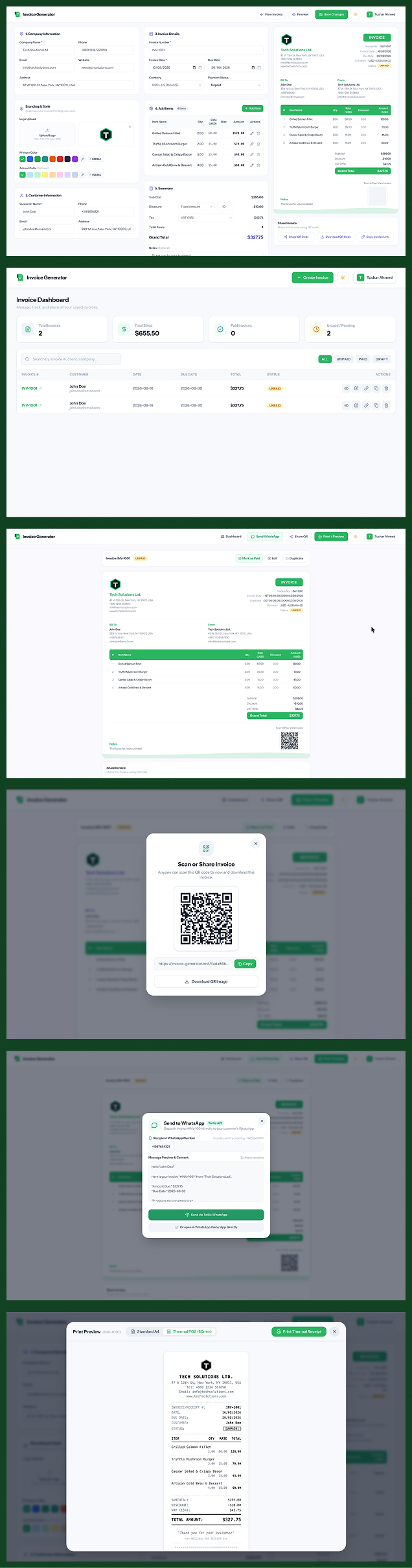
Invoice Generator is an interactive, modern web application designed for freelancers, contractors, small businesses, restaurants, and enterprises. It empowers users to create professional invoices and 80mm thermal POS receipts in real-time with an intuitive dual-pane interface (live WYSIWYG editor and instant preview).
Users can build invoices on the fly as guests and seamlessly register or log in upon saving. Invoices can be customized with company branding (logos, color palettes), calculated with item-level or overall discounts and international taxes, printed in A4 or thermal receipt formats, shared via QR codes and unique short URLs, and managed through a dashboard with status tracking (Draft, Unpaid, Paid, Sent).
Features
🎨 Real-Time Interactive Builder & Preview
- Live WYSIWYG Editing: Split-screen workflow with instant preview updates as you type.
- Dynamic Calculations: Real-time computation of subtotals, item-level discounts, global discounts (fixed or percentage), taxes/VAT, and grand totals.
- Multi-Currency Support: Pre-configured support for USD ($), EUR (€), GBP (£), BDT (৳), CAD (CA$), AUD (AU$), INR (₹), and JPY (¥).
- Flexible Tax / VAT Engine: Standard presets including VAT (15%), Tax (10%), GST (18%), Tax (5%), and Tax-exempt (0%).
🖨️ Multi-Format Print & POS Receipt Mode
- Standard A4 Invoice: Clean, professional print stylesheet optimized for paper and PDF export.
- 80mm Thermal POS Receipt: Compact layout tailored for point-of-sale receipt printers.
- Print Preview Modal: Quick format switcher to preview and print either standard A4 or thermal receipt views.
🏢 Custom Branding & Theming
- Logo Upload & URL: Upload custom company logos (persisted to storage) or provide direct image URLs.
- Palette Customization: Select from pre-configured primary and accent color presets or define custom brand colors.
- Dark Mode Support: Full light and dark theme switching across the application interface and editor cards.
🔗 Public Sharing, WhatsApp & QR Code
- Twilio WhatsApp Integration: Automated 1-click dispatch of formatted invoice summaries and view links directly to client WhatsApp numbers.
- Direct WhatsApp Web Fallback: Instant fallback button to open invoices via WhatsApp Web or mobile app without API setup.
- Unique Public URLs: Client-friendly short URLs (
/i/{uuid}) for sharing invoices without authentication barriers. - Instant QR Code: Built-in QR code modal with one-click URL copying and printable scannable codes.
📊 Invoice Management & Dashboard
- Guest-to-User Onboarding: Start creating immediately as a guest; save directly with an inline modal for registration/login.
- Invoice Overview & Metrics: Dashboard displaying key metrics (Total Invoices, Total Revenue, Paid Count, Unpaid Count).
- Search & Filter: Real-time debounced search by invoice number, client name, or company, plus status filters (All, Draft, Unpaid, Paid, Sent).
- Invoice Lifecycle Actions:
- One-click Duplicate Invoice for recurring billing.
- Quick Status Toggle (Paid / Unpaid / Sent / Draft).
- Inline Edit and Delete with confirmation dialogs.
Requirements
Server & Runtime
- PHP:
^8.3 - Composer:
^2.x - Node.js:
^20.xor^22.x - NPM:
^10.x(or Yarn / PNPM / Bun)
Required PHP Extensions
BCMath, Ctype, cURL, DOM, Fileinfo, Filter, Hash, JSON, Mbstring, OpenSSL, PCRE, PDO (with pdo_sqlite or pdo_mysql), Session, Tokenizer, XML
Database
- SQLite (Default for development) or MySQL 8.0+ / PostgreSQL 14+
Instructions
1. Extract Project & Install Dependencies
<code># Extract downloaded main_file.zip
unzip main_file.zip
cd invoice-generator

# Install PHP dependencies
composer install

# Install Node.js dependencies
npm install</code>
2. Environment Configuration
<code># Copy example env file
cp .env.example .env

# Generate application key
php artisan key:generate</code>
Configure your database in .env (SQLite is enabled by default):
<code>DB_CONNECTION=sqlite</code>
3. Database Migration & Storage Link
<code># Run database migrations
php artisan migrate

# Create storage symlink for uploaded logos
php artisan storage:link</code>
4. Running the Development Server
Option A: With Laravel Herd (macOS)
The app is automatically available at: http://invoice-generator.test
Run the frontend Vite server:
<code>npm run dev</code>
Option B: With Artisan & Vite
<code>composer run dev</code>
(or run php artisan serve and npm run dev in separate terminals)
5. Production Build
<code># Compile and minify frontend assets
npm run build

# Cache configurations and routes
php artisan config:cache
php artisan route:cache
php artisan view:cache</code>
| Author | winxlab |
|---|---|
| Category | Scripts & Code / PHP Scripts / Management / Inventory |
| Price | $19 |
| Extended License | $57 |
| Likes | 1 |
| First Release | Aug 28, 2026 |
| Last Update | Aug 28, 2026 |
| Files included | .php, .css, .html, JavaScript .js |
| Software version | PHP 8.2, PHP 8.3, PHP 8.4, Node.js 24 |
| Software framework | Vue.js, Laravel |
| Programming language | PHP, JavaScript |
Categories
Tags
External listing. code.market does not sell this product and does not process payment for it. Pricing, payment, delivery, licensing, refunds, and support are handled by the third-party merchant on its own website. We may earn an affiliate commission from a referral. Details.
Products of the Week.
Submit🥇

Perceptle
Perceptle is a daily browser-based game that challenges you to test your sensory intuition through five quick estimation and rhythm-based rounds.
Other · 1,489 views · 9 clicksOther · Week 47 · 1,489 views · 9 clicks
🥈

Free LinkedIn Likes From Real
Get free LinkedIn likes on your posts from real members who react by hand. No
SaaS · 1,632 views · 10 clicksSaaS · Week 47 · 1,632 views · 10 clicks
🥉

STOP GUESSING WHAT TO POST
AI that learns your brand voice and builds a month of consistent, on-brand social content: carousels, posts and hooks that sound like you, not like everyone else's AI.
SaaS · 9,176 views · 75 clicksSaaS · Week 47 · 9,176 views · 75 clicks
#4

aaas.market
407 reliable micro tools for solo founders, marketers and creators. They work in your browser
SaaS · 1,597 views · 5 clicksSaaS · Week 47 · 1,597 views · 5 clicks