
Modern HRM Admin Dashboard – Next.js
Description
Modern HRM Admin Dashboard
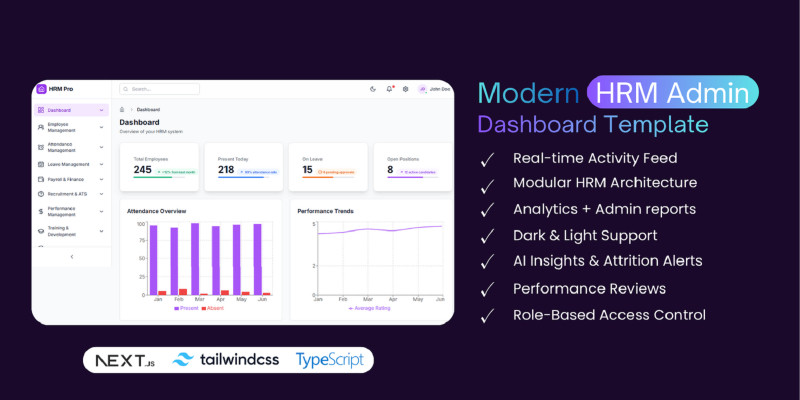
A production-ready Human Resource Management (HRM) admin dashboard built with Next.js 14, TypeScript, and Tailwind CSS. Perfect for businesses looking to manage their workforce efficiently.
Key Features
- 16+ Enterprise Modules: Dashboard, Employee Management, Attendance, Leave, Payroll, Recruitment, Performance, Training, and more
- AI-Powered Features: AI Insights, AI Attendance & Face Recognition, AI Recruitment, AI Performance Coach
- Modern UI/UX: Clean, professional design with purple brand palette
- Dark Mode: Full dark mode support with theme toggle
- Fully Responsive: Mobile-first design with collapsible sidebar
- Type-Safe: Built with TypeScript for better code quality
- Component Library: Reusable UI components (Buttons, Cards, Tables, Modals, etc.)
- Advanced Data Grid: Sortable, searchable, paginated data tables
- Accessible: Semantic HTML, keyboard navigation, ARIA labels
Technical Stack
- Next.js 14 (App Router)
- React 18
- TypeScript
- Tailwind CSS
- Lucide React Icons
- Recharts for data visualization
What's Included
- Complete source code
- Comprehensive documentation
- Installation guide
- Deployment guides (Vercel, Netlify, Cloudflare Pages)
- Component documentation
- Customization guide
Easy to Customize
Well-organized code structure makes it easy to customize colors, add new modules, or modify existing features. All components are modular and reusable.
Deployment Ready
Includes configuration for static export, making it compatible with Cloudflare Pages, Vercel, Netlify, and other static hosting platforms.
Features
- 16+ Enterprise HRM Modules
- AI-Powered Features (Insights, Attendance, Recruitment, Performance) - Modern UI/UX Design - Dark Mode Support - Fully Responsive (Mobile, Tablet, Desktop) - TypeScript for Type Safety - Advanced Data Grid with Sorting & Search - Reusable Component Library - Accessible (WCAG Compliant) - Static Export Ready - Comprehensive Documentation - Easy Customization
Requirements
- Node.js 18.0.0 or higher
- npm 9.0.0 or higher - Modern web browser (Chrome, Firefox, Safari, Edge)
Instructions
Installation Instructions
Prerequisites
Before installing, make sure you have the following installed on your system:
- Node.js 18.0.0 or higher
- npm 9.0.0 or higher
Step 1: Extract the Files
Extract the downloaded ZIP file to your desired location.
Step 2: Install Dependencies
Open your terminal/command prompt, navigate to the project directory, and run:
<code>npm install</code>
This will install all required dependencies listed in package.json.
Step 3: Run Development Server
To start the development server, run:
<code>npm run dev</code>
The application will be available at http://localhost:3000
Step 4: Build for Production
To create a production build, run:
<code>npm run build</code>
This will create an optimized production build in the .next folder.
Step 5: Start Production Server
After building, start the production server:
<code>npm start</code>
Deployment
Static Export (Cloudflare Pages, Netlify, Vercel)
The project is already configured for static export. The build output will be in the out folder.
For detailed deployment instructions, please refer to the docs/DEPLOYMENT.md file included in the package.
Environment Variables
Currently, the application uses demo data and doesn't require environment variables. If you need to add API endpoints or database connections, create a .env.local file in the root directory.
Customization
Changing Colors
Edit the tailwind.config.js file to customize the color scheme. The primary color is set to purple, but you can change it to any color you prefer.
Adding New Modules
New modules can be added by:
- Creating a new route in
src/app/ - Adding the module to the navigation configuration in
src/config/navigation.ts - Creating the necessary components and pages
Documentation
Comprehensive documentation is included in the docs/ folder:
INSTALLATION.md- Detailed installation guideDEPLOYMENT.md- Deployment instructions for various platformsCOMPONENTS.md- Component documentationCUSTOMIZATION.md- Customization guideAPI.md- API documentation (if applicable)
Support
For any issues or questions, please refer to the documentation files or contact support through the marketplace.
Important Notes
- Make sure Node.js version is 18.0.0 or higher
- Run
npm installbefore starting the development server - The application uses demo data - connect to your backend API as needed
- For production deployment, always run
npm run buildfirst
| Author | nextfio |
|---|---|
| Category | Themes / HTML / Admin Templates |
| Price | $44 |
| Extended License | $132 |
| First Release | Nov 15, 2025 |
| Last Update | Nov 15, 2025 |
| Files included | .css, JavaScript .js |
Categories
Tags
External listing. code.market does not sell this product and does not process payment for it. Pricing, payment, delivery, licensing, refunds, and support are handled by the third-party merchant on its own website. We may earn an affiliate commission from a referral. Details.
Products of the Week.
Submit🥇

Perceptle
Perceptle is a daily browser-based game that challenges you to test your sensory intuition through five quick estimation and rhythm-based rounds.
Other · 1,489 views · 9 clicksOther · Week 47 · 1,489 views · 9 clicks
🥈

Free LinkedIn Likes From Real
Get free LinkedIn likes on your posts from real members who react by hand. No
SaaS · 1,632 views · 10 clicksSaaS · Week 47 · 1,632 views · 10 clicks
🥉

STOP GUESSING WHAT TO POST
AI that learns your brand voice and builds a month of consistent, on-brand social content: carousels, posts and hooks that sound like you, not like everyone else's AI.
SaaS · 9,176 views · 75 clicksSaaS · Week 47 · 9,176 views · 75 clicks
#4

aaas.market
407 reliable micro tools for solo founders, marketers and creators. They work in your browser
SaaS · 1,597 views · 5 clicksSaaS · Week 47 · 1,597 views · 5 clicks