
Mix Puzzle - Android App Template
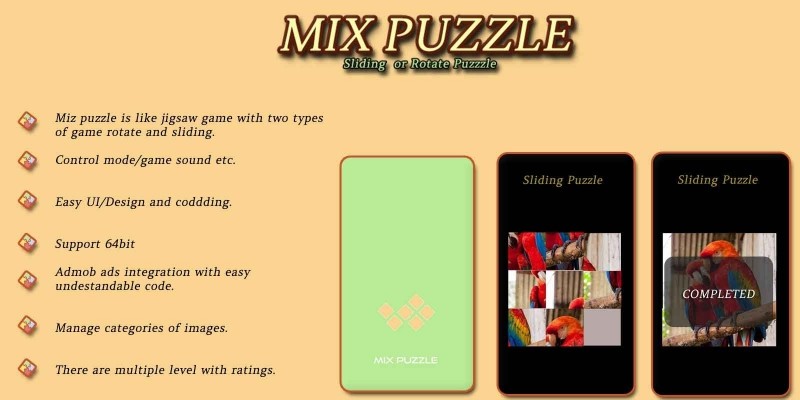
Description
Complete Java Android Studio project · 10 photo categories · 120+ levels · Rotate & Slide modes · AdMob ready · Publish on Google Play in minutes
⬇️ Try the Live Demo APK Before You Buy
Install the demo APK on your Android phone or tablet, pick a category and play a few levels to feel the rotate / slide puzzle gameplay before purchasing the source code.
Tip: enable "Install unknown apps" for your browser on Android to install the APK file.
📖 About This Mix Puzzle Android Source Code
Mix Puzzle is a complete, ready-to-publish Android puzzle game source code written in Java using Android Studio. The game shuffles a real photo into a grid of blocks and challenges the player to rebuild the original picture in the shortest time possible. Two gameplay modes are included out of the box - Rotate mode (tap blocks to rotate them) and Slide mode (classic 15-puzzle style sliding). The project ships with 10 hand-picked photo categories (Animal, Aquarium, Architecture, Bike, Bird, Car, City, Flowers, Food, Nature) totalling 120+ playable levels, with per-photo best-time tracking stored in a local SQLite database. With AdMob banner ads already integrated, this is one of the fastest complete Android games to rebrand, reskin and upload to Google Play.
What end-users get:
- 🧩 A relaxing photo puzzle game with two distinct play modes (rotate & slide).
- 🖼️ A modern category grid with cover thumbnails for each pack of levels.
- ⏱️ A built-in timer + best-time record per photo to keep players coming back.
- 🔊 Background music + click / move / win sound effects with an in-game mute toggle.
✨ Key Features
Feature What It Does 🔁 Two Game Modes Switch between Rotate-blocks mode and Slide-blocks mode from the in-game settings - one codebase, two games. 🖼️ 10 Bundled Photo Categories Animal, Aquarium, Architecture, Bike, Bird, Car, City, Flowers, Food, Nature - 120+ playable levels included. ➕ Add Unlimited Categories & Levels Drop a new folder of JPGs intoassets/Categories/ - it is auto-discovered and seeded into the database on first launch.
⏱️ Best-Time Tracking
Per-photo personal best stored in SQLite - encourages replay and player retention.
🎬 Branded Splash Screen
2-second branded splash with a custom display font (Good Times) before the category grid appears.
⚙️ In-Game Pause & Settings
Pause dialog with Resume / Restart / Exit, plus a sound-mute switch and a Rotate / Slide mode selector.
🔊 Music & Sound Effects
Looping background music + dedicated SFX for block moves, UI taps and level-complete.
💰 Google AdMob Integrated
Adaptive banner ads on both the category grid and the in-game screen. Change all ad IDs in a single XML file.
🎨 Modern Material UI
AndroidX AppCompat + Material 3, ConstraintLayout, RecyclerView grid, CardView - polished, portrait-locked layout.
🌀 Spinner Loader
Android-SpinKit loading animation while the first-run database is being seeded from the asset folder.
📐 Density-Independent Sizing
Built with sdp-android so the UI scales beautifully from small phones to tablets.
💾 100% Offline SQLite Storage
Categories, levels, best times and settings are saved locally - no server, no backend, no API keys.
🖼️ Picasso Image Loader
Fast, cached image loading directly from the assets:// folder - no APK bloat from extra resource buckets.
🌍 Multi-Language Ready
All UI strings in strings.xml - add any language with a new values-xx/ folder.
⚡ Easy Reskin
Change package name, app name, icon, AdMob IDs, fonts, sounds and photos in under an hour.
📚 Detailed Documentation
Step-by-step README.md plus inline // RESKIN: code comments showing exactly what to change for a custom build.
🕹️ How the Game Works for the End User
- Open the app - a 2-second branded splash screen welcomes the player.
- Pick a photo category from the grid (Animal, Car, Nature, Food ...).
- Swipe through the photos in that category and tap PLAY on any one.
- The chosen image is shuffled into a grid of blocks - the timer starts.
- In Rotate mode, tap a block to rotate it 90°; in Slide mode, tap a block next to the empty slot to slide it.
- Reassemble the original photo. When the image is complete a "COMPLETED" screen appears with the elapsed time.
- The new time is compared against the best time for that photo and saved if it is a new record.
- Open the in-game Settings to mute the sound or swap between Rotate and Slide modes at any time.
🛠️ Technical Specifications
- Programming Language: Java 11
- IDE: Android Studio Ladybug (2024.2) or newer
- Build System: Gradle 9.4 · AGP 9.x · Version Catalog (
gradle/libs.versions.toml) - compileSdk / targetSdk: 36 (latest)
- minSdk: 24 (Android 7.0+) - covers ~98% of active Android devices
- UI: AndroidX AppCompat, Material 3, ConstraintLayout, RecyclerView, CardView, GridLayout
- Image Loading: Picasso (assets-based)
- Sizing:
intuit/sdp-androiddensity-independent units - Extras:
kyleduo/SwitchButton,ybq/Android-SpinKit - Storage: SQLite (
PuzzleDatabaseHelper) - categories, levels, best times, user settings - Audio: Android
MediaPlayer(BGM loop) +SoundPool(move / info / result SFX) - Backend: None required - 100% offline game
- Monetisation: Google AdMob (adaptive banners, Mobile Ads SDK 23.x)
- Output: APK and AAB (Android App Bundle) ready for Google Play
📦 What You Get In This Package
- ✅ Full Android Studio project with complete Java source code.
- ✅ All assets included: 10 photo categories with 120+ JPG levels, 2 custom fonts, 4 sound effects, launcher icons and drawables.
- ✅ Working Rotate-mode & Slide-mode puzzle gameplay.
- ✅ Working AdMob banner integration (Google Mobile Ads SDK 23.x).
- ✅ SQLite database helper with auto-seeding from
assets/Categories/. - ✅ Detailed README.md with rebrand, reskin and Google Play publish guide.
- ✅ Inline // RESKIN: code comments showing exactly where to change AdMob IDs, package name, app name, fonts and sounds.
- ✅ Free future bug fixes.
⚡ Reskin & Publish on Google Play in Under an Hour
You can launch your own branded photo puzzle game on Google Play very quickly:
- Open the project in Android Studio & let Gradle sync.
- Change the package name &
applicationIdinapp/build.gradle(Refactor → Rename). - Replace the launcher icon via Image Asset Studio.
- Replace the splash background at
res/drawable/bg.xmland the logo atres/drawable/blank_logo.png. - Drop your own JPG categories into
assets/Categories/<CategoryName>/1.jpg, 2.jpg ...- they are auto-discovered. - (Optional) Swap the display font - drop your
.ttfintoassets/and update one line inMyApplication.java. - (Optional) Replace the four MP3 sound files in
assets/(snd_bg.mp3,snd_move.mp3,snd_info.mp3,snd_result.mp3). - Edit 3 strings in
res/values/strings.xmlto set your own AdMob App ID, Banner ID and Interstitial ID. - (Optional) Recolor the theme from
res/values/colors.xml. - Generate a signed AAB and upload to Google Play Console.
💡 No advanced coding required for the basic rebrand - everything important lives in resource files and is clearly marked with // RESKIN: comments in code. Just search the project for RESKIN to jump to every touch-point.
🎯 Perfect For
- Indie Android developers looking for a complete photo puzzle game source code.
- App resellers and reskin agencies who want a quick Google Play launch.
- Beginners learning Android Studio with a real-world Java casual game project.
- Studios that need a polished jigsaw / slide puzzle template to ship fast.
- Educators teaching Android, SQLite, AdMob integration, custom views and touch handling.
- Brands that want to ship a branded picture puzzle using their own photo library for marketing.
📋 Requirements
- Android Studio Ladybug (2024.2) or newer
- JDK 17+ (auto-provisioned by Android Studio / Gradle)
- Android SDK 36 installed
- A test device or emulator running Android 7.0+ (API 24+)
- An AdMob account for ad monetisation (optional)
🏷️ Tags
android source code, photo puzzle game, picture puzzle android, mix puzzle, jigsaw puzzle android, slide puzzle android, rotate puzzle game, casual puzzle template, android studio project, java puzzle game, complete android game, reskin android app, admob integrated app, android game template, google play ready, offline android game, sqlite android, material 3 android, picasso android, kids puzzle game.
💬 Support
Need help with rebranding, publishing or adding a new feature? Send us a message and we will be happy to help. Free updates and bug fixes are included.
Launch Your Own Photo Puzzle Game Today 🚀
Buy once, brand it, publish it on Google Play. No subscriptions, no hidden costs.
Android, Google Play, AdMob and the Android robot are trademarks of Google LLC.
Features
- Two game modes - Rotate blocks & Slide blocks (switchable in-game).
- Control background music and sound effects with a one-tap mute switch.
- Easy UI / Design and clean, well-commented Java code.
- Supports 64-bit devices (arm64-v8a + x86_64) - Google Play ready.
- AdMob banner ads integration with easy, understandable code.
- Manage categories of images straight from the assets folder.
- 10 bundled photo categories - Animal, Aquarium, Architecture, Bike, Bird, Car, City, Flowers, Food, Nature.
- 120+ playable levels included out of the box.
- Each category has many levels (12-17 photos per pack).
- Add / Remove categories & levels as you want - just drop JPGs into
assets/Categories/. - Per-photo best-time tracking saved in local SQLite.
- Auto-generated category thumbnails (uses the first image of each folder).
- Branded 2-second splash screen with custom display font.
- In-game Pause dialog with Resume / Restart / Exit.
- Modern Material UI - AppCompat, ConstraintLayout, RecyclerView, CardView.
- Density-independent sizing (sdp-android) - scales beautifully phone to tablet.
- Picasso image loader directly from assets - no APK bloat.
- Android-SpinKit loading animation while the first-run DB seeds.
- 100% offline - no server, no backend, no API keys.
- Multi-language ready - all UI text in
strings.xml. - Built with Android Studio Ladybug+, Java 11, AGP 9.x, Gradle 9.4.
- minSdk 24 (Android 7.0) to targetSdk 36 (Android 14) - covers ~98% of devices.
- Detailed README + inline
// RESKIN:code comments for fast rebranding.
Requirements
<p>Android Studio Should be Installed (Ladybug 2024.2 or newer)<br>JDK 17+ Installed (bundled with Android Studio)<br>Android SDK 36 Installed via SDK Manager<br>Gradle 9.4+ (auto-downloaded by the Gradle Wrapper)<br>Internet Connection (required for the first Gradle sync to download AGP, AndroidX, Picasso, AdMob, JitPack libs)<br>A Real Android Device or Emulator running Android 7.0+ (API 24+)<br>Google Play Developer Account ($25 one-time fee, for publishing)<br>AdMob Account (for ad monetisation - optional)<br>Keystore File (for signing the release APK / AAB)<br>Basic knowledge of Java & Android Studio (for advanced reskinning)<br>Read attach Document (README.md) carefully</p>
Instructions
Open Project in Android Studio & let Gradle Sync finish
Replace your Launcher Icon (right-click res → New → Image Asset)
Replace AdMob App ID, Banner ID & Interstitial ID in res/values/strings.xml
Change the App Title (app_name) in res/values/strings.xml
Change the Package Name / applicationId (Refactor → Rename) in app/build.gradle
Replace the Splash Logo (res/drawable/blank_logo.png) and Splash Background (res/drawable/bg.xml)
Replace the Puzzle Photos - drop your JPGs into assets/Categories/<CategoryName>/1.jpg, 2.jpg ...
(Optional) Replace the Sound Files in assets/ (snd_bg.mp3, snd_move.mp3, snd_info.mp3, snd_result.mp3)
(Optional) Recolor the theme in res/values/colors.xml
Search the project for RESKIN to jump to every touch-point in code
Generate a Signed APK / AAB (Build → Generate Signed Bundle / APK)
There you Go - Upload that new APK / AAB to your Google Play Console.
Export it as APK and publish it.
| Author | radhi1995 |
|---|---|
| Category | App Templates / Android / Games / Puzzle |
| Price | $21 |
| Extended License | $63 |
| Likes | 4 |
| First Release | Sep 15, 2020 |
| Last Update | May 18, 2026 |
| Files included | .html, .apk, .java, .xml |
| Operating systems | Android 7.0, Android 8.0, Android 9.0, Android 10.0, Android 11.0, Android 12.0, Android 4.0, Android 5.0, Android 6.0 |
Categories
Tags
External listing. code.market does not sell this product and does not process payment for it. Pricing, payment, delivery, licensing, refunds, and support are handled by the third-party merchant on its own website. We may earn an affiliate commission from a referral. Details.
Products of the Week.
Submit🥇

Perceptle
Perceptle is a daily browser-based game that challenges you to test your sensory intuition through five quick estimation and rhythm-based rounds.
Other · 3,957 views · 16 clicksOther · Week 47 · 3,957 views · 16 clicks
🥈

Free LinkedIn Likes From Real
Get free LinkedIn likes on your posts from real members who react by hand. No
SaaS · 4,075 views · 18 clicksSaaS · Week 47 · 4,075 views · 18 clicks
🥉

STOP GUESSING WHAT TO POST
AI that learns your brand voice and builds a month of consistent, on-brand social content: carousels, posts and hooks that sound like you, not like everyone else's AI.
SaaS · 11,557 views · 80 clicksSaaS · Week 47 · 11,557 views · 80 clicks
#4

aaas.market
407 reliable micro tools for solo founders, marketers and creators. They work in your browser
SaaS · 3,936 views · 7 clicksSaaS · Week 47 · 3,936 views · 7 clicks