
MiniPOS Offline - Xamarin.Forms Mobile POS Application with License System
Description


About MiniPOS
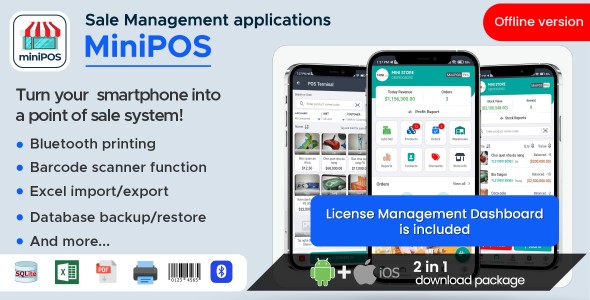
MiniPOS is a mobile point of sale application designed to simplify sales transactions and enhance customer experience. Developed using Xamarin.Forms, MiniPOS is a cross-platform solution that offers a range of features to help merchants manage their inventory, process orders, and track sales. With a user-friendly interface and easy-to-navigate menus, MiniPOS is ideal for small businesses, pop-up shops, and individuals looking for a powerful yet simple POS solution on their mobile device. Whether you’re selling products or services, MiniPOS makes it easy to sell, issue receipts, and keep track of your sales data.
This is Offline version. The application stores data locally with SQLite Database. It’s comes with License Management Module, mobile devices need to activate the app by license key . With this application, you are assured to save time-consumming process of developing mobile point of sale system that supports both Android and iOS devices.
Install the app and preview instantly

Application Features
- Pos function, add sale orders, discounts, print invoice, pdf invoice
- Use device camera as barcode scanner, call out items quickly
- Warehouse, inventory and stock management
- Expenses & incomes management
- Product management: add/modify/delete products
- Report profit, stock, stock balanced, expenses & imcome, trending items…
- Product categories and units management
- Suppliers, customers management
- Database management, backup, restore, Excel import/export
License Management System
This system is designed as a separated module, or it’s an optional: you can enable/disable license system. When enabled, users need to enter a license key in order to activate the app.
- License registration form with owner contact information
- License Expiry: can be assigned per each license. Default is 365 days.
- License Expired Reminder: able to notify user for license expiration, advance notification days is configurable.
iOS App Preview
Note: Bluetooth direct printing is NOT AVAILABLE in iOS, only PDF invoice available.


Android App Preview


Demo Info
Step 1: Install App (Android)
Click below image to Install Android app from Google Play :
Step 2: Generate A License
Create a new license from License Managment Dashboard:
| License Dashboard: | http://minipos-license.tlssoftwarevn.com | |
| Admin credentials: | superadmin@gmail.com | 123Pa$$word! | |
| User credentials: | basicuser@gmail.com | 123Pa$$word! |
Step 3: Activate Your License
Open mobile app, register your device with the generated license and start trying MiniPOS.
Excel Import Template: Click here to download
❓ Need help?
Mailbox: thanhlongsolutions4u@gmail.com
Business time: Mon – Fri, 10:00 AM – 7:00 PM GMT+7
Release Notes
v2.2.0- 16 Nov 2023
  Update permissions for Android 13 target
  Add Finger print/ PIN authentication option
v2.1.8- 16 Aug 2023
  Fix Android splash screen crashes issue
  Fix app crashes when open Youtube link
  Update Info.plist in iOS app for AppStore submission compliance
v2.1.7 – 27 Apr, 2023
  Fix bug on cart item when user add custom quantity in sale and stock in module
  Fix error XamlC error XFC0000 : Cannot resolve type "MediaElement"
  iOS app improvement, supports iOS 16.2, (built with XCode 14.2, Xamarin.iOS 16.2.0.5)
  Update Admob earning system, added config to enable/disable Ads
v2.1.6 – 25 Apr, 2023
  Using Font icons instead of images
  Fix app crashed when enable bluetooth printer connection
  Fix issue price show zero value when import products from Excel
  Added configuration to enable/disable license system
  Use web url for Terms of Use, Privacy Policy screens
  Remove redundancy resources
V2.1.2 (Updated: 17 Jun 2022)
  Stock Report: added Stock out report chart
  Mobile app: activate license to use app
  License Management: added license management dashboard + license control api
V2.1.0 (Updated: 23 May 2022)
  New UIUX design
  Add more business report type
  Add Income feature to Cashflow module
  Add Warehouse feature
  Stock Adjustment: able to key in custom quantity
  Navigation and another  performance improvements.
V1.1.9 (Updated: 10 May 2022)
  Add more languages and translation templates file
  Update load currency and pricing format base on language selected
  Fixed Pdf invoice printing button not work when target SDK 30, android 12.
| Author | tlssoftware |
|---|---|
| Price | $29 |
| Sales | 71 |
| Rating | 3 (3) |
| Published | Mar 26, 2021 |
| Last Update | Nov 16, 2023 |
| Compatible Software | iOS 15, iOS 14, iOS 13, iOS 12, Android 12.0, Android 11.0, Android 10.0, Android 9.0 |
| Demo Url | http://minipos.tlssoftwarevn.com/ |
| Mobile Files Included | JavaScript JS, CSS, HTML, JavaScript JSON, XML, .apk, .db, .xml, JavaScript JSON, .storyboard, .plist |
Categories
Tags
External listing. code.market does not sell this product and does not process payment for it. Pricing, payment, delivery, licensing, refunds, and support are handled by the third-party merchant on its own website. We may earn an affiliate commission from a referral. Details.