
Mighty Tables | Add sorting, search, filters, and highlighting to your tables

Description
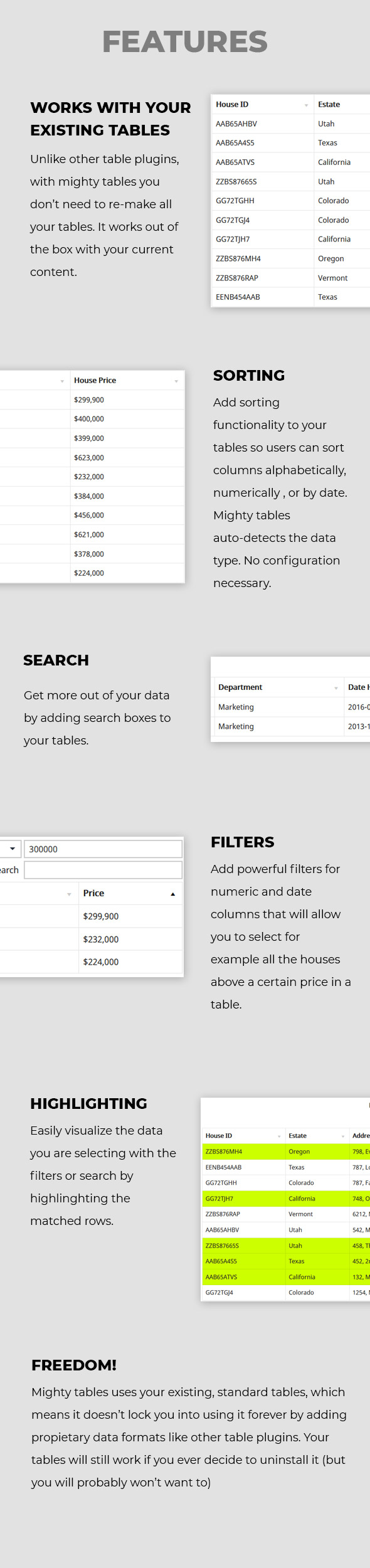
Mighty Tables allows you to magically add sorting, search, filters, and highlighting functionality to your existing and future tables.
It works out of the box and automatically. Very little configuration is needed. Just plug and play.
KEY FEATURES
Sorting: Add sorting controls and functionality to your columns so users can sort them alphabetically and numerically.
Search: Add a search box to your tables so users can look for cells that contain keywords or numbers.
Filters: Advanced filters allow the users to look for more complex groups of data in the tables. For example, “listings where the house price is above $400,000” or “employees hired before 2018”.
Highlighting: Highlight the rows matched by the search field or filters to visualize them easily.
Works with your existing tables: Unlike other table plugins, you don’t need to re-make all your tables to get the features working. If your tables have a column header, they are ready to work with the plugin.
Don’t get locked in: Since Mighty Tables doesn’t use proprietary data formats to generate the tables, it doesn’t lock you into using it forever like other plugins. You can move on from it any time you want (but you probably won’t want to).
REQUIREMENTS
The requirements for Mighty Tables to work out of the box are pretty simple.
Tables: In order for the plugin to work automatically with your tables, they simply need to have a proper header with a column name. In the WordPress editor, this can simply be done with one click by activating the ¨header¨ function in the block settings. Page builders like elementor and visual composer have equivalent settings,
If you know your way around HTML, it simply means it need to have a thead tag with th tags as the cells.
WordPress: The plugin requires WordPress 5.0 or newer.
SUPPORT
An e-mail address is included in the help document that comes with your plugin. Please send your support questions there with the subject “Mighty Tables Support Request” and include your purchase code.
RELEASE NOTES
V 1.0 - Initial release
V 1.1 -
* WordPress 6.0+ fully supported.
* Carbon Fields plugin is no longer required for Mighty Tables to work. If you are updating from version 1.0 you can delete the Carbon Fields plugin after installing version 1.1.
V 1.2 -
* Fixed a compatibility bug with WordPress 6.6.1 and newer versions| Type | WordPress Plugin |
|---|---|
| Author | BioXD |
| Category | Wordpress / Utilities |
| Price | $19 |
| Sales | 63 |
| Rating | 5.00 from 3 ratings |
| Published | Jan 4, 2021 |
| Last Update | Dec 25, 2024 |
| Compatible Browsers | IE10, IE11, Firefox, Safari, Opera, Chrome, Edge |
| Compatible Software | WordPress 6.7.x, WordPress 6.6.x, WordPress 6.5.x, WordPress 6.4.x, WordPress 6.3.x, WordPress 6.2.x, WordPress 6.1.x, WordPress 6.0.x, WordPress 5.9.x, WordPress 5.8.x, WordPress 5.7.x, WordPress 5.6.x, WordPress 5.5.x, WordPress 5.4.x, WordPress 5.3.x, WordPress 5.2.x, WordPress 5.1.x, WordPress 5.0.x |
| Gutenberg Optimized | Yes |
| Source Files Included | JavaScript JS, CSS, PHP |
External listing. code.market does not sell this product and does not process payment for it. Pricing, payment, delivery, licensing, refunds, and support are handled by the third-party merchant on its own website. We may earn an affiliate commission from a referral. Details.
Products of the Week.
Submit🥇

STOP GUESSING WHAT TO POST
AI that learns your brand voice and builds a month of consistent, on-brand social content: carousels, posts and hooks that sound like you, not like everyone else's AI.
SaaS · 3,991 views · 35 clicksSaaS · Week 45 · 3,991 views · 35 clicks
🥈

Conversational Backlinks for Busy Founders
Place Backlink Relevant Conversation for your domain across Forums and Conversations
Website · 41,638 views · 222 clicksWebsite · Week 45 · 41,638 views · 222 clicks
🥉

upvote.club
Free Social Media Engagement that Helps Boost Your Content. Upvote Club supports 19 social networks with 100+ engagement actions in one dashboard. Add links to your posts and get free engagement from real users.
SaaS · 39,664 views · 114 clicksSaaS · Week 45 · 39,664 views · 114 clicks
#4

Substack Posting API
Onboard your Agent to Substack. Write Publish on Substack via API
SaaS · 58,693 views · 198 clicksSaaS · Week 45 · 58,693 views · 198 clicks
#5

Seenshot App
Free, Fast, MacOS Screenshot app. Make Screenshot cmd+shift+2 and send it via link
Desktop App · 28,075 views · 122 clicksDesktop App · Week 45 · 28,075 views · 122 clicks
#6

Hand-Placed Backlinks $9.99 per link. Flat rate.
Buy hand-placed forum, Q-A and directory backlinks. Flat $9.99 per link, no subscriptions — you only pay for approved listings.
Website · 3,934 views · 19 clicksWebsite · Week 45 · 3,934 views · 19 clicks
#7

Free Invoice Generator - PDF Invoices in Your Browser, No Sign-Up
A free invoice maker for freelancers and small businesses: fill in the invoice, check the live preview, and download a PDF that looks exactly like it. Any currency, tax per item, three templates, no sign-up, and nothing leaves your device.
2,611 views · 17 clicksWeek 45 · 2,611 views · 17 clicks
#8

Merge PDF Files Free - Combine PDFs in Your Browser, No Upload
A free PDF merger for office workers, students, and freelancers: combine PDFs and images into one file in the browser, reorder files and pages, pick page ranges, keep bookmarks, and open password-protected PDFs. Nothing is uploaded, no sign-up, no watermark.
2,430 views · 13 clicksWeek 45 · 2,430 views · 13 clicks