
MERN Clothing Ecommerce NodeJS
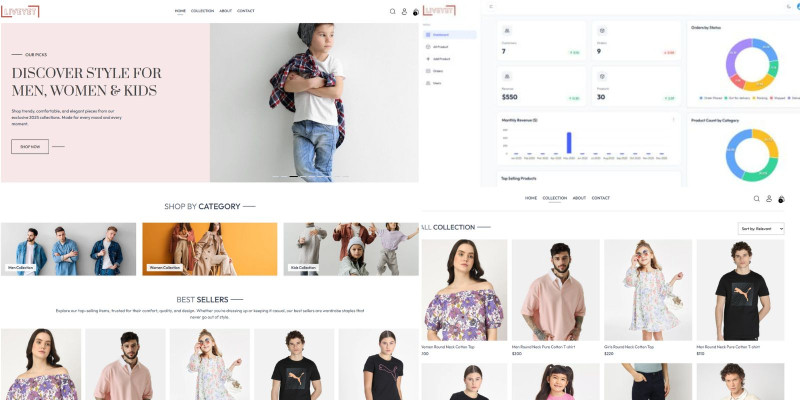
Description
🛍️ MERN Clothing Ecommerce Platform
A full-featured clothing ecommerce platform built using the MERN stack (MongoDB, Express, React, Node.js). It includes a modern frontend for customers and a powerful admin dashboard for managing products, users, and orders.
🚀 Live Demo
- 🌐 Frontend: https://rong-bd-frontend.vercel.app/
- 🔐 Admin Panel: https://rong-bd-admin.vercel.app/
🧑💼 Admin Login Credentials
- Email: admin1@gmail.com
- Password: 12345678
⚠️ Please do not delete important data. The demo database may reset periodically for testing purposes.
✨ Key Features
- Full-stack MERN architecture
- Modern and clean UI with Tailwind CSS
- Product catalog, shopping cart, and checkout flow
- JWT-based user authentication and protected routes
- Powerful admin dashboard with product, user, and order management
- Order status and payment tracking
- Responsive design for desktop, tablet, and mobile
- Built with Vite for faster development experience
✅ Technologies Used
- Frontend: React, Tailwind CSS, React Router, Context API
- Backend: Node.js, Express.js, MongoDB, Mongoose, JWT
Features
- Full-stack MERN (MongoDB, Express, React, Node.js)
- Clean and modern UI with Tailwind CSS
- Secure user login/register with JWT
- Protected admin dashboard
- Product catalog and cart management
- Order creation and status tracking
- Mobile-responsive design
- React Context API for state management
- Built with Vite for lightning-fast performance
Requirements
- Node.js v16 or higher
- MongoDB (Local or Atlas)
- Code Editor (e.g., VS Code)
- Basic knowledge of JavaScript and React
- Modern browser (Chrome, Firefox, etc.)
- Internet connection to install dependencies
Instructions
🛠️ Installation Guide
- Unzip the downloaded project files.
- Install dependencies in both
/frontendand/backendfolders using:npm install - Set up your MongoDB database and add your credentials in the provided
.envfile. - Start the backend server:
cd backend && npm run dev - Start the frontend:
cd frontend && npm run dev - Access the user frontend at: http://localhost:3000
- Access the admin panel at: http://localhost:3001
🔐 Admin Panel Demo
- URL: https://rong-bd-admin.vercel.app/
- Email: admin1@gmail.com
- Password: 12345678
🌐 Frontend Demo
| Author | nayemkhan4496 |
|---|---|
| Category | Scripts & Code / NodeJS |
| Price | $9 |
| Extended License | $27 |
| Likes | 3 |
| First Release | May 30, 2025 |
| Last Update | May 30, 2025 |
Categories
Tags
External listing. code.market does not sell this product and does not process payment for it. Pricing, payment, delivery, licensing, refunds, and support are handled by the third-party merchant on its own website. We may earn an affiliate commission from a referral. Details.
Products of the Week.
Submit🥇

STOP GUESSING WHAT TO POST
AI that learns your brand voice and builds a month of consistent, on-brand social content: carousels, posts and hooks that sound like you, not like everyone else's AI.
SaaS · 5,417 views · 51 clicksSaaS · Week 45 · 5,417 views · 51 clicks
🥈

Conversational Backlinks for Busy Founders
Place Backlink Relevant Conversation for your domain across Forums and Conversations
Website · 43,618 views · 226 clicksWebsite · Week 45 · 43,618 views · 226 clicks
🥉

upvote.club
Free Social Media Engagement that Helps Boost Your Content. Upvote Club supports 19 social networks with 100+ engagement actions in one dashboard. Add links to your posts and get free engagement from real users.
SaaS · 41,632 views · 123 clicksSaaS · Week 45 · 41,632 views · 123 clicks
#4

Substack Posting API
Onboard your Agent to Substack. Write Publish on Substack via API
SaaS · 60,582 views · 203 clicksSaaS · Week 45 · 60,582 views · 203 clicks
#5

Seenshot App
Free, Fast, MacOS Screenshot app. Make Screenshot cmd+shift+2 and send it via link
Desktop App · 29,912 views · 124 clicksDesktop App · Week 45 · 29,912 views · 124 clicks
#6

Hand-Placed Backlinks $9.99 per link. Flat rate.
Buy hand-placed forum, Q-A and directory backlinks. Flat $9.99 per link, no subscriptions — you only pay for approved listings.
Website · 5,656 views · 19 clicksWebsite · Week 45 · 5,656 views · 19 clicks
#7

Free Invoice Generator - PDF Invoices in Your Browser, No Sign-Up
A free invoice maker for freelancers and small businesses: fill in the invoice, check the live preview, and download a PDF that looks exactly like it. Any currency, tax per item, three templates, no sign-up, and nothing leaves your device.
4,316 views · 17 clicksWeek 45 · 4,316 views · 17 clicks
#8

Merge PDF Files Free - Combine PDFs in Your Browser, No Upload
A free PDF merger for office workers, students, and freelancers: combine PDFs and images into one file in the browser, reorder files and pages, pick page ranges, keep bookmarks, and open password-protected PDFs. Nothing is uploaded, no sign-up, no watermark.
3,965 views · 14 clicksWeek 45 · 3,965 views · 14 clicks