
Mendora | Flutter Home Services Customer and Technician Apps With Laravel Admin
Description
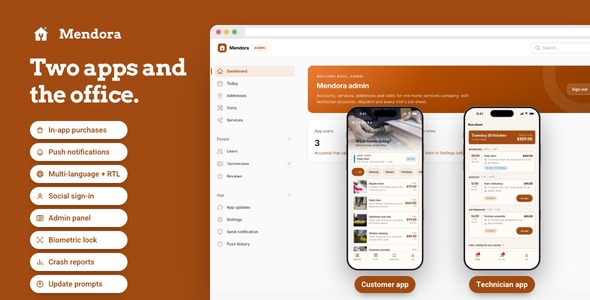
Run a home services company from two phones and one browser: customers book a cleaner, a plumber or an electrician for an arrival window and follow every step, technicians work through a checklist with before and after photos, and the office assigns the day from a Laravel admin panel. Sign-in with Google and Apple, push, three languages and a landing page are already wired, all switchable from one file. Light and dark, tested on every screen.

Requires your own Firebase project
Push notifications, analytics and crash reports in both apps run on a Firebase project you create and pay for yourself (free tier, then billed by Google); it is not included in the price. Without one, both apps and the back end still run, with those three features switched off.
Demo Instructions
The live preview opens on five demos, listed below under See every part before you buy. In both apps the sign-in screen runs on the sample company and accepts any credentials: use the pairs below, any other pair, or tap Sign in with the fields empty. Every screen is populated the moment each app opens.
- Customer app sign-in — Email: demo@mendora.app · Password: demo1234
- Technician app sign-in — Email: partner@mendora.app · Password: demo1234
- Admin panel of the included back end, once you install it — Email: admin@mendora.test · Password: password
Costs not included in the price
Push notifications to both apps, analytics and crash reports run on a Firebase project you create under your own Google account; Google bills its usage above the free tier. Google Sign-In, Sign in with Apple and push notifications only work with your own paid developer accounts and services (an Apple Developer Program membership, a Google Play Console account, a Firebase project), and so do analytics and publishing two apps to the stores. Sign-up and password-reset codes go out through your own SMTP email provider, and the back end runs on hosting you choose. Every one of them bills you directly, and they are not included in the purchase price.
Why Mendora
- Both sides of the visit are built: a customer app that books by service, address and arrival window and shows a five-step progress band, and a technician app with a run sheet by window and a job sheet that will not mark a visit done until both photos and every checklist line are in.
- The office comes with it:
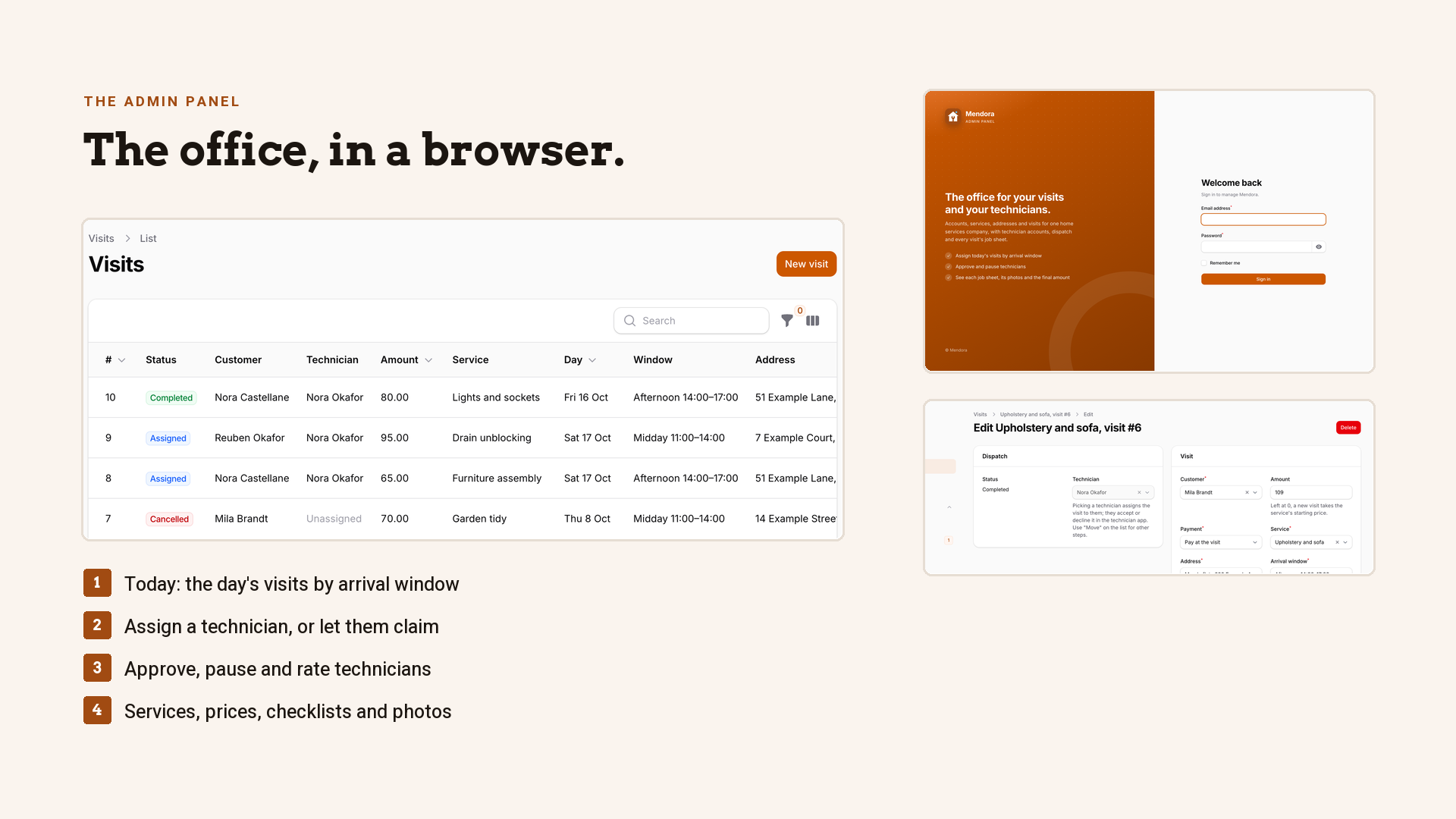
backend/is a Laravel API with a Filament admin panel holding accounts, services with their checklists and photos, customer addresses and visits, plus a Today board by arrival window, technician approval, reviews, and the App updates, Send notification and Push history pages;landing/is a one-page product site already in Mendora’s colors. - Ready to show on day one: 15 customer screens and 12 technician screens with loading and empty states, 62 customer app tests, 72 technician app tests and 155 back end tests, all passing.
Eight things you will not have to build
- Sign in with Google and Apple — the id token is exchanged with the included back end for a session; buttons appear only for the providers you configure.
- Push notifications — send from your admin panel to every install; every visit step also reaches the customer’s phone and every new assignment the technician’s.
- Analytics and crash reports — every screen view and the errors users actually hit, behind a consent switch.
- Face ID / Touch ID / fingerprint lock — lock on launch in both apps, disabled on phones with nothing enrolled.
- Three languages with RTL — English, Spanish, Arabic in both apps; add a language by copying one file; the server answers in the same language.
- Update prompts — a gentle nudge or a must-update screen, set by four lines in your server’s
.env. - Share sheet — the visit report from the customer app, the visit’s address from the technician app, iPad anchored.
- Pictures with fallbacks — service photos and before / after photos from your server’s URLs or bundled assets, with placeholders.
Open all five demos before you buy
Everything on this page is one click away in the Live Preview, not just the apps. It opens on a page with five demos, and All demos brings you back from each one:

- Customer app: the Flutter customer app running in your browser inside a phone frame, with the sample company already loaded.
- Technician app: the technician app the same way, on the same sample visits.
- Documentation: every chapter of the manual, opened from the very file you get in the zip.
- Admin panel: a read-only snapshot of the Laravel admin from a live install: the dashboard, every sidebar page, one record in its edit form.
- Landing page: the one-page site for your company that comes in the zip, set in Mendora’s colors and type.
The full source code is included with every license type, Regular and Extended alike.
Arrival windows, not time slots
The customer picks a day and one of the company’s windows; windows already under way today are hatched and cannot be picked.

A visit, step by step
Booked, technician confirmed, on site, done, reviewed, each with its time; the technician’s card opens once they confirm.

Before and after, side by side
The finished visit shows the technician’s two photos, the ticked checklist, the final amount and their note.

The technician’s run sheet
Today’s visits grouped by arrival window, waiting and accepted together, with the day’s value on top and Accept on each card.

The job sheet
Tick the service’s checklist, add the photos from the camera or the library, set the final amount; Done unlocks when the sheet is full.

Two apps, one office
Every step a technician takes is logged on the server and pushed to the customer, and the office assigns the day from its Today board.

Your catalog, their front doors
Services with photos, starting prices and checklists, edited in the admin panel; customers keep their addresses with an access note for the technician.

Plus the screens a real app needs: onboarding, sign-in and sign-up with email codes, the service catalog by category, service details, saved addresses with access notes, visit history, reviews, settings with language, theme, lock and notifications, account deletion and legal pages.
Landing page included
The download ships a one-page product website for your company (landing/): hero with two phone mock-ups, three feature tiles, a swipeable gallery of both apps, FAQ and store buttons, already set in Mendora’s colors and type; swap the copy and the store links and publish it anywhere static HTML is served.

Laravel back end included
backend/ is a Laravel API with a Filament admin panel: customer and technician accounts with approval, the service catalog with checklists and photos, customer addresses, visits with their step log, the job sheet with photo uploads, reviews, push devices, social sign-in exchange and the version endpoint, with a Docker compose file and an installer. Point both apps at it with one --dart-define each and the same screens talk to it. It runs on PHP 8.4 or newer, on a shared host or with Docker.
How the code is put together
- Clean GetX architecture: View, Controller, Service, Model in both apps, with lazy bindings per route.
- One config file for every integration:
feature_config.dartholds the product ids, client ids and switches;feature_packs.dartis the only place an implementation is chosen. - One visit flow, two apps, one server: the step table lives in the server’s
TaskFlow.phpand both apps mirror it, with a test that fails when they drift. - Rules where you can find them: arrival windows, how far ahead people can book and the currency sit in
config/visits.php; both apps read them from the server. - Theme-aware components: the same tiles look right in light and dark; one color file re-skins each app, and the icon and the landing page follow it.

What you get: full Flutter source code of both apps with the feature packs, the Laravel back end with admin panel, the landing page, READMEs, offline HTML documentation, sample data that matches the server’s demo data, light and dark themes.
AI disclosure
AI-assisted tools were used to help write and review the source code and the documentation of this item. The author reviewed, tested and finalized every part before release. The 19 photographs are licensed Pexels stock, each listed with its photographer in assets/images/services/LICENSES.txt; no image-generation model was used. The apps themselves have no AI features.
Notes
Visits are paid at the door or settled offline with the company; the apps record the final amount and take no payment. This version has no map or live technician location, no chat and no multi-company marketplace.
Without a server both apps run on the bundled sample company; connect the included back end when you deploy it. The sample photographs are for the demo and are meant to be replaced with your own.
Visits are paid at the door or as agreed with the company; the apps take no payment. The interface lives in the Dart source of each app, with no Figma or Sketch files alongside it. Connecting the apps to live services such as hosting, Firebase or the app stores will involve those third-party services, which will incur their own separate costs.
| Author | coderqh |
|---|---|
| Price | $99 |
| Sales | 0 |
| Rating | 0 (0) |
| Published | Nov 4, 2026 |
| Last Update | Nov 4, 2026 |
| Compatible Software | Flutter 3.x |
| Mobile Files Included | Dart, YAML, JavaScript JSON, .kotlin, .swift, JavaScript JS, CSS, PHP, HTML |
Categories
Tags
External listing. code.market does not sell this product and does not process payment for it. Pricing, payment, delivery, licensing, refunds, and support are handled by the third-party merchant on its own website. We may earn an affiliate commission from a referral. Details.
Products of the Week.
Submit🥇

Perceptle
Perceptle is a daily browser-based game that challenges you to test your sensory intuition through five quick estimation and rhythm-based rounds.
Other · 1 views · 0 clicksOther · Week 47 · 1 views · 0 clicks
🥈

Free LinkedIn Likes From Real
Get free LinkedIn likes on your posts from real members who react by hand. No
SaaS · 124 views · 2 clicksSaaS · Week 47 · 124 views · 2 clicks
🥉

STOP GUESSING WHAT TO POST
AI that learns your brand voice and builds a month of consistent, on-brand social content: carousels, posts and hooks that sound like you, not like everyone else's AI.
SaaS · 7,686 views · 71 clicksSaaS · Week 47 · 7,686 views · 71 clicks
#4

aaas.market
407 reliable micro tools for solo founders, marketers and creators. They work in your browser
SaaS · 122 views · 0 clicksSaaS · Week 47 · 122 views · 0 clicks