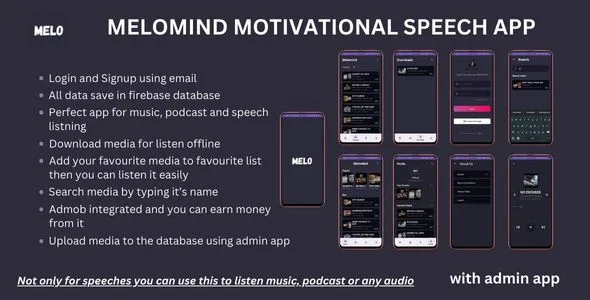
Melomind - Speeches and Audio listening App
Description
Immerse Yourself in the World of Audio Empowerment
Embark on a transformative journey with Melomind , a creation born from the synergy of innovation and passion, crafted by Virtisoft. Here, we bring together motivation, inspiration, and the joy of audio entertainment to redefine your audio experience.
Why Melomind ?
- Enriching Audio Content: Immerse yourself in a curated collection, transcending the ordinary with motivational speeches, soulful music, and captivating podcasts.
- Firebase Integration: Join the creative movement! With Firebase at our core, users seamlessly contribute to our community by uploading their own audio files.
- Admin App Perks: Acquire Melomind and receive the Admin App for free. Effortlessly manage and upload audio, supported by an exclusive setup guide video and source code for seamless integration.
- Monetize Your Passion: Beyond consumption, Melomind is a platform for creators. Integrated with AdMob, users can turn passion into profit through various ad formats.
- Rewarding Downloads: Elevate every download with our unique rewarding system. Each audio file download brings a special reward, creating a fulfilling and financially gratifying experience.
Try the Demo App:
Want to experience Melomind before purchasing? Download our demo app to explore its features. Please note that ads may not work in the demo version. After purchasing, replace the ads ID to enable ad functionality.
Start Your Audio Revolution:
Join the movement! Melomind is more than an app; it’s a canvas for creativity, a stage for expression, and a marketplace for passion. Download now and redefine how you experience motivation, music, and podcasts.
Your Moment, Your Audio, Your Revolution:
Melomind by Virtisoft. Redefining the future of audio—one inspiring moment at a time. Let the revolution commence!
Categories
Tags
External listing. code.market does not sell this product and does not process payment for it. Pricing, payment, delivery, licensing, refunds, and support are handled by the third-party merchant on its own website. We may earn an affiliate commission from a referral. Details.
Products of the Week.
Submit🥇

STOP GUESSING WHAT TO POST
AI that learns your brand voice and builds a month of consistent, on-brand social content: carousels, posts and hooks that sound like you, not like everyone else's AI.
SaaS · 4,307 views · 38 clicksSaaS · Week 45 · 4,307 views · 38 clicks
🥈

Conversational Backlinks for Busy Founders
Place Backlink Relevant Conversation for your domain across Forums and Conversations
Website · 42,039 views · 223 clicksWebsite · Week 45 · 42,039 views · 223 clicks
🥉

upvote.club
Free Social Media Engagement that Helps Boost Your Content. Upvote Club supports 19 social networks with 100+ engagement actions in one dashboard. Add links to your posts and get free engagement from real users.
SaaS · 40,084 views · 117 clicksSaaS · Week 45 · 40,084 views · 117 clicks
#4

Substack Posting API
Onboard your Agent to Substack. Write Publish on Substack via API
SaaS · 59,090 views · 198 clicksSaaS · Week 45 · 59,090 views · 198 clicks
#5

Seenshot App
Free, Fast, MacOS Screenshot app. Make Screenshot cmd+shift+2 and send it via link
Desktop App · 28,465 views · 122 clicksDesktop App · Week 45 · 28,465 views · 122 clicks
#6

Hand-Placed Backlinks $9.99 per link. Flat rate.
Buy hand-placed forum, Q-A and directory backlinks. Flat $9.99 per link, no subscriptions — you only pay for approved listings.
Website · 4,297 views · 19 clicksWebsite · Week 45 · 4,297 views · 19 clicks
#7

Free Invoice Generator - PDF Invoices in Your Browser, No Sign-Up
A free invoice maker for freelancers and small businesses: fill in the invoice, check the live preview, and download a PDF that looks exactly like it. Any currency, tax per item, three templates, no sign-up, and nothing leaves your device.
2,974 views · 17 clicksWeek 45 · 2,974 views · 17 clicks
#8

Merge PDF Files Free - Combine PDFs in Your Browser, No Upload
A free PDF merger for office workers, students, and freelancers: combine PDFs and images into one file in the browser, reorder files and pages, pick page ranges, keep bookmarks, and open password-protected PDFs. Nothing is uploaded, no sign-up, no watermark.
2,745 views · 13 clicksWeek 45 · 2,745 views · 13 clicks