
Meetzy Mobile Addon – WhatsApp Clone with Real-Time Chat & Video Calling
Description

Note: This addon includes the Flutter mobile app. Backend is available separately in the main Meetzy product. Buy Here
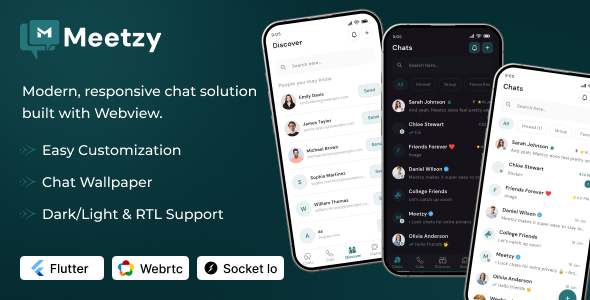
Meetzy Mobile App Addon – WhatsApp Clone Chat | Real-Time Chat | Audio & Video Calling | Group Chat
Important : Only buy from Codecanyon or Envato Marketplace to avoid fraud and scams. Contact our official support staff, not other parties, if you need help.
Download Demo Apk Here : Click here
Demo and Credentials :
User 1:Link https://meetzy-frontend.vercel.app/
Email ID : lily.cooper@meetzy.com
Password : 123456789
User 2:
Link https://meetzy-frontend.vercel.app/
Email ID : chloe.stewart@meetzy.com
Password : 123456789
Admin: Link https://meetzy-admin.vercel.app/
Email ID : admin@example.com
Password : 123456789


Core Tech Stack
- Flutter 3.38 – Flutter is use for faster app perfomance
- Socket.IO – Real-time communication (messaging, typing, presence)
- WebRTC – Peer-to-peer audio, video calling, and screen sharing
- Clean & Well-Commented Code
- Google Fonts (e.g., Inter, Roboto)
- Detailed Developer Documentation
Key Features
- Real-time Messaging — Instant one-to-one and group chat using WebSockets/Socket.IO.
- WhatsApp-like UI — Familiar, clean interface optimized for desktop and mobile browsers.
- Audio & Video Calls — Browser-based calling using WebRTC for high-quality voice and video.
- Group Chat — Create, manage and moderate group conversations with ease.
- Message Status — Sent / Delivered / Seen indicators like WhatsApp.
- Real-time User Presence — Online / offline / typing indicators synced instantly.
- Rich Media Support — Images, videos, documents, and voice notes with resumable upload.
- Admin Panel — Manage users, chats, reports, and settings from a powerful admin dashboard.
- Authentication & Security — Secure login, JWT auth, password hashing, and HTTPS-ready.
- Reusable Widgets — Modular chat UI widgets for fast customization and integration.
- Well-Documented — Clear setup guide, API docs, and UI component usage.
Messaging Features
- Send and receive real-time text messages
- Rich text formatting (bold, italic, strikethrough, code,coloring)
- Markdown support for formatting
- Threaded replies and conversation threads
- Edit and delete messages
- Forward messages to other channels/users
- Copy message text or permalink
- Message reactions with emojis
- @ mentions for users, channels, groups
- Code blocks with syntax highlighting
- Quote and cite messages
- Important/starred messages collection
- Pin messages collection
- Read receipts
- Typing indicators in real-time
- Message search with advanced filters
- Message preview for links, images, videos and files
Media & Attachments
- Send images (PNG, JPG/JPEG, GIF, WebP, SVG)
- Send videos
- Send audio files and music
- Record and send voice messages (push-to-talk)
- Send documents (PDF, Word, Excel, PowerPoint, CSV)
- Send compressed files (ZIP, RAR, 7z)
- Drag-and-drop file upload interface
- File preview and inline display
- Download files and media attachments
- File size limits and upload restrictions
- Multiple file upload at once
Voice & Video Communication
- 1-to-1 Audio Calling with HD quality
- 1-to-1 Video Calling with HD quality
- Group Audio Calls
- Group Video Calls with grid and speaker view
- Screen sharing (full screen, window, or application)
- Presenter mode with screen controls
- Mute/unmute controls for all participants
- Camera on/off controls
- Real time call messages
- Call waiting and hold functionality
Search & Discovery
- Global Search – Search messages, files, people, channels
- Advanced Filters – Filter by date, person, channel
- Search within conversation threads
- Filter pinned messages only
- Filter starred messages
- Jump to date in conversation
User Profile & Status
- Upload custom profile pictures and avatars
- Set display name and full legal name
- Contact information (email, phone, extension)
- Availability indicators (active, offline)
- Last seen/active timestamp
- Custom fields
Note: Images used in demo are not included in download version.
- We don’t offer a refund. (if theme is already downloaded)
- Please read the description and version compatibility content thoroughly before purchasing as we don’t offer a refund if you buy it by mistake.
| Type | Flutter App |
|---|---|
| Author | PixelStrap |
| Price | $69 |
| Sales | 12 |
| Rating | 0 (0) |
| Published | Mar 18, 2026 |
| Last Update | May 7, 2026 |
| Compatible Software | Flutter 3.x |
| Demo Url | https://landing.pixelstrap.net/flutter/meetzy/ |
| Mobile Files Included | Dart, HTML |
Categories
Tags
External listing. code.market does not sell this product and does not process payment for it. Pricing, payment, delivery, licensing, refunds, and support are handled by the third-party merchant on its own website. We may earn an affiliate commission from a referral. Details.
Products of the Week.
Submit🥇

STOP GUESSING WHAT TO POST
AI that learns your brand voice and builds a month of consistent, on-brand social content: carousels, posts and hooks that sound like you, not like everyone else's AI.
SaaS · 7,384 views · 67 clicksSaaS · Week 46 · 7,384 views · 67 clicks
🥈

Conversational Backlinks for Busy Founders
Place Backlink Relevant Conversation for your domain across Forums and Conversations
Website · 46,671 views · 232 clicksWebsite · Week 46 · 46,671 views · 232 clicks
🥉

upvote.club
Free Social Media Engagement that Helps Boost Your Content. Upvote Club supports 19 social networks with 100+ engagement actions in one dashboard. Add links to your posts and get free engagement from real users.
SaaS · 44,611 views · 127 clicksSaaS · Week 46 · 44,611 views · 127 clicks
#4

Substack Posting API
Onboard your Agent to Substack. Write Publish on Substack via API
SaaS · 63,497 views · 206 clicksSaaS · Week 46 · 63,497 views · 206 clicks
#5

Seenshot App
Free, Fast, MacOS Screenshot app. Make Screenshot cmd+shift+2 and send it via link
Desktop App · 32,745 views · 127 clicksDesktop App · Week 46 · 32,745 views · 127 clicks
#6

Hand-Placed Backlinks $9.99 per link. Flat rate.
Buy hand-placed forum, Q-A and directory backlinks. Flat $9.99 per link, no subscriptions — you only pay for approved listings.
Website · 8,363 views · 19 clicksWebsite · Week 46 · 8,363 views · 19 clicks
#7

Free Invoice Generator - PDF Invoices in Your Browser, No Sign-Up
A free invoice maker for freelancers and small businesses: fill in the invoice, check the live preview, and download a PDF that looks exactly like it. Any currency, tax per item, three templates, no sign-up, and nothing leaves your device.
6,993 views · 29 clicksWeek 46 · 6,993 views · 29 clicks
#8

Merge PDF Files Free - Combine PDFs in Your Browser, No Upload
A free PDF merger for office workers, students, and freelancers: combine PDFs and images into one file in the browser, reorder files and pages, pick page ranges, keep bookmarks, and open password-protected PDFs. Nothing is uploaded, no sign-up, no watermark.
6,469 views · 18 clicksWeek 46 · 6,469 views · 18 clicks