
MediTrack+ - The Most Complete Medication Tracking iOS App Template
Description
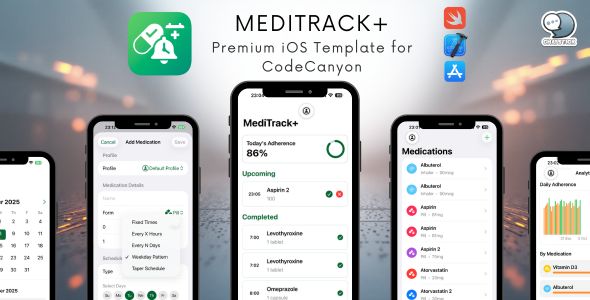
MediTrack+ – Premium iOS Template for CodeCanyon
A production-ready, fully-commented medication tracking app template
Features • Quick Start • Documentation • Support
MediTrack+ – The Most Complete Medication Tracking iOS App Template
Launch your professional medication tracking app in just 2–4 hours! MediTrack+ is a production-ready, fully-documented iOS app template built with the latest technologies: SwiftUI, SwiftData, StoreKit 2, and CloudKit. Perfect for entrepreneurs, developers, or agencies entering the health & wellness market without months of development.
⭐ Why Choose MediTrack+
10-Minute Customization – Single Configuration File
All customization is centralized in AppConfig.swift. Change your app name, colors, features, pricing, and URLs in minutes.
What You Get
- ✅ Fully Commented Code – Every function documented
- ✅ Easy Reskinning – Change branding in one config file
- ✅ In-App Purchases – StoreKit 2 (one-time or subscription)
- ✅ CloudKit Sync – Multi-device synchronization built-in
- ✅ Premium Features – Analytics, widgets, themes, Face ID lock
- ✅ Professional UI – Modern SwiftUI with dark mode
- ✅ No Third-Party Dependencies – Pure Apple frameworks
- ✅ App Store Ready – Production-quality code, no hacks
⭐ Key Features
Free Tier Features
- Medication tracking (up to 5 medications)
- ⏰ Smart notification reminders
- Calendar view with adherence tracking
- CSV export
- ☁️ CloudKit sync across devices
- Dark mode support
- ♿️ Full accessibility (VoiceOver, Dynamic Type)
Premium Features (Unlock via In-App Purchase)
- Unlimited medications
- Advanced analytics dashboard
- Multiple profiles (family members)
- Custom themes (Ocean, Forest, Sunset, Lavender)
- Home Screen & Lock Screen widgets
- Face ID / Touch ID privacy lock
- PDF report generation for doctors
- ⚡️ Advanced schedules (taper plans, custom patterns)
- ️ Siri Shortcuts integration
- Backup & restore
Quick Start
Step 1: Open Project (2 minutes)
cd "MediTrack+ Template"
open MediTrack+.xcodeproj
Step 2: Rebrand Your App (10 minutes)
Everything is in ONE file: MediTrack+/Config/AppConfig.swift
// Change app name
static let appDisplayName = "MyMedTracker"
static let appTagline = "Never Miss a Dose"

// Update URLs (REQUIRED for App Store)
struct URLs {
    static let privacyPolicy = "https://yoursite.com/privacy"
    static let termsOfService = "https://yoursite.com/terms"
    static let supportEmail = "support@yoursite.com"
}

// Configure pricing
static let unlockAllProductId = "YourApp_Premium"

struct FreeLimits {
    static let maxMedications = 3  // Free tier limit
}
Step 3: Customize Visuals (10 minutes)
- App Icon:
Assets.xcassets/AppIcon.appiconset - Accent Color:
Assets.xcassets/AccentColor.colorset - Bundle ID: Xcode → Project Settings → Signing & Capabilities
Step 4: Configure In-App Purchases (15 minutes)
- Create product in App Store Connect
- Match product ID in
AppConfig.swift - Test with included
Products.storekitfile
Done! Your app is ready to test and submit.
Full Guide: See RESKIN_MANUAL.md for step-by-step instructions
Documentation
- RESKIN_MANUAL.pdf – Complete customization guide (START HERE!)
- SETUP_GUIDE.pdf – Technical setup instructions
- TESTING_GUIDE.pdf – Quality assurance checklist
- PROJECT_STRUCTURE.pdf – Code architecture overview
- WIDGET_SETUP_GUIDE.pdf – Widget configuration guide
Customization Made Easy
Single Configuration File: All app customization in AppConfig.swift
- ✏️ Branding – App name, tagline, description
- Pricing – Product IDs, free tier limits
- ⚙️ Features – Enable/disable with flags
- Themes – Add custom color themes
- Copy – Paywall, onboarding, disclaimers
- URLs – Privacy policy, terms, support
No Code Changes Required!
- Remove analytics?
analytics = false - Change free tier?
maxMedications = 3 - Add a theme? Add to
proThemesarray
Technical Stack
Built with modern iOS technologies:
- SwiftUI – Modern declarative UI
- SwiftData – Local database with CloudKit sync
- StoreKit 2 – In-app purchases
- UserNotifications – Local reminders
- WidgetKit – Home & Lock Screen widgets
- AppIntents – Siri Shortcuts (iOS 26+)
- LocalAuthentication – Face ID / Touch ID
- PDFKit – PDF report generation
- Charts – SwiftUI Charts for analytics
No Third-Party Dependencies means:
- ✅ Long-term compatibility
- ✅ No licensing issues
- ✅ Smaller app size
- ✅ Better performance
Requirements
- Xcode: 15.0 or later
- iOS: 26.0+
- Swift: 5.9+
- Apple Developer Account: Required for CloudKit & App Store
- Mac: macOS Sonoma (14.0) or later
Code Quality
Fully Commented – Every file includes:
- ✅ Function documentation & purpose
- ✅ Parameter descriptions & usage
- ✅ Tips and best practices
Example:
/// Initiates a purchase for the given product
///
/// - Parameter product: The product to purchase (from products array)
/// - Returns: The completed transaction, or nil if cancelled/pending
/// - Throws: StoreError if purchase fails or verification fails
///
/// Usage:
/// ```
/// if let product = StoreManager.shared.products.first {
///     try await StoreManager.shared.purchase(product)
/// }
/// ```
func purchase(_ product: Product) async throws -> Transaction?
Clean Architecture
- ✅ MVVM pattern & separation of concerns
- ✅ Singleton managers for shared resources
- ✅ SwiftUI best practices
- ✅ Async/await concurrency
- ✅
@Observablefor iOS 17+ state
️ White-Label Features
Easy Rebranding – Change once in AppConfig.swift, updates everywhere (names, IDs, URLs, colors, paywall copy, disclaimer).
Multiple App Variants
- Free app with ads (disable premium features)
- Freemium with upgrade (default)
- Paid upfront (set
maxMedications = 999) - Subscription-based (auto-renewable products)
Localization Ready – Multiple languages, SF Symbols, RTL support, localizable strings.
What’s Included
Source Code
- ✅ Complete Xcode project
- ✅ Fully commented Swift files & SwiftUI views
- ✅ StoreKit 2 integration & CloudKit sync
- ✅ Widget extension & App Intents
Documentation
- ✅ RESKIN_MANUAL.md · SETUP_GUIDE.md · TESTING_GUIDE.md
- ✅ PROJECT_STRUCTURE.md · WIDGET_SETUP_GUIDE.md
Assets
- ✅ App icon templates · SF Symbols integration · Color assets
- ✅ Localizable strings structure
Bonus
- ✅ StoreKit configuration file · Build scripts · Demo data generator
- ✅ Marketing copy templates
️ Project Structure
MediTrack+/
├── Config/
│   ├── AppConfig.swift          ⭐ Main configuration file
│   └── ThemeManager.swift       (Theme management)
├── Store/
│   └── StoreManager.swift       (In-app purchases)
├── Models/
│   ├── Medication.swift         (Data models)
│   └── DataController.swift     (Database setup)
├── Services/
│   ├── ReminderEngine.swift     (Notifications)
│   ├── ExportManager.swift      (CSV/PDF export)
│   ├── ProfileManager.swift     (Multi-profile support)
│   └── WidgetDataService.swift  (Widget data)
├── Views/
│   ├── TodayView.swift          (Main dashboard)
│   ├── MedicationsView.swift    (Medication list)
│   ├── CalendarView.swift       (Calendar)
│   ├── AnalyticsView.swift      (Premium analytics)
│   ├── PaywallView.swift        (Purchase screen)
│   ├── OnboardingView.swift     (First launch)
│   ├── ProfilesView.swift       (Multi-profile)
│   ├── SettingsView.swift       (Settings)
│   ├── LockScreenView.swift     (Face ID lock)
│   └── MainTabView.swift        (Tab navigation)
├── AppIntents/
│   └── MedicationIntents.swift  (Siri shortcuts)
├── Widgets/
│   └── [Widget implementation]
└── Assets.xcassets/
    ├── AppIcon.appiconset/
    └── AccentColor.colorset/
Testing
Pre-Launch Checklist
- [ ]
enableDemoMode = falsein AppConfig - [ ] Privacy/Terms URLs live & accessible
- [ ] Support email valid · Product IDs match
- [ ] Onboarding completes · Free tier enforced
- [ ] Paywall pricing correct · Purchase/Restore work
- [ ] Notifications on time · CloudKit sync on 2 devices
- [ ] Face ID lock works · Analytics show data
- [ ] CSV/PDF export works
- [ ] No crashes · VoiceOver/Dynamic Type ok · Dark mode ok
See TESTING_GUIDE.md for full checklist.
Deployment
Pre-Submission
- Update
AppConfig.swiftbranding & Bundle ID - Create IAP in App Store Connect
- Configure CloudKit container
- Add 1024×1024 App Icon
- Test on real devices
App Store Connect
- Create app, fill metadata (name, subtitle, description)
- Keywords, screenshots (6.7” iPhone), category (Health & Fitness)
- Privacy Policy & Support URLs · Pricing
- Submit for review
See RESKIN_MANUAL.md for detailed submission guide
Privacy & Compliance
Data Handling
- ✅ All data stored locally (SwiftData/SQLite)
- ✅ Optional CloudKit sync (encrypted by Apple)
- ✅ No third-party tracking/analytics (optional toggle)
- ✅ Face ID/Touch ID for privacy
Legal Requirements
⚠️ This app is a medication reminder tool, NOT a medical device. Include a medical disclaimer, Privacy Policy, Terms of Service, and comply with local regulations.
Monetization Ideas
Pricing Strategies
- One-Time Purchase: $1.99–$9.99 for unlimited access
- Freemium: 3–5 meds free, unlimited with purchase
Upsell Tips
- Show paywall after 3rd medication
- Offer first-purchase discount
- Highlight most-used premium features
Customization Examples
Change App Name & Branding (5 min)
// In AppConfig.swift
static let appDisplayName = "PillPal"
static let appTagline = "Your Smart Pill Reminder"
Adjust Free Tier (2 min)
static let maxMedications = 10 // generous
// or
static let maxMedications = 2  // restrictive
Remove a Feature (1 min)
static let analytics = false
Add a Theme (5 min)
static let proThemes = [
  ("Ocean", Color.blue, Color(red: 0.02, green: 0.05, blue: 0.12)),
  ("MyBrand", Color.purple, Color(red: 0.10, green: 0.02, blue: 0.15))
]
Support
Getting Help
- Contact via CodeCanyon support tab
- Check documentation first
- Report bugs with details
Include in Support Request
- Purchase code · Xcode & iOS versions
- Issue description · Steps to reproduce
- Screenshots if applicable
Post-Launch
Marketing Checklist
- ASO · Social media · Product Hunt · Reddit · Blogs · Press
Monitoring
- Downloads · Reviews · Crash reports · Conversion · Feedback
Updates
- Bug fixes (as needed) · Features (quarterly) · iOS updates (annually) · Design refresh (yearly)
License
- ✅ Create unlimited apps for yourself/clients
- ✅ Modify code · No attribution required · Free lifetime updates
- ❌ Cannot resell the template source code
Thank You!
We’ve built MediTrack+ for production quality, easy customization, and professional design.
- Read RESKIN_MANUAL.md
- Customize AppConfig.swift
- Test thoroughly
- Launch your app
Happy with the template? Please leave a review! ⭐⭐⭐⭐⭐
Version 1.0 – October 2025
Technical Specifications
- Platform: iOS 26.0+
- Language: Swift 5.9+
- Framework: SwiftUI
- IAP: StoreKit 2
- Dependencies: None
- Compatibility: iPhone
- Orientation: Portrait
- Localization: Ready
Ready to launch your medication tracking app? Get MediTrack+ today and start your journey to app success!
| Type | iOS App |
|---|---|
| Author | pooccm |
| Price | $29 |
| Sales | 3 |
| Rating | 0 (1) |
| Published | Oct 10, 2025 |
| Last Update | Oct 10, 2025 |
| Compatible Software | Other |
| Compatible With | Swift |
| Mobile Files Included | .m |
| Video Preview Resolution | 1080x1920 |
Categories
Tags
External listing. code.market does not sell this product and does not process payment for it. Pricing, payment, delivery, licensing, refunds, and support are handled by the third-party merchant on its own website. We may earn an affiliate commission from a referral. Details.
Products of the Week.
Submit🥇

STOP GUESSING WHAT TO POST
AI that learns your brand voice and builds a month of consistent, on-brand social content: carousels, posts and hooks that sound like you, not like everyone else's AI.
SaaS · 7,379 views · 67 clicksSaaS · Week 46 · 7,379 views · 67 clicks
🥈

Conversational Backlinks for Busy Founders
Place Backlink Relevant Conversation for your domain across Forums and Conversations
Website · 46,664 views · 232 clicksWebsite · Week 46 · 46,664 views · 232 clicks
🥉

upvote.club
Free Social Media Engagement that Helps Boost Your Content. Upvote Club supports 19 social networks with 100+ engagement actions in one dashboard. Add links to your posts and get free engagement from real users.
SaaS · 44,605 views · 127 clicksSaaS · Week 46 · 44,605 views · 127 clicks
#4

Substack Posting API
Onboard your Agent to Substack. Write Publish on Substack via API
SaaS · 63,491 views · 206 clicksSaaS · Week 46 · 63,491 views · 206 clicks
#5

Seenshot App
Free, Fast, MacOS Screenshot app. Make Screenshot cmd+shift+2 and send it via link
Desktop App · 32,739 views · 127 clicksDesktop App · Week 46 · 32,739 views · 127 clicks
#6

Hand-Placed Backlinks $9.99 per link. Flat rate.
Buy hand-placed forum, Q-A and directory backlinks. Flat $9.99 per link, no subscriptions — you only pay for approved listings.
Website · 8,358 views · 19 clicksWebsite · Week 46 · 8,358 views · 19 clicks
#7

Free Invoice Generator - PDF Invoices in Your Browser, No Sign-Up
A free invoice maker for freelancers and small businesses: fill in the invoice, check the live preview, and download a PDF that looks exactly like it. Any currency, tax per item, three templates, no sign-up, and nothing leaves your device.
6,986 views · 29 clicksWeek 46 · 6,986 views · 29 clicks
#8

Merge PDF Files Free - Combine PDFs in Your Browser, No Upload
A free PDF merger for office workers, students, and freelancers: combine PDFs and images into one file in the browser, reorder files and pages, pick page ranges, keep bookmarks, and open password-protected PDFs. Nothing is uploaded, no sign-up, no watermark.
6,464 views · 18 clicksWeek 46 · 6,464 views · 18 clicks