
Media Player Flutter UI Kit
Description

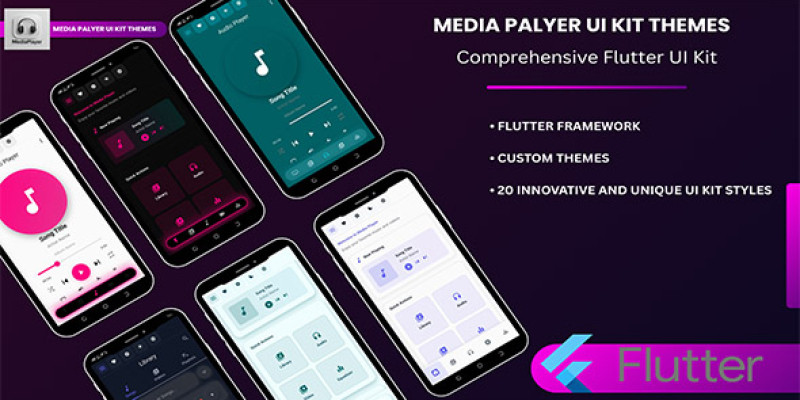
Build stunning, modern, and high-performance Flutter apps quickly. This all-in-one UI Kit includes 20 unique design styles (each with ready-made screens and reusable components) so you can prototype and ship apps faster.
Features
✨ Key Features
- 20 complete UI styles (each style includes 7 ready-made screens).
- Responsive layout — mobile, tablet, desktop support.
- Light & Dark mode support.
- Multi-language support (RTL & LTR) — Arabic & English included.
- Reusable components: buttons, cards, nav bars, lists, forms.
- Clean, well-structured, and scalable Flutter code following best practices.
- Easy to customize: colors, fonts, assets, and layouts.
!-- What's Included -->
📦 What’s Included
- Full Flutter project source code
- 20 UI styles × 7 screens each
- Light/Dark mode assets and theme configs
- RTL (Arabic) & LTR (English) layouts
- Documentation (installation & customization)
📥 Live Demo APK
Requirements
⚙️ Requirements
- Flutter SDK (stable) — recommended version: 2.10+ (or newer). Verify compatibility with your target Flutter version.
- Dart SDK matching the Flutter release.
- Android Studio / Xcode for building platform binaries.
- Internet connection to fetch dependencies (pub packages).
🛠 Installation & Quick Start
- Unzip the downloaded package.
- Open the project folder in your IDE (Android Studio, VS Code).
- Run
flutter pub getto install dependencies. - To run on Android emulator:
flutter run(or use your IDE run configuration). - To build release APK:
flutter build apk --release. - Customize themes & assets in
lib/themes/andassets/.
🧩 Development Details
- Project structure follows Flutter best practices (separation of widgets, screens, services, and themes).
- Components are modular and reusable to simplify integration into existing apps.
- RTL support implemented at layout & text level for Arabic compatibility.
- Designed for easy theming (colors, fonts, shape tokens).
📱 Platforms
Android, iOS, Web (responsive), Desktop (experimental depending on Flutter version).
Instructions
🛠 Instructions
- Download and unzip the package after purchase.
- Open the project folder in your preferred IDE (Android Studio or VS Code).
- Run
flutter pub getto install all required dependencies. - Connect a device or start an emulator.
- Run the app using
flutter runor your IDE’s Run button. - To build a release APK, use:
flutter build apk --release. - Customize colors, fonts, and assets in the
lib/themes/andassets/folders. - For iOS builds, open the iOS folder in Xcode and run on a simulator or real device.
| Author | MYname |
|---|---|
| Category | App Templates / Flutter / UI Kits |
| Price | $15 |
| Extended License | $45 |
| Likes | 4 |
| First Release | Aug 12, 2025 |
| Last Update | Aug 12, 2025 |
| Operating systems | Android 7.0, Android 8.0, Android 9.0, Android 10.0, Android 11.0, Android 4.0, Android 5.0, Android 6.0 |
Categories
Tags
External listing. code.market does not sell this product and does not process payment for it. Pricing, payment, delivery, licensing, refunds, and support are handled by the third-party merchant on its own website. We may earn an affiliate commission from a referral. Details.
Products of the Week.
Submit🥇

STOP GUESSING WHAT TO POST
AI that learns your brand voice and builds a month of consistent, on-brand social content: carousels, posts and hooks that sound like you, not like everyone else's AI.
SaaS · 6,263 views · 56 clicksSaaS · Week 46 · 6,263 views · 56 clicks
🥈

Conversational Backlinks for Busy Founders
Place Backlink Relevant Conversation for your domain across Forums and Conversations
Website · 44,959 views · 228 clicksWebsite · Week 46 · 44,959 views · 228 clicks
🥉

upvote.club
Free Social Media Engagement that Helps Boost Your Content. Upvote Club supports 19 social networks with 100+ engagement actions in one dashboard. Add links to your posts and get free engagement from real users.
SaaS · 42,967 views · 124 clicksSaaS · Week 46 · 42,967 views · 124 clicks
#4

Substack Posting API
Onboard your Agent to Substack. Write Publish on Substack via API
SaaS · 61,908 views · 204 clicksSaaS · Week 46 · 61,908 views · 204 clicks
#5

Seenshot App
Free, Fast, MacOS Screenshot app. Make Screenshot cmd+shift+2 and send it via link
Desktop App · 31,171 views · 124 clicksDesktop App · Week 46 · 31,171 views · 124 clicks
#6

Hand-Placed Backlinks $9.99 per link. Flat rate.
Buy hand-placed forum, Q-A and directory backlinks. Flat $9.99 per link, no subscriptions — you only pay for approved listings.
Website · 6,906 views · 19 clicksWebsite · Week 46 · 6,906 views · 19 clicks
#7

Free Invoice Generator - PDF Invoices in Your Browser, No Sign-Up
A free invoice maker for freelancers and small businesses: fill in the invoice, check the live preview, and download a PDF that looks exactly like it. Any currency, tax per item, three templates, no sign-up, and nothing leaves your device.
5,531 views · 19 clicksWeek 46 · 5,531 views · 19 clicks
#8

Merge PDF Files Free - Combine PDFs in Your Browser, No Upload
A free PDF merger for office workers, students, and freelancers: combine PDFs and images into one file in the browser, reorder files and pages, pick page ranges, keep bookmarks, and open password-protected PDFs. Nothing is uploaded, no sign-up, no watermark.
5,102 views · 15 clicksWeek 46 · 5,102 views · 15 clicks