
Mattora | Flutter Paint Planner App with Laravel Key Proxy
Description
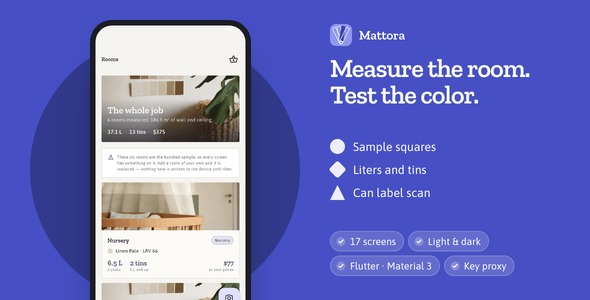
Ship a paint-planning app your users open with a tape measure in their hand: seventeen finished screens, a room that unfolds into a drawn elevation as the numbers are typed, and a tin list costed at their own prices. Light and dark themes, GetX architecture, offline documentation, a Laravel key proxy and a one-page product website in the same download.

Demo Instructions: the sign-in screen is a mock and contacts no server, so any credentials are accepted. Use demo@mattora.app / demo1234, or tap Sign in with both fields left empty. Demo mode is on out of the box and the app opens on a sample project of six measured rooms, so every screen is populated the moment the preview loads.
Why this one
- A drawing, not a form: the room’s walls unfold into one scaled elevation with the doors and windows cut out of it, and it redraws as the measurements are typed.
- A tin list someone can take to the shop: litres divided by tin size is not a shopping list, so the plan is a bounded search over the sizes and prices the user entered and prefers the cheapest basket with the least left in the tin.
- Tested, not just screenshotted: 259 tests pass on the app and 43 on the back end, and the driver walks all seventeen screens in light and dark before every release.
Four walls, unfolded flat
Each wall keeps its own width and its own height, and every door and window is cut out of the wall it belongs to, so the painted area is the wall the decorator will actually roll. Type a number and the drawing redraws under your hand. It is a CustomPainter over the measurements, not an image.

Which tins to buy, and what is left over
7.3 litres, sold in 1, 2.5 and 5 litre tins, can be bought three ways. The planner searches all of them, takes the cheapest at the prices the user typed in, and settles a tie on the paint left in the can. Every figure above it is shown as a line of working rather than a total.

120 colors, twelve families of ten
A deck on a rivet: drag to fan it open, tap a chip to read it. Every chip prints its light reflectance value, the share of the light a painted wall gives back, worked out with the same arithmetic a contrast checker runs. The deck is generated at first use, so it costs the download nothing.

Try the color where it goes
Photograph the wall and put squares of candidate color on it. They are the exact color, multiplied over the room’s own light, so the wall’s texture and the shadow falling across it stay visible through the paint and the candidates are compared on one wall at one time of day.

Point it at the tin
Photograph a paint can and the model reads the coverage, the finish, the tin size, the coats and the recoat time off the label, then writes them into the room’s spec. What goes to the provider is on the screen before it leaves, and a field the label did not print comes back empty rather than estimated.

4 routes to a model, and a demo that answers here
Google Gemini, OpenAI and Anthropic Claude on the decorator’s own key, or the Laravel proxy in this download holding yours. All four carry photographs, over plain REST with no vendor SDKs. Demo mode answers on the device and says so on the screen.

One color file, both themes
Three grades of one periwinkle, and the drawing’s own materials — paper, pencil, the hole a window leaves, masking tape — in a single file. Change the hex and the app, the launcher icon and the bundled landing page follow. Two regression tests measure the contrast of the selected state rather than trusting it.

Three folders, and what is in them
The Flutter app, a Laravel key proxy with a Filament admin panel, and a one-page product website, with the documentation that covers all three.

Laravel back end included
The download ships a Laravel key proxy in backend/ with a Filament admin panel: it holds the provider API keys so the people using the app never have to, meters each device against a daily allowance you set, and shows the usage in the panel. The app runs fully without it on its own bundled sample project, and one setting points it at your server when you deploy one. It needs PHP 8.4 or newer (Laravel 13), or the included Docker compose file; provider usage is billed to your own account with whichever vendor you configure.

Landing page included
The download ships a one-page product website for your app (landing/): hero with two phone mock-ups, three feature tiles, a swipeable screen gallery, FAQ and store buttons, already set in the same colours and typefaces as the app and filled with its real screenshots. It is a single self-contained HTML file with no frameworks and no external requests, so you can put it on any static host in a minute and replace the copy and store links from the marked spots.

Built for developers
- Clean GetX architecture: View, Controller, Service, Model, with lazy bindings per route.
- The arithmetic is yours to read: area, coats, waste, tin planning, light reflectance and colour schemes are six files of plain Dart with no Flutter import and no network, each pinned by its own tests.
- Swap in your API without touching a screen: the sample project lives behind Future-returning services in one folder; replace the bodies with your HTTP calls.
- One file re-skins all of it: every colour, radius and type token lives in
app_colors.dart; change the three brand grades and the app, the launcher icon and the bundled landing page follow. - Theme-aware components: the same widgets look right in light and dark.
What you get: full Flutter source code, README with re-theming and API integration guide, offline HTML documentation (41 chapters, 25 screenshots and two animations), the sample data layer, light and dark themes, the landing page, and the Laravel key proxy with its own deployment guide.
AI disclosure
Mattora talks to large language models for two jobs and no others: reading what is printed on a photograph of a paint tin’s label, and suggesting colour schemes around a colour the user has already chosen. Four routes are wired, all over plain REST with no vendor SDKs: Google Gemini, OpenAI, Anthropic Claude and the included Laravel key proxy. Demo mode is the default and answers on the device from a bundled sample label, so the app is usable with no key and no network.
Every quantity the app prints is computed on the device in plain Dart, never asked of a model. The item ships no API keys; you bring your own, or deploy the included proxy. The screenshots, the illustrations, the launcher icon, the documentation, the landing page and the source code in this download were produced by hand and are not AI-generated; the twelve bundled photographs are royalty-free stock under the Pexels License, listed file by file in the download.
Notes
The sign-in and sign-up screens are interface only and perform no authentication; the paywall is a mock checkout and contacts no store. The colour deck is the item’s own and is not matched to any manufacturer’s range.
The app runs in demo mode on the bundled sample project until you give it a key or a server; connect the included back end when you deploy it. Photographs taken in the app stay on the device that took them.
Push notifications and in-app purchase are not wired in this version. Figma or Sketch source files are not included; the interface is defined in the Dart source.
Third-party services and external costs: Mattora runs on bundled sample data out of the box. Connecting it to a live back end such as Firebase, AWS, REST APIs or payment gateways will involve those third-party services, which will incur their own separate costs and are not part of this item. The included Laravel back end needs PHP 8.4 or newer and a host you provide; hosting is yours.
| Type | Flutter App |
|---|---|
| Author | coderqh |
| Price | $53 |
| Sales | 0 |
| Rating | 0 (0) |
| Published | Sep 24, 2026 |
| Last Update | Sep 24, 2026 |
| Compatible Software | Flutter 3.x |
| Mobile Files Included | Dart, YAML, JavaScript JSON, .kotlin, .swift, JavaScript JS, CSS, PHP, HTML |
Categories
Tags
External listing. code.market does not sell this product and does not process payment for it. Pricing, payment, delivery, licensing, refunds, and support are handled by the third-party merchant on its own website. We may earn an affiliate commission from a referral. Details.
Products of the Week.
Submit🥇

Perceptle
Perceptle is a daily browser-based game that challenges you to test your sensory intuition through five quick estimation and rhythm-based rounds.
Other · 1 views · 0 clicksOther · Week 47 · 1 views · 0 clicks
🥈

Free LinkedIn Likes From Real
Get free LinkedIn likes on your posts from real members who react by hand. No
SaaS · 124 views · 2 clicksSaaS · Week 47 · 124 views · 2 clicks
🥉

STOP GUESSING WHAT TO POST
AI that learns your brand voice and builds a month of consistent, on-brand social content: carousels, posts and hooks that sound like you, not like everyone else's AI.
SaaS · 7,686 views · 71 clicksSaaS · Week 47 · 7,686 views · 71 clicks
#4

aaas.market
407 reliable micro tools for solo founders, marketers and creators. They work in your browser
SaaS · 122 views · 0 clicksSaaS · Week 47 · 122 views · 0 clicks