
MaintDock | Asset and Maintenance Management CMMS
Description
MaintDock: Asset and Maintenance Management (CMMS)
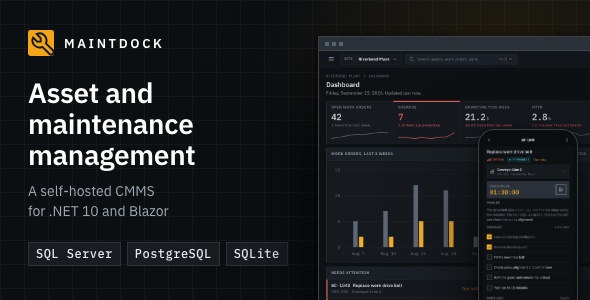
MaintDock is a self-hosted web app for asset and maintenance management (a CMMS). It tracks your company’s equipment, plans preventive maintenance, and runs work orders. Managers work on the desktop. Technicians work from a phone view. You install it on your own server, and your data stays with you.
It is built with .NET 10 (LTS), ASP.NET Core, and Blazor (Interactive Server). It works with SQL Server, PostgreSQL, or SQLite. A setup wizard in the browser connects the database and creates the first admin account.
Live demo
https://maintdock-demo.jawad.work/
The sign-in page lists the demo accounts. One click signs in. The password for every account is Demo@12345.
- Admin: dana.brooks@riverbend.example
- Manager: priya.nair@riverbend.example
- Technician: luis.ortega@riverbend.example (sign in on a phone to see the phone view)
- Requester: maria.lopez@riverbend.example
Screens

Dashboard
The dashboard shows open and overdue work orders, downtime this week, MTTR and MTBF, low-stock parts, and a chart of the last 8 weeks. The list below it shows the jobs that need attention. On the right, a technician sees today’s jobs on the phone view.

Work orders
A work order holds everything about a job on one page: the checklist the technician ticks off, spare parts and labor hours with their cost, photos and other files, and a history of every change. Print it as PDF. On the right, the downtime of the machine keeps counting while it is stopped.

Preventive maintenance
The preventive maintenance page with a plan of the next two weeks. Overdue work stands out. The dialog in front sets up a schedule by date or by meter reading, for example every 250 hours. MaintDock creates the work order when a schedule is due.

Phone view for technicians
Three screens of the phone view. On the left, today’s jobs. In the middle, a job with its timer and checklist. On the right, the scanner that opens an asset from its QR code. Technicians install it on their phone like an app. It needs a connection.

Assets
The page of one asset, with the tree of sites, areas, machines, and parts on the left. The page shows the MTBF, MTTR, and downtime of the asset and its QR label. Tabs hold its work orders, schedules, parts, meters, files, and history.

Problem requests and downtime
Behind, the downtime page shows the stops this week, what is down now, and the availability of each asset. In front, the list of problem requests from operators. A manager turns a request into a work order. When the machine is stopped, downtime starts on its own.

Spare parts and purchasing
The spare parts list shows the stock in each store, the parts below their minimum, and the stock value. The purchase order in front shows each step (requested, approved, and ordered) and how many of each part have been received.

Reports
The MTBF and MTTR report, one of the 11 reports listed on the left. Filter each report by site and period, export it to Excel, or print it as PDF.

Users and roles
The permissions of Storekeeper, a role added next to the four built-in ones. For each area, choose whether the role can view, create, edit, delete, and approve.

Light and dark mode
The same dashboard in light mode and in dark mode. Each user switches with one click, or MaintDock follows the setting of the device.

Setup wizard
The setup wizard runs in the browser the first time you open MaintDock. It connects the database (SQL Server, PostgreSQL, or SQLite) and creates your admin account. MaintDock runs on Windows with IIS, Linux with Nginx, or Docker.
Features
- Asset register with a hierarchy: site, area, machine, and part.
- QR code and barcode labels. Print them as PDF.
- Multi-site support. Each user sees only the data of their sites. Admins see all sites.
- Work orders with checklists, spare parts, labor hours, file attachments, and a history timeline.
- Problem requests from operators. When a machine is stopped, downtime starts on its own.
- Preventive maintenance by date (every N days, weeks, months, or years) or by meter reading.
- A phone view for technicians (installable web app, online only): my jobs, a job timer, the checklist, parts, photos, QR scanning, and problem reports.
- Downtime logging with causes, and availability per asset.
- Spare parts stock per store, with low-stock alerts and average unit cost.
- Vendors, purchase requests with approval, purchase orders, and receiving.
- 11 reports: MTBF and MTTR, failure history, downtime by asset, downtime by cause, work order summary, PM compliance, technician hours, cost by asset, parts usage, stock value, and purchase spend by vendor.
- Export lists to Excel. Print work orders, purchase orders, reports, and asset labels as PDF.
- Built-in roles (Admin, Manager, Technician, and Requester), plus your own roles with a permission matrix.
- A full audit trail: who changed what, and when, field by field.
- Email notifications (SMTP) and in-app notifications.
- Light and dark mode. Every UI string is translatable, and a translation template (template.json) is included.
- Optional sample data, so you can try every screen right after setup. No default users.
What you get
- maintdock/binaries: the published app, ready to run.
- maintdock/source: the full C# source code, the solution file, and the xUnit tests.
- maintdock/database: SQL scripts for SQL Server and PostgreSQL, and the EF Core migrations for all three databases.
- documentation: the HTML guide for installation, setup, and daily use.
- README.txt, CHANGELOG.txt, and THIRD-PARTY-NOTICES.md.
Requirements
- The .NET 10 runtime. On Windows with IIS, the .NET 10 Hosting Bundle. On Linux, the ASP.NET Core Runtime 10.0. With Docker, nothing: the image includes it.
- Windows Server 2019 or later with IIS, Ubuntu 22.04 or later with Nginx (or another Linux system that runs .NET 10), or any Docker host.
- A database: SQL Server 2019 or later (Express works), Azure SQL, PostgreSQL 14 or later, or SQLite (built in, no database server needed).
- A web address with HTTPS. Phones need HTTPS to use the camera for QR codes.
- WebSockets allowed between the browser and the server.
- For about 50 users: 2 CPU cores and 4 GB of memory.
Limitations
- One company per install. It is not a multi-tenant SaaS.
- The phone view needs a connection. There is no offline mode.
- English only. You can add your own translation.
- Local accounts only (email and password). No two-factor login, external login, or LDAP.
- No public REST API in version 1.
- There is no tool to move data from SQLite to SQL Server or PostgreSQL later.
- It must run on its own host name, not in a sub-folder of another site.
Credits
MudBlazor, PDFsharp and MigraDoc, ClosedXML, MailKit, ZXing.Net, and jsQR (MIT or Apache 2.0), plus IBM Plex fonts (SIL Open Font License) and Tabler icons (MIT). Every license allows use in a commercial product. All files are bundled in the download. Nothing loads from a CDN. The company in the sample data and all its people, assets, and vendors are made up.
Documentation and support
Documentation: https://maintdock.jawad.work/documentation/
Each purchase includes 6 months of support. To ask for help, use the Support tab on this item page. Support covers questions about the features and the installation steps in the documentation, and help with bugs that you report.
| Author | Avagon |
|---|---|
| Price | $89 |
| Sales | 0 |
| Rating | 0 (0) |
| Published | Oct 16, 2026 |
| Last Update | Oct 16, 2026 |
| Compatible Browsers | Firefox, Safari, Opera, Chrome, Edge |
| Compatible Software | .NET 10.x |
| Demo Url | https://maintdock.jawad.work/ |
| High Resolution | Yes |
| Source Files Included | C# CS, SQL, XML, JavaScript JS, HTML, CSS |
Categories
Tags
External listing. code.market does not sell this product and does not process payment for it. Pricing, payment, delivery, licensing, refunds, and support are handled by the third-party merchant on its own website. We may earn an affiliate commission from a referral. Details.
Products of the Week.
Submit🥇

STOP GUESSING WHAT TO POST
AI that learns your brand voice and builds a month of consistent, on-brand social content: carousels, posts and hooks that sound like you, not like everyone else's AI.
SaaS · 7,317 views · 67 clicksSaaS · Week 46 · 7,317 views · 67 clicks
🥈

Conversational Backlinks for Busy Founders
Place Backlink Relevant Conversation for your domain across Forums and Conversations
Website · 46,586 views · 232 clicksWebsite · Week 46 · 46,586 views · 232 clicks
🥉

upvote.club
Free Social Media Engagement that Helps Boost Your Content. Upvote Club supports 19 social networks with 100+ engagement actions in one dashboard. Add links to your posts and get free engagement from real users.
SaaS · 44,527 views · 127 clicksSaaS · Week 46 · 44,527 views · 127 clicks
#4

Substack Posting API
Onboard your Agent to Substack. Write Publish on Substack via API
SaaS · 63,415 views · 206 clicksSaaS · Week 46 · 63,415 views · 206 clicks
#5

Seenshot App
Free, Fast, MacOS Screenshot app. Make Screenshot cmd+shift+2 and send it via link
Desktop App · 32,659 views · 127 clicksDesktop App · Week 46 · 32,659 views · 127 clicks
#6

Hand-Placed Backlinks $9.99 per link. Flat rate.
Buy hand-placed forum, Q-A and directory backlinks. Flat $9.99 per link, no subscriptions — you only pay for approved listings.
Website · 8,288 views · 19 clicksWebsite · Week 46 · 8,288 views · 19 clicks
#7

Free Invoice Generator - PDF Invoices in Your Browser, No Sign-Up
A free invoice maker for freelancers and small businesses: fill in the invoice, check the live preview, and download a PDF that looks exactly like it. Any currency, tax per item, three templates, no sign-up, and nothing leaves your device.
6,915 views · 29 clicksWeek 46 · 6,915 views · 29 clicks
#8

Merge PDF Files Free - Combine PDFs in Your Browser, No Upload
A free PDF merger for office workers, students, and freelancers: combine PDFs and images into one file in the browser, reorder files and pages, pick page ranges, keep bookmarks, and open password-protected PDFs. Nothing is uploaded, no sign-up, no watermark.
6,399 views · 18 clicksWeek 46 · 6,399 views · 18 clicks