
Macaroon Sweet Shop - Colorful WooCommerce Theme icon

Macaroon Sweet Shop - Colorful WooCommerce Theme

Hot or Not
Macaroon Sweet Shop - Colorful WooCommerce Theme

Description

Macaroon Sweet Shop – Colorful WP WooCommerce Theme

Cookies are made of sugar & code!

Features

  • 100% Fully Responsive

    With our themes & plugins every pixel of your site will respond the way it should no matter what the device is (tablet, iPhone, desktop).

  • Retina Ready

    Macaroon Sweet Shop is also retina ready ensuring it will look fantastic on High Resolution displays like the iPad or iPhone Retina devices.

  • Translation support & WPML ready

    Translation of Macaroon Sweet Shop is quick & easy! Macaroon Sweet Shop is also WMPL compatible in case you need a multi-lingual site!

  • WP Bakery Page Builder (previously named Visual Composer)

    Macaroon Sweet Shop comes packaged with a tailored visual page builder. As developers we know exactly how important your comfort is. Now you create your stunning pages with drag&drop simplicity.

  • Our Extra Plugins Come For Free!

    Buying themes & plugins by createIT you get all our WooCommerce plugins for free! And we are creating new IT plugins while you are clicking!

  • No HTML knowledge required

    All themes by createIT are for pros and professionals as well. Our pre-defined elements, layouts and pages as well as friendly admin panel make your life so much easier!

  • UberMenu

    Macaroon Sweet Shop supports UberMenu – a user-friendly, highly customizable & responsive Mega Menu WordPress plugin. Now you can design with pre-designed skins and over 50 configurable settings.

  • Unlimited colors

    Macaroon Sweet Shop gives you opportunity to set your site into a color combination that suits you the best. Macaroon Sweet Shop includes a backend color picker in the theme options that allows you to easily change the color of any element throughout the entire theme.

  • Browser Compatibility

    All themes & plugins by createIT are compatible with the most popular internet browsers. They look perfect no matter who visits them.

  • WooCommerce Compatible

    Macaroon Sweet Shop is WooCommerce compatible so now only sky is the limit! Create personal & business websites as well as great shops!

  • eCommerce Ready Functionalities

    Macaroon Sweet Shop comes with the most comprehensive eCommerce functionalities to ensure your ultimate experience while building, customizing and managing a web store.

  • Parallax Effect

    Macaroon Sweet Shop supports multiple parallax effect making your site look unique & modern. We just love creating IT the glamour way…

  • Ken Burns Effect

    Ken burns section add a nice touch to your site and visually beautify the appearance of any section.

  • Video Media Sections

    Macaroon Sweet Shop comes with video support feature that enables you to incorporate multimedia/video files within your site.

  • Customizable Sliders

    Flex, video, full-width, parallax, ken-burns… to simplify we have equipped Macaroon Sweet Shop in all sliders so that you do not have to feel limited. It is most likely the last theme you will ever buy!

  • Modern Blog Features

    Whatever your business is or if you just want to blog with a modern theme, you?ll surely appreciate the design and features of Macaroon Sweet Shop.

  • Masonry Feature

    We like being fashionable that is why all themes & plugins by createIT follow the latest trends! Macaroon Sweet Shop supports masonry feature to make sure your website look modern & unique.

  • Interactive Elements

    Make your website stunning with our gorgeous animated elements – tables, charts, progress bars and so many more! Use masonry gallery or parallax/ken burns sliders and your Macaroon Sweet Shop shop will just blow everyone away!

  • Animate.CSS included

    We have equipped Macaroon Sweet Shop also in Animate.CSS co you can create cool animations with (almost) any element of your website!

  • Ajax Ready

    Load your portfolios smoothly with Macaroon Sweet Shop’s ajax-powered multi-media gallery. They can be sorted into different categories without re-loading the page. Now browsing portfolios is quicker & much more enjoyable!

  • Full-width Layouts

    With Macaroon Sweet Shop you have a choice of boxed or full width layout. Also you can change the content width to be 978px or 1218px.

  • Robust Admin Panel

    All themes & plugins by createIT are equipped with user-friendly & powerful admin panel. Take advantage of our robust options panels which are easy to use, maintain and update web content.

  • Testimonials, Pricing, Services, FAQ, 404… Pages

    Save time & money by taking advantage of pre-made pages. Macaroon Sweet Shop just has them all!

  • Contact Form 7

    An effective contact form is absolutely vital to any online business, and Contact Form 7 is a valuable and reliable tool for building forms. We just had to offer you this one in Macaroon Sweet Shop theme!

  • 400+ Font Awesome Icons Included

    Macaroon Sweet Shop comes with over 400 icons from font awesome pack.

  • Social Media

    Macaroon Sweet Shop is equipped with twitter, facebook, linkedin, ? encourage social interactions using social media buttons.

  • Clean Code & Speed Optimization

    Improper or deprecated code can break layouts, corrupt data or deteriorate page speed or even worse… We take great care to create IT solutions with well-structured, modular and clean code.

  • Less Files Included

    Having in mind all pro users we include in Macaroon Sweet Shop theme .less files. We know exactly how important your comfort at work is!

  • SEO Ready

    All themes & plugins by createIT are built with the best SEO practises to work great with popular SEO Wordpress plugins.

  • Automatic Updates for Life

    Purchasing our theme or plugin, you gain access to 5* customer support & free updates for life! Take advantage of automatically managed updates and stop wasting time on updating manually.

  • Outstanding 5* Support Team

    Not only do we create premium IT products, but also want to support you in every step. Don’t hesitate to contact us on our dedicated forum www.createit.support, before & after your purchase!

  • Extensive Documentation

    We provide step by step user guides for all our themes & plugins. Check out also our exclusive support forum www.createit.support and get to know our helpful and friendly team!

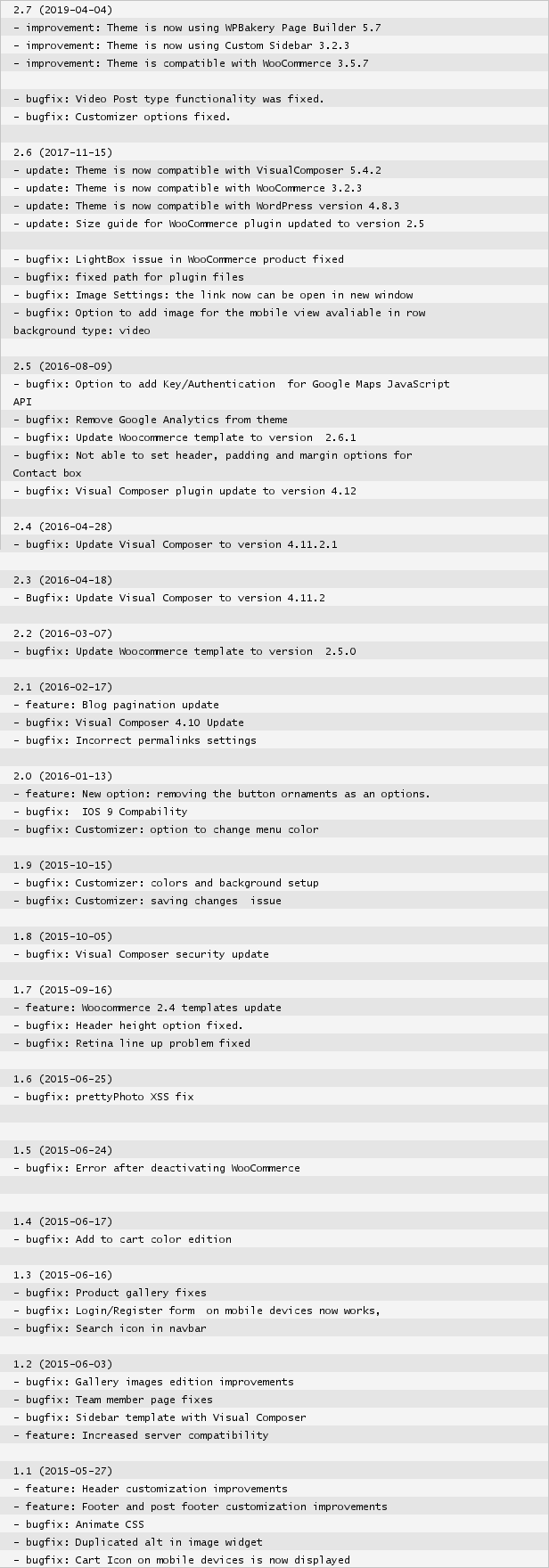
Changelog:
CREDITS:

Framework:
Scripts:
Coding by:

External listing. code.market does not sell this product and does not process payment for it. Pricing, payment, delivery, licensing, refunds, and support are handled by the third-party merchant on its own website. We may earn an affiliate commission from a referral. Details.

WooCommerce Shipping Tracking

Hot or Not

Description

The WooCommerce Shipping Tracking allows your customers to monitor the shipping status and track their orders via a visual timeline! no tricky configuration, just select a predefined company and insert the tracking code. The visual timeline will be automatically displayed on the Order details page. Customers will also receive an URL via email by which they can track the shipping status. You can add, edit, and import tracking numbers via CSV. Supported more than 1000 shipping companies!

LIVE DEMO

url: user: demo pass: demo NOTE: In case you don’t receive notifications emails, please check you spam folder.

Tracking url reporting

In case any tracking URL stops working, please report me!

DOCUMENTATION

WooCommerce Shipping Tracking allows your clients to easily track their orders. You will be able to associate every order with a shipping company and a tracking number. WooCommerce Shipping Tracking will display tracking data (Tracking URL and tracking code) directly in the “Complete Order” email and “View Order” page. Your clients just clicking on the link generated by WooCommerce Shipping Tracking will easily track their orders or just check the shipping status via the visual timeline.

How to automatically update the plugin

To receive automatic updates just install and configure the Envato updater plugin: httpss://goo.gl/pkJS33 .The official guide that explains how to configure it can be found at the following link: httpss://envato.com/market-plugin .

DEFINE YOUR OWN COMPANIES

WooCommerce Shipping Tracking has defined more than 1000 shipping companies. Don’t you find the one you need? Don’t worry!! WooCommerce Shipping Tracking allows you to define your own custom shipping companies (Name and Tracking URL), just add it from WooCommerce -> Shipping tracking -> Add Custom company page br> NOTE: the visual timeline won’t work for custom defined companies.

MULTIPLE TRACKING CODE, SHIPPING COMPANIES, DISPATCH DATES AND CUSTOM TEXT!

WooCommerce Shipping Tracking allows you to associate one or more tracking codes and shipping companies for each order. Furthermore, for every shipping can be also specified a dispatch date and custom text. In this way, both the shop admin and the customer can easily keep track of the shipping timings!

CUSTOMIZE EMAIL AND ORDER DETAILS HTML SNIPPET

Would you like to customize the HTML snippet included in the email Template and Order details page? It’s possible! You can customize templates directly from the admin menu.

Track shipment progress status via a visual timeline on the order details page.

The Shipping Tracking plugin allows also showing shipment progress status with a timeline directly on site. To do that just use the special shortcode inside the Order details message through the special menu. Once done, a tracking info widget will be displayed showing every step the shipping has performed until the current day on every Order details page! Optionally you can show the “track in site” widget on any page. To do that just use the following shortcode with the special “track_in_site” parameter: . It will render a form where once the user has entered a tracking code, the “track in site” widget will be shown displaying the shipping progress.

TRACKING INFO ON ALL OUTGOING WOOCOMMERCE EMAILS AND ORDER DETAILS PAGE

Once the tracking info is saved on the order admin page, all the info will be displayed on the order details page. Furthermore, info will be also embedded in all outgoing woocommerce emails according to the order status. By default tracking info is only embedded in the emails only when the status is set as “completed” but you can choose to display info also for other statuses. Go to the General options menu to choose for which status(es) the info has to be embedded into the emails. You can also specify custom statuses! In this way, the customer can have all the needed info at his fingertips!

EMAIL NOTIFICATION FOR SELECTED TRACKING CODES

The admin can also send active notification emails by just selecting the tracking code for which he wants the user to be notified. Once selected, he has just to click on the Order update button, the plugin will then send an email containing the selected tracking codes. The tracking code email templates can be customized by using the special options menu. You can also use a shortcode to display the user’s first and last name in order to customize the message!

Germanized pro invoice email

The plugin has support for Germanized pro invoice email, so it will be able to inject tracking info into invoice emails according to the current order status.

DATE AND TIME DELIVERY FIELDS

Would you like to let your customer specify a delivery date and time range? now you can! WooCommerce Shipping Tracking allows you to enable some extra fields (visible on the checkout and/or order details page) where the user can specify a start and end date, a start and end time (optionally even a secondary time range) when he would like to receive the items! The description, title, and label are fully customizable! Multi-language supported! Furthermore, delivery dates and times are included in WooCommerce emails! Last but not least, on the checkout page, the selectable date will consider the product’s estimated shipping time and the selected shipping method’s estimated delivery time!

BULK IMPORT FROM CSV

WooCommerce Shipping Tracking allows you to import order tracking info from a .csv file! Shop admin for each order can also import one or more shipping info. The csv file has to have the following columns:
  • order_id: This is the numeric id of the order
  • order_status: can be left empty. If specified the order status will be set as the specified value. Values that can be used: wc-pending, wc-processing, wc-on-hold, wc-completed, wc-cancelled, wc-refunded, wc-failed
  • force_email_notification: can be left empty. If specified, the plugin will resend the woocommerce notification email according to the selected value. Value that can be used: send_email_new_order, send_email_cancelled_order, send_email_customer_processing_order, send_email_customer_completed_order, end_email_customer_refunded_order, send_email_customer_invoice
  • dispatch_date: Can be left empty. In case of multiple dispatch date, values have to be separated by | character. Format must be yyyy-mm-dd. Ex.: 2018-05-13|2018-03-21
  • custom_text: Can be left empty. In case of multiple custom text, values have to be separated by | character. NOTE: REMOVE ALL , from custom texts. Ex.: custom text 1 | custom text 2.
  • tracking_info: Has to have the following format company_id:tracking_code. In case of multiple shipping, values have to be separated by | character. Ex.: DHL:#232R|GLS:1234TR3

Example of the .csv file that can be used to be imported can be found clicking in the following link: Example file NOTE: Do you want to import orders using custom ids assigned by WooCommerce Sequential Order Number Pro (By SkyVerge)? Just install the following add-on! if you instead are using the Free version, use this add-on.

AUTOMATIC BULK IMPORT

You can optionally configure the plugin to automatically import Order shipping tracking from an URL pointing to a .csv file. You have just to enter the .csv file URL path ( like DropBox file link, HTTPS URL, etc…) and select the bulk import task time interval! NOTE: Scheduling task is performed using the WordPress function wp_schedule_event(). It will trigger the scheduled import task at the specified interval ONLY if someone visits your WordPress site. More info at wp_schedule_event reference page.

MULTILANGUAGE CUSTOM MESSAGES

WooCommerce Shipping Tracking supports WPML, this lets the shop admin define HTML Snippets for every language installed. To add a message for a language, the shop admin has only to select the desired language in the WPML selector, enter the text and save!

QUICK ASSIGN MENU

The shop admin can now assign shipping info to an order directly using the “Quick assign” menu without editing every order. Using this menu in just a few clicks you can assign shipping info to an order, set its status, and optionally resend a status notification email to the customer!

FAVORITE SHIPPING COMPANY

You can also select a “favorite” shipping company on the options menu. This will be preselected during tracking code submission!

DELIVERY ESTIMATION FOR SHIPPING RATES

For each shipping rate defined using the native WooCommerce functionalities, the Table Rate Shipping for WooCommerce or the Table Rate Shipping by WooThemes you can define a delivery estimation.

AUTOMATIC SHIPPING ESTIMATION FOR PRODUCT

The WooCommerce Shipping Tracking plugin has another useful feature: Estimated shipping dates (shipping date: the date on which the package is delivered to the courier). The shop admin, simply using a shortcode or setting the automatic estimated date display option (in the plugin options menu), can show on product pages the estimated shipping date. This is calculated automatically on the basis of the “Estimation rule” that matches that product. The plugin can show both a specific shipping date and a date range in which the product will be shown. Furthermore, if the product is out of stock, the estimated date will not be displayed! Optionally estimated dates can be also shown on the Cart/Checkout pages after each item showed in the product table. To do just enable the special option you find in the plugin options menu. Last but not least, you can also configure a customized label (translatable via WPML) to be displayed before the estimated date! How does it work? it’s simple! You have only to do two steps: FIRST STEP: Estimated dates configuration Using the “Estimated shipping configurator” under the “Shipping tracking” menu, the shop admin can create multiple “Estimation rules”. For each of them he can select:
  1. Products / Categories / Tags: Selection of products, categories, or tags to which the rule applies.
  2. Dispatch / Shipment days: days in which the goods are shipped/dispatched to the courier.
  3. Cut-off hour: if an order is placed before that hour, the shipment takes place on the same day (if it is a dispatch/shipment day).
  4. Dispatch delay: If this value is specified, the estimated date will be computed starting from the first dispatch day available after the delay (expressed in days).
  5. Holidays / Non working days: days in which shipments cannot take place.

SECOND STEP: Use the shortcode (or setting the automatic estimated date option) on product page On the product page, on the description or short description or any tab, the shop admin can use the special shortcode to display the estimated shipping date. As an alternative, the shop admin can enable the automatic estimated date option display (in the plugin options menu). The plugin will then calculate the date finding the “Estimation” rule that matches the item. The plugin will automatically find the next working day when the item can be shipped. Furthermore, on the product list, a new column is added displaying the Estimated shipping rule that matches the product.

TRACKING FORM SHORTCODE

Using the special shortcode a tracking form can be displayed on any post/page that will allow the user to choose the shipping company (using a select menu) and input the tracking code and be redirected to the shipping company tracking page. The tracking code can also be used with the parameters:
  1. company_id (company id can be retrieved in the company configuration page): In this way the shipping company will be already selected (the shipping company select menu is thus hidden).
  2. button_classes: in this way the specified classes will be added to the tracking button.

Additionally, you can also use the special track_in_site paramenter to directly show shipping current status directly in site! read more about it in the previous Track shipping tracking in site paragraph!

Retrieve order tracking data programmatically

To retrieve order tracking data programmatically you can use the special wcst_get_order_tracking_data($order_id) function that will retrieve all the tracking data associated to the order. The result will be an array that will have the following format:
array(2) {
  [0]=>
  array(6) {
    ["tracking_number"]=>
    string(5) "12332" 
    ["dispatch_date"]=>
    string(0) "" 
    ["custom_text"]=>
    string(0) "" 
    ["company_name"]=>
    string(6) "Aramex" 
    ["company_id"]=>
    string(6) "ARAMEX" 
    ["tracking_url"]=>
    string(70) " 
  }
  [1]=>
  array(6) {
    ["tracking_number"]=>
    string(5) "12312" 
    ["dispatch_date"]=>
    string(10) "2019-01-08" 
    ["custom_text"]=>
    string(2) "aa" 
    ["company_name"]=>
    string(15) "Correos España" 
    ["company_id"]=>
    string(14) "CORREOSESPAGNA" 
    ["tracking_url"]=>
    string(128) " 
  }
}
In the previous example, the order has associated with two tracking codes.

Actions and Hooks

The plugin triggers two actions before and after sending an active notification email. They can be hooked in the following way:
add_action('wcst_before_active_notofication_email', 'your_custom_function_name', 10, 2);
function your_custom_function_name($recipients, $order)
{
   [...]
}
and
add_action('wcst_after_active_notofication_email', 'your_custom_function_name', 10, 2);
function your_custom_function_name($recipients, $order)
{
    [...]
}

AFTERSHIP AND TRACKINGMORE TRACKING URL SUPPORT

Create a custom company and then enable the “Aftership service” or the “TrackingMore” option. The plugin will automatically generate the tracking URL using the Aftership/TrackingMore service and the tracking code inserted in the order page! (Note: The standard track.aftership.com and track.trackingmore.com URL are used. Make sure the shipping company you are using is supported by Aftership/TrackingMore)

AUTOFOCUS ON TRACKING INPUT FIELD AND SEARCH BY TRACKING CODE AND SHIPPING COMPANY NAME!

Optionally can be enabled the option to autofocus on the main tracking code input field when editing the order page. This could be useful for bar code scanners (Note: Some 3rd party plugins could break this feature). Furthermore, the plugin lets the shop admin search orders by tracking code and shipping companies by using the default “Search Order” input box already present on the WooCommerce orders page!

FILTER BY SHIPPING COMPANY

WooCommerce Shipping Tracking adds a dropdown box menu on the orders table that allows the admin to filter orders by company.

CHANGE LOG

= 34.1 - 22.02.23 =
* Minor bugfix

= 34.0 - 21.02.23 =
* Minor bugfix

= 33.9 - 20.02.23 =
* Fixed an issue that prevented order to be properly saved

= 33.8 - 20.02.23 =
* Minor improvements

= 33.7 - 18.02.23 =
* Improved tracking monitor system

= 33.6 - 18.02.23 =
* Improved tracking monitor system

= 33.5 - 16.02.23 =
* Minor UI improvements

= 33.4 - 16.02.23 =
* Minor UI improvements

= 33.3 - 14.02.23 =
* Minor improvements

= 33.2 - 13.02.23 =
* Fixed an issue related to the email templating system

= 33.1 - 09.02.23 =
* Added new companies 
* Typo

= 33.0 - 09.02.23 =
* Added YunExpress
* Added Sunyou Post
* Added 4PX
* Added Equick China

= 32.9 - 07.02.23 =
* Added Delhivery company
* Updated the DPD Tracking URL

= 32.8 - 17.01.23 =
* Typo

= 32.7 - 10.01.23 =
* Tracking data associated with products, is now displayed on the Product table on the Order details page

= 32.6 - 07.01.23 =
* Updated the URL of POS MALAYSIA

= 32.5 - 28.12.22 =
* UI improvements

= 32.4 - 23.12.22 =
* Minor improvements

= 32.3 - 22.12.22 =
* Custom companies are now properly sorted on the order details page

= 32.2 - 15.11.22 =
* Minor improvements

= 32.1 - 10.11.22 =
* Minor bugfix

= 32.0 - 12.10.22 =
* Fixed the GLS Germany URL

= 31.9 - 23.09.22 =
* Updated Vasp Expresso URL

= 31.8 - 21.09.22 =
* Added GLS Germany

= 31.7 - 31.08.22 =
* Minor bugfix

= 31.6 - 28.08.22 =
* Minor bugfix

= 31.5 - 07.07.22 =
* GLS Spain tracking URL updated

= 31.4 - 04.06.22 =
* Typo

= 31.3 - 23.05.22 =
* Added Vasp Expresso

= 31.2 - 26.04.22 =
* Option menu restyling 
* Added some new options

= 31.1 - 07.03.22 =
* Minor improvements

= 31.0 - 05.03.22 =
* The plugin now avoids invoking the WC_Order save() method in case the tracking data was equal to the already present data

= 30.9 - 08.02.22 =
* Fixed an issue due to Custom company tracking URLs were not properly generated

= 30.8 - 03.02.22 =
* Updated POSTNL shipping address
* Custom companies tracking URL now accepts the new %post_code and %country_code placeholders

= 30.7 - 04.01.22 =
* Minor bugfix

= 30.6 - 17.12.21 =
* Fixed an issued that prevented tracking info to be properly embedded into the emails

= 30.5 - 08.12.21 =
* Improved estimated product date computation

= 30.4 - 07.12.21 =
* Minor bugfix

= 30.3 - 06.12.21 =
* Typo

= 30.2 - 29.01.21 =
* Added the following filters: 'wcst_getting_tracking_url' and 'wcst_getting_shipping_companies'

= 30.1 - 29.01.21 =
* Order items can now be selected also in the "Quick assign" page

= 30.0 - 28.01.21 =
* Fixed an issue that prevented the "Quick assign" page from properly work

= 29.9 - 25.01.21 =
* Added the option to associate a shipment to specific order items

= 29.8 - 23.01.21 =
* Fixed an issue related to the activation system

= 29.7 - 21.01.21 =
* Updated Belpost tracking URL
* Updated AfterShip carriers list

= 29.6 - 01.01.21 =
* Templates can be now copied into the theme folder

= 29.5 - 21.10.21 =
* Minor update

= 29.4 - 04.10.21 =
* Fixed an issue related to multiple tracking number display

= 29.3 - 01.10.21 =
* Updated FedEx URL

= 29.2 - 28.07.21 =
* Chile Express updated

= 29.1 - 28.07.21 =
* Added Welivery

= 28.9 - 23.07.21 =
* Typo

= 28.8 - 21.07.21 =
* Updated the Russian post URL

= 28.7 - 07.07.21 =
* Added GLS Spain

= 28.6 - 02.07.21 =
* Fixed some javascript issues

= 28.5 - 01.07.21 =
* Minor improvements

= 28.4 - 07.06.21 =
* Fixed an issue related to the dispatch date selector

= 28.3 - 02.06.21 =
* Typo

= 28.2 - 28.05.21 =
* Fixed an issue that caused the plugin to crash

= 28.1 - 27.05.21 =
* Code redesign

= 28.0 - 18.05.21 =
* Fixed an issue due to the hour timepicker was not working

= 27.9 - 13.04.21 =
* Added two new options to customize the active notification from name and from email address

= 27.8 - 19.03.21 =
* Improved active notification management

= 27.7 - 06.02.21 =
* Fixed an issue related to the "Add another tracking code" button

= 27.6 - 19.01.21 =
* Fixed an issue with WooCommerce 4.9

= 27.5 - 14.01.21 =
* Added new tracking company: Flash Express

= 27.4 - 12.01.21 =
* Fixed an issue with WooCommerce 4.9

= 27.3 - 05.01.21 =
* Added option that allows excluding specific dates to be selected as delivery dates

= 27.2 - 28.10.20 =
* Fixed an issue related to the bulk import feature

= 27.1 - 27.10.20 =
* Minor improvements

= 27.0 - 20.10.20 =
* Updated the Colissimo tracking URL

= 26.9 - 05.10.20 =
* Improved estimation delivery date computation

= 26.8 - 22.09.20 =
* Fixed an issue related to the product shipping estimation

= 26.7 - 07.09.20 =
* Fixed DHL DE shipping company

= 26.6 - 31.08.20 =
* Added DHL DE shipping company

= 26.5 - 14.08.20 =
* Fixed an issue related to WordPress 5.5 and jQuery

= 26.4 - 07.08.20 =
* Added option to merge imported data for the automatic bulk importer

= 26.3 - 04.08.20 =
* Fixed an issue related to the estimation date display on the cart page for out of stock item

= 26.2 - 30.07.20 =
* Added option to disable UTF8 encoding for the estimated shipping dates

= 26.1 - 28.07.20 =
* Updated the POSTNL link generation 
* Added the new "Tracking link" button in the order details page

= 26.0 - 22.07.20 =
* Fixed an issue related to the tag management

= 25.9 - 08.07.20 =
* Updated the Correos Chile tracking URL

= 25.8 - 29.06.20 =
* Minor improvement

= 25.7 - 28.06.20 =
* Minor improvement

= 25.6 - 28.06.20 =
* Minor improvement

= 25.5 - 28.06.20 =
* Minor improvement

= 25.4 - 15.06.20 =
* Minor improvement

= 25.3 - 15.06.20 =
* Minor improvement

= 25.2 - 08.06.20 =
* Added a new option to consider the "non shipment days" when computing the next available shipping date

= 25.1 - 29.05.20 =
* Added Mondial relay
* Added DPD France

= 25.0 - 28.05.20 =
* The calendar picker now displays according to the current language

= 24.9 - 25.05.20 =
* Updated the GD Express tracking URL

= 24.8 - 25.05.20 =
* Updated the GD Express tracking URL

= 24.7 - 24.04.20 =
* Dispatch date displayed in the order table is now rendered according to the datetime format set through the WordPress settings menu

= 24.6 - 05.04.20 =
* Minor bugfix

= 24.5 - 14.03.20 =
* Updated the Australian Post International tracking URL

= 24.4 - 13.02.20 =
* Minor improvements

= 24.3 - 05.02.20 =
* Minor UI improvements

= 24.2 - 05.02.20 =
* Minor UI improvements

= 24.1 - 18.01.20 =
* Fixed a minor issue related to the CSV import process

= 24.0 - 17.01.20 =
* Fixed a display issue related to custom tracking numbers containing multiple codes

= 23.9 - 22.12.19 =
* Minor bugfix

= 23.8 - 19.12.19 =
* Belgium post tracking URL updated

= 23.7 - 06.12.19 =
* JNE Express tracking URL has been replaced with AfterShip service. The original one no longer permits tracking via URL.

= 23.6 - 07.11.19 =
* Removed the N/A text shown when no custom text, dispatch date or was entered for additional custom companies

= 23.5 - 03.11.19 =
* Added "l, d.m" date format

= 23.4 - 16.10.19 =
* Minor UI improvements

= 23.3 - 13.10.19 =
* Update internal libraries
* Updated Chronopost URL

= 23.2 - 17.08.19 =
* Minor bugfix

= 23.1 - 12.08.19 =
* Added support to SF Express

= 23.0 - 21.06.19 =
* Fixed LaPoste tracking URL
* Internal libraries update

= 22.9 - 21.06.19 =
* Internal libraries update

= 22.8 - 08.05.19 =
* Added new date format "j m" 

= 22.7 - 08.05.19 =
* Typo

= 22.6 - 24.04.19 =
* Removed the DTDC company

= 22.5 - 21.04.19 =
* Added DHL Global Mail

= 22.4 - 02.03.19 =
* Fixed a minor CSS loading issue

= 22.3 - 21.02.19 =
* The  and  now will render the order url

= 22.2 - 20.02.19 =
* Added option to hide "Track shipment" buttons in the Orders list table (My Account -> Orders)

= 22.1 - 13.02.19 =
* Added option to send active notification during bulk import

= 22.0 - 13.02.19 =
* Typo

= 21.9 - 13.02.19 =
* Minor bugfix

= 21.8 - 13.02.19 =
* Updated the USPS tracking URL

= 21.7 - 12.02.19 =
* Minor bugfix

= 21.6 - 11.02.19 =
* Included .po file for Spanish

= 21.5 - 11.02.19 =
* Minor bugfix

External listing. code.market does not sell this product and does not process payment for it. Pricing, payment, delivery, licensing, refunds, and support are handled by the third-party merchant on its own website. We may earn an affiliate commission from a referral. Details.