
Ludo Royale | Board Game with Power-ups - Unity Ready Project
Description
Ludo Royale | Board Game with Power-ups – Unity Ready Project
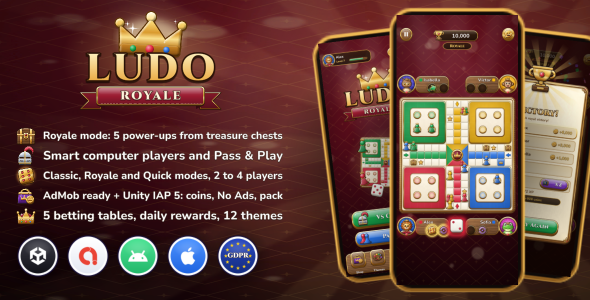
Ludo Royale is a complete, ready-to-publish Ludo board game for Android and iOS, made with Unity 6 in a premium royal wood & gold style. Play the classic rules, the Royale mode with treasure chests and five power-ups, or a short Quick match, against smart computer players or with friends on one phone. It comes with betting tables, levels, daily rewards, themes, an ads layer ready for AdMob (switched on by importing Google’s free Mobile Ads plugin) and Unity IAP 5 purchases.
⚠ Required before you publish: replace the three placeholders
Every copy of Ludo Royale ships with the same three placeholders. Replace them before your first release:
- 1. Your own save secret. Saves are protected against tampering by a signing secret (HMAC-SHA256), and every copy of Ludo Royale ships with the same secret. If you skip this step, a game published with the default secret shares its anti-tamper secret with every other buyer of this package, which nullifies the save protection: anyone who has the package can forge a save on their own phone (coins, levels, No Ads, every theme), and your game accepts it as genuine. That costs you sales of coins, No Ads and the Royal Pack. What to do: Tools → Ludo Royale → Generate New Save Secret (one click), once, before your first release; keep the same secret in every update.
- 2. Your own AdMob ids. The Game Config ships with Google’s public test ids (2 App IDs and 6 ad unit ids). Replace all 8 with ids from your own AdMob account: with test ids your published game shows only test ads and earns nothing, and a wrong or swapped id shows no ads at all.
- 3. Your own store product ids. The 6 shop products ship with placeholder ids (com.yourcompany.ludoroyale…). Replace them in the Game Config and create exactly the same ids in Google Play Console and App Store Connect: with placeholder ids every purchase fails.
In Unity, the Setup Checklist window (Tools → Ludo Royale → Setup Checklist) opens with the project and shows each of these, plus the Google Play receipt key, your links and your package name, as TO DO until it is done, with a button to fix it. The download also has a BEFORE YOU PUBLISH – REQUIRED.txt file at the top, and the documentation explains every step.
Screenshots: see the preview images above (real screenshots from an Android phone)
Android demo APK: https://zaviro.net/ludo-royale/LudoRoyale-Demo-v1.0.0.apk
Online documentation: https://zaviro.net/ludo-royale/
Full-size screenshots (1080×2400): https://zaviro.net/ludo-royale/screenshots.html
Not included: install these separately
- Google Mobile Ads Unity plugin (by Google, free), needed only to show real AdMob ads. It is not in the download: you download it from Google and import it into the project, and the game then switches AdMob on by itself. Using it means accepting Google’s terms (the Google Mobile Ads SDK terms and the AdMob program policies). Google’s External Dependency Manager comes with it.
- Unity IAP (Unity’s In-App Purchasing package, com.unity.purchasing 5.4.4), needed for in-app purchases. It is not in the download either: the project lists it, and Unity’s Package Manager downloads it from Unity’s registry when you open the project. The download contains no Unity IAP files or binaries. Unity’s terms apply.
Without Google’s plugin the game builds and runs without ads. The documentation explains both installs step by step.
Demo Instructions
The game has no login, no user accounts and no admin panel, so no email or password is needed to test it. Download the APK above on an Android phone (Android 7.0 or newer), allow installing apps from your browser if asked, and open Ludo Royale. The demo starts like a fresh install of the game. It shows placeholder ads drawn by the game where ads appear in your version.
Gameplay
- Classic: four tokens, a 6 to come out, bonus rolls for a 6, a capture and a token home, three 6s lose the turn, safe stars and start squares, exact roll to finish.
- Royale: treasure chests appear on the track; land on one to win a power-up. Carry two and use one per turn before rolling.
- 5 power-ups: Shield (no capture for two turns), Golden Six (the next roll is a 6), Dash (three squares forward, can capture), Swap (trade places with the nearest rival ahead) and Thunder (send the leading rival back to its yard).
- Quick: two tokens to bring home, one already out, a 1 or a 6 to come out.
- Every rule is a setting: exit rolls, bonus rolls, safe squares, tokens to finish, chests, power-up chances…
- Smooth token hops, captures with effects, a die that spins, stickers to react, short hints in the first match, auto move when every move is the same.
- The match in progress is saved every turn: Continue picks it up after the app closes.
Players
- Vs Computer: 2 to 4 players, Easy / Normal / Hard. Computer players have four play styles (balanced, hunter, guard, sprinter), use power-ups, and Hard looks one roll ahead to keep its tokens safe.
- Pass & Play: 2 to 4 seats on one phone, each one a named person or a computer player.
- Choose your colour; your colour can always sit at the bottom of the board.
Progress and rewards
- 5 betting tables (100 to 50,000 coins) unlocked by level: every player pays the entry, the winners share the pot.
- XP for matches, wins and captures; coins for every level up.
- 7-day daily reward ending in a treasure chest, clock-safe.
- Profile with 12 royal animal avatars, name, level and stats (win rate, captures, power-ups used, best streak).
- Themes: 4 boards, 3 pawn sets and 5 dice to buy with coins.
Monetization
- Ads layer ready for AdMob: banner, interstitial (frequency and cooldown) and rewarded ads, Google’s UMP consent form (GDPR), which also shows Apple’s tracking prompt once you publish an IDFA message in AdMob.
- Only Google’s official test ad ids are included (in the Game Config, publisher ca-app-pub-3940256099942544). Import Google’s Mobile Ads plugin (free download from Google): the game switches AdMob on automatically and shows Google’s test ads. Then replace the test ids with your own App IDs and ad unit ids in the Game Config before publishing. Without the plugin the game builds and runs with no ads, and the editor shows placeholder ads to test every flow.
- Rewarded ads for free coins, rescue coins when a table is too expensive, and double winnings.
- Unity IAP 5 (Google Play Billing, StoreKit 2), installed from Unity’s Package Manager: 4 coin packs, No Ads and a Royal Pack (coins, No Ads, a board, pawns and dice); receipt validation on the device (release builds refuse any purchase they can’t verify; Android needs your Google Play licensing key, one paste in Unity); purchases never delivered twice; iOS restore. Optional: a ready hook for server-side checks if you build your own backend (explained in the documentation).
Technical
- Unity 6000.0 LTS (built with 6000.0.84f1), uGUI + TextMesh Pro, portrait, phones and tablets with safe areas.
- The rules engine and computer players are plain C# with no Unity dependency. The project includes automated tests you can run yourself (Tools → Ludo Royale → Tests): rule situations, save checks and up to 10,800 simulated matches with over 300 million rule checks.
- One Game Config asset for every setting (with tooltips); every screen and popup is a prefab; themes are simple assets.
- 9 languages in one CSV file: English, French, Spanish, Portuguese, German, Italian, Dutch, Indonesian and Turkish.
- Signed save (HMAC-SHA256), rewards saved the moment they are won.
- Original art, music and sound effects, drawn and synthesized by the author’s own code for this game (no AI image or audio generator); no stock images, emoji sets or sound libraries.
- Full HTML documentation with screenshots of every screen and the Game Config.
Your own accounts and possible costs
AdMob and Unity IAP are third-party services. To show real ads, sell in-app purchases and publish the game you need your own accounts, and some of them cost money:
- Google AdMob: your own AdMob account (free to create; Google’s terms and payment thresholds apply).
- Google Play Console: one-time registration fee (US$25 at the time of writing).
- Apple Developer Program: US$99 per year at the time of writing, and a Mac for iOS builds.
- Store fees: Google and Apple keep a commission (usually 15% to 30%) on in-app purchases.
- Unity: Unity’s license terms apply (Unity Personal is free within Unity’s revenue limits).
The documentation explains each step, including where to enter your own ids.
Requirements
- Unity 6000.0 LTS (6000.0.58f2 or newer).
- Android Build Support (minimum API level 24, Android 7.0; target API level 36, Android 16, set explicitly in Player Settings) and/or iOS Build Support with Xcode (iOS 13 and newer).
- For AdMob ads: Google’s Mobile Ads Unity plugin, free from Google (not included; the documentation explains the import).
- For in-app purchases: Unity IAP 5.4.4 (not included in the download; Unity’s Package Manager installs it when the project opens).
- Players’ devices: Android 7.0 (API 24) or newer, ARM64 or ARMv7, OpenGL ES 3.0 or Vulkan, 2 GB of RAM recommended (the game uses about 250–300 MB); iOS 13 or newer. Full list in the documentation (Device requirements).
Changelog
Version 1.0.0: first release.
AI disclosure
An AI coding assistant (Claude by Anthropic) was used to help write the C# code (the game, the rules engine and computer players, the editor tools and tests, and the code that draws the art and synthesizes the sounds), the game’s texts and their translations, and the documentation, under the author’s direction; everything was tested in Unity and on Android phones. No AI image, audio or music generator was used: all art, sounds and music are drawn and synthesized by the author’s own code, and the screenshots are real phone captures. The computer players are hand-written rules that score every possible move, not machine learning.
Credits
Fonts: Cinzel and Nunito (SIL Open Font License 1.1). Every other asset (art, icons, avatars, music, sound effects) is original, made for Ludo Royale by the author’s own drawing and audio code (see AI disclosure); some general-purpose framework scripts (UI, tweening, save, ads and purchase managers) are shared with the author’s other items.
Unity, Android, Google, AdMob, Apple and iOS are trademarks of their respective owners; their logos appear in the preview image only to show what the project works with.
Support
Support desk: send your questions before you buy, your support requests after you buy and any other questions to https://zaviro.net/support. Please include your Unity version and the platform you build for. You can also leave a comment on the item page.
Note: every copy of Ludo Royale sold here comes with an Envato license. We can’t be held responsible for problems with copies obtained anywhere else. Before you buy, please try the demo: it shows everything you get. Third-party packages the game works with (Unity IAP, Google’s Mobile Ads plugin) are supported by their own makers.
| Author | Zaviro |
|---|---|
| Price | $29 |
| Sales | 0 |
| Rating | 0 (0) |
| Published | Nov 9, 2026 |
| Last Update | Nov 9, 2026 |
| Compatible Software | Android 15.0, Android 12.0, Android 11.0, Android 10.0, Android 9.0 |
| Demo Url | https://zaviro.net/ludo-royale/LudoRoyale-Demo-v1.0.0.apk |
| Mobile Files Included | .xml, HTML |
Categories
Tags
External listing. code.market does not sell this product and does not process payment for it. Pricing, payment, delivery, licensing, refunds, and support are handled by the third-party merchant on its own website. We may earn an affiliate commission from a referral. Details.