
LowLatencyKit - Self-Hosted WebRTC Video Server
Description
LowLatencyKit is a self-hosted real-time video server you can read and modify.
WebRTC lets two browsers exchange video directly, but a real product needs a server: one to exchange the connection details, and one to forward the media when a single publisher has many viewers. This kit is that server, together with a working browser client.
It ships as one Go binary with WebSocket signaling on /ws, SFU-style media forwarding, and static hosting for the web pages. Room state is held in memory. There is no database to provision, no Redis or message broker, and no per-minute billing.
The room model is deliberately simple: one publisher, many viewers. That covers "show me what you see" support, one-to-many broadcast, and remote assistance. It is not a multi-party conferencing product, and this description says so rather than leaving you to find out after purchase.
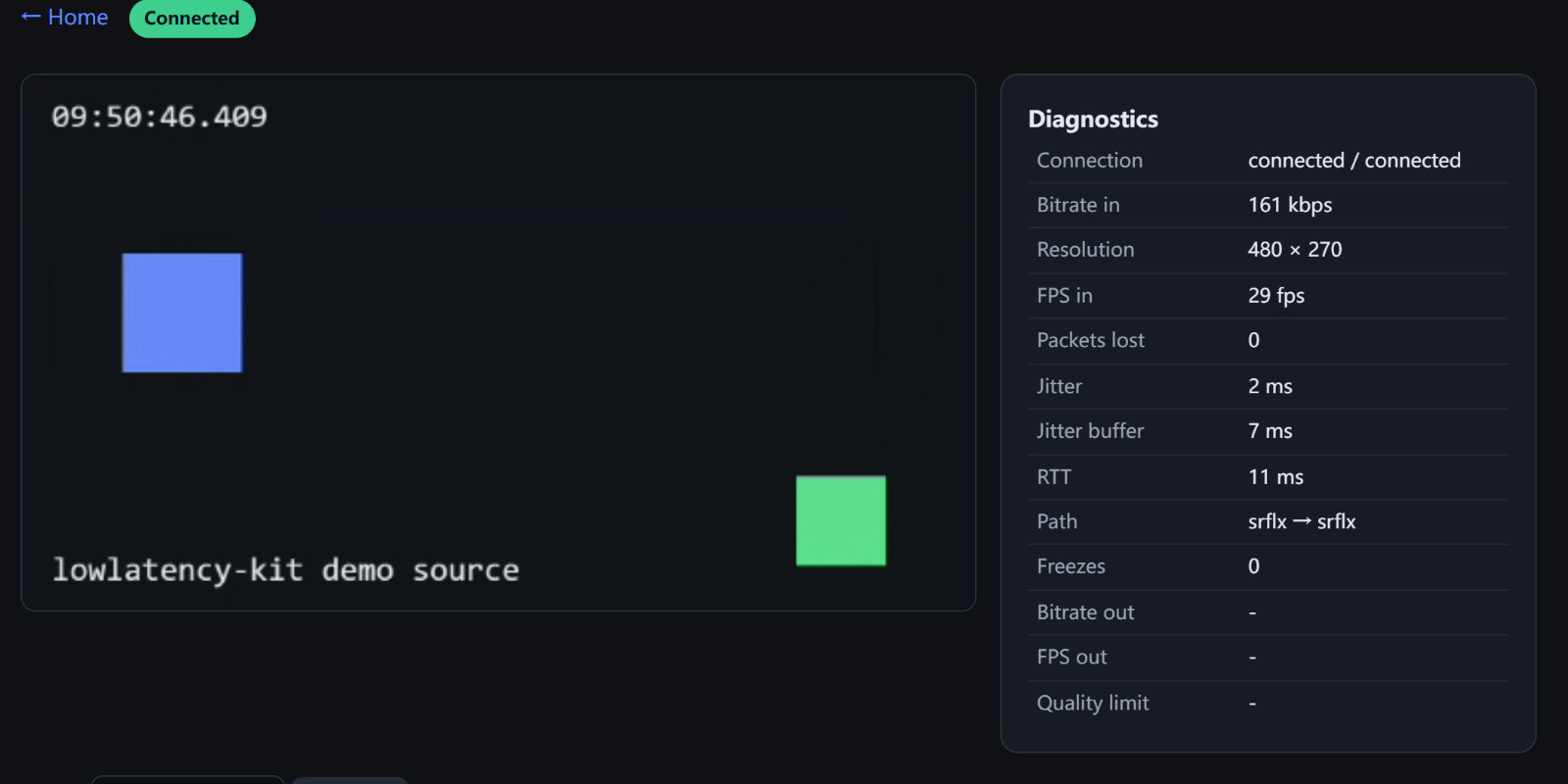
You can exercise the entire path before installing anything: open the live self-test. That page sends a generated canvas to a real server and plays it back, with no camera and no account required. If it reads PASS, signaling, the SFU hop and browser playback all worked in that browser on that network.
Features
- Single Go binary: WebSocket signaling, SFU forwarding and static site hosting
- Publisher page with camera, screen share, and a synthetic demo source that needs no camera permission
- Viewer page with automatic recovery: ICE restart first, full rejoin as the fallback, with jittered backoff
- Freeze detection built on requestVideoFrameCallback
- Live diagnostics panel: bitrate, FPS, packet loss, jitter, jitter buffer, round-trip time, network path in use, and a plain-English quality-limitation reason
- RTP passthrough: the viewer registers a MediaEngine with the publisher's own codec and payload type, so nothing has to rewrite payload types
- RTCP back to the publisher, so viewer PLI and NACK reach it and on-demand keyframes work
- Browser relay check page that separates "the UDP port is unreachable" from "the relay refused the allocation"
- Optional TURN relay: -turn, -turn-user and -turn-pass advertise the relay to every browser through iceConfig.iceServers
- coturn configuration template and a documented set of ports to open
- -public-ip flag so ICE candidates are routable on hosts that only know their private address
- -udp-port-min and -udp-port-max to pin the media port range for a finite firewall rule
- 25 second signaling heartbeat, because reverse proxies reap idle WebSockets while media flows
- Deployment files: Dockerfile, docker-compose behind Caddy, systemd unit, and a tunnel route for when there is no domain
- Self-tests included: an end-to-end canvas test and a TURN relay test, both runnable from a browser
- Pitfalls document: nine real traps written as symptom, cause and fix
- Full buyer documentation: thirteen sections covering installation, every flag, deployment, TURN, integration, customisation and troubleshooting
- Plain ES modules in the browser client, no build step and no bundler
- No third-party scripts, no CDN dependencies, no external API calls
Requirements
- Go 1.24 or newer to build the server
- A modern browser: Chrome, Edge, Firefox or Safari, current versions
- HTTPS for anything beyond a local test, because browsers only grant camera access in a secure context (localhost is the exception)
- A Linux host with a public IP for anything reachable from outside your network
- Docker is optional; the tested deployment route is the systemd unit
- A separate coturn install only if you need relayed media behind symmetric NAT
Instructions
- Unzip the package.
server/holds the Go source,web/is the browser client,deploy/holds the deployment files. - Build the server:
cd server && go build ./cmd/kitserver - Run it locally:
./kitserver. It listens on :18080 and finds the web directory on its own. - Open
http://localhost:18080/test/v2/. A PASS result means signaling, the SFU hop and playback all work. - Open
/publisher/and/viewer/in two tabs with the same room name to watch a live stream end to end. - For a real deployment follow
deploy/README.md: copy the binary andweb/to/opt/lowlatency-kit, install the systemd unit, and open the media UDP range in your provider's firewall as well as in ufw. - If the host only has a private address, start the server with
-public-ip <your public IP>. - Behind symmetric NAT, run coturn from
deploy/turnserver.confand start the server with-turn,-turn-userand-turn-pass, then verify with/test/turn/. - Full documentation is in
documentation/index.html, and online at https://lowlatencykit.com/documentation/
| Author | LowLatency |
|---|---|
| Category | Scripts & Code / Golang |
| Price | $54 |
| Extended License | $162 |
| First Release | Oct 15, 2026 |
| Last Update | Oct 16, 2026 |
| Files included | .css, .html, .go, .svg, .md, .yml/.yaml, Dockerfile, JavaScript .js |
| Programming language | JavaScript, Go |
Categories
Tags
External listing. code.market does not sell this product and does not process payment for it. Pricing, payment, delivery, licensing, refunds, and support are handled by the third-party merchant on its own website. We may earn an affiliate commission from a referral. Details.
Products of the Week.
Submit🥇

Actionbook
It works inside the user's own browser with the accounts already signed in. The user describes the result they need, and the agent reads, clicks and types through the pages, then delivers a dashboard or report where each data links back to its source.
Other · 722 views · 9 clicksOther · Week 44 · 722 views · 9 clicks
🥈

Free social media tools for creators & solofounders
295 free tools for growing your social media: write, plan, grow on local AI models, 100% free forever, No sign-up required, No trial. Write, check and measure posts on LinkedIn, Instagram, TikTok, X, YouTube, Reddit, Product Hunt and more: a free social media scheduler for 17 networks, engagement rate calculators, character counters, best time to post, hook generators and follower growth calculators. No login anywhere, no API or credit usage.
691 views · 6 clicksWeek 44 · 691 views · 6 clicks
🥉

STOP GUESSING WHAT TO POST
AI that learns your brand voice and builds a month of consistent, on-brand social content: carousels, posts and hooks that sound like you, not like everyone else's AI.
SaaS · 1,937 views · 21 clicksSaaS · Week 44 · 1,937 views · 21 clicks
#4

Hand-Placed Backlinks $9.99 per link. Flat rate.
Buy hand-placed forum, Q-A and directory backlinks. Flat $9.99 per link, no subscriptions — you only pay for approved listings.
Website · 1,889 views · 17 clicksWebsite · Week 44 · 1,889 views · 17 clicks
#5

Conversational Backlinks for Busy Founders
Place Backlink Relevant Conversation for your domain across Forums and Conversations
39,348 views · 211 clicksWeek 44 · 39,348 views · 211 clicks
#6

Free Invoice Generator - PDF Invoices in Your Browser, No Sign-Up
A free invoice maker for freelancers and small businesses: fill in the invoice, check the live preview, and download a PDF that looks exactly like it. Any currency, tax per item, three templates, no sign-up, and nothing leaves your device.
628 views · 11 clicksWeek 44 · 628 views · 11 clicks
#7

Merge PDF Files Free - Combine PDFs in Your Browser, No Upload
A free PDF merger for office workers, students, and freelancers: combine PDFs and images into one file in the browser, reorder files and pages, pick page ranges, keep bookmarks, and open password-protected PDFs. Nothing is uploaded, no sign-up, no watermark.
571 views · 4 clicksWeek 44 · 571 views · 4 clicks