
LoveDate | Social Dating Network Flutter App
Description
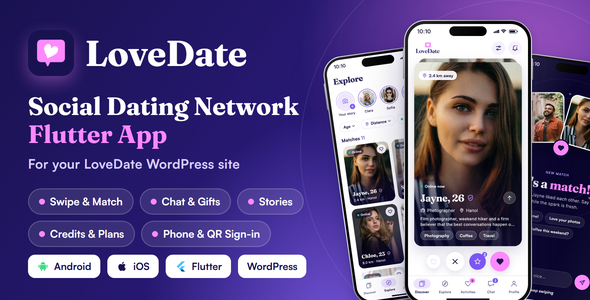
LoveDate turns your LoveDate WordPress dating site into a native app for Android and iOS. Members swipe, match, chat with photos, GIFs and gifts, post stories and buy credits, Super Likes and membership plans, all with the account they already have on your website. Phone and QR code sign-in, photo privacy, report and block, push notifications and credits for watching ads are built in. One Flutter code base, one WordPress dashboard, no second database.


Give Your Dating Community an App of Its Own
Profiles, likes, matches, messages, credits, and membership plans stay on your website. A like or a message sent on the website shows in the app, and the other way around. Most app settings are on your WordPress dashboard, so you change them without a new app build.
The LoveDate Difference
01. One Account on the Website and in the App
Members do not create a second account. A member who signs up in the app signs in on the website with the same details, and chats, matches, and credits follow them on every screen.
02. Swipe, Match, and Chat in Five Tabs
Discover, Explore, Activities, Chat, and Profile give members a clear path: swipe member cards, find people with filters and stories, see who likes them, and talk with their matches.
03. Earn From Credits, Super Likes, Plans, and Ads
Your website sells credits and Super Likes through WooCommerce and membership plans through Paid Memberships Pro, and every purchase works in the app. Members can also watch a Google AdMob rewarded video in the app to earn free credits.
04. Email, Phone, and QR Code Sign-in
Members sign in with a username or email, or with a phone number and a code sent by SMS or WhatsApp. Signed-in members can scan a QR code to sign in on the website, with no code to pay for.
A Modern Dating Experience

- Swipe cards on Discover with like, pass, Super Like, and Rewind to undo a pass.
- New match screen that opens on a mutual like, with quick replies to start the chat.
- Explore with filters from your website search form, such as age, distance, gender, and country, plus sorting and an online badge.
- Stories that members post and watch, with replies that open in the chat.
- Activities tab with Likes me, You like, profile visitors, and suitable members.
- Verified badge on profiles that passed verification.
- Notifications screen and push notifications for likes, matches, messages, gifts, and profile visitors.
- LoveDate look with the brand purple and pink palette, and the Fraunces, Inter, and Plus Jakarta Sans fonts.
Discover & Match
- Member cards with photo, age, job, city, and distance.
- Like, pass, and Super Like on every card.
- Rewind to undo a pass, set per plan on the website.
- New match screen with quick replies.
- Member search with the filters of your website search form.
- Distance in kilometres or miles, with a place search.
- Sort results and see who is online.
- Post and watch stories.
- Full member profiles with about, interests, and basics.
- Likes me, You like, visitors, and suitable members in Activities.
Chat, Gifts & GIFs
- The same conversations as the website chat.
- Send photos in a chat.
- Send GIFs with a GIPHY search, using your own GIPHY API key.
- Send virtual gifts, priced in credits.
- Press and hold a message to reply, like, copy, or delete it.
- View profile, report, and block from the chat menu.
- Real-time messages with Pusher, or regular checks without it.
- Message cost in credits, or free messages, set on the website.
Earn From Your Community
LoveDate supports more than one way to earn, so you choose what members pay for.
- Credits: sell credit packages through WooCommerce. Members spend credits on likes, messages, and gifts.
- Super Likes: sell Super Like packages through WooCommerce.
- Membership plans: sell Paid Memberships Pro levels, for example unlimited likes or seeing who liked the member.
- Store switch per platform: the in-app Store opens your website checkout in an in-app window. It is off by default in the iOS and Android apps to follow the App Store and Google Play payment rules, and you turn it on per platform only for builds allowed to sell through your website.
- Credits for watching ads: members watch a Google AdMob rewarded video and earn credits. You set the credits per ad, ads per day, and the wait between ads.
- Server-side verification: Google tells your website when a member watched the ad to the end, and only then are credits added.
Sign-up, Sign-in & Safety
- Sign-up in 4 steps with the same profile fields as your website.
- Photo step with 1 to 6 photo slots.
- Email verification when it is on for the website.
- Sign in with a username or email, and reset a forgotten password.
- Phone sign-up and sign-in with Twilio SMS, Twilio Verify, WhatsApp through Twilio Verify, WhatsApp through the Meta Cloud API, or Firebase Phone Authentication.
- A fallback code provider, offered on the code screen.
- Sign in on the website by scanning a QR code with the app.
- Photo privacy: everyone, signed-in members, matches only, or a password, with blurred or locked previews.
- Report and block on every profile and chat.
- Blocked profiles and removed profiles lists.
- Account deletion from the app settings.
- Notification choices per member in the app settings.
WordPress as Your Dating Control Center
The LoveDate API plugin ships with the LoveDate theme and connects the app to your website. One LoveDate App page in your WordPress dashboard shows the API address to copy into the app and the state of sign-up, phone sign-in, push notifications, and ad rewards.

- API address with a Copy button.
- Sign-up step titles, descriptions, and photo step settings.
- Phone sign-in method, code provider, fallback provider, and test mode.
- QR code sign-in on the website login form.
- Firebase connection and a test push to your own devices.
- Ad rewards: credits per ad, ads per day, and AdMob ad units.
- Chat, credits, Super Likes, Rewind, and photo privacy from the theme options.
- Website setting changes reach the app without a new build.
Built for Customization and Growth
LoveDate is one Flutter and Dart code base for Android and iOS, with a feature-first folder structure, Provider state management, GoRouter navigation, secure token storage, and the colors and fonts kept in one theme folder.
Change the app name, package name, icon, logo, launch screen, colors, and fonts with the steps in the documentation. You can run the app on its built-in demo members before you connect a website.
Ideal For
- Owners of a LoveDate WordPress dating site.
- Local and city dating communities.
- Niche dating sites for a shared interest or lifestyle.
- Matchmaking agencies with an online member base.
- Membership-based dating businesses.
- Agencies that build dating sites for clients.

Demo Instructions
- Demo login for the app and the demo site: username kathrin, password admin@1234
- Android app: LoveDate on Google Play.
- Website the app connects to: LoveDate demo site.
Documentation
Follow the WordPress setup, installation, customization, feature configuration, and store publishing guides in the official LoveDate app documentation.
Support
Need help with the product? Submit a ticket through the JWSThemes support center.
Standard item support covers verified errors and bugs in the original product. Third-party integrations, custom modifications, server setup, and customization services are not included.
Third-Party Service Costs
Disclaimer: Twilio, the Meta WhatsApp Cloud API, Firebase, Google AdMob, Google Maps Platform, GIPHY, Pusher, and the payment gateways of WooCommerce and Paid Memberships Pro are external services with their own prices. Their fees are not covered by the purchase price of this item. You open each account yourself and pay that provider directly. None of them is required to run the app: without a key, that feature stays off and the rest of the app works.
You are responsible for all usage fees of your own Firebase, Google Maps Platform, and Google AdMob accounts, and of every other service you connect. The GIF picker uses your own GIPHY API key, added in the LoveDate App settings; no key ships with the plugin.
Requirements & Important Notes
- The LoveDate WordPress theme is required and is not included in this purchase. The app shows the members, matches, chats, and plans of a website that runs the LoveDate theme. Get the theme on ThemeForest: LoveDate – Social Dating Network WordPress Theme.
- WordPress 7.1.4 or higher and PHP 8.2 or higher on the website server. PHP 8.4 is recommended.
- The LoveDate Core and LoveDate API plugins must be active. The LoveDate API plugin ships with the theme.
- Your website must use HTTPS. Release builds do not connect over plain HTTP.
- Flutter 3.44 or newer (Dart 3.12).
- Android Studio with JDK 17 for Android builds.
- A Mac with Xcode 16 or newer and CocoaPods for iOS builds. The app runs on iOS 15.0 or newer.
- A Google Play developer account and an Apple Developer account to publish.
- WooCommerce is required for credits and Super Likes.
- Paid Memberships Pro is required for membership plans.
- Third-party services are not included in this purchase. See Third-Party Service Costs above.
- Firebase is optional. Without it, the app runs without push notifications and without Firebase phone codes.
- The App Store and Google Play require in-app purchase for digital items. The app has no in-app purchase, so the Store (credits, Super Likes, and plans) is hidden in the iOS and Android apps by default. Members buy on your website, and their purchases work in the app. A switch per platform is in Jws Settings > LoveDate App > Store.
- The app ships in English. Texts from your website appear in the language of your website.
- The member photos in the screenshots and in the built-in demo data are licensed for commercial use. Your live app shows the photos your members upload to your website.
- Please review the product requirements and compatibility information before purchasing.
AI Disclosure
AI writing tools helped draft and edit parts of the documentation and this item description. Every step was checked against the app and the plugin. The app code, the plugin code, and the graphics were made without AI tools. The app has no AI features.
Changelog
Version 1.0.1 (build 3), 28 October 2026
Initial release.

| Author | jwsthemes |
|---|---|
| Price | $299 |
| Sales | 0 |
| Rating | 0 (0) |
| Published | Oct 30, 2026 |
| Last Update | Oct 30, 2026 |
| Compatible Software | Flutter 3.x |
| Demo Url | https://lovedate.jwsuperthemes.com/flutter-app |
| Mobile Files Included | JavaScript JS, PHP, HTML, Dart, .kotlin, .swift |
Categories
Tags
External listing. code.market does not sell this product and does not process payment for it. Pricing, payment, delivery, licensing, refunds, and support are handled by the third-party merchant on its own website. We may earn an affiliate commission from a referral. Details.
Products of the Week.
Submit🥇

Perceptle
Perceptle is a daily browser-based game that challenges you to test your sensory intuition through five quick estimation and rhythm-based rounds.
Other · 1,800 views · 11 clicksOther · Week 47 · 1,800 views · 11 clicks
🥈

Free LinkedIn Likes From Real
Get free LinkedIn likes on your posts from real members who react by hand. No
SaaS · 1,935 views · 11 clicksSaaS · Week 47 · 1,935 views · 11 clicks
🥉

STOP GUESSING WHAT TO POST
AI that learns your brand voice and builds a month of consistent, on-brand social content: carousels, posts and hooks that sound like you, not like everyone else's AI.
SaaS · 9,478 views · 76 clicksSaaS · Week 47 · 9,478 views · 76 clicks
#4

aaas.market
407 reliable micro tools for solo founders, marketers and creators. They work in your browser
SaaS · 1,899 views · 5 clicksSaaS · Week 47 · 1,899 views · 5 clicks