
Loudline | Audio Loudness Normalizer Flutter App for Android and iOS With Paywall and Admin
Description
AI disclosure: AI tools were used to assist with parts of the code, documentation and graphics of this item. The author reviewed the result. The product itself contains no AI features.
What it is
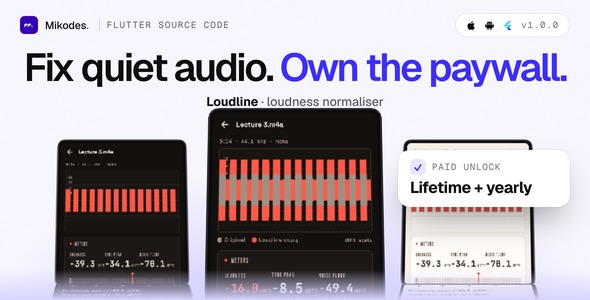
Loudline is a Flutter source code for a loudness normaliser on Android and iOS: it normalises a recording to a LUFS target, together with an operator console (MIKODES Admin Kit, Node.js server) to run the app as a small business. The user picks a quiet recording (a voice memo, a lecture, the sound of a video, a chat voice note), Loudline measures it in LUFS and true peak, and exports a louder, cleaner copy aimed at a target such as Podcast -16 or Voice note -18. The copy is measured again and the result says plainly when a target could not be reached. The original file is never changed and nothing is uploaded. You rename it, add your store product ids, and publish it under your own brand.
Who it is for
Developers and small studios who want a ready paid-unlock utility app for the stores: you rename it, add your store product ids, publish it under your account, and keep the store revenue. Loudline works on recording files: it does not change the volume of the phone or of other apps, and it is not a playback volume or sound-effect app.
Demo Instructions
The mobile app has no user accounts, so it has no login. The operator console demo is read-only (every change is refused). To try it:
- Open the demo page below, download the demo Android app (arm64 APK) and the quiet test recording (a synthesised, speech-like sample made for the demo), or build the real app for Android and iOS from the download with flutter run.
- Finish onboarding, tap Choose a file and pick the test recording. The studio shows its loudness, true peak and noise floor.
- Pick the Podcast target and tap Make it louder. The result shows before and after loudness; switch between Original and Copy with A/B.
- Open Settings, then the paywall (product ids are empty, so it says purchases are not set up yet).
- Open the operator console with the read-only login below and look at the paywall, file limits, presets and announcement pages. A sample of the settings JSON the app reads is in contract/CONTRACT.md.
Live demo and docs
- Demo: https://loudline-demo.mikodes.com/ (demo page with a demo Android app and a test recording; examples are labelled)
- Operator console, read-only: https://loudline-demo.mikodes.com/admin
Email: demo@loudline.demo · Password: loudline-demo-c72c5c-2026 (read-only demo account) - Documentation: https://loudline-demo.mikodes.com/docs/
How you earn with it
- Lifetime and yearly Pro unlock with restore, using the stores’ in-app purchase (store fees apply). Without Pro a user gets 3 exports a day and files up to 10 minutes; both limits are settings.
- Server-side purchase verification for Apple (signed transactions and Server API) and Google Play, off by default, so unlocks can be checked on your server.
- A revenue page in the console showing gross verified store transactions.
- Paywall, product ids, unpaid-tier limits, presets, brand name and accent colour are changed from the console without a new build.
Every money setting starts empty: no product ids ship, so the paywall reads “not set up yet” until you add your own ids. Nothing in this item promises any income.
Third-party services and costs (not included in the price)
- Store accounts and the lifetime and yearly store products (no product ids ship)
- Release signing (Android keystore, iOS team and bundle id)
- Hosting, domain and https for the server (optional; the app works offline)
- Support, privacy and terms URLs (empty by default)
- Store listing text and screenshots for your own app
- Real-device testing before release
Core features
- Measured, not guessed: integrated loudness after ITU-R BS.1770-4 (K-weighting, gating), a 4x true-peak meter, the noise floor and clipping detection, checked in tests against reference values.
- Targets: Podcast -16, Streaming -14, Lecture -16 and Voice note -18 LUFS, or a custom target from -30 to -5 LUFS and a ceiling from -6 to 0 dBTP. Presets come from your console.
- Look-ahead limiter and noise reduction: a louder copy with no sample over the ceiling; spectral noise reduction learns the noise from the quietest stretches (light, medium, strong); tone presets flat, voice clarity, warm and bright.
- Honest result: the copy is measured again; the app says when the target was not reached, when the noise got louder or when the original was already clipped.
- Before and after: one waveform on a dB scale with instant A/B playback and optional level matching.
- Export and share: m4a (AAC) or WAV, a history of copies, batch mode, and files shared in from other apps. Video files give their audio; the export is an audio file.
- Own audio code: the measuring and processing is Dart code in this item. Only file decoding and AAC encoding use the system codecs (MediaCodec on Android, AVFoundation on iOS), so there is no FFmpeg and no GPL or LGPL audio library to list.
- Offline first: an offline config client with ETag cache and fallback defaults.
Workflow
Install, onboarding, choose a file, read the measurements, pick a target, make the copy, compare with A/B, share, paywall. The app reads its settings from your server with ETag caching (rate limited, health check included) and works fully without it.
Admin: operator console
- Brand (name, accent, support URL) and legal URLs
- Paywall, unpaid-tier export and file-length limits and store product ids
- Feature switches (noise reduction, tone presets, batch, video input, waveform compare) and file limits
- Presets: target, ceiling, tone and noise reduction
- Announcement banner and force update screen
- Optional purchase verification for Apple and Google Play, off by default
- Opted-in installs (anonymous pings) and revenue
- Team, audit log, 2FA and notifications (MIKODES Admin Kit)
- Read-only demo mode
Security
- Console with team roles, 2FA and an audit trail.
- Purchase verification checks Apple signed transactions (JWS) and Google Play on the server.
- Secrets live in server/.env (a .env.example without values is included).
- Usage pings are opt-in, off by default and anonymous; recordings never leave the phone.
Tech stack
App: Flutter 3.41, Dart 3.11, in_app_purchase, just_audio (playback only), file_picker, share_plus. Audio: own Dart DSP plus the platform codecs. Server: Node.js with Hono and better-sqlite3.
Requirements
- Flutter 3.41 or newer (built with 3.41.4, Dart 3.11.1+); Android Studio for Android; Xcode for iOS (deployment target 15.0).
- Node.js 26 LTS (22.12 or newer also works) for the server; Linux or macOS.
- Apple Developer and Google Play developer accounts to publish and to create the store products.
- Optional: App Store Server API key and Google Play service account for purchase verification.
External paid services are not included in the item price: developer accounts, store fees, hosting, a domain with https for the server, and any service you connect.
What is included
- Flutter app source (Android and iOS)
- Node.js server with the operator console
- .env.example, third-party licence list and documentation
Good to know before you buy
- Nothing was run on a real device or simulator. The Kotlin and Swift codec bridges compile and are in the release builds, but decoding and AAC encoding of real files is untested: pick an .m4a, an .mp3 and a video on your own phones before you publish.
- Mono and stereo files are supported; more channels are reduced to the first two. Copy-protected files cannot be read. A video gives its audio and the export is an audio file (the picture is not re-muxed).
- Noise reduction is tested with numbers (the noise floor falls and the loudness stays on target), not by ear.
- Store purchases, the server round trip and the share-in paths are covered by unit tests and code reading only. iOS has Open in for files, no share extension.
- The Dockerfile is untested. The Android release build is debug-signed until you add your own key.
Installation summary
1) Server: copy .env.example to .env, then npm ci, npm run build, npm start. 2) App: set your brand and server URL in app/lib/brand.dart, set bundle id and signing, then flutter run or build. 3) Create the two store products and enter their ids in the console. Full steps are in the documentation.
Declarations
AI declaration: AI tools were used to assist with parts of the code, documentation and graphics of this item. The author reviewed the result. The product itself contains no AI features.
Changelog
v1.0.0 (first marketplace release): loudness meter and true peak, targets, limiter, noise reduction, tone presets, before and after with A/B, export and share, batch, paywall with restore, announcement, force update, purchase verification, operator console.
Support
Support covers questions about the item and bugs in the included code. Help with your own store accounts, signing or custom changes is not part of item support. Contact: https://mikodes.com/support
Credits
Open-source packages are listed in THIRD-PARTY-LICENSES.md. Preview images are real screens with labelled example data; device frames are illustrations. Not affiliated with Apple, Google or any other company; their names only describe the platforms.
| Author | Mikodes |
|---|---|
| Price | $29 |
| Sales | 0 |
| Rating | 0 (0) |
| Published | Nov 19, 2026 |
| Last Update | Nov 19, 2026 |
| Compatible Software | Flutter 3.x |
| Demo Url | https://loudline-demo.mikodes.com |
| Mobile Files Included | Dart, YAML, JavaScript JSON, .kotlin, .plist, .swift, JavaScript JS, CSS, HTML |
Categories
Tags
External listing. code.market does not sell this product and does not process payment for it. Pricing, payment, delivery, licensing, refunds, and support are handled by the third-party merchant on its own website. We may earn an affiliate commission from a referral. Details.
Products of the Week.
Submit🥇

Perceptle
Perceptle is a daily browser-based game that challenges you to test your sensory intuition through five quick estimation and rhythm-based rounds.
Other · 1,800 views · 11 clicksOther · Week 47 · 1,800 views · 11 clicks
🥈

Free LinkedIn Likes From Real
Get free LinkedIn likes on your posts from real members who react by hand. No
SaaS · 1,935 views · 11 clicksSaaS · Week 47 · 1,935 views · 11 clicks
🥉

STOP GUESSING WHAT TO POST
AI that learns your brand voice and builds a month of consistent, on-brand social content: carousels, posts and hooks that sound like you, not like everyone else's AI.
SaaS · 9,478 views · 76 clicksSaaS · Week 47 · 9,478 views · 76 clicks
#4

aaas.market
407 reliable micro tools for solo founders, marketers and creators. They work in your browser
SaaS · 1,899 views · 5 clicksSaaS · Week 47 · 1,899 views · 5 clicks