
Login And Registration System Docker
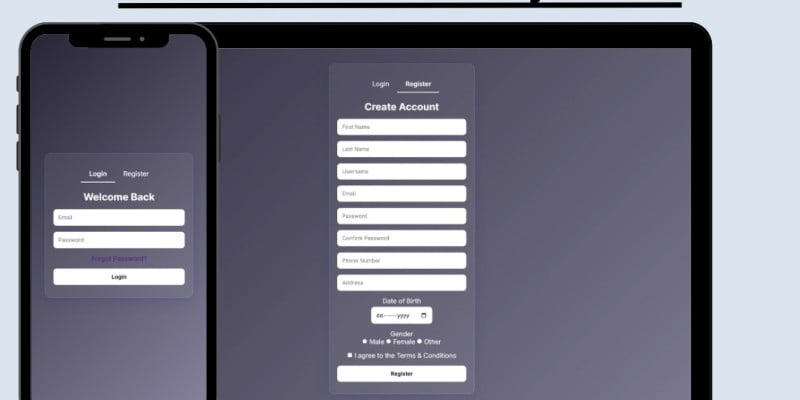
Description
A modern, secure user authentication system, featuring email verification, password reset, CSRF protection, and more.
This project is designed to provide a secure and production-ready login/register system that can be easily deployed on any device using Docker. It follows best practices for authentication, input validation, and session management, making it a solid starting point for any web application requiring user accounts.
Features
🔧 Core Functionality
- User Registration with Validation
- Secure Login with Session Management
- Email Verification using unique tokens
- Forgot Password and Reset Flow
- Responsive UI with modern design
- Clean Code and well-documented structure
🔒 Security Features
- Passwords hashed with password_hash()
- CSRF protection using unique tokens
- Input validation and sanitization
- Session hardening (httponly, secure, strict_mode)
- Email verification required before access to dashboard
🐳 Dockerized Setup
- PHP backend and MySQL database running in separate Docker containers
- Easily portable and deployable to any environment
🛠️ Tech Stack
- Frontend: HTML5, CSS3, JavaScript
- Backend: PHP (PDO)
- Database: MySQL (MariaDB)
- Email: PHPMailer (SMTP-based)
- DevOps: Docker, Docker Compose
Requirements
1. For Dockerized Setup (Recommended)
You must have the following installed:
- Docker Engine
- Version: 20.10+
- Required to run PHP and MySQL containers
- Docker Compose
- Version: 1.29+
- Used to define and run multi-container applications
2. Email Delivery (SMTP Configuration)
To use email verification and password reset, you need:
- Access to an SMTP server (e.g., Gmail, Outlook, Zoho, SendGrid)
-
Valid SMTP credentials:
- Host (e.g., smtp.gmail.com)
- Port (usually 465 or 587)
- Username
- Password or App Password
- TLS/SSL enabled
Note: If using Gmail, you may need to enable “App Passwords” and allow access for less secure apps (or use OAuth2 setup)
Instructions
Step 1: Download and place the files in a directory of your choice without changing the structure of the folders.
⚙️ Step 2: Configure Email & Database Credentials
- Open the
php/config.phpfile. - Set the following variables with your own values:
// Database
$db_host = 'db';              // Use 'db' for Docker-based hostname
$db_name = 'login_db';
$db_user = 'user';
$db_pass = 'password';

// Email (SMTP)
$mailHost = 'smtp.yourserver.com';
$mailUsername = 'youremail@example.com';
$mailPassword = 'yourSMTPpassword';
$mailFrom = 'youremail@example.com';
💡 Use an SMTP provider like Gmail (with App Password), Outlook, Zoho, or SendGrid.
Step 3: Start the Project with Docker
In the root project directory:
docker-compose up --build
Step x: Shut Down the Project
docker-compose down
| Author | andreasn |
|---|---|
| Category | Scripts & Code / PHP Scripts / Login |
| Price | $20 |
| Extended License | $60 |
| First Release | Aug 4, 2025 |
| Last Update | Aug 4, 2025 |
| Files included | .php, .css, .html, .sql, JavaScript .js |
Categories
Tags
External listing. code.market does not sell this product and does not process payment for it. Pricing, payment, delivery, licensing, refunds, and support are handled by the third-party merchant on its own website. We may earn an affiliate commission from a referral. Details.