
Learnify LMS – Complete Laravel LMS & Course Selling Marketplace with Flutter Mobile App

Description
Learnify LMS | Online Course Marketplace and Learning Platform With Flutter App
Learnify LMS is a complete online course marketplace and learning management
system — a public storefront where students discover and buy courses, a workspace where
instructors build and sell them, and an admin panel that runs the business behind both. Students learn
on the web or in the included Flutter app, and their progress follows them between the two.
From one Laravel 13 backend you get the course storefront, the student learning area, the
instructor workspace, the full admin back office and a Flutter app for Android and iOS.
Everything ships together in the main download package and talks to a single backend and database over a
documented REST API.
A course moves through one flow — created, submitted, approved, published, purchased, studied, completed,
certified — while the platform commission is split, instructor earnings accrue to a ledger, payouts are
requested and paid, and every transaction posts to double-entry accounts automatically. The platform
supports multi-language usability with RTL and LTR layouts across web and mobile.
Demo
Web
Storefront: lms.bugbuild.com
Admin panel ·
Instructor workspace ·
Student area
Demo logins (password for all: 12345678)
Admin: admin@learnify.test
Instructor: john@learnify.test
Student: alice@learnify.test
Android app
Download the demo APK
— the login screen has one-tap Student and Instructor demo accounts, so you can sign in without typing anything (demo site only; they never appear on your own install).
The same accounts are offered as one-tap chips on the demo login page. The demo resets every hour, so please do not change the demo passwords.
What You Get
- Laravel Web Backend — course storefront (page-builder driven), student learning area with the lesson player, instructor workspace, and the full admin back office.
- Mobile App (Flutter) — one app for students and instructors: browse and buy courses, watch lessons with progress sync, take quizzes, download for offline, join live classes, collect certificates and badges; instructors get an earnings dashboard and assignment grading.
- Both platforms are included — one Flutter codebase with the Android and iOS projects in the package; nothing is sold separately or excluded.
- Full source code for the backend and the app, the database, and complete documentation — all inside the main
Main_Files.zip, as two folders:WebSourceCode(Laravel) andAppSourceCode(Flutter, Android and iOS). - Web installer — a guided
/installwizard checks requirements, writes the environment file, runs the migrations and creates your admin account. No command line needed. Works on shared hosting: nosymlink()needed, and an interrupted install simply resumes. - No ionCube, no licence server, no phone-home. The code is plain, readable PHP and Dart. Nothing in the product checks a purchase code at runtime, so your site can never go down because a licensing server did.
- Four website templates — Aurora (modern gradient), Academy (classic institute), Editorial (minimal & typographic) and Nova (dark & techy). Preview any of them on your live site, then apply with one click; your sections, copy and brand colours carry over.
- 17 payment gateways — Stripe, PayPal, Square, Mollie, Paystack, Flutterwave, Razorpay, Cashfree, Xendit, Mercado Pago, PayTabs, SSLCommerz, bKash, Nagad, aamarPay, shurjoPay and manual bank transfer — each with sandbox mode, per-gateway fees and API refunds where the provider supports them.
- One-click updates — upload the release ZIP in the admin panel and it installs itself: backup, migrate, reseed roles/permissions and reference data, clear caches, safely re-runnable. No SSH needed; a manual/cPanel path with a one-command fallback is there too. Your custom head/CSS/body code lives in the database and survives every update.
Who It Is For
Course marketplaces that sign up many instructors and take a commission, individual creators and coaches selling their own catalogue, training companies and academies running paid or internal programmes, and schools or institutes that need fees, batches and guardians alongside their courses. It is a learning platform, not a general webshop — nothing in the panel is retail noise you have to work around.
Important Note About Third-Party Service Costs
Any costs related to hosting, domains, server infrastructure, SMS gateway providers, email services, push-notification (Firebase) services, video hosting or CDN providers, Apple/Google developer accounts for publishing the app, or any other third-party service are not included in the item price. Buyers must purchase and configure these separately based on their own requirements. You also generate your own application key and configure your own credentials during setup.
Payment gateways — Stripe, PayPal, Square, Mollie, Paystack, Flutterwave, Razorpay, Cashfree, Xendit, Mercado Pago, PayTabs, SSLCommerz, bKash, Nagad, aamarPay and shurjoPay are independent third-party services. You need your own merchant account with each one, and their transaction fees, currency-conversion charges and account requirements are between you and the provider. Stripe Connect is used for automatic instructor payouts and has its own onboarding and country availability rules.
AI features — the optional course-outline generator, the AI tutor inside a course and the grading assistant can call a large-language-model API (Anthropic Claude, or any OpenAI-compatible endpoint). They are off by default, run only with an API key you add under Settings, and are billed by the AI provider on your own account; no AI service is included with the item.
Documentation
Full installation, configuration and app build guides:
View Documentation
— the same files ship in the documentation folder inside the download.


Application Features
Course Marketplace & Storefront
- Course catalogue with keyword search, category, level, price, instructor and minimum-rating filters, and sorting
- Course page with curriculum, preview lessons, instructor profile, reviews, ratings breakdown and FAQs
- Instructor directory and public instructor profiles with their catalogue and student count
- Cart, wishlist, checkout, coupons, gift a course, a full order history and print-ready invoices for every order
- Pay in instalments: the first payment enrols, the rest are scheduled with due dates and a grace period
- Waitlist for courses with a seat limit, and a student wallet for refunds, invite bonuses and loyalty points
- Course bundles, membership plans (monthly and yearly, all-access or selected courses) and post-purchase upsell offers
- Learning paths — ordered course sequences with their own landing page
- Blog, events, testimonials, FAQs, contact page and static pages, all editable from the panel
- Hero banner with four layouts (classic, centered showcase, full-width photo, bento grid), live learner avatars, rating and popular-topic chips
- Homepage builder: 23 toggleable, reorderable sections — rearrange the storefront without touching a template
- Four website templates — Aurora, Academy, Editorial, Nova — that restyle header, hero, cards, fonts and footer; preview on the live site, apply with one click
- Redesigned checkout: step indicator, one-time order bump, wallet balance and purchase-order options, trust badges and a clear order summary
- Light and dark theme, multi-currency display, and a language switcher
Learning Experience (Web & App)
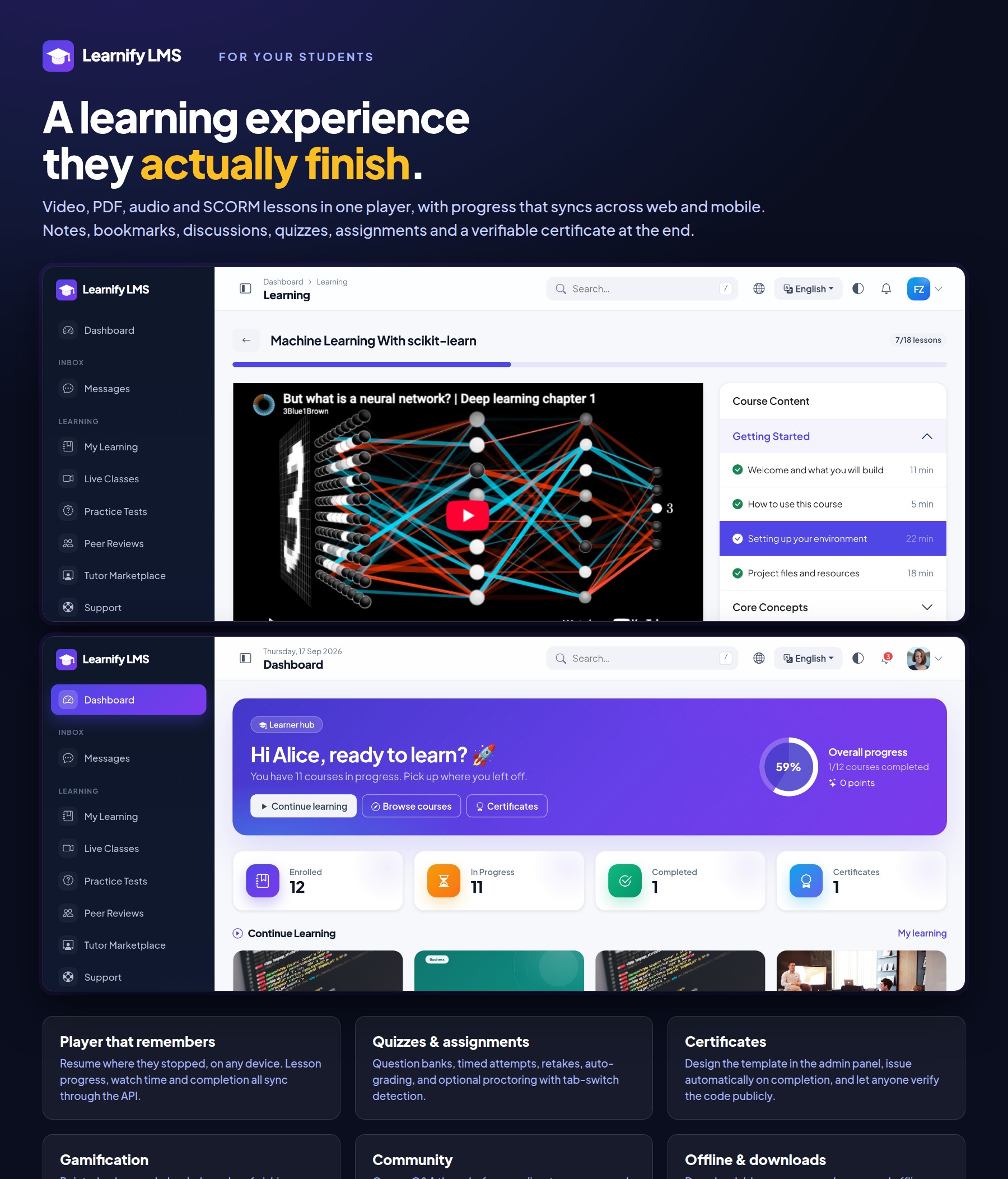
- One player for video, text, PDF, audio, downloadable file, live and SCORM lessons
- Video from YouTube, Vimeo, Google Drive, a direct URL, HLS, an uploaded file, Bunny Stream or Cloudflare Stream, with signed range streaming for uploads; a course preview video (YouTube / Vimeo / Drive / MP4) on the sales page
- Subtitles per lesson, playback resume, Previous / Next navigation with auto-advance on completion, watch time and per-lesson completion, synced between web and app
- SCORM 1.2 and 2004 runtime with tracking, for content authored elsewhere
- Drip content — release sections by schedule or on completion of the previous one
- Per-lesson notes, bookmarks, downloadable resources and a course Q&A thread
- Video checkpoints: the player pauses at a timestamp for a note or a question the instructor placed there
- Practice tests (unlimited, explained answers) and timed mock exams drawn from question banks, with attempt history
- Peer review: classmates score and comment on each other’s assignments anonymously
- Direct messages, course group threads and instructor announcements, with attachments and push notifications
- Support tickets with categories, priorities and staff replies; a tutor marketplace where students post requests, instructors bid, the accepted bid is paid through checkout and the tutor is paid via Earnings
- Quizzes with question banks and eight question types — single-answer and multiple-answer choice, true/false, fill-in-the-blank, put-in-order, match-the-pairs, short answer and essay — plus CSV bulk import, time limits, negative marking, retake rules and instant results with per-question review
- Optional proctoring: full-screen requirement, tab-switch detection, copy-paste blocking, webcam snapshots and a violation log
- Assignments with text, file or link submission, instructor grading with feedback, return-for-resubmission with attempt history, and an optional AI grading assistant
- Certificates issued automatically on completion (with an emailed download link), from a template you design in the drag-and-drop designer, with public verification by code and QR
- Gamification: points, badges and a leaderboard
- Live classes over Zoom (meetings created automatically via the Zoom API), Google Meet (created in the instructor’s calendar), Jitsi or the built-in classroom, with email / push reminders before start, attendance and recordings
- Forums, direct messages and notifications, in the browser and as push
Instructor Workspace
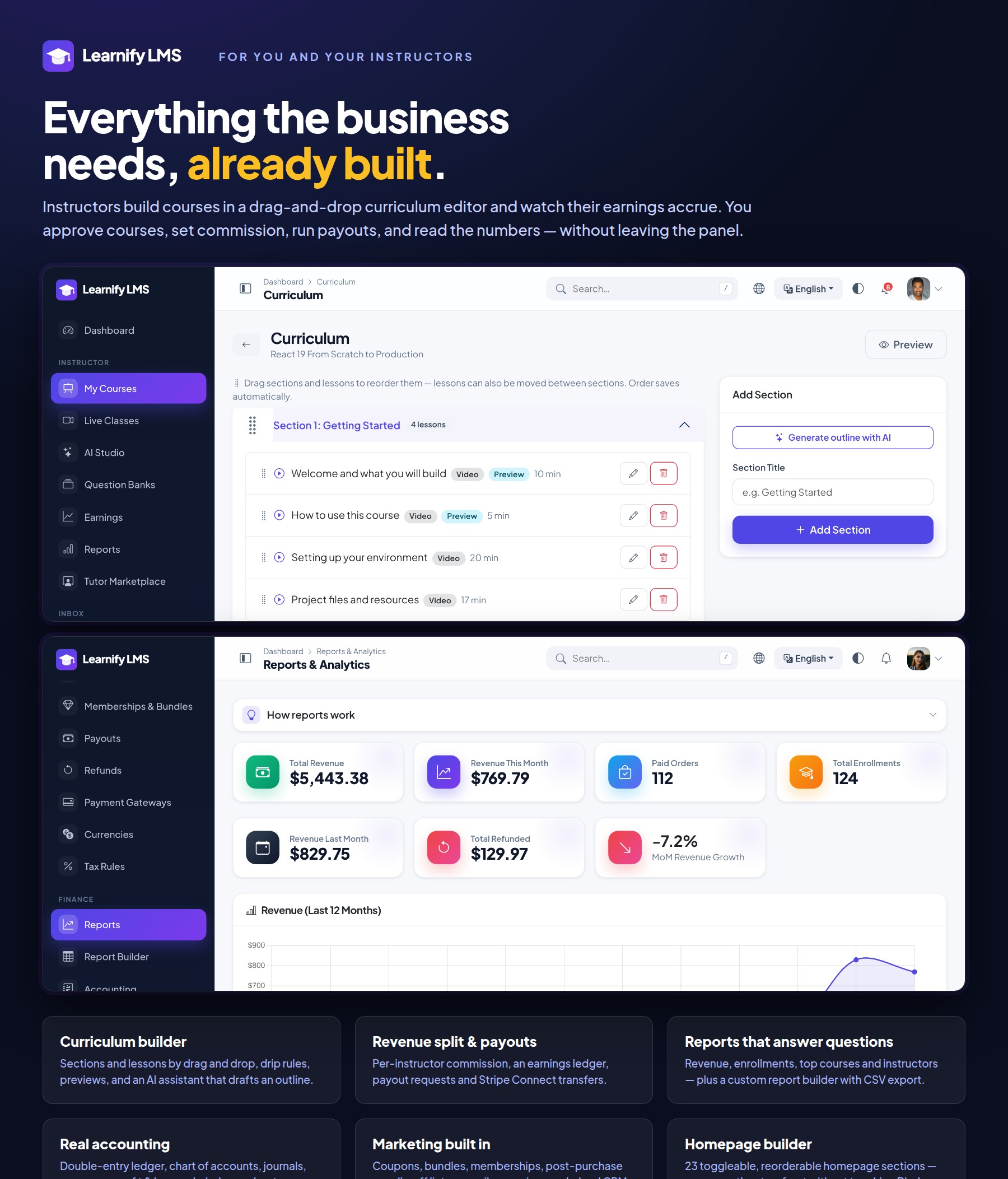
- Drag-and-drop curriculum builder for sections and lessons, with preview flags and drip rules
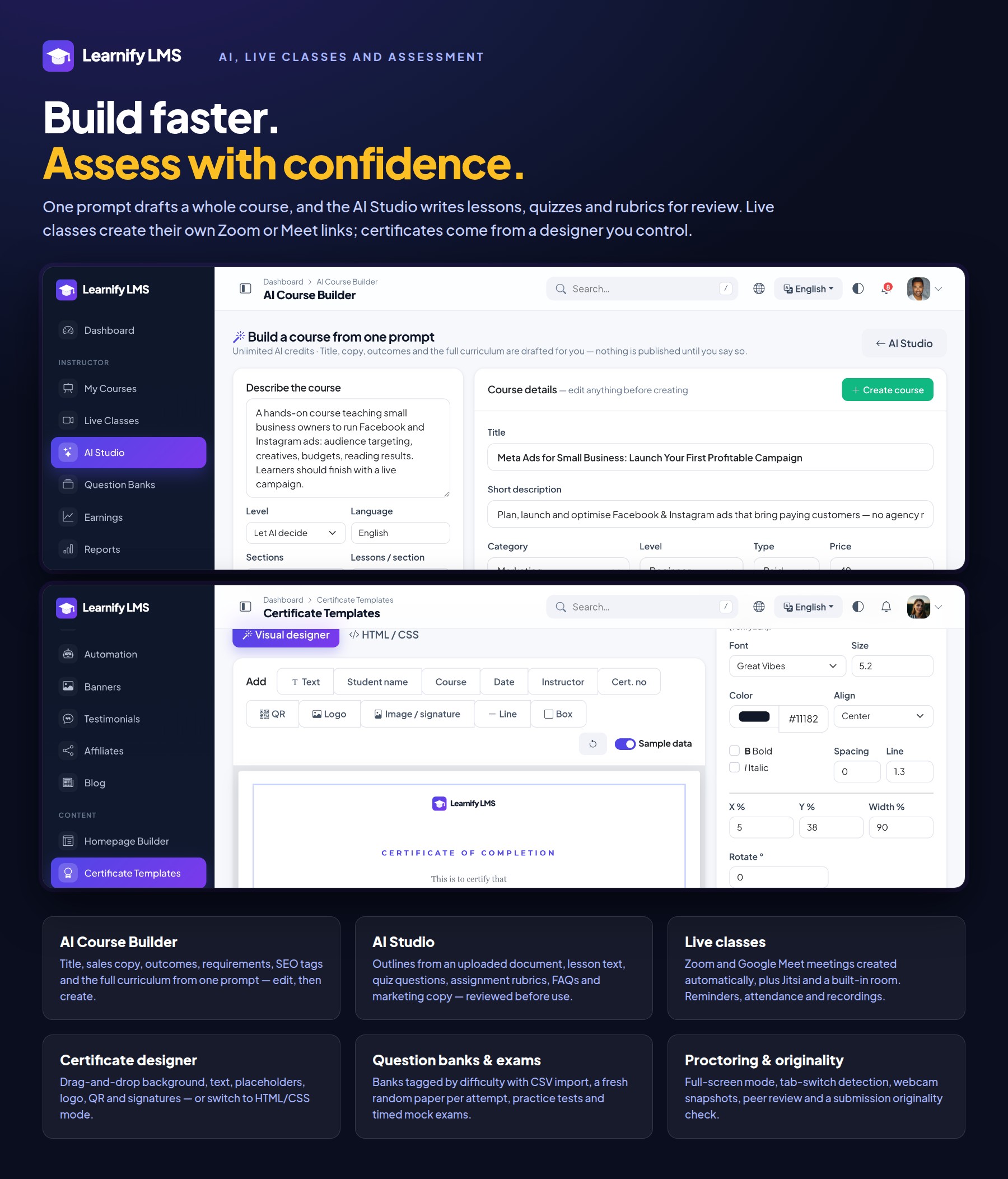
- AI Course Builder: one prompt drafts the title, sales copy, outcomes, requirements, SEO tags and the full curriculum — edit, then create the course
- Quiz builder with reusable question banks, and attempt review including proctoring snapshots
- Question banks tagged by difficulty, CSV import, and a fresh random paper per attempt
- Originality check that compares a submission against every other one for the assignment, plus an optional external similarity provider
- AI Studio: course outline (also from an uploaded document), lesson text, quiz questions, an assignment with rubric, course FAQs and marketing copy (titles, descriptions, SEO, email and social) — everything reviewed before it is applied
- Assignment creation with accepted submission types, submission list, grading and return-for-resubmission
- Course FAQs, Q&A answering and review responses
- Live class scheduling with automatic Zoom / Google Meet meeting creation and student reminders
- Earnings ledger, payout requests and Stripe Connect onboarding
- Reports: enrolments, revenue, completion rate and student progress per course
Admin Back Office
- Dashboard with revenue, enrolments, growth and an action list of what needs approving
- Course approval queue, categories, levels, featured courses, and manual enrolment by e-mail with expiry, revoke and restore
- Instructor applications: approve or reject who may teach (with the applicant’s note and your reason on rejection), the role granted on approval and the decision emailed; or switch marketplace mode off for a single-academy site where only admins add instructors
- Automation rules: abandoned-cart, inactive-learner, course-completion follow-up and membership-expiring emails, each with its own timing and a manual run button
- Users, roles and granular permissions
- Orders, refunds, coupons, bundles, memberships and upsells
- Manual / bank-transfer payments held as pending until staff confirm them — for orders, memberships and fee invoices alike
- Support ticket desk and a contact-message inbox
- Revenue share per course, per instructor or global, earnings ledger, payout requests with clear balance messages (decisions emailed) and Stripe Connect transfers
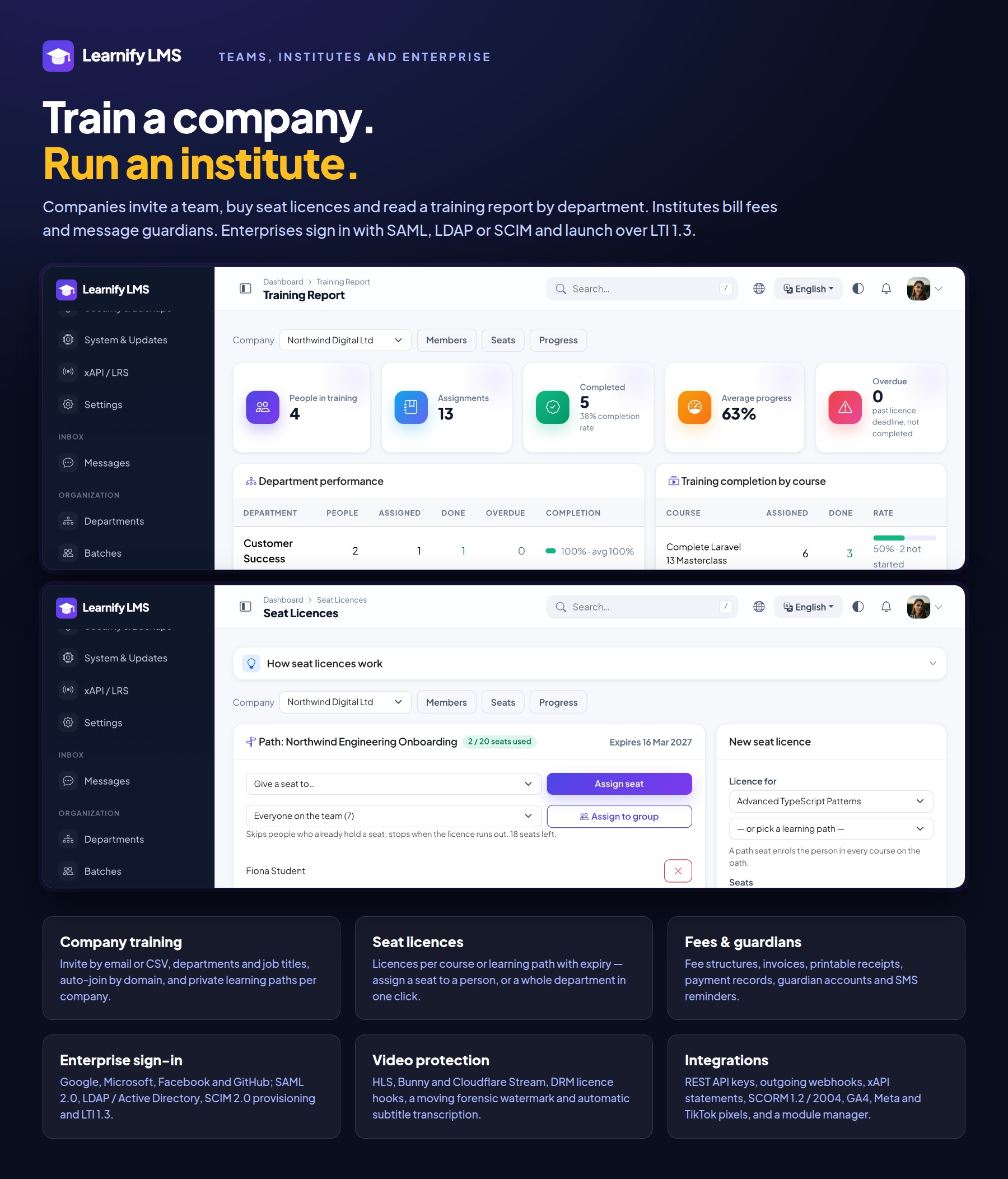
- B2B invoicing: purchase-order number and billing company on orders; company seat licences with allowed e-mail domains for automatic joining, departments, job titles and learning paths pushed per department
- 17 payment gateways grouped by region (Stripe, PayPal, Square, Mollie, Paystack, Flutterwave, Razorpay, Cashfree, Xendit, Mercado Pago, PayTabs, SSLCommerz, bKash, Nagad, aamarPay, shurjoPay, manual transfer) with sandbox mode, processing fees and API refunds; currencies with exchange rates; tax rules by country
- Reports and analytics, plus a custom report builder with CSV export and saved reports
- Marketing: promotional banners, email campaigns, testimonials, a lead CRM and an affiliate programme
- Drag-and-drop certificate designer: background, text, placeholders, logo, QR, signature images, fonts and colours, with an HTML/CSS mode for developers
- Transactional email for every step — receipts, enrolment welcome, certificates, assignment updates, live-class reminders, payouts, refunds, applications — with editable templates for email and push, and a push composer
- Appearance settings: website template, colour presets or custom primary / secondary colours, gradients, corner radius, font, default light / dark mode and sidebar style — applied to the storefront and the admin panel together, with a live preview
- Languages, translation manager and RTL support
- SEO settings, sitemap and meta control per course and page
- Mail and storage configuration (local, S3 or compatible), with a storage limit per account
- Security: two-factor authentication with QR and backup codes, login history, an audit trail, GDPR data export and delete, and scheduled backups
- Sign-in with Google, Microsoft, Facebook or GitHub; SAML 2.0 (Entra ID, Okta, ADFS, Keycloak); LDAP / Active Directory; SCIM 2.0 provisioning; LTI 1.3 launches from Moodle, Canvas or Blackboard
- DRM (Widevine / FairPlay) licence hooks, viewer-bound video links with a moving forensic watermark, and automatic subtitle transcription (Whisper, Deepgram, AssemblyAI)
- Order bump at checkout, Google Analytics 4, Meta and TikTok pixels, plus custom head / CSS / body code fields for any other tag or widget
- Module manager — enable or disable optional features without touching code
- Mobile app settings — name, colours, logo and splash for the Flutter app, applied at runtime
- API keys, outgoing webhooks and an xAPI (Tin Can) statement endpoint
- System page with requirement checks, one-click update, cache tools and one-click demo data (five niche presets: academy, school, coaching, corporate, marketplace)
- Demo mode for your own showcase site: destructive actions blocked, hourly automatic reset
Accounting & Finance
- Double-entry ledger with a chart of accounts, posted automatically from orders, refunds and payouts
- Journal entries, opening balances, fiscal periods and reconciliation
- Expenses and expense categories
- Reports: profit and loss, balance sheet, cash flow, trial balance, general ledger, account statements and instructor payables
Institute Features (optional modules)
- Fees: fee structures, invoices, printable receipts, payment records, guardians and fee SMS reminders
- Companies: invite a team by email or CSV, departments and job titles, auto-join by email domain, seat licences per course or learning path with expiry, assign a licence to a whole department or team in one click, company-private learning paths, and a training report with department performance, completion by course, employee progress and CSV export
- Coaching centres and schools: departments, batches with CSV enrolment, an attendance register, guardian portal and SMS alerts (absent, invoice, payment)
- Events with registrations, paid or free, online or on site
- Automation rules for repetitive admin work
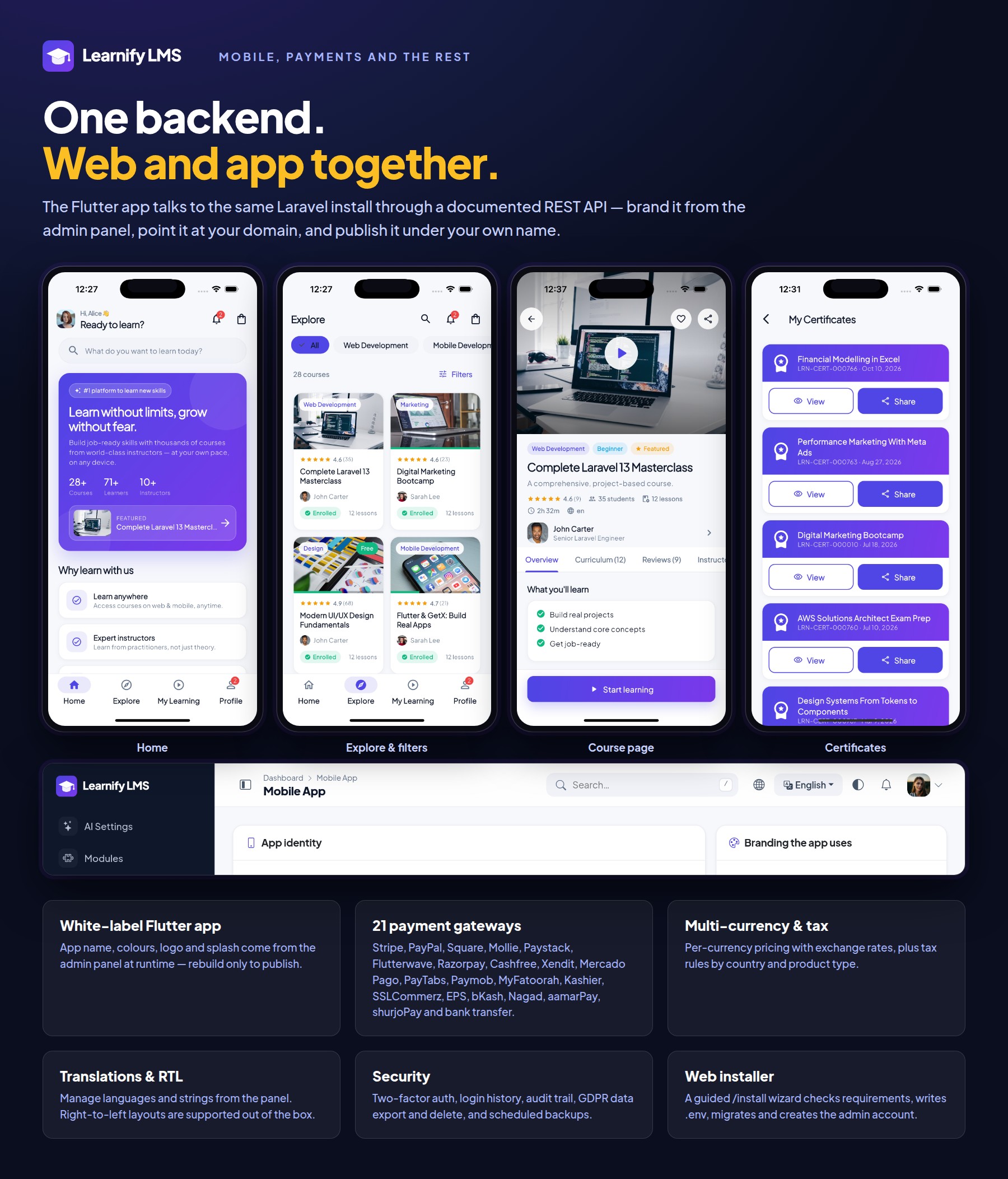
Mobile App (Flutter) — students and instructors
- Onboarding, email login, social login and guest browsing
- Home, explore with filters, search, course page with curriculum, reviews and instructor
- Cart, checkout and payment, returning to the app by deep link when the gateway finishes
- Lesson player with progress sync, notes, bookmarks and offline downloads
- Quizzes, assignments, certificates, badges and the leaderboard
- Live classes, forums, messages and push notifications
- Instructor dashboard: earnings, pending payout, course status, recent enrolments, reviews, and assignment grading with AI-suggested marks
- White-label: the app takes its name, colours and splash from your admin panel at runtime, with its own app logo (separate from the website logo) uploaded under Mobile App settings
- Light and dark theme, multi-language with RTL
Technologies Used
- Laravel 13 (PHP 8.3) with a modular architecture — no ionCube, no encoded files
- MySQL 8
- Bootstrap 5, jQuery and Blade templates
- Flutter 3.44 with GetX for state, routing and dependency injection
- Laravel Sanctum for API authentication
- Firebase Cloud Messaging for push notifications
- Chart.js for the dashboards and reports
System Requirements
Laravel Backend Requirements
- PHP 8.3 or newer
- MySQL 8.0 or newer (MariaDB 10.6+ also works)
- Apache or Nginx with URL rewriting enabled
allow_url_fopenenabled- A writable
storageandbootstrap/cachedirectory - Cron access for scheduled tasks (drip release, campaigns, backups)
Required PHP Extensions
- BCMath, Ctype, cURL, DOM, Fileinfo, GD (or Imagick), JSON, Mbstring, OpenSSL, PCRE, PDO, PDO MySQL, Tokenizer, XML, Zip
App Requirements (Flutter)
- Flutter 3.44 (stable channel) with Dart 3.12
- Android Studio for Android builds; Xcode on macOS for iOS builds
- Android 6.0 (API 23) and above; iOS 13 and above
- A Firebase project if you want push notifications
- An Apple Developer and/or Google Play Console account to publish
Changelog
Version 1.2.0
- One-click Automatic Update — upload the release ZIP under Admin → System & Updates and it installs itself: extracts the package, backs up the folders it is about to touch, swaps them in, migrates, reseeds roles/permissions and reference data, and clears caches
- Manual/cPanel update path for hosts that block ZIP uploads, with a one-click Apply update button
- Super-admin quick-sync URL — a super-admin/owner can hit
/admin/system/quick-syncdirectly after copying files in by hand to migrate and re-sync permissions, no maintenance window - Every update path now re-syncs the super-admin/owner role to the release’s full permission set automatically
Version 1.0.0
Initial release, with:
- Course marketplace storefront — catalogue, cart, checkout, coupons, bundles, memberships, learning paths, homepage builder and 4 website templates (Aurora, Academy, Editorial, Nova)
- Full learning experience — video/text/PDF/audio/live/SCORM lesson player, quizzes (8 question types), assignments, peer review, proctoring, certificates, gamification and live classes (Zoom, Google Meet, Jitsi)
- Instructor workspace — drag-and-drop curriculum builder, AI Course Builder, AI Studio, question banks, grading and an earnings/payout ledger
- Admin back office — approvals, automation rules, roles & permissions, SSO (Google/Microsoft/Facebook/GitHub, SAML, LDAP, SCIM, LTI 1.3), DRM & video protection, and a module manager
- Accounting & finance — double-entry ledger, journal entries and P&L / balance sheet / cash-flow reports
- Institute features — fees & guardians, company seat licences, batches/attendance, events
- 17 payment gateways (Stripe, PayPal, Square, Mollie, Paystack, Flutterwave, Razorpay, Cashfree, Xendit, Mercado Pago, PayTabs, SSLCommerz, bKash, Nagad, aamarPay, shurjoPay, manual transfer)
- Flutter mobile app for students and instructors, white-labelled at runtime (name, colours, logo, splash) from the admin panel
- No ionCube, no licence server — plain, readable PHP and Dart source throughout
| Type | Flutter App |
|---|---|
| Author | BugBuild-Labs |
| Price | $44 |
| Sales | 7 |
| Rating | 0 (1) |
| Published | Sep 24, 2026 |
| Last Update | Oct 13, 2026 |
| Compatible Software | Flutter 3.x, Flutter 2.x, Flutter 1.x |
| Demo Url | https://lms.bugbuild.com |
| Mobile Files Included | JavaScript JS, CSS, LESS, Sass, Stylus, PHP, HTML |
Categories
Tags
External listing. code.market does not sell this product and does not process payment for it. Pricing, payment, delivery, licensing, refunds, and support are handled by the third-party merchant on its own website. We may earn an affiliate commission from a referral. Details.
Products of the Week.
Submit🥇

STOP GUESSING WHAT TO POST
AI that learns your brand voice and builds a month of consistent, on-brand social content: carousels, posts and hooks that sound like you, not like everyone else's AI.
SaaS · 7,397 views · 67 clicksSaaS · Week 46 · 7,397 views · 67 clicks
🥈

Conversational Backlinks for Busy Founders
Place Backlink Relevant Conversation for your domain across Forums and Conversations
Website · 46,697 views · 232 clicksWebsite · Week 46 · 46,697 views · 232 clicks
🥉

upvote.club
Free Social Media Engagement that Helps Boost Your Content. Upvote Club supports 19 social networks with 100+ engagement actions in one dashboard. Add links to your posts and get free engagement from real users.
SaaS · 44,633 views · 127 clicksSaaS · Week 46 · 44,633 views · 127 clicks
#4

Substack Posting API
Onboard your Agent to Substack. Write Publish on Substack via API
SaaS · 63,518 views · 206 clicksSaaS · Week 46 · 63,518 views · 206 clicks
#5

Seenshot App
Free, Fast, MacOS Screenshot app. Make Screenshot cmd+shift+2 and send it via link
Desktop App · 32,767 views · 127 clicksDesktop App · Week 46 · 32,767 views · 127 clicks
#6

Hand-Placed Backlinks $9.99 per link. Flat rate.
Buy hand-placed forum, Q-A and directory backlinks. Flat $9.99 per link, no subscriptions — you only pay for approved listings.
Website · 8,384 views · 19 clicksWebsite · Week 46 · 8,384 views · 19 clicks
#7

Free Invoice Generator - PDF Invoices in Your Browser, No Sign-Up
A free invoice maker for freelancers and small businesses: fill in the invoice, check the live preview, and download a PDF that looks exactly like it. Any currency, tax per item, three templates, no sign-up, and nothing leaves your device.
7,012 views · 29 clicksWeek 46 · 7,012 views · 29 clicks
#8

Merge PDF Files Free - Combine PDFs in Your Browser, No Upload
A free PDF merger for office workers, students, and freelancers: combine PDFs and images into one file in the browser, reorder files and pages, pick page ranges, keep bookmarks, and open password-protected PDFs. Nothing is uploaded, no sign-up, no watermark.
6,487 views · 18 clicksWeek 46 · 6,487 views · 18 clicks