
League Table

Description

League Table is a versatile WordPress plugin that allows you to create beautiful sortable and responsive tables inside your posts, pages, custom post types or widget area.
So many WordPress users are using this plugin because:
It’s fast and easy to use
It’s easy to use and you will be able to create a perfect table without even reading the manual, check out this video to see how you can create a table in about 30 seconds.
It’s powerful
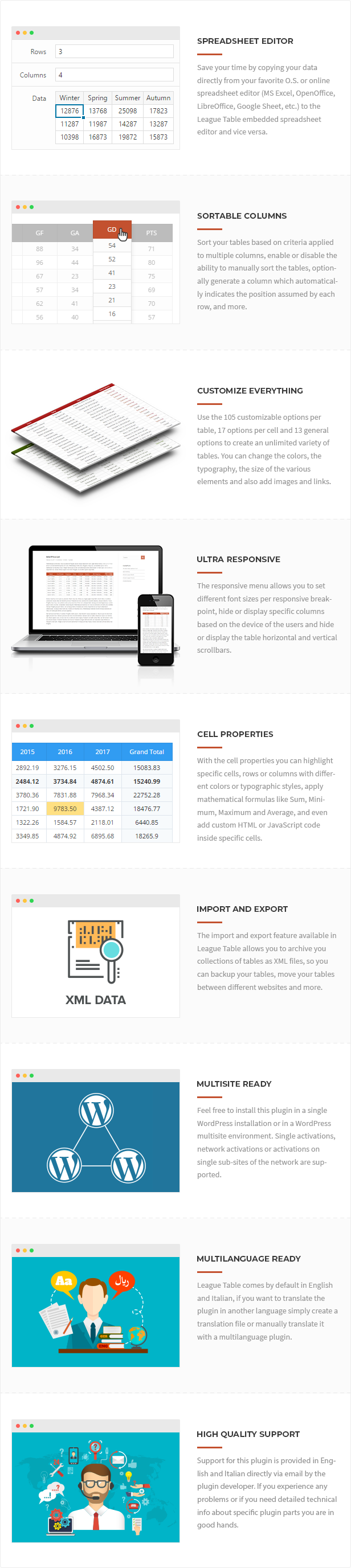
With 105 options per table, 17 options per cell, 13 general options, a spreadsheet editor to edit the table data and an advanced multi-columns sorting system you can creatively represent every kind of table. Check out this screenshot to have an idea of the extremely high number of available options.

Demo
Some examples of what you will be able to create with this plugin:
Sport
- Premier League Standings – Sortable Responsive Table with Images
- Premier League Fixtures – Responsive Table with Images
- Premier League Results – Responsive Table with Images
- Sports Betting – Responsive Table
- Bundesliga Standings – Sortable Responsive Table in Sidebar
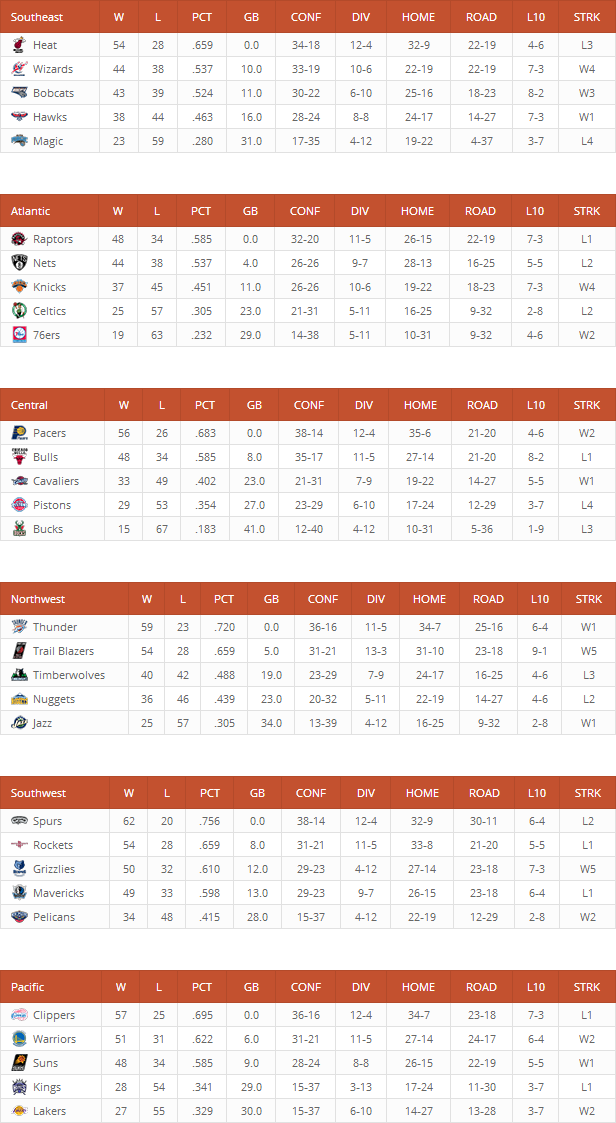
- NBA Standings – Multiple Sortable Responsive Tables with Images
- Football Statistics – Table with Scrollbar Enabled
Pricing
Gaming
Financial Data
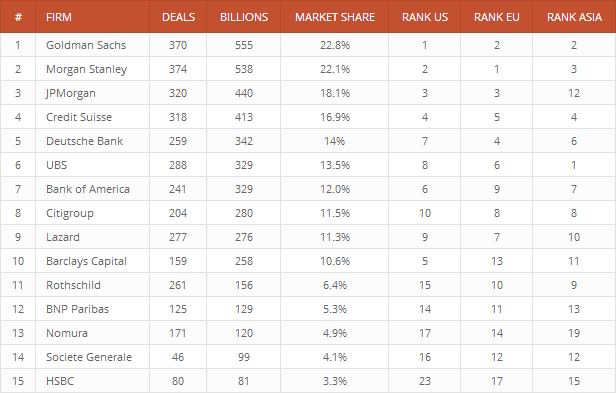
- Top Financial Advisers – Sortable Responsive Table
- Interest Rates – Sortable Table with Scrollbar Enabled
- NASDAQ – Sortable Table with Scrollbar Enabled
Weather
Education
Medical
Demography
Agricolture
Video Tutorials
- Create a simple table
- Apply sorting criteria
- Customize the style of a table
- Customize the cell properties
- Apply the autocolors
- Apply the autoalignment
- Make a table responsive
Spreadsheet Editor
With League Table you will not lose time adding table data with a normal CRUD editor, the most efficient method to create and edit table data is clearly a spreadsheet editor, which in this plugin is implemented with the powerful Handsontable JavaScript library.
The spreadsheet editor available in League Table gives you the ability to:
- Copy your data directly from your favorite O.S. or online spreadsheet editor (MS Excel, OpenOffice, LibreOffice, Google Sheet, etc.) to League Table and vice versa
- Easily add you data by using the common functions provided by a spreadsheet software (copy and paste a group of cells, drag rows, drag columns)
With an embedded spreasheet editor you don’t even need the usual “Import CSV” feature, because by copying and pasting from a spreadsheet software you can easily import the data of any CSV, XLS or ODS (and all the other formats supported by your spreadsheet software) file.
Sortable Columns
With the included sorting system you will be able to sort your tables based on criteria applied to multiple columns, enable or disable the ability to manually sort the table for your users, optionally generate a column which automatically indicates the position assumed by each row, and more.
The included sorting system supports different types of data:
- Text
- Digit
- Percent
- Currency (you can use point or comma as a decimal mark based on your needs)
- URL
- Time
- Date (all the most common date formats are supported)
The ability of the sorting system to work with different types of data makes this plugin very versatile, just to give you an idea you can use it for:
- Sports Fixtures
- Sports Results
- Sports Betting
- Sports Statistics
- Standings Tables
- Pricing Tables
- Products Comparison
- Financial Data
- Weather Data
- Demographic Data
- Ladder Tournaments
- Lists of Achievements
- And more …
If you need to create any kind of statistic or if your purpose is to list the best albums of this year, the best laptop computers in Amazon, the best WordPress Themes available in ThemeForest or the best of whatever you want, then you should use League Table!
Customize Everything
In the “Style” menu of League Table you have control of the general style of the table, here you will find the following options:
- Table Width
- Table Width Value
- Table Minimum Width
- Enable Container
- Container Width
- Container Height
- Table Margin Top
- Table Margin Bottom
- Header Font Size
- Header Font Family
- Header Font Weight
- Header Font Style
- Header Position Alignment
- Header Background Color
- Header Font Color
- Header Link Color
- Header Border Color
- Body Font Size
- Body Font Family
- Body Font Weight
- Body Font Style
- Even Rows Background Color
- Odd Rows Background Color
- Even Rows Font Color
- Odd Rows Font Color
- Even Rows Link color
- Odd Rows Link Color
- Rows Border Color
Ultra Responsive
With League Table you can use all the best techniques to make your table perfectly responsive:
- You can change the font size of the table cells when the browser viewport width goes below specific values
- You can hide specific columns when the browser viewport width goes below specific values
- You can hide the images included in the cells when the browser viewport width goes below specific values
- You can enable the scrollbars when the table container is smaller than the table
Cell Properties
With the cell properties you can change the style of single table cells, add images, add links, apply a mathematical formula (with the formula you can automatically generate the value of a cell based on the the values of other cells in the same row, the available formulas are Sum, Minimum, Maximum and Average) or add custom HTML and JavaScript code.
This is a list of the available cell properties:
- Text Color
- Background Color
- Alignment
- Font Weight
- Font Style
- Link
- Link Color
- Open Link New Table
- Image Left
- Image Left Link
- Image Left Open Link New Tab
- Image Right
- Image Right Link
- Image Right Open Link New Tab
- Formula
- Formula Data
- HTML Content
Import and Export
The import and export feature available in League Table allows you to archive your collections of tables as XML files.
This is extremely useful because:
- Works as backup system for your tables (you will never lose any table)
- You can move your tables between different websites
- You can move your tables between different subsites of a WordPress network
Examples
Premier League Standings
Sortable responsive table with links and images.

NBA Standings
Multiple sortable responsive table with images.
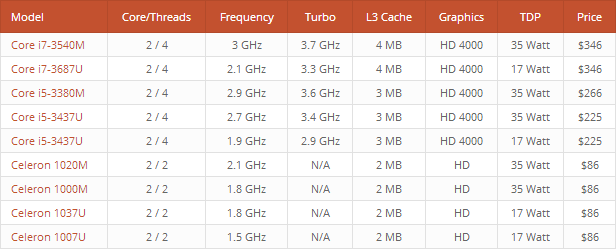
Intel Price List
Sortable responsive table with links.
Top Financial Advisers
Sortable responsive table with no links and no images.
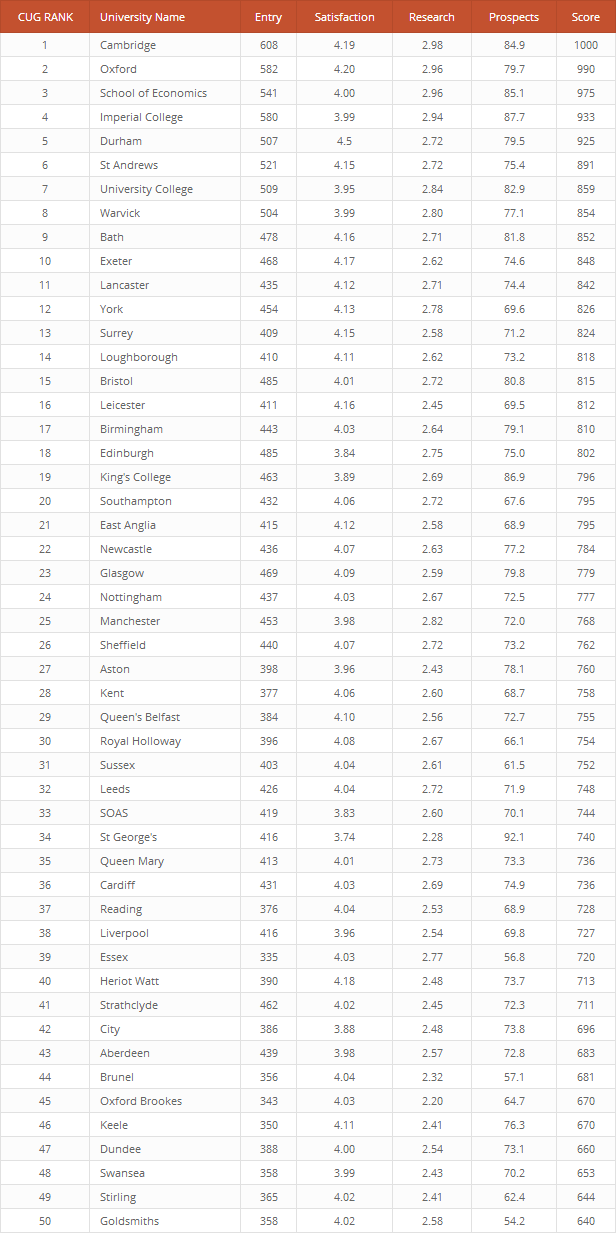
Top 50 UK Universities
Sortable responsive table with no links and no images.
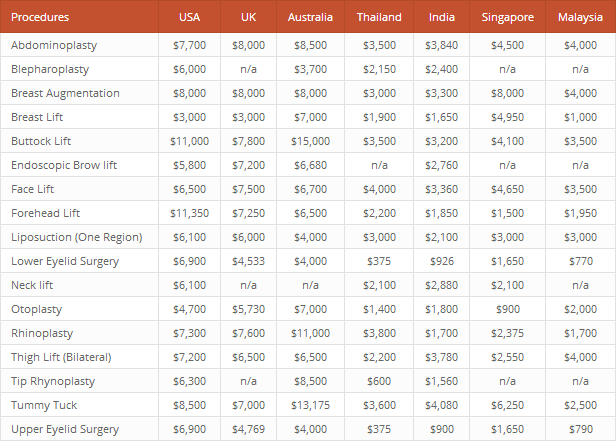
A Healtcare Cost Comparison
Sortable responsive table with no links and no images.
Five Stars Reviews

Documentation
The official plugin documentation and the plugin FAQs are available on the League Table Documentation page.
Yearly Plans
You can alternatively purchase yearly plans for 1, 5, or 25 websites. For more information, please see the League Table Pricing Section on our portal.
Credits
This plugin makes use of the following resources:
- Chosen licensed under the MIT License
- Handsontable licensed under the MIT License
- TableSorter licensed under the MIT License.
Updates
28.05.2025 - v2.25
  - Updated the internal version of the plugin options to support recent changes
27.05.2025 - v2.24
  - Deleting multiple tables from the Tables menu now correctly removes the related records from subsidiary database tables
  - You can now define how many items are displayed per page in the Tables menu via a new setting
16.05.2025 - v2.23
  - Bug fix applied to PluginUpdateChecker class, updated to version 1.0.11
  - Fixed PHP notice caused by early use of translation functions
  - Fixed JavaScript deprecation notices for back-end functionality
15.04.2025 - v2.22
  - Minor bug fixes
  - The plugin now supports importing data exported from the free version
07.04.2025 - v2.21
  - Improved back-end UI in the "Tables" menu
31.03.2025 - v2.20
  - Added support for seamless updates delivered directly from our server
  - Major back-end UI update
  - Refactoring
22.10.2024 - v2.19
  - Improved plugin activation logic to support WordPress.com Calypso and WP CLI
05.04.2023 - v2.18
  - The link to the documentation page has been updated
28.09.2022 - v2.17
  - The "Sticky Header" option has been added
16.05.2022 - v2.16
  - The offline plugin documentation has been replaced with a quick start guide with links to the online manual
09.10.2021 - v2.15
  - Added the ability to copy and paste cell properties
29.05.2021 - v2.13
  - General refactoring
  - Added a .pot file
  - TableSorter library updated to the latest version
02.09.2020 - v2.09
  - Bug fix
17.08.2020 - v2.08
  - Removed deprecated jQuery methods
  - Minor back-end improvements
29.11.2019 - v2.07
  - Fixed CSS issues caused by the changes applied in WordPress 5.3
  - Fixed a conflict with the MariaDB reserved words
  - Minor back-end improvements
03.05.2019 - v2.06
  - A context menu has been added to the spreadsheet editor
  - In the spreadsheet editor the presence of the cell properties is now visually displayed
  - The single cell properties can now be displayed or hidden with the "Cell Properties" options
  - A caption can now be assigned to the table
  - New style options have been added
  - New cell properties useful to apply colspan and rowspan have been added
  - The minified versions of the front-end assets are now provided and used by default
  - Additional code improvements
14.12.2018 - v2.05
  - The "League Table" block has been added
  - Minor back-end improvements
13.09.2018 - v2.04
  - Fixed a conflict between the "ROWS" reserved word added in MariaDB starting from version 10.2.4 and the "ROWS" database column used in the plugin database
19.11.2017 - v2.03
  - Fixed color picker style issue caused by style changes implemented in WordPress 4.9
16.06.2017 - v2.02
  - The TinyMCE "League Table" button implementation has been updated
  - Added the "Subtraction" formula
  - In the "Tables" menu the search can now be performed by ID
  - The shortcode is now displayed in the "Tables" menu
  - Minor back-end improvements
28.02.2017 - v2.00
  - The plugin has been rewritten with an OOP approach
  - The database structure has changed
  - New back-end interface
  - The table data are now editable with a spreadsheet editor
  - The table cells are now customizable with the cell properties
  - Added new sorting options
  - Added new style options
  - Added Autocolors options
  - Added Autoalignment options
  - Added new responsive options
  - Added Import and Export feature
  - Added new plugin options
  - Added a new TinyMCE button
18.03.2016 - v1.12
  - Added support for RTL Layout
  - Removed PHP notices
28.06.2015 - v1.09
  - Fixed issue with SSL
26.06.2014 - v1.08
  - Backend interface revamp
25.06.2014 - v1.07
  - Added a new option useful to clone tables layouts with items included
  - Backend interface revamp
13.05.2014 - v1.06
  - Added a new option useful to clone tables layouts
  - Fixed a bug in the uninstall hook
Try now the powerful UberChart plugin
Create high-quality charts and graphs with UberChart, probably the most advanced WordPress chart plugin ever created.
Do you care about your website’s SEO?
Improve your internal links structure and get more visits on your WordPress website with the Interlinks Manager plugin.

| Type | WordPress Plugin |
|---|---|
| Author | DAEXT |
| Category | Wordpress / Interface Elements / Tables |
| Price | $129 |
| Sales | 2,745 |
| Rating | 4.82 from 114 ratings |
| Published | Apr 26, 2014 |
| Last Update | May 28, 2025 |
| Compatible Browsers | IE8, IE9, IE10, IE11, Firefox, Safari, Opera, Chrome, Edge |
| Compatible Software | WordPress 6.8.x, WordPress 6.7.x, WordPress 6.6.x, WordPress 6.5.x, WordPress 6.4.x, WordPress 6.3.x, WordPress 6.2.x, WordPress 6.1.x, WordPress 6.0.x, WordPress 5.9.x, WordPress 5.8.x, WordPress 5.7.x, WordPress 5.6.x, WordPress 5.5.x, WordPress 5.4.x, WordPress 5.3.x, WordPress 5.2.x, WordPress 5.1.x, WordPress 5.0.x, WordPress 4.9.x |
| Gutenberg Optimized | Yes |
| Source Files Included | JavaScript JS, CSS, PHP, Layered PNG |
Categories
Tags
External listing. code.market does not sell this product and does not process payment for it. Pricing, payment, delivery, licensing, refunds, and support are handled by the third-party merchant on its own website. We may earn an affiliate commission from a referral. Details.
Products of the Week.
Submit🥇

STOP GUESSING WHAT TO POST
AI that learns your brand voice and builds a month of consistent, on-brand social content: carousels, posts and hooks that sound like you, not like everyone else's AI.
SaaS · 3,986 views · 35 clicksSaaS · Week 45 · 3,986 views · 35 clicks
🥈

Conversational Backlinks for Busy Founders
Place Backlink Relevant Conversation for your domain across Forums and Conversations
Website · 41,634 views · 222 clicksWebsite · Week 45 · 41,634 views · 222 clicks
🥉

upvote.club
Free Social Media Engagement that Helps Boost Your Content. Upvote Club supports 19 social networks with 100+ engagement actions in one dashboard. Add links to your posts and get free engagement from real users.
SaaS · 39,661 views · 114 clicksSaaS · Week 45 · 39,661 views · 114 clicks
#4

Substack Posting API
Onboard your Agent to Substack. Write Publish on Substack via API
SaaS · 58,690 views · 198 clicksSaaS · Week 45 · 58,690 views · 198 clicks
#5

Seenshot App
Free, Fast, MacOS Screenshot app. Make Screenshot cmd+shift+2 and send it via link
Desktop App · 28,072 views · 122 clicksDesktop App · Week 45 · 28,072 views · 122 clicks
#6

Hand-Placed Backlinks $9.99 per link. Flat rate.
Buy hand-placed forum, Q-A and directory backlinks. Flat $9.99 per link, no subscriptions — you only pay for approved listings.
Website · 3,930 views · 19 clicksWebsite · Week 45 · 3,930 views · 19 clicks
#7

Free Invoice Generator - PDF Invoices in Your Browser, No Sign-Up
A free invoice maker for freelancers and small businesses: fill in the invoice, check the live preview, and download a PDF that looks exactly like it. Any currency, tax per item, three templates, no sign-up, and nothing leaves your device.
2,607 views · 17 clicksWeek 45 · 2,607 views · 17 clicks
#8

Merge PDF Files Free - Combine PDFs in Your Browser, No Upload
A free PDF merger for office workers, students, and freelancers: combine PDFs and images into one file in the browser, reorder files and pages, pick page ranges, keep bookmarks, and open password-protected PDFs. Nothing is uploaded, no sign-up, no watermark.
2,426 views · 13 clicksWeek 45 · 2,426 views · 13 clicks