
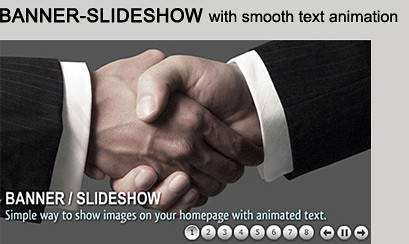
Layer - jQuery Ad Banner / Slideshow

Description
Features:
- Full Customizable
- Set Start / Stay time for each layer
- Set Easing In / Out Type
- Set Animation Speed
- Cufon font support
- Set number of preload images
- Enable / disable play pause button
- Option to add Replay button
- Support relative path
- Support unlimited layers
jQuery(function($){
        $('#jq_AdBanner').fmAdBanner({

            assetPath : 'fmBanner_assets',
            banner_width : 250,
            banner_height : 250,
            numberOfImages_preload : 3,
            image_loader : "loader_img.png",
            image_sprite : "sprite.png",

            loop : true,

            playPause : true,

            default_data_align : "C",
            default_data_spacing : "0,0",
            default_data_inOutDirection : "LR",
            default_data_inOutDistance : "0",
            link_url : "#",
            link_target : "_self"

        });
    });
Sample banner code
<div id="jq_AdBanner" style="position:relative; width:250px;
height:250px; overflow:hidden; visibility:hidden; margin: 0 auto; background-color:#FFF" align="center">

    <div data-starttime="0" data-staytime="30" class="imgSty" src="img1.jpg" style="width:250px; height:250px" />

    <div data-align="BC" data-spacing="32,0" data-inoutdirection="LR" data-inoutdistance="40" data-starttime="6" data-staytime="20" class="divStyle">
        <span class="txtMedium" style=" font-size:1em; color:#fff;">Layer - Ad Banner / Slideshow</span>
    </div>

    <div data-align="LC" data-spacing="15,0" data-inoutdirection="T" data-inoutdistance="180" data-starttime="2" data-staytime="14" data-animationspeed="400" data-easein="easeOutBack" data-easeout="easeOutQuart" class="imgSty" src="img2.png" style="width:172px; height:111px" />

    <div data-align="TL" data-spacing="2,90" data-inoutdirection="RL" data-inoutdistance="100" data-starttime="11" data-staytime="15" class="divStyle">
        <span class="txtMedium" style=" font-size:1em; color:#000;">Clean</span>
    </div>

</div>
Customize this banner into any size:
300×250, 250×250, 240×400, 336×280, 180×150, 300×100, 720×300, 468×60, 234×60, 88×31, 120×90, 120×60, 120×240, 125×125, 728×90, 160×600 120×600, 300×600
Complete help document is included in download file
If you have any questions about this file contact me through my profile page.

CHECK OUT MY OTHER FILES:


Check out my other files:

Check out my Flash files:



| Type | JavaScript Script |
|---|---|
| Author | FMedia |
| Category | Javascript / Sliders |
| Price | $12 |
| Sales | 243 |
| Rating | 4.20 from 20 ratings |
| Published | Dec 15, 2011 |
| Last Update | Nov 25, 2013 |
| Compatible Browsers | IE7, IE8, IE9, IE10, Firefox, Safari, Opera, Chrome |
| Compatible Software | jQuery |
| Source Files Included | JavaScript JS, HTML, CSS |
External listing. code.market does not sell this product and does not process payment for it. Pricing, payment, delivery, licensing, refunds, and support are handled by the third-party merchant on its own website. We may earn an affiliate commission from a referral. Details.
Products of the Week.
Submit🥇

STOP GUESSING WHAT TO POST
AI that learns your brand voice and builds a month of consistent, on-brand social content: carousels, posts and hooks that sound like you, not like everyone else's AI.
SaaS · 6,175 views · 53 clicksSaaS · Week 46 · 6,175 views · 53 clicks
🥈

Conversational Backlinks for Busy Founders
Place Backlink Relevant Conversation for your domain across Forums and Conversations
Website · 44,810 views · 227 clicksWebsite · Week 46 · 44,810 views · 227 clicks
🥉

upvote.club
Free Social Media Engagement that Helps Boost Your Content. Upvote Club supports 19 social networks with 100+ engagement actions in one dashboard. Add links to your posts and get free engagement from real users.
SaaS · 42,822 views · 123 clicksSaaS · Week 46 · 42,822 views · 123 clicks
#4

Substack Posting API
Onboard your Agent to Substack. Write Publish on Substack via API
SaaS · 61,769 views · 204 clicksSaaS · Week 46 · 61,769 views · 204 clicks
#5

Seenshot App
Free, Fast, MacOS Screenshot app. Make Screenshot cmd+shift+2 and send it via link
Desktop App · 31,037 views · 124 clicksDesktop App · Week 46 · 31,037 views · 124 clicks
#6

Hand-Placed Backlinks $9.99 per link. Flat rate.
Buy hand-placed forum, Q-A and directory backlinks. Flat $9.99 per link, no subscriptions — you only pay for approved listings.
Website · 6,775 views · 19 clicksWebsite · Week 46 · 6,775 views · 19 clicks
#7

Free Invoice Generator - PDF Invoices in Your Browser, No Sign-Up
A free invoice maker for freelancers and small businesses: fill in the invoice, check the live preview, and download a PDF that looks exactly like it. Any currency, tax per item, three templates, no sign-up, and nothing leaves your device.
5,406 views · 19 clicksWeek 46 · 5,406 views · 19 clicks
#8

Merge PDF Files Free - Combine PDFs in Your Browser, No Upload
A free PDF merger for office workers, students, and freelancers: combine PDFs and images into one file in the browser, reorder files and pages, pick page ranges, keep bookmarks, and open password-protected PDFs. Nothing is uploaded, no sign-up, no watermark.
4,981 views · 15 clicksWeek 46 · 4,981 views · 15 clicks