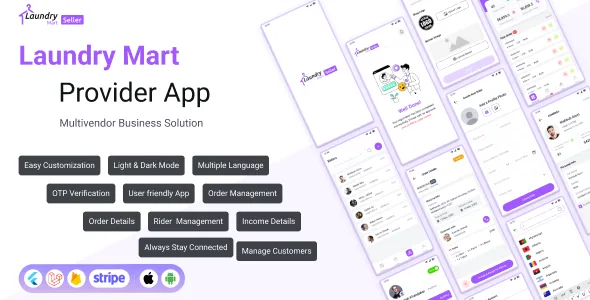
LaundryMart Provider - Single & Multi Vendor Store Management App | Laundry Seller Mobile App.
Description

 ADMIN PROVIDER LOGIN INFO
Email: root@provider.com
Password: secret
ADMIN PROVIDER LOGIN INFO
Email: root@provider.com
Password: secret


 Laundry Mart Provider App is a user-friendly app that simplifies the laundry service process. Noteworthy attributes include effortless customization,
efficient order and service management, multi-language support, rider assignment functionality, and comprehensive provider performance tracking.
The application is designed to deliver a superior user experience, ensuring convenience and satisfaction.
Start your on-demand service business, laundryMart provider is a complete solution that includes mobile apps for customers and service providers, plus a powerful admin panel to control everything in your business.
LaundryMart provider is built using native and modern languages, designed to have the best performance to make your app stand out from your competitors and easily maintain and extend the code base. The Android apps
use Flutter, and iOS apps use Swift and integrate with Firebase for phone authentication, notifications, and more. At the same time, the APIs and admin panel are built using Laravel which is one of the most popular
frameworks for PHP. The app has unique and modern designs and it’s so lightweight, so it’s absolutely a perfect choice for your business.
Top Features of Laundry Mart Provider:
Laundry Mart Provider App is a user-friendly app that simplifies the laundry service process. Noteworthy attributes include effortless customization,
efficient order and service management, multi-language support, rider assignment functionality, and comprehensive provider performance tracking.
The application is designed to deliver a superior user experience, ensuring convenience and satisfaction.
Start your on-demand service business, laundryMart provider is a complete solution that includes mobile apps for customers and service providers, plus a powerful admin panel to control everything in your business.
LaundryMart provider is built using native and modern languages, designed to have the best performance to make your app stand out from your competitors and easily maintain and extend the code base. The Android apps
use Flutter, and iOS apps use Swift and integrate with Firebase for phone authentication, notifications, and more. At the same time, the APIs and admin panel are built using Laravel which is one of the most popular
frameworks for PHP. The app has unique and modern designs and it’s so lightweight, so it’s absolutely a perfect choice for your business.
Top Features of Laundry Mart Provider:
- Provider Registration
- Easy Customization
- Order Management
- Service Management
- Multi Language
- Provider Management
- Assign Rider
- Provider Profile
- OTP Verification
- Always stay connected
- Order Details
- Light Dark Mode
- Earning History
-
- The provider can accept/decline or view the bookings.
- After the customers book a service, the provider can track the status of the booking by toggling the booking tab, he can also accept or decline the booking.
-
- Provider mobile application allows users to manage their services.
- Also, the app shows customer reviews and ratings for each service that they book.
- Razinsoftltd Homepage: Click Here
- Admin Demo: Click Here
- App Demo: Click Here
- All Documentation: Click Here


 Learn more about LaundryMart Provider App:
Intuitive Dashboard
LaundryMart provider app’s intuitive dashboard shows total business summary such as Total Earnings, Total Subscribed Subcategories,
Total Servicemen, Total Booking Services, Earnings Statistics, Recent Booking Activities, Memberships and Serviceman List.
Booking Requests System
From the Booking Requests page, providers can view various booking requests, such as Pending, Accepted, In Progress, Completed and Cancelled.
Providers can also view booking details from each sub-category and change booking status, change booking schedule, download invoices, chat with customers and view booking status.
Self-Registration
Users can register themselves as a provider from the LaundryMart provider app
Transaction History
Providers can view all the transaction history along with settlement status, transaction date, and special notes.
Withdrawal Option System
From the account information section of the LaundryMart provider app’s profile settings option, providers can request a withdrawal to the administrator. On the withdrawal request page,
providers can select their preferred withdrawal method and provide the relevant information accordingly and then slide the request to withdraw from the app.
Change Request Status
From the booking details page, providers can change the booking request status according to the task update. Such as pending, accepted, ongoing, completed, and canceled.
Assign Rider
From the booking details page of the LaundryMart provider app, providers can hire a serviceman whose skills and expertise perfectly match the customer’s service request criteria.
Change Language
From the app setting section, providers can change the app language to their preferences.
Print & Download Invoice
From the accepted booking requests detail page, providers can view, edit, download, and print the invoice easily from the LaundryMart provider app.
View Order Details
Providers can view service details from each subcategory, which includes service overview, FAQs, customer reviews, etc., before choosing to subscribe or unsubscribe to a service.
Get Notifications
Providers get real-time notifications when a customer nearby places an order. They can view the order details from the notification section. The notification also includes direct notifications from the admin.
View Booking on Map
Providers can view the customer’s location on the map from the LaundryMart provider app. This feature allows the provider to find a nearby serviceman to serve the customer on time.
Edit Provider Profile
Providers can edit their profile from the provider app and change their name, email, phone number, and address. They can also change their account information from this section.
Light & Dark Mode
The LaundryMart provider app comes with light and dark mode appearance to enhance better user experience and give users an aesthetic experience while using the app.
Legality
From the LaundryMart provider app, providers can see various legal pages crucial for the app’s authenticity, such as terms and conditions, policy, cancellation policy, and privacy policy.
All these amazing features and functionalities make the LaundryMart Provider App the best. If you want your providers to experience a smooth business operation via mobile devices,
then LaundryMart- Provider App is a must-have.
Learn more about LaundryMart Provider App:
Intuitive Dashboard
LaundryMart provider app’s intuitive dashboard shows total business summary such as Total Earnings, Total Subscribed Subcategories,
Total Servicemen, Total Booking Services, Earnings Statistics, Recent Booking Activities, Memberships and Serviceman List.
Booking Requests System
From the Booking Requests page, providers can view various booking requests, such as Pending, Accepted, In Progress, Completed and Cancelled.
Providers can also view booking details from each sub-category and change booking status, change booking schedule, download invoices, chat with customers and view booking status.
Self-Registration
Users can register themselves as a provider from the LaundryMart provider app
Transaction History
Providers can view all the transaction history along with settlement status, transaction date, and special notes.
Withdrawal Option System
From the account information section of the LaundryMart provider app’s profile settings option, providers can request a withdrawal to the administrator. On the withdrawal request page,
providers can select their preferred withdrawal method and provide the relevant information accordingly and then slide the request to withdraw from the app.
Change Request Status
From the booking details page, providers can change the booking request status according to the task update. Such as pending, accepted, ongoing, completed, and canceled.
Assign Rider
From the booking details page of the LaundryMart provider app, providers can hire a serviceman whose skills and expertise perfectly match the customer’s service request criteria.
Change Language
From the app setting section, providers can change the app language to their preferences.
Print & Download Invoice
From the accepted booking requests detail page, providers can view, edit, download, and print the invoice easily from the LaundryMart provider app.
View Order Details
Providers can view service details from each subcategory, which includes service overview, FAQs, customer reviews, etc., before choosing to subscribe or unsubscribe to a service.
Get Notifications
Providers get real-time notifications when a customer nearby places an order. They can view the order details from the notification section. The notification also includes direct notifications from the admin.
View Booking on Map
Providers can view the customer’s location on the map from the LaundryMart provider app. This feature allows the provider to find a nearby serviceman to serve the customer on time.
Edit Provider Profile
Providers can edit their profile from the provider app and change their name, email, phone number, and address. They can also change their account information from this section.
Light & Dark Mode
The LaundryMart provider app comes with light and dark mode appearance to enhance better user experience and give users an aesthetic experience while using the app.
Legality
From the LaundryMart provider app, providers can see various legal pages crucial for the app’s authenticity, such as terms and conditions, policy, cancellation policy, and privacy policy.
All these amazing features and functionalities make the LaundryMart Provider App the best. If you want your providers to experience a smooth business operation via mobile devices,
then LaundryMart- Provider App is a must-have.
 Mobile & Web Admin V:0.0.1
   - Initial Release
Categories
Tags
Products of the Week.
Submit🥇

STOP GUESSING WHAT TO POST
AI that learns your brand voice and builds a month of consistent, on-brand social content: carousels, posts and hooks that sound like you, not like everyone else's AI.
SaaS · 3,102 views · 28 clicksSaaS · Week 45 · 3,102 views · 28 clicks
🥈

Conversational Backlinks for Busy Founders
Place Backlink Relevant Conversation for your domain across Forums and Conversations
Website · 40,498 views · 216 clicksWebsite · Week 45 · 40,498 views · 216 clicks
🥉

upvote.club
Free Social Media Engagement that Helps Boost Your Content. Upvote Club supports 19 social networks with 100+ engagement actions in one dashboard. Add links to your posts and get free engagement from real users.
SaaS · 38,585 views · 110 clicksSaaS · Week 45 · 38,585 views · 110 clicks
#4

Substack Posting API
Onboard your Agent to Substack. Write Publish on Substack via API
SaaS · 57,628 views · 197 clicksSaaS · Week 45 · 57,628 views · 197 clicks
#5

Seenshot App
Free, Fast, MacOS Screenshot app. Make Screenshot cmd+shift+2 and send it via link
Desktop App · 27,058 views · 119 clicksDesktop App · Week 45 · 27,058 views · 119 clicks
#6

Hand-Placed Backlinks $9.99 per link. Flat rate.
Buy hand-placed forum, Q-A and directory backlinks. Flat $9.99 per link, no subscriptions — you only pay for approved listings.
Website · 2,996 views · 18 clicksWebsite · Week 45 · 2,996 views · 18 clicks
#7

Free Invoice Generator - PDF Invoices in Your Browser, No Sign-Up
A free invoice maker for freelancers and small businesses: fill in the invoice, check the live preview, and download a PDF that looks exactly like it. Any currency, tax per item, three templates, no sign-up, and nothing leaves your device.
1,692 views · 16 clicksWeek 45 · 1,692 views · 16 clicks
#8

Merge PDF Files Free - Combine PDFs in Your Browser, No Upload
A free PDF merger for office workers, students, and freelancers: combine PDFs and images into one file in the browser, reorder files and pages, pick page ranges, keep bookmarks, and open password-protected PDFs. Nothing is uploaded, no sign-up, no watermark.
1,582 views · 13 clicksWeek 45 · 1,582 views · 13 clicks