
Laundry Box POS and Order Management System
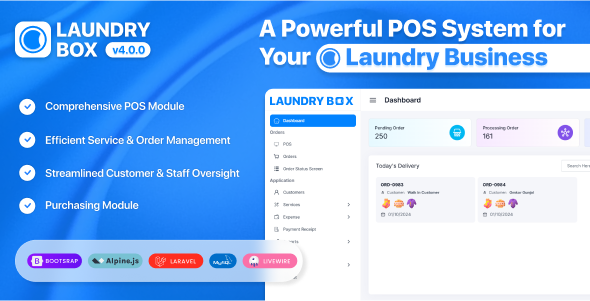
Description
- Latest Version 2.2.0 – Updated 14 October, 2024.
Important Update: Version 2.0 Now Available!
To ensure optimal performance, this update requires PHP 8.0 or above and follows all requirements for Laravel 11. If you encounter any licensing issues, please reach out to our support team for assistance. Stay updated, stay secure!
Explore Our Demo
Admin Panel: Login to Admin Panel Admin Panel Login: admin@admin.com | 123456
About Laundry Box
Laundry Box is a dedicated POS and order management system for laundry businesses across the globe. The complete application is built in Laravel Livewire to bring a hassle free and easy experience for business owners or managers


Dashboard
Get an overview of your business’s performance through the dashboard, which consolidates all key metrics and data into one convenient location. The dashboard includes counts of pending orders, processing orders, ready-to-deliver orders, and delivered orders. Additionally, you can view today’s delivery details, complete with status filters and order number filters for precise tracking. The dashboard also provides an overview of order ratio details, allowing you to analyze your order performance effectively. You can customize the dashboard to display the most relevant information tailored to your business operations.
POS (Point of Sale)
The integrated POS functionality empowers you to efficiently manage customer transactions, encompassing everything from payment processing to itemized receipts. Designed to streamline your sales operations, this system enables you to handle customer purchases with remarkable speed and precision. Within the POS interface, you can seamlessly create new customer profiles, add relevant add-on details to enhance the purchasing experience, and include payment notes to provide greater clarity for each transaction. This comprehensive approach ensures a smooth and efficient sales process for you.
Orders
Easily create, manage, and track orders from start to finish. The order status screen provides an at-a-glance view of all ongoing orders, featuring clear indicators for order progression—from placement to processing, shipment, and completion. You can also change orders between statuses directly from this screen. The order list section includes detailed information about each order item, along with the status of the order and payment details. You can add payments directly on the order list page, edit and delete orders as needed, and print invoices for quick access and distribution.
Customers
Efficiently manage your customers and their associated contacts with ease. Upon selecting a customer, you can view their full financial history, including invoices and payments made. The system provides a clear summary of the total invoices, total amount paid, and the remaining balance for each customer. Additionally, you can access and view the customer ledger, which details every financial transaction linked to that customer. Moreover, you have complete control over customer management—easily edit or delete customer details as needed, ensuring your records stay up to date and accurate.
Services
Organize your services into clear categories to enhance visibility and tracking. Easily create, modify, and manage services while grouping similar offerings through service types for better organization. Set corresponding prices based on the selected service type to structure your offerings efficiently. Additionally, customize each service with add-ons by setting their names and prices, giving you the flexibility to offer enhanced options and upsell complementary features to provide more value to your customers.
Expenses
Efficiently manage all business-related expenses by creating distinct expense categories to group similar types of expenses, making organization and reporting simpler. You can manage each expense category by assigning it a category type (e.g., assets or liability) for clearer financial tracking. Additionally, manage individual expenses by associating them with the relevant expense category, specifying the payment type, amount, and whether tax is enabled or disabled. If tax is enabled, the system allows you to specify the tax Percentage, ensuring accurate financial records.
Payment Receipts
You can view detailed payment receipts that include both customer details and payment information, such as the payment type and transaction specifics. For ease of management, the system allows you to filter receipts by customer, enabling quick access to relevant records based on the selected customer. This ensures streamlined organization and quick retrieval of payment history.
Tools
Optimize your system’s functionality using various built-in tools:
- Financial Year: Set up and manage financial years to enhance reporting accuracy and ensure compliance with regulations.
- Translation Tools: Make the system user-friendly for all clients by translating the interface and communications into multiple languages.
- Mail Settings: Configure email settings, including host, port, and other settings. You can also enable Password Recovery to facilitate a smooth Forgot Password process.
- File Tools: Easily update service icons for a polished presentation.
- SMS Settings: Set up SMS configuration details, including Twilio number, SID, and auth token. Customize SMS formats for order creation and status changes to enhance communication with customers.
- Roles: Define specific user roles and assign permissions to control access throughout the platform, ensuring appropriate security levels.
- Staff Management: Manage employee profiles, roles, and responsibilities effortlessly, fostering effective team coordination.
- Master Settings: Configure application details such as the application logo, email, phone number, firm information, and financial specifics, including financial year, tax percentage, tax type, currency symbol, and position.
- Theme Customization: Change the color theme of the application to align with your branding and aesthetic preferences.This comprehensive suite of tools empowers you to tailor the system to meet your business needs effectively.
- Daily Report: Track daily performance with detailed data about orders, payments, and other transactions.
- Order Report: Monitor the status and completion of customer orders.
- Sales Report: Gain insights into your sales trends, including product performance and revenue generation.
- Ledger Report: Keep track of your company’s accounting ledgers for seamless bookkeeping.
- Tax Report: Simplify your tax calculations by generating detailed tax reports for easier filing and compliance.
- Expense Report: Analyze and categorize your expenses to gain a better understanding of where your money is being spent.
Reports
Generate and view comprehensive reports in various categories, giving you a clear picture of your business:
Demo
https://laundry.blarve.com/Login User or email: admin@admin.com Password: 123456
 Version 2.4.0  [14 May 2025]
* Added Inventory Management with reports.
* Added Purchase module.
* Added Purchase Return module.
* Added Supplier management.
* Updated dashboard charts.
* Added Payment vs Expense chart to dashboard.
 Version 2.2.0  [14/10/2024]
1.Added support for creating and managing multiple payment methods on the invoice screen. Now, you can collect payments using different payment types directly from the POS page.
2.Enhanced application performance by reducing polling intervals.
3.Correctly marked all required fields throughout the application.
 Version 2.1.0  [10/10/2024]
1. Introduced Role Management, allowing users to customize permissions for each role.
 Version 2.0.0  [05/10/2024]
1. Implemented theme support.
2. Added Right-to-Left (RTL) language support.
3. Orders can now only be marked as "Delivered" if the payment has been fully completed.
4. Once an order is marked as "Delivered" or "Returned," further status changes are restricted.
5. Introduced filters on the Order Status screen to display orders by day, month, or year for streamlined data viewing.
6. Resolved an issue where the page was reloading unnecessarily when orders were deleted.
 Version 1.7.0  [29/09/2024]
1. Improved functionality for editing in the Point of Sale (POS) system.
2. Fixed issues related to editing delivery dates.
3. Resolved scrolling issues within the Point of Sale (POS) interface.
Version 1.6.0 [10/09/2024] 1. The issue with the paid amount showing as 0 has been fixed in both the print invoice and invoice listing. 2. The POS user interface has been updated. 3. The issue with the Walk-In customer phone number has been resolved.
 Version 1.5.0  [26/10/2023]
  1. Payment receipt section integrated.
  2. Delivery date edit option integrated in View Order section.
  3. The integration of exporting the customer list in Excel format has been updated
   4. Message notification for delivered orders integrated.
   5. Country code update integrated in master settings
 Version 1.4.0  [18/10/2023]
  1. Email Required update is included in customer management.
  2. The Paid payment amount is indicated in the Invoice section.
  3 .The responsive issue within the sidebar, particularly in accommodating long application names, has been successfully resolved.
  4. The currency position has been added to both the left and right alignment.
  5. Order delete option updated in Order Management.
  6. Financial Year configuration missing alert added.
  7. Thermal Print of 80mm option added.
 Version 1.3.0 [26/09/2023]
  1. Customer Ledger Added.
  2. Customer Profile View Added.
  3. Sidebar scroll issue fixed.
  4. Major bug fixes.
 Version 1.2.0 [09/06/2022]
  1. Provision to add billing staffs.
  2. Color select for items in pos.
  3. Twillio sms gateway integation Added.
  4. Pagination in orders list page.
  5. Option to upload custom icons.
  6. Major bug fixes.
 Version 1.1.1 [26/03/2022]
  1. RTL option for Arabic Added.
  2. Dedicated Pos Tab Added.
  3. Payment Auto-Fill for walk-in customers Added.
  4. Customer Search using name and phone number Added.
  5. Easy Updater Added.
  Version 1.0.0 [06/03/2022]
     First Release
| Type | PHP Script |
|---|---|
| Author | Tellizo |
| Category | Php Scripts / Shopping Carts |
| Price | $104 |
| Sales | 171 |
| Rating | 3.93 from 14 ratings |
| Published | Mar 6, 2022 |
| Last Update | May 21, 2025 |
| Compatible Browsers | IE9, IE10, IE11, Firefox, Safari, Opera, Chrome, Edge |
| Compatible Software | PHP 8.x, PHP 7.x |
| Software Framework | Laravel |
| Source Files Included | JavaScript JS, HTML, CSS, PHP, SQL |
Categories
Tags
External listing. code.market does not sell this product and does not process payment for it. Pricing, payment, delivery, licensing, refunds, and support are handled by the third-party merchant on its own website. We may earn an affiliate commission from a referral. Details.
Products of the Week.
Submit🥇

STOP GUESSING WHAT TO POST
AI that learns your brand voice and builds a month of consistent, on-brand social content: carousels, posts and hooks that sound like you, not like everyone else's AI.
SaaS · 4,000 views · 35 clicksSaaS · Week 45 · 4,000 views · 35 clicks
🥈

Conversational Backlinks for Busy Founders
Place Backlink Relevant Conversation for your domain across Forums and Conversations
Website · 41,653 views · 222 clicksWebsite · Week 45 · 41,653 views · 222 clicks
🥉

upvote.club
Free Social Media Engagement that Helps Boost Your Content. Upvote Club supports 19 social networks with 100+ engagement actions in one dashboard. Add links to your posts and get free engagement from real users.
SaaS · 39,678 views · 114 clicksSaaS · Week 45 · 39,678 views · 114 clicks
#4

Substack Posting API
Onboard your Agent to Substack. Write Publish on Substack via API
SaaS · 58,706 views · 198 clicksSaaS · Week 45 · 58,706 views · 198 clicks
#5

Seenshot App
Free, Fast, MacOS Screenshot app. Make Screenshot cmd+shift+2 and send it via link
Desktop App · 28,089 views · 122 clicksDesktop App · Week 45 · 28,089 views · 122 clicks
#6

Hand-Placed Backlinks $9.99 per link. Flat rate.
Buy hand-placed forum, Q-A and directory backlinks. Flat $9.99 per link, no subscriptions — you only pay for approved listings.
Website · 3,948 views · 19 clicksWebsite · Week 45 · 3,948 views · 19 clicks
#7

Free Invoice Generator - PDF Invoices in Your Browser, No Sign-Up
A free invoice maker for freelancers and small businesses: fill in the invoice, check the live preview, and download a PDF that looks exactly like it. Any currency, tax per item, three templates, no sign-up, and nothing leaves your device.
2,625 views · 17 clicksWeek 45 · 2,625 views · 17 clicks
#8

Merge PDF Files Free - Combine PDFs in Your Browser, No Upload
A free PDF merger for office workers, students, and freelancers: combine PDFs and images into one file in the browser, reorder files and pages, pick page ranges, keep bookmarks, and open password-protected PDFs. Nothing is uploaded, no sign-up, no watermark.
2,442 views · 13 clicksWeek 45 · 2,442 views · 13 clicks