Laravel USDT TRC20 Automatic Payments by Cryptopayments
Description
Plug this script into any Laravel application and start accepting USDT TRC20 payments automatically — no third-party payment gateway, no manual reconciliation, no unnecessary fees.
Unique Wallet per transaction 0% Gateway middleman fees Live TRON blockchain trackingWhy Add USDT TRC20 Payments to Your Laravel App?
USDT TRC20 is one of the most widely used stablecoins in the world, moving over $10 billion in daily trading volume. Your users already hold it — now let them pay you with it, directly, without a payment processor sitting in the middle.
What This Plugin Does For You
💼No Third-Party Gateway
Funds go straight into your own TRON wallet. No processor fees, no payout delays, no dependency on an external service staying online.
🔑Unique Wallet Per Transaction
Every payment gets its own TRON address, making it simple to automatically match incoming funds to the right order or user.
⚡Real-Time Blockchain Tracking
The plugin continuously monitors the TRON blockchain, automatically updating payment status inside your Laravel app the moment funds arrive.
🔒Central Wallet Consolidation
All incoming payments are automatically consolidated into a single central wallet, simplifying accounting and financial management.
🔧Drop-In Laravel Integration
Built as a plugin for Laravel — add it to an existing application without redesigning your architecture.
🌐Works for Any Use Case
Donations, subscriptions, or online shopping — the plugin adapts to whatever kind of payment flow your platform needs.
Built for Every Type of Laravel Platform
Donation Platforms
Accept crypto donations without a processor taking a cut.
Subscription Services
Let recurring customers pay in stablecoin, tracked automatically.
Online Shopping
Give e-commerce customers a fast, low-fee checkout option.
How It Works
1Customer initiates a payment
The user enters the amount to pay inside your Laravel app.
2A unique TRON address is generated
The plugin assigns a dedicated deposit wallet just for that transaction.
3The plugin watches the blockchain
It continuously checks the TRON network for incoming USDT TRC20 transfers to that address.
4Payment status updates automatically
Once funds are detected, your app's database is updated — no manual confirmation needed.
5Funds consolidate into your central wallet
All received USDT flows into one wallet you control, keeping your finances simple to manage.
Start Accepting USDT TRC20 Payments Today
Add the plugin to your Laravel application and give your users a modern, low-fee, self-custodied way to pay you.
Frequently Asked Questions
Do I need a third-party payment gateway?
No. Payments are received directly into your own TRON wallet, with no external processor involved.
Can I use this for any type of Laravel application?
Yes. It works as a plugin for donation platforms, subscription services, online stores, or any Laravel app that needs to accept payments.
How does the plugin know a payment was made?
It continuously interacts with the TRON blockchain, checking each transaction's unique wallet address for incoming USDT TRC20 transfers.
Where do the funds end up?
All payments are automatically consolidated into a single central wallet that you configure, making financial management straightforward.
Laravel USDT TRC20 Automatic Payments Plugin · Built for the TRON blockchain
Features
- Automatic USDT TRC20 Payments
- Easily integrates with your laravel application
- Just a simple piece of code that you add in your laravel application to start accepting usdt trc20 payments
- Comes with a comprehensive guide on how to add it in your laravel application
Requirements
- Must be familiar with PHP and the Laravel framework
Instructions
Laravel · Crypto Payments · TRON
Integrate Automatic USDT TRC20 Payments in a Laravel ApplicationA step-by-step guide to accepting USDT TRC20 donations, subscriptions, or e-commerce payments directly into your own TRON wallet — no third-party payment gateway required.
Introduction
Do you have a Laravel application where you accept payments from users in the form of donations or subscriptions? Or is it a Laravel online shopping website and you want to start accepting USDT TRC20 payments?
This article is a straightforward guideline on how to integrate USDT TRC20 payments into your Laravel website and receive funds directly in your crypto wallet, without depending on any third-party payment gateway service — that is the power of decentralized finance.
USDT TRC20 is a version of the Tether (USDT) stablecoin issued on the TRON blockchain, adhering to the TRC20 token standard. It is currently one of the most widely used stablecoins for online payments and transfers, with an average trading volume of over $10 billion per day.
Prerequisites
- A Laravel application with user authentication already set up, ready to accept USDT payments from users.
- A TRON wallet — preferably the TronLink wallet — with access to your wallet's private key.
- Basic familiarity with the Laravel PHP framework.
1 Install Required Packages
To get started, install the two required Laravel/PHP packages:
iexbase/tron-api
A PHP package for interacting with the TRON blockchain.
simplesoftwareio/simple-qrcode
A PHP package for generating QR codes, making it easier for users to scan the deposit wallet address directly from their mobile device.
2 Set Up TronLink Wallet
If you don't already have the TronLink wallet app or browser extension, install it from tronlink.org and create a TRON wallet. This wallet will act as your central deposit address.
3 Configuration
With your Laravel project ready, it's time to add the required models, controller, and other files. First, download and unzip the USDT TRC20 Automatic Payments for Laravel package. Its file structure looks like this:
📁 app 📁 Console 📁 Commands 📄 CheckUsdtPayments.php 📄 Kernel.php 📁 Http 📁 Controllers 📄 UsdtPaymentController.php 📁 Models 📄 Tron.php 📄 UsdtPayment.php 📄 User.php 📁 database 📁 migrations 📄 2024_01_07_072047_create_usdt_payments_table.php 📁 resources 📁 views 📁 usdt_payments 📄 amount.blade.php 📄 pay.blade.php 📁 routes 📄 web.php
Now copy the files into your Laravel application according to the structure above. Some files (app/Console/Kernel.php, app/Models/User.php, routes/web.php) already exist in your project, so you'll paste in the specified snippets rather than replacing the whole file.
Copy these files directly:
app/Console/Commands/CheckUsdtPayments.phpapp/Http/Controllers/UsdtPaymentController.phpapp/Models/Tron.phpandapp/Models/UsdtPayment.phpdatabase/migrations/2024_01_07_072047_create_usdt_payments_table.phpresources/views/usdt_payments/amount.blade.phpandpay.blade.php
app/Console/Kernel.php
Add the following to your schedule() function:
$schedule->command('app:check-usdt-payments')->everyThreeMinutes()->withoutOverlapping();
This scheduled command relies on a cron job / task scheduler to continuously interact with the TRON blockchain and process payments. See the official Laravel Task Scheduling documentation for setup details.
For testing purposes, you can run the scheduler manually:
php artisan schedule:run
Or run the payment-check command directly:
php artisan app:check-usdt-payments
app/Models/User.php
Add these two methods to your User model:
public function usdtPayments(){
    return $this->hasMany(UsdtPayment::class);
}

public function getTotalUsdtPayments(){
    return $this->usdtPayments()->where('status', '=', 'success')->sum('amount');
}
routes/web.php
Add the following routes, protected by authentication middleware:
Route::middleware([
    'auth:sanctum',
    config('jetstream.auth_session'),
    'verified',
])->group(function () {
    Route::get('/usdt-payment', [
        AppHttpControllersUsdtPaymentController::class,
        'showPayment',
    ]);
    Route::post('/usdt-payment', [
        AppHttpControllersUsdtPaymentController::class,
        'initiatePayment',
    ]);
    Route::get('/pay-usdt', [
        AppHttpControllersUsdtPaymentController::class,
        'pay',
    ]);
});
Run the migrations
Generate the required usdt_payments table by running:
php artisan migrate
Export your TRON wallet address and private key
The final configuration step is to export your TRON wallet address and private key from TronLink, then add them to app/Models/Tron.php.
Your TRON wallet serves two purposes:
- It acts as the central wallet that receives all funds paid by users.
- It provides TRX to cover transaction fees when transferring USDT TRC20 tokens to the central wallet. Keep a minimum balance of about 100 TRX in the wallet.
Fill in the address and private key inside the Tron model:
private $deposit_wallet = "wallet address";
private $deposit_key = "wallet private key";
Security note: Never commit your private key to version control. Store it in your .env file and reference it via Laravel's configuration system instead of hardcoding it directly in a model.
4 Testing and Running
With everything set up, it's time to test the payment flow.
Log in as a user and navigate to /usdt-payment. You'll see a simple form prompting for the amount you want to pay or send. Feel free to customize the UI and flow to match your application's requirements.
Amount (MIN: 3 USDT)
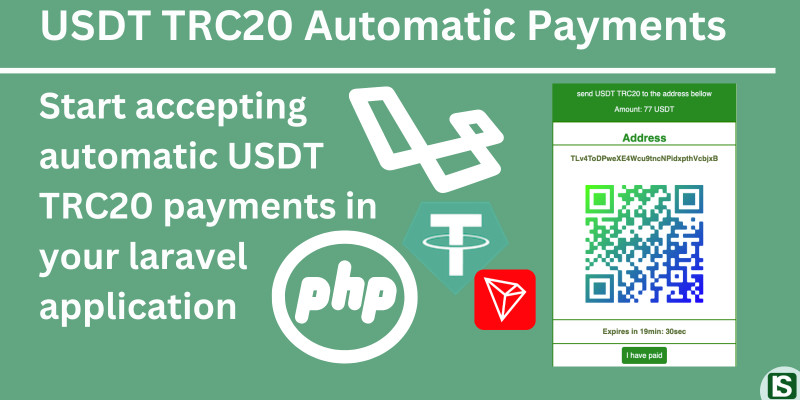
SubmitYou'll then be redirected to a payment page showing the deposit wallet address and a scannable QR code.
Send USDT TRC20 to the address below Amount: 77 USDTAddress
TLv4ToDPweXE4Wcu9tncNPidxpthVcbjxB
QR CodeExpires in 19min : 30sec
I have paidMake the payment to the displayed wallet address, then run the artisan command below to have it processed against the TRON blockchain in your development environment:
php artisan app:check-usdt-payments
Click "I have paid" after sending the funds, and you should see a success alert confirming the payment was processed. With everything configured correctly, the funds will be transferred automatically to your central wallet.
From here, you can take it further and make the final touches to match your application's specific requirements.
Thanks and Best Wishes
You now have a working, self-hosted USDT TRC20 payment flow inside your Laravel application — letting you accept stablecoin payments directly into your own TRON wallet without relying on a third-party payment processor.
| Author | cryptopayments |
|---|---|
| Category | Scripts & Code / PHP Scripts / Finance / Cryptocurrency |
| Price | $35 |
| Extended License | $105 |
| Likes | 3 |
| First Release | Jan 22, 2024 |
| Last Update | Feb 19, 2024 |
| Software version | PHP 8.0, PHP 8.1, PHP 8.2, PHP 8.3, PHP 8.4 |
Tags
External listing. code.market does not sell this product and does not process payment for it. Pricing, payment, delivery, licensing, refunds, and support are handled by the third-party merchant on its own website. We may earn an affiliate commission from a referral. Details.
Products of the Week.
Submit🥇

STOP GUESSING WHAT TO POST
AI that learns your brand voice and builds a month of consistent, on-brand social content: carousels, posts and hooks that sound like you, not like everyone else's AI.
SaaS · 4,310 views · 38 clicksSaaS · Week 45 · 4,310 views · 38 clicks
🥈

Conversational Backlinks for Busy Founders
Place Backlink Relevant Conversation for your domain across Forums and Conversations
Website · 42,043 views · 223 clicksWebsite · Week 45 · 42,043 views · 223 clicks
🥉

upvote.club
Free Social Media Engagement that Helps Boost Your Content. Upvote Club supports 19 social networks with 100+ engagement actions in one dashboard. Add links to your posts and get free engagement from real users.
SaaS · 40,088 views · 117 clicksSaaS · Week 45 · 40,088 views · 117 clicks
#4

Substack Posting API
Onboard your Agent to Substack. Write Publish on Substack via API
SaaS · 59,094 views · 198 clicksSaaS · Week 45 · 59,094 views · 198 clicks
#5

Seenshot App
Free, Fast, MacOS Screenshot app. Make Screenshot cmd+shift+2 and send it via link
Desktop App · 28,467 views · 122 clicksDesktop App · Week 45 · 28,467 views · 122 clicks
#6

Hand-Placed Backlinks $9.99 per link. Flat rate.
Buy hand-placed forum, Q-A and directory backlinks. Flat $9.99 per link, no subscriptions — you only pay for approved listings.
Website · 4,299 views · 19 clicksWebsite · Week 45 · 4,299 views · 19 clicks
#7

Free Invoice Generator - PDF Invoices in Your Browser, No Sign-Up
A free invoice maker for freelancers and small businesses: fill in the invoice, check the live preview, and download a PDF that looks exactly like it. Any currency, tax per item, three templates, no sign-up, and nothing leaves your device.
2,976 views · 17 clicksWeek 45 · 2,976 views · 17 clicks
#8

Merge PDF Files Free - Combine PDFs in Your Browser, No Upload
A free PDF merger for office workers, students, and freelancers: combine PDFs and images into one file in the browser, reorder files and pages, pick page ranges, keep bookmarks, and open password-protected PDFs. Nothing is uploaded, no sign-up, no watermark.
2,747 views · 13 clicksWeek 45 · 2,747 views · 13 clicks