
La Comète - Fashion and Clothing Store Theme

Description
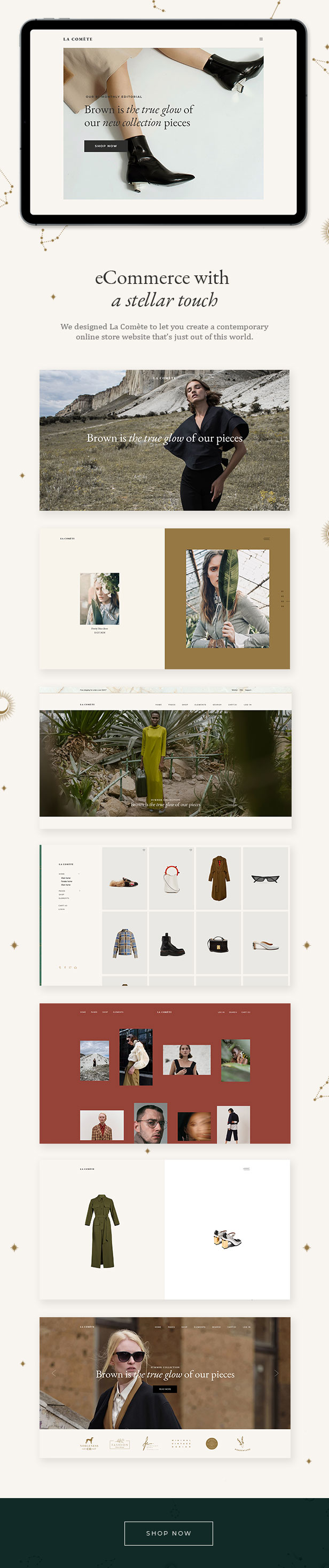
We designed La Comète to let you create any type of modern fashion shop or clothing store website with ease. You get an alluring collection of fashion shop and clothing store templates in addition to full WooCommerce compatibility, including the YITH Quick View, Wishlist & Color and Label Variations add-ons. Get La Comète and create a contemporary online store website that’s just out of this world.
Here is a link if you want to check out the La Comète documentation
Theme Features
- Easy-to-Use Powerful Admin Interface
- One-click import of demo site
- 8 predesigned homepages
- Practical inner pages
- WPBakery Page Builder for WordPress included ($46 value)
- Slider Revolution Responsive WordPress Plugin included ($26 value)
- Compatible with the WooCommerce plugin for eCommerce
- YITH WooCommerce Quick View plugin compatibility
- YITH WooCommerce Wishlist plugin compatibility
- YITH WooCommerce Color and Label Variations plugin compatibility
- Large collection of custom shortcodes
- Product List shortcode
- Product Info shortcode
- Product Overview shortcode
- Product List – Carousel shortcode
- Product Category List shortcode
- Product List – Simple shortcode
- Pricing Table shortcode
- Instagram List shortcode
- Twitter List shortcode
- Team shortcode
- Team Carousel shortcode
- Animation Holder shortcode
- Split Section shortcode
- Vertical Split Slider shortcode
- Elements Holder shortcode
- Countdown shortcode
- Cards Gallery shortcode
- Clients Carousel shortcode
- Clients Grid shortcode
- Testimonials shortcode
- Call to Action shortcode
- Various infographic shortcodes
- Portfolio List shortcode
- Multiple customizable layouts for portfolio lists
- Portfolio Masonry lists
- Portfolio Gallery lists
- Multiple hover styles for portfolio lists
- Multiple customizable layouts for portfolio single items
- Portfolio Single classic layouts
- Portfolio Single slider layouts
- Portfolio Single gallery layouts
- Portfolio Single masonry layouts
- Portfolio Single full width layout
- Portfolio Single custom layouts
- Portfolio Slider shortcode
- Portfolio Category List shortcode
- Portfolio Project Info shortcode
- Portfolio Vertical Loop shortcode
- 5 Header types
- Standard Header
- Vertical Header
- Minimal Header
- Divided Header
- Bottom Header
- Multiple Header behaviors
- Side Area
- Integrated Search
- Optional separate logo for Mobile Header
- Separate styles for Mobile Header
- Optional separate logo for light and dark header versions
- Optional separate logo for Sticky header type
- Header Top and Header Bottom Widget Areas
- Parallax images in sections
- Customizable Mega Menu
- Anchor functionality for One Page sites
- Video and image backgrounds in sections
- Variable grid size
- Back to Top button functionality
- Blog List shortcode
- Blog Slider shortcode
- Multiple customizable blog layouts
- Blog Masonry Layout
- Blog Standard Layout
- Custom Post Formats: Audio, Video, Standard, Gallery, Link, Quote
- Social Share functionality
- Content Entry Animations
- Twitter feed widget
- Instagram feed widget
- Social Icons widget
- WooCommerce Dropdown Cart widget
- Footer Top and Footer Bottom
- Customizable Footer Top with 1-4 Columns layouts
- Customizable Footer Bottom with 1-4 Columns layouts
- Child Theme included
- Custom Widget Areas
- Responsive Design
- Retina Ready
- Ion Icons font pack
- Font Elegant font pack
- Dripicons font pack
- Font Awesome font pack
- Linea Icons font pack
- Linear Icons font pack
- Simple Line Icons font pack
- Translation Ready
- WPML compatible
- Contact Form 7 compatible
- Highly customizable typography settings
- Separate typography settings for responsive
- 800+ Google Fonts
We do not own the copyright for the images featured in this theme. The images in question are only used for presentational purposes on our demos. These images cannot be used on your website, unless you purchase the license from a stock image website yourself.
Update Log
Version 1.4 – January 22th, 2026
- Added WPML config file
- Added WooCommerce 10.x compatibility
- Updated WPBakery page builder to 8.7.2
- Updated Revolution Slider plugin to 6.7.40
- Updated Lacomete Core plugin to 1.2
- Improved PHP 8.3 compatibility
- Improved post social share functionality
- Improved theme performance
- Improved theme security
- Improved Google Map API compatibility
- Improved lacomete_edge_get_attachment_id_from_url helper function
- Fixed wishlist icon not showing
- Fixed Woocommerce 'figure' css selector
- Fixed welcome page redirect
- Removed Lacomete Instagram Feed due to Instagram API changes
- Removed Lacomete Twitter Feed due to Twitter API changes
- Prevent WooCommerce drop down and simple cart widgets loading on cart page
- Minor fixes
Version 1.3 – January 18th, 2022
- Added WordPress 5.8.3 compatibility
- Added WooCommerce 6.1.0 compatibility
- Updated WPBakery page builder to 6.8.0
- Updated Revolution Slider plugin to 6.5.14
- Fixed Coming Soon page template to display preloader when enabled
Version 1.2 – November 23rd, 2021
- Added WordPress 5.8.2 compatibility
- Added WooCommerce 5.9.0 compatibility
- Added PHP 8 compatibility
- Updated WPBakery page builder to 6.7.0
- Updated Revolution Slider plugin to 6.5.11
- Updated Lacomete Core plugin to 1.1
- Updated Lacomete Instagram Feed to 2.0.1
- Updated Lacomete Twitter Feed to 1.0.2
- Updated Child theme to 1.0.1
- Fixed Quick View button displaying incorrectly
- Fixed error when Quick View option is disabled
- Fixed cart widget not closing when Side Area type set to be Uncovered from Content
- Fixed countdown calculation
- Fixed revolution slider preview functionality
- Fixed potential security issue
- Fixed cart widget on WP 5.8
- Fixed creation of the Custom Sidebars in new Widgets layout
- Fixed 'Bulk Select' functionality with Menus
- Removed Google Plus social share option
Version 1.1 – October 26th, 2020
- Added WordPress 5.5 compatibility
- Added WooCommerce 4.6.1 compatibility
- Updated WPBakery page builder to 6.4.1
- Updated Revolution Slider plugin to 6.2.23
- Updated Lacomete Core to 1.0.1
- Updated Lacomete Instagram Feed to 2.0
- Updated Lacomete Twitter Feed to 1.0.1
- Fixed conflict between Smooth transitions and back button
- Removed unused file instagram-redirect.php from Lacomete Instagram Feed plugin
- Removed unused file twitter-redirect.php from Lacomete Twitter Feed plugin
| Type | WooCommerce Theme |
|---|---|
| Author | Edge-Themes |
| Category | Wordpress / Ecommerce / Woocommerce |
| Price | $85 |
| Sales | 488 |
| Rating | 4.38 from 8 ratings |
| Published | Jul 3, 2019 |
| Last Update | Jan 22, 2026 |
| Columns | 4+ |
| Compatible Browsers | IE10, IE11, Firefox, Safari, Opera, Chrome, Edge |
| Compatible Software | WordPress 7.0.x, WordPress 6.9.x, WordPress 6.8.x, WordPress 6.7.x, WordPress 6.6.x, WordPress 6.5.x |
| Compatible With | WooCommerce 10.x.x, WooCommerce 9.x.x, WPBakery Page Builder, WPML |
| Documentation | Well Documented |
| Layout | Responsive |
| Files Included | PHP Files, CSS Files, JS Files |
| Widget Ready | Yes |
| Key Features | Designed for all modern WooCommerce websites, Alluring fashion shop, clothing store layouts, 2 premium plugins included for free |
Categories
Tags
External listing. code.market does not sell this product and does not process payment for it. Pricing, payment, delivery, licensing, refunds, and support are handled by the third-party merchant on its own website. We may earn an affiliate commission from a referral. Details.
Products of the Week.
Submit🥇

STOP GUESSING WHAT TO POST
AI that learns your brand voice and builds a month of consistent, on-brand social content: carousels, posts and hooks that sound like you, not like everyone else's AI.
SaaS · 4,322 views · 38 clicksSaaS · Week 45 · 4,322 views · 38 clicks
🥈

Conversational Backlinks for Busy Founders
Place Backlink Relevant Conversation for your domain across Forums and Conversations
Website · 42,059 views · 223 clicksWebsite · Week 45 · 42,059 views · 223 clicks
🥉

upvote.club
Free Social Media Engagement that Helps Boost Your Content. Upvote Club supports 19 social networks with 100+ engagement actions in one dashboard. Add links to your posts and get free engagement from real users.
SaaS · 40,104 views · 117 clicksSaaS · Week 45 · 40,104 views · 117 clicks
#4

Substack Posting API
Onboard your Agent to Substack. Write Publish on Substack via API
SaaS · 59,108 views · 198 clicksSaaS · Week 45 · 59,108 views · 198 clicks
#5

Seenshot App
Free, Fast, MacOS Screenshot app. Make Screenshot cmd+shift+2 and send it via link
Desktop App · 28,483 views · 122 clicksDesktop App · Week 45 · 28,483 views · 122 clicks
#6

Hand-Placed Backlinks $9.99 per link. Flat rate.
Buy hand-placed forum, Q-A and directory backlinks. Flat $9.99 per link, no subscriptions — you only pay for approved listings.
Website · 4,314 views · 19 clicksWebsite · Week 45 · 4,314 views · 19 clicks
#7

Free Invoice Generator - PDF Invoices in Your Browser, No Sign-Up
A free invoice maker for freelancers and small businesses: fill in the invoice, check the live preview, and download a PDF that looks exactly like it. Any currency, tax per item, three templates, no sign-up, and nothing leaves your device.
2,988 views · 17 clicksWeek 45 · 2,988 views · 17 clicks
#8

Merge PDF Files Free - Combine PDFs in Your Browser, No Upload
A free PDF merger for office workers, students, and freelancers: combine PDFs and images into one file in the browser, reorder files and pages, pick page ranges, keep bookmarks, and open password-protected PDFs. Nothing is uploaded, no sign-up, no watermark.
2,759 views · 13 clicksWeek 45 · 2,759 views · 13 clicks