
Komoye Security Tool Python by Komoyek
Hot or Not
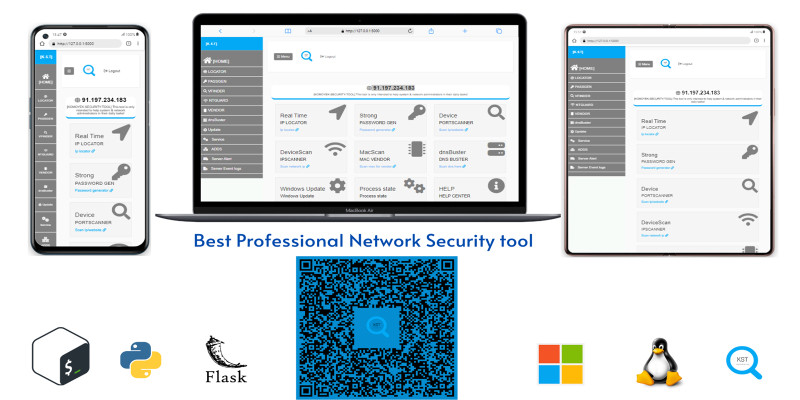
Description
KST is a multifunctional application built with the Python Flask framework, focusing on security and network device management. Tailored to provide advanced monitoring and management tools, the application is designed for users seeking to enhance the security of their IT environments.
Features
Features
- Real-Time IP Locator: Instantly locate IP addresses for precise network connectivity management.
- Strong Password Generator: Generate strong and secure passwords to bolster the security of accounts and systems.
- Device Port Scanner: Explore connected device ports to identify potential vulnerabilities.
- Device Scanner: Scan the network to detect and list connected devices, facilitating efficient management.
- IP Scanner: Conduct in-depth scans of IP addresses to assess network health and detect anomalies.
- Mac Scanner & Mac Vendor Lookup: Identify device MAC addresses and access vendor information for detailed management.
- dnsBuster - DNS Resolution Tool: Quickly resolve domain names to ease DNS server management.
- Windows Update Status: Monitor the status of Windows updates to ensure compliance and security.
- Process State Monitoring: Keep an eye on the status of running processes to detect any suspicious activity.
- Help Center: Access an integrated knowledge base for valuable information and guidance.
- Active Directory Management: Manage accounts and permissions in Active Directory for effective user control.
- Server Alert for Important Events: Receive real-time alerts for critical events on servers.
- Installed Programs Overview: Explore installed programs on devices for detailed software environment tracking.
Requirements
Requirements
- Python 3.7 or earlier installed on your system
- Download and install Python
- Unzip the "komoy_security_tool.zip" in your preferred location
- Download and install PyCharm Community Edition
Instructions
Instructions
- Create a new project in PyCharm and locate the folder where you unzipped the "KOMOYE_SECURITY_TOOL.ZIP" project.
- Create a virtual environment in PyCharm.
- Open the terminal in PyCharm and navigate to your project directory.
- Run the command to create a virtual environment:
python -m venv venv - Activate the virtual environment:
- On Windows:
venvScriptsactivate - On macOS and Linux:
source venv/bin/activate
- On Windows:
- Verify activation and install required packages with
pip freeze > requirements.txt. - Execute
app.py. - Access the application at
http://127.0.0.1:5000/login. - Create an account and activate it using the license key: WXYZ-9876-QRST-4321.
- Modify the email notification settings in
app.pybefore using the application. - Replace email addresses in the email setup section with your Gmail email address and password.
| Author | komoyek |
|---|---|
| Category | Scripts & Code / Python |
| Price | $30 |
| Extended License | $90 |
| Likes | 4 |
| First Release | Dec 22, 2023 |
| Last Update | Dec 22, 2023 |
| Files included | .py, .css, .html, .sql, .db, JavaScript .js |
Categories
Tags
External listing. code.market does not sell this product and does not process payment for it. Pricing, payment, delivery, licensing, refunds, and support are handled by the third-party merchant on its own website. We may earn an affiliate commission from a referral. Details.