
King Browser app V2 | Flutter Internet Browser
Description
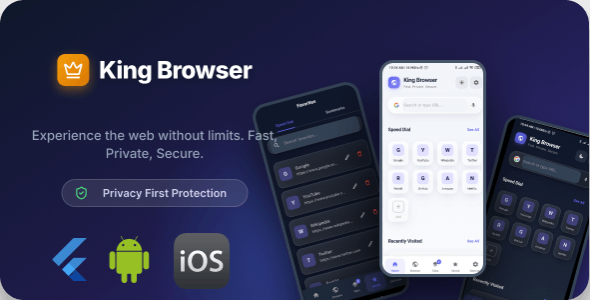
King Browser App V2 | Flutter Privacy-Focused Internet Browser
King Browser is a modern, lightweight, and privacy-first Android web browser built with Flutter. It is designed for users who want fast browsing, strong privacy protection, and a clean UI without unnecessary news feeds, push notifications, or distractions.
Demo APK

Privacy & Security Features
- Advanced ad & tracker blocking (45+ blocked domains)
- JavaScript injection to remove ad elements
- HTTPS-First mode (automatically upgrades HTTP to HTTPS)
- Do-Not-Track (DNT) & Sec-GPC headers support
- Fingerprint protection with canvas noise injection
- Clear browsing data automatically on app exit
- App lock with biometric / fingerprint authentication
- Incognito (private) browsing tabs
Browsing Experience
- Full-featured web browsing using InAppWebView engine
- Smart URL bar with Google search support
- Pull-to-refresh pages
- Page loading progress indicator
- Forward & back navigation
- Desktop mode toggle
- Find text within pages
- Share webpage links easily
️ Tab Management
- Multiple tab support
- Grid view & stack view tab layouts
- Swipe to close tabs
- Tab count badge indicator
- New tab quick action
- Separate incognito tab system
- Tab hibernation with configurable timer to save memory
Home Screen & Speed Dial
- Speed dial with 8–12 customizable shortcut tiles
- Add, edit, and delete speed dial entries
- Home screen search bar
⭐ Bookmarks & Favorites
- Add and remove bookmarks
- Create bookmark folders
- Search bookmarks
- Drag & reorder bookmarks
Reader Mode
- Distraction-free reading mode
- Automatically removes ads and clutter from articles
Data Saver Mode
- Data saver toggle
- Block images to reduce data usage
- JavaScript on/off toggle for low-data browsing
⚙️ Settings Panel
- General: Search engine selection, homepage settings, download path
- Privacy: Ad blocker, HTTPS-first, DNT, fingerprint protection, clear data on exit, app lock
- Browsing: JavaScript toggle, image loading toggle, data saver, tab hibernation, default desktop mode
- About: App version and open-source licenses
UI / UX Design
- Modern purple & indigo color scheme
- Glassmorphism (frosted glass) design
- Bottom URL bar with floating action button menu
- Swipe gestures for tab switching
- Blocked ads counter display
- Material 3 design system
- Dark / Night mode support
Screenshots

Updates V2 :

⭐ Rate the App
If you are satisfied with this product, please consider rating it on Codecanyon. Your feedback helps improve future updates. Thank you!
| Type | Flutter App |
|---|---|
| Author | trustitbdltd |
| Price | $20 |
| Sales | 7 |
| Rating | 0 (0) |
| Published | Dec 14, 2022 |
| Last Update | Feb 16, 2026 |
| Compatible Software | Flutter 2.x, Flutter 1.x |
| Mobile Files Included | Dart, YAML |
Categories
Tags
External listing. code.market does not sell this product and does not process payment for it. Pricing, payment, delivery, licensing, refunds, and support are handled by the third-party merchant on its own website. We may earn an affiliate commission from a referral. Details.
Products of the Week.
Submit🥇

STOP GUESSING WHAT TO POST
AI that learns your brand voice and builds a month of consistent, on-brand social content: carousels, posts and hooks that sound like you, not like everyone else's AI.
SaaS · 7,395 views · 67 clicksSaaS · Week 46 · 7,395 views · 67 clicks
🥈

Conversational Backlinks for Busy Founders
Place Backlink Relevant Conversation for your domain across Forums and Conversations
Website · 46,692 views · 232 clicksWebsite · Week 46 · 46,692 views · 232 clicks
🥉

upvote.club
Free Social Media Engagement that Helps Boost Your Content. Upvote Club supports 19 social networks with 100+ engagement actions in one dashboard. Add links to your posts and get free engagement from real users.
SaaS · 44,628 views · 127 clicksSaaS · Week 46 · 44,628 views · 127 clicks
#4

Substack Posting API
Onboard your Agent to Substack. Write Publish on Substack via API
SaaS · 63,514 views · 206 clicksSaaS · Week 46 · 63,514 views · 206 clicks
#5

Seenshot App
Free, Fast, MacOS Screenshot app. Make Screenshot cmd+shift+2 and send it via link
Desktop App · 32,764 views · 127 clicksDesktop App · Week 46 · 32,764 views · 127 clicks
#6

Hand-Placed Backlinks $9.99 per link. Flat rate.
Buy hand-placed forum, Q-A and directory backlinks. Flat $9.99 per link, no subscriptions — you only pay for approved listings.
Website · 8,381 views · 19 clicksWebsite · Week 46 · 8,381 views · 19 clicks
#7

Free Invoice Generator - PDF Invoices in Your Browser, No Sign-Up
A free invoice maker for freelancers and small businesses: fill in the invoice, check the live preview, and download a PDF that looks exactly like it. Any currency, tax per item, three templates, no sign-up, and nothing leaves your device.
7,010 views · 29 clicksWeek 46 · 7,010 views · 29 clicks
#8

Merge PDF Files Free - Combine PDFs in Your Browser, No Upload
A free PDF merger for office workers, students, and freelancers: combine PDFs and images into one file in the browser, reorder files and pages, pick page ranges, keep bookmarks, and open password-protected PDFs. Nothing is uploaded, no sign-up, no watermark.
6,485 views · 18 clicksWeek 46 · 6,485 views · 18 clicks