Kids Coloring Book For Android by GSBusiness
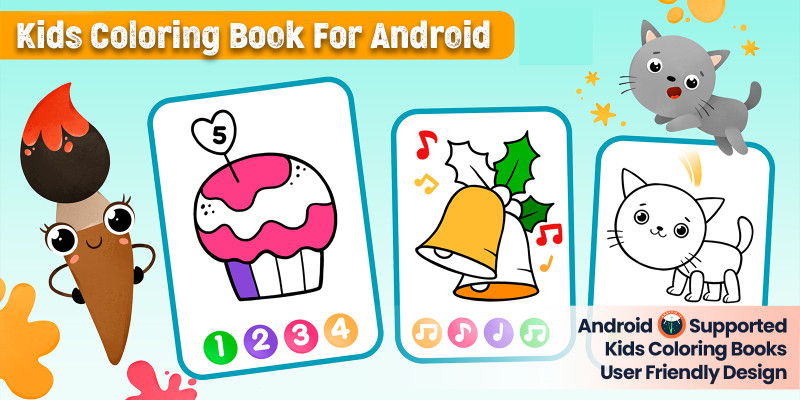
Description
Apk Download Link:-

Features:-
- Save colored images to a specific folder in the gallery.
- Share colored images with other apps.
- Color picker tool: select any color with desired transparency.
- Responsive design, support Phones, Tablets, and all screen sizes and orientations.
- Android Studio project, Easy customization with clean code.
- Zoom-in, Zoom-out, and move using 2 fingers.
- Efficiency and Speed
- User friendly beautiful UI design
- Maximum privacy
- Smooth animations
What You Get:-
- Full android source code
- Admob ads integration
- Supported all latest android 13 device
- Full Document with Screen Shot.
Features
1. Save Functionality: Ability to save colored images to a specific folder in the gallery.
2. Share Functionality: Option to share colored images with other apps.
3. Color Picker Tool: Select any color with desired transparency.
4. Responsive Design: Supports Phones, Tablets, and all screen sizes and orientations.
5. Android Studio Project: Easy customization with clean code.
6. Zoom and Move: Zoom-in, zoom-out, and move the image using two fingers.
7. Efficiency and Speed: Optimized for performance.
8. User-Friendly UI: Beautiful and intuitive user interface design.
9. Maximum Privacy: Ensures privacy for users.
10. Smooth Animations: Provides smooth and engaging animations.
11. Admob Ads Integration: Includes Admob ads for monetization.
12. Support for Latest Android Devices: Compatible with all the latest Android 13 devices.
13. Full Documentation: Comes with full documentation and screenshots for easier understanding and customization.
Requirements
Technical Requirements:
1. Operating System:
- Android 5.0 (Lollipop) or higher (recommended for better performance and compatibility with latest features).
2. Development Environment:
- Android Studio: Integrated development environment (IDE) used for app development.
3. Programming Languages:
- Java/Kotlin: The primary programming languages for Android app development.
4. Libraries and SDKs:
- AdMob SDK: For integrating ads.
- Android Support Libraries: To ensure compatibility with various Android versions and devices.
5. Screen Sizes and Orientations:
- Responsive Design: Support for multiple screen sizes and orientations (portrait and landscape).
Hardware Requirements:
1. Minimum Device Specifications:
- Processor: ARM or x86 architecture.
- RAM: Minimum 1 GB of RAM (2 GB recommended for better performance).
- Storage: Sufficient storage space for app installation and saved images (at least 100 MB).
2. Device Compatibility:
- Phones and Tablets: The app should be compatible with both phones and tablets of various sizes.
Features and Functional Requirements:
1. Color Picker Tool:
- Ability to select colors with transparency options.
2. Zoom and Move Functionality:
- Multi-touch support for zooming and moving images.
3. Saving and Sharing:
- Options to save colored images to a gallery and share them with other apps.
4. User Interface:
- Clean, user-friendly UI with smooth animations.
5. Privacy:
- Ensure user data privacy and security.
Additional Requirements:
1. Ad Integration:
- Proper configuration and setup of AdMob ads.
2. Documentation:
- Comprehensive documentation including setup instructions, screenshots, and customization guides.
3. Testing:
- Extensive testing on various devices and screen sizes to ensure compatibility and performance.
4. Compliance:
- Adhere to Google Play Store policies and guidelines for app submission and updates.
Instructions
1. Setup Instructions
1.1. Download and Install
1. Download the APK:
- Obtain the APK file from the provided link or your source.
2. Install the APK:
- Transfer the APK to your Android device if needed.
- Open the APK file on your device to begin installation.
- Follow the on-screen prompts to complete the installation.
1.2. Set Up the Development Environment
1. Install Android Studio:
- Download and install Android Studio from the (https://developer.android.com/studio).
2. Open the Project:
- Launch Android Studio.
- Select `Open an existing project` and navigate to the project directory of your app.
- Click `OK` to open the project.
3. Install Required SDKs and Libraries:
- Ensure that you have the latest SDKs installed.
- Install the AdMob SDK if not already included in your project.
2. Customization Instructions
2.1. Modify Code
1. Access Code Files:
- Navigate to the `src` directory in Android Studio to access Java or Kotlin files.
- Modify the code as needed for your custom features or changes.
2. Edit Layouts and UI:
- Open XML layout files in the `res/layout` directory to customize UI elements.
- Adjust properties and styles to fit your design preferences.
3. Update Color Palette:
- Modify color resources in `res/values/colors.xml` to change the color options available in the app.
2.2. Configure AdMob
1. Set Up AdMob Account:
- Create an AdMob account if you don’t already have one.
- Add your app to the AdMob dashboard and obtain ad unit IDs.
2. Integrate AdMob in Code:
- Replace placeholder ad unit IDs in your code with the ones obtained from AdMob.
- Follow AdMob integration guidelines to ensure proper implementation.
3. Testing Instructions
3.1. Run the App
1. Build and Run:
- Connect an Android device to your computer or use an emulator.
- Click the `Run` button in Android Studio to build and deploy the app on the device/emulator.
2. Test Features:
- Verify that all features (e.g., color picker, zoom, save, share) function as expected.
- Check for smooth animations and responsiveness on various devices.
3.2. Debugging
1. Use Logcat:
- Open the Logcat window in Android Studio to view logs and debug messages.
- Address any errors or warnings shown in the logs.
2. Perform Usability Testing:
- Conduct testing with real users (e.g., children) to gather feedback on usability and design.
4. Deployment Instructions
4.1. Prepare for Release
1. Generate a Signed APK:
- Go to `Build` > `Generate Signed Bundle / APK`.
- Follow the wizard to create a signed APK file for release.
2. Test Release APK:
- Test the signed APK on various devices to ensure it works correctly.
4.2. Publish to Google Play Store
1. Create a Google Play Developer Account:
- Register for a Google Play Developer account if you don’t have one.
2. Submit the App:
- Go to the Google Play Console and create a new app listing.
- Upload the signed APK, provide necessary details (e.g., app description, screenshots), and follow the submission process.
3. Monitor and Update:
- Monitor app performance and user feedback via the Google Play Console.
- Update the app as needed based on user feedback and new feature requests.
5. User Instructions
5.1. Using the App
1. Start Coloring:
- Open the app on your device.
- Select a picture from the gallery or available options.
2. Choose Colors:
- Use the color picker tool to select colors with desired transparency.
3. Draw and Color:
- Tap or drag on the image to color different segments.
4. Save and Share:
- Save your masterpiece to the gallery or share it with other apps using the provided options.
5. Zoom and Move:
- Use two fingers to zoom in, zoom out, or move the image for better coloring control.
By following these instructions, you should be able to set up, customize, test, and deploy the drawing and coloring app effectively, ensuring it meets the needs of its young users.
| Author | CelestialInfosoft |
|---|---|
| Category | App Templates / Android / Applications / Miscellaneous |
| Price | $15 |
| Extended License | $45 |
| Likes | 2 |
| First Release | Apr 19, 2024 |
| Last Update | Apr 19, 2024 |
| Files included | .cpp, .java, .dll, .xml |
| Operating systems | Android 7.0, Android 8.0, Android 9.0, Android 10.0, Android 11.0, Android 12.0, Android 6.0 |
Categories
Tags
External listing. code.market does not sell this product and does not process payment for it. Pricing, payment, delivery, licensing, refunds, and support are handled by the third-party merchant on its own website. We may earn an affiliate commission from a referral. Details.
Products of the Week.
Submit🥇

STOP GUESSING WHAT TO POST
AI that learns your brand voice and builds a month of consistent, on-brand social content: carousels, posts and hooks that sound like you, not like everyone else's AI.
SaaS · 4,276 views · 38 clicksSaaS · Week 45 · 4,276 views · 38 clicks
🥈

Conversational Backlinks for Busy Founders
Place Backlink Relevant Conversation for your domain across Forums and Conversations
Website · 41,985 views · 223 clicksWebsite · Week 45 · 41,985 views · 223 clicks
🥉

upvote.club
Free Social Media Engagement that Helps Boost Your Content. Upvote Club supports 19 social networks with 100+ engagement actions in one dashboard. Add links to your posts and get free engagement from real users.
SaaS · 40,028 views · 117 clicksSaaS · Week 45 · 40,028 views · 117 clicks
#4

Substack Posting API
Onboard your Agent to Substack. Write Publish on Substack via API
SaaS · 59,037 views · 198 clicksSaaS · Week 45 · 59,037 views · 198 clicks
#5

Seenshot App
Free, Fast, MacOS Screenshot app. Make Screenshot cmd+shift+2 and send it via link
Desktop App · 28,409 views · 122 clicksDesktop App · Week 45 · 28,409 views · 122 clicks
#6

Hand-Placed Backlinks $9.99 per link. Flat rate.
Buy hand-placed forum, Q-A and directory backlinks. Flat $9.99 per link, no subscriptions — you only pay for approved listings.
Website · 4,247 views · 19 clicksWebsite · Week 45 · 4,247 views · 19 clicks
#7

Free Invoice Generator - PDF Invoices in Your Browser, No Sign-Up
A free invoice maker for freelancers and small businesses: fill in the invoice, check the live preview, and download a PDF that looks exactly like it. Any currency, tax per item, three templates, no sign-up, and nothing leaves your device.
2,927 views · 17 clicksWeek 45 · 2,927 views · 17 clicks
#8

Merge PDF Files Free - Combine PDFs in Your Browser, No Upload
A free PDF merger for office workers, students, and freelancers: combine PDFs and images into one file in the browser, reorder files and pages, pick page ranges, keep bookmarks, and open password-protected PDFs. Nothing is uploaded, no sign-up, no watermark.
2,703 views · 13 clicksWeek 45 · 2,703 views · 13 clicks