Kaddora - AI Chatbot Pro for WordPress
Description
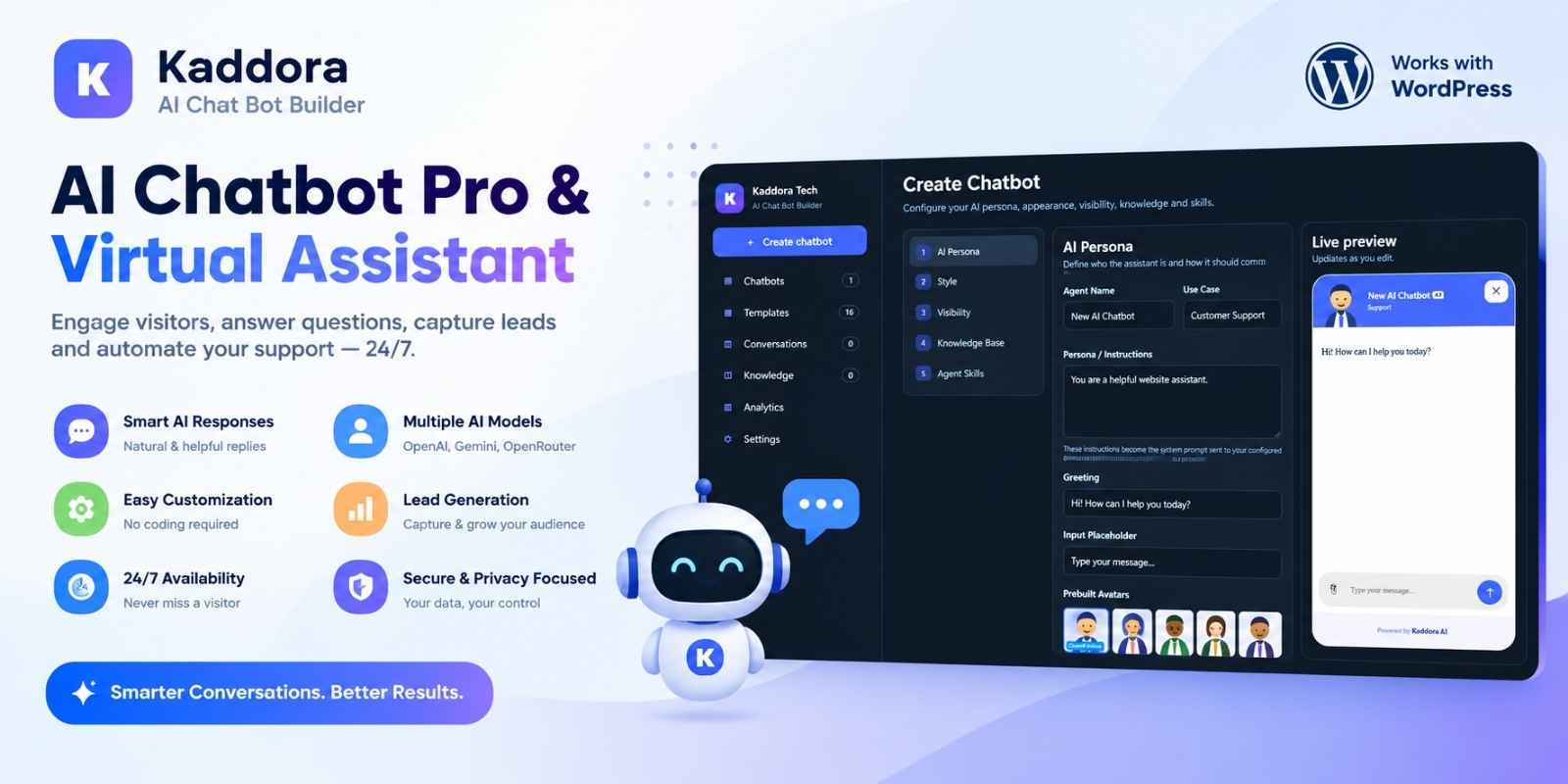
AI Chatbot Pro & Virtual Assistant By Kaddora is a WordPress plugin that helps you build, customize, and manage AI-powered chatbots from one convenient dashboard. Create multiple virtual assistants for customer support, sales, lead generation, eCommerce, education, and other website use cases. Customize each chatbot's name, personality, instructions, greeting, avatar, colors, fonts, and visibility settings. Connect your own OpenAI, OpenRouter, or Google Gemini API credentials to generate AI-powered responses. Build a knowledge base using text, question-and-answer entries, website URLs, supported text documents, and image or video reference material. Add a floating chat widget to your website so visitors can ask questions, receive assistance, and optionally attach files.
Features
- Multiple AI Chatbots: Create, edit, duplicate, manage, and publish multiple chatbots from one WordPress dashboard.
- Ready-to-Use Templates: Start with 16 chatbot templates covering customer support, sales, eCommerce, marketing, education, hospitality, and other use cases, with 15 editable starter Q&A items per template.
- Custom AI Persona: Set the assistant's name, use case, personality, system instructions, welcome message, and input placeholder.
- AI Provider Integration: Connect OpenAI, OpenRouter, or Google Gemini using your own API credentials.
- Chatbot Appearance: Customize theme colors, background, text, buttons, fonts, chat positioning, and visual style.
- Built-In Avatars: Choose from 10 built-in Kaddora avatars or configure a custom avatar URL.
- Knowledge Base: Add text, question-and-answer pairs, website URL content, supported text documents, and image or video reference material.
- Website URL Import: Import readable page text from a supplied website URL for use as chatbot knowledge.
- Agent Skills: Enable knowledge-based Q&A, lead-capture guidance, and WooCommerce catalog context.
- Floating Frontend Chat: Display a chat widget on your website for visitor questions and support conversations.
- Device and Page Visibility: Configure desktop/mobile visibility and page-targeting rules for individual chatbots.
- Visitor File Attachments: Optionally allow visitors to attach images, videos, and files to chat messages, subject to supported formats and server limits.
- Conversation Management: Optionally save conversations in the WordPress database, review messages, and manage conversation records.
- Analytics Dashboard: View locally stored chatbot and conversation statistics.
- AI Response Controls: Configure the selected model, response temperature, and maximum response tokens.
- Privacy Configuration: Configure a privacy notice and control whether chatbot conversations are stored.
Requirements
- WordPress: Version 6.3 or later.
- PHP: Version 7.4 or later.
- Database: A database supported by your WordPress installation, such as MySQL or a compatible MariaDB version.
- Web Server: A working WordPress-compatible hosting environment.
- Internet Access: Required for external AI provider requests and website URL imports.
- AI Provider Account: OpenAI, OpenRouter, or Google Gemini credentials are required for generative AI responses.
- WooCommerce: Optional; required only for the WooCommerce catalog context feature.
- File Upload Support: WordPress and PHP upload limits must permit the selected attachments and knowledge files.
Instructions
- Download the Plugin: Obtain the
ai-chat-bot-kaddora.zippackage. - Open WordPress Admin: Sign in to your WordPress dashboard with administrator permissions.
- Upload the Plugin: Navigate to Plugins → Add New Plugin → Upload Plugin.
- Select the ZIP: Choose the downloaded plugin ZIP file and click Install Now.
- Activate the Plugin: Click Activate Plugin after installation is complete.
- Open Kaddora AI Chat Bot: Locate the AI Chat Bot menu in the WordPress admin sidebar.
- Configure an AI Provider: Open Settings, select OpenAI, OpenRouter, or Google Gemini, enter your API credentials, choose a model, and save your settings.
- Create a Chatbot: Choose a ready-to-use template or create a blank chatbot.
- Customize the Assistant: Set the chatbot name, persona, instructions, greeting, avatar, appearance, and display rules.
- Add Knowledge: Add text, Q&A entries, a website URL, supported documents, or image/video reference material.
| Author | KaddoraTech |
|---|---|
| Category | Plugins / WordPress |
| Price | $69 |
| Extended License | $207 |
| First Release | Oct 19, 2026 |
| Last Update | Oct 19, 2026 |
| Supported cms | WordPress 6.2, WordPress 6.3, WordPress 6.4, WordPress 6.5, WordPress 6.6, WordPress 6.7, WordPress 6.8, WordPress 6.9, WordPress 7.0, WordPress 7.1 |
| Files included | .php |
Categories
Tags
External listing. code.market does not sell this product and does not process payment for it. Pricing, payment, delivery, licensing, refunds, and support are handled by the third-party merchant on its own website. We may earn an affiliate commission from a referral. Details.
Products of the Week.
Submit🥇

Actionbook
It works inside the user's own browser with the accounts already signed in. The user describes the result they need, and the agent reads, clicks and types through the pages, then delivers a dashboard or report where each data links back to its source.
Other · 624 views · 9 clicksOther · Week 44 · 624 views · 9 clicks
🥈

Free social media tools for creators & solofounders
295 free tools for growing your social media: write, plan, grow on local AI models, 100% free forever, No sign-up required, No trial. Write, check and measure posts on LinkedIn, Instagram, TikTok, X, YouTube, Reddit, Product Hunt and more: a free social media scheduler for 17 networks, engagement rate calculators, character counters, best time to post, hook generators and follower growth calculators. No login anywhere, no API or credit usage.
591 views · 6 clicksWeek 44 · 591 views · 6 clicks
🥉

STOP GUESSING WHAT TO POST
AI that learns your brand voice and builds a month of consistent, on-brand social content: carousels, posts and hooks that sound like you, not like everyone else's AI.
SaaS · 1,846 views · 19 clicksSaaS · Week 44 · 1,846 views · 19 clicks
#4

Hand-Placed Backlinks $9.99 per link. Flat rate.
Buy hand-placed forum, Q-A and directory backlinks. Flat $9.99 per link, no subscriptions — you only pay for approved listings.
Website · 1,800 views · 17 clicksWebsite · Week 44 · 1,800 views · 17 clicks
#5

Conversational Backlinks for Busy Founders
Place Backlink Relevant Conversation for your domain across Forums and Conversations
39,262 views · 210 clicksWeek 44 · 39,262 views · 210 clicks
#6

Free Invoice Generator - PDF Invoices in Your Browser, No Sign-Up
A free invoice maker for freelancers and small businesses: fill in the invoice, check the live preview, and download a PDF that looks exactly like it. Any currency, tax per item, three templates, no sign-up, and nothing leaves your device.
550 views · 11 clicksWeek 44 · 550 views · 11 clicks
#7

Merge PDF Files Free - Combine PDFs in Your Browser, No Upload
A free PDF merger for office workers, students, and freelancers: combine PDFs and images into one file in the browser, reorder files and pages, pick page ranges, keep bookmarks, and open password-protected PDFs. Nothing is uploaded, no sign-up, no watermark.
492 views · 4 clicksWeek 44 · 492 views · 4 clicks