
Jusvia - Lawyer & Attorney Elementor Template Kit
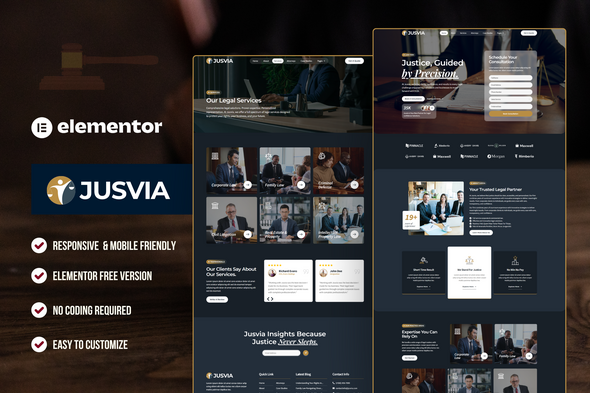
Description
Jusvia is a professional, elegant Elementor template kit built for law firms, attorneys, legal advisors, and consultancy businesses. With clean layouts and a modern, authoritative design, it helps you build a credible online presence that inspires trust — showcasing legal services, attorney profiles, and case studies to attract potential clients.
Built with Elementor and MetForm appointment and career forms, Jusvia is fully responsive, SEO-friendly, and optimized for fast loading — no coding required. Help your law firm or legal practice rank in search and convert visitors into client consultations.
Why Choose Jusvia?
- Perfect for lawyers, legal advisors, and law firms
- Clean and authoritative design for credibility
- Includes appointment and career submission forms
- Fast, responsive, and easy to customize with Elementor
- Ready-to-use professional layouts
Required Plugins:
- Elementor (Page Builder)
- Ultimate Addons for Elementor (Header & Footer)
- MetForm (Forms)
- Jeg Elementor Kit (Addons)
What’s Included in the Zip:
- Home Page
- About Page
- Service Page
- Case Studies Page
- Case Studies Details Page
- Careers Page
- Attorneys Page
- Blog Archive
- Single Post
- Contact Page
- 404 Page
- Coming Soon Page
- Careers Form
- Appointment Form
- Newsletter Form
- Header
- Footer
This is not a WordPress Theme. Template Kits contain design data for Elementor only and can be imported using the Envato Elements plugin or directly via Elementor.
How to Import MetForm Custom Form:
- Import the MetForm templates first.
- Import the page template where the form appears and edit with Elementor.
- Click the MetForm widget in the page and click Edit Form.
- Select “New”, leave blank, and click the Edit Form button.
- Click the gray folder icon and open the “My Templates” tab.
- Select your imported MetForm template and click Insert.
- Once done, click “Update”.
How to Setup Header & Footer with Ultimate Addons for Elementor (UAE):
- If you are using Elementor Pro, manage headers and footers via Theme Builder. Otherwise, make sure Elementor and Ultimate Addons for Elementor (UAE) are installed and activated.
- Go to Dashboard > UAE > Header & Footer Builder and click Add New.
- Give the template a Title, set the Type of Template to Header (repeat later for Footer), and set the Display Location to Entire Site.
- Publish the template, then click Edit with Elementor.
- Insert the header (or footer) template using the gray folder icon (“My Templates” tab).
- Customize as needed and click Update.
Detailed Installation Guide:
Images:
This Template Kit uses demo images from Envato Elements. You must license these images from Envato Elements to use them on your live website, or you can replace them with your own.
Collection Link:
| Type | Elementor Template Kit |
|---|---|
| Author | TemplateNitro |
| Category | Template Kits / Elementor / Finance Law |
| Price | $24 |
| Sales | 17 |
| Published | Oct 15, 2025 |
| Last Update | Aug 24, 2026 |
| Template Kit Certified | No |
| Template Kit Software Version | Elementor 3.10.x |
| Template Kit Type | Envato Template Kit |
| Key Features | Elementor Free Version, Responsive and SEO Friendly, Lawyers and Law Firm Templatet Kit |
Categories
Tags
External listing. code.market does not sell this product and does not process payment for it. Pricing, payment, delivery, licensing, refunds, and support are handled by the third-party merchant on its own website. We may earn an affiliate commission from a referral. Details.
