
Journio - Travel and Social Flutter UI Kit
Description
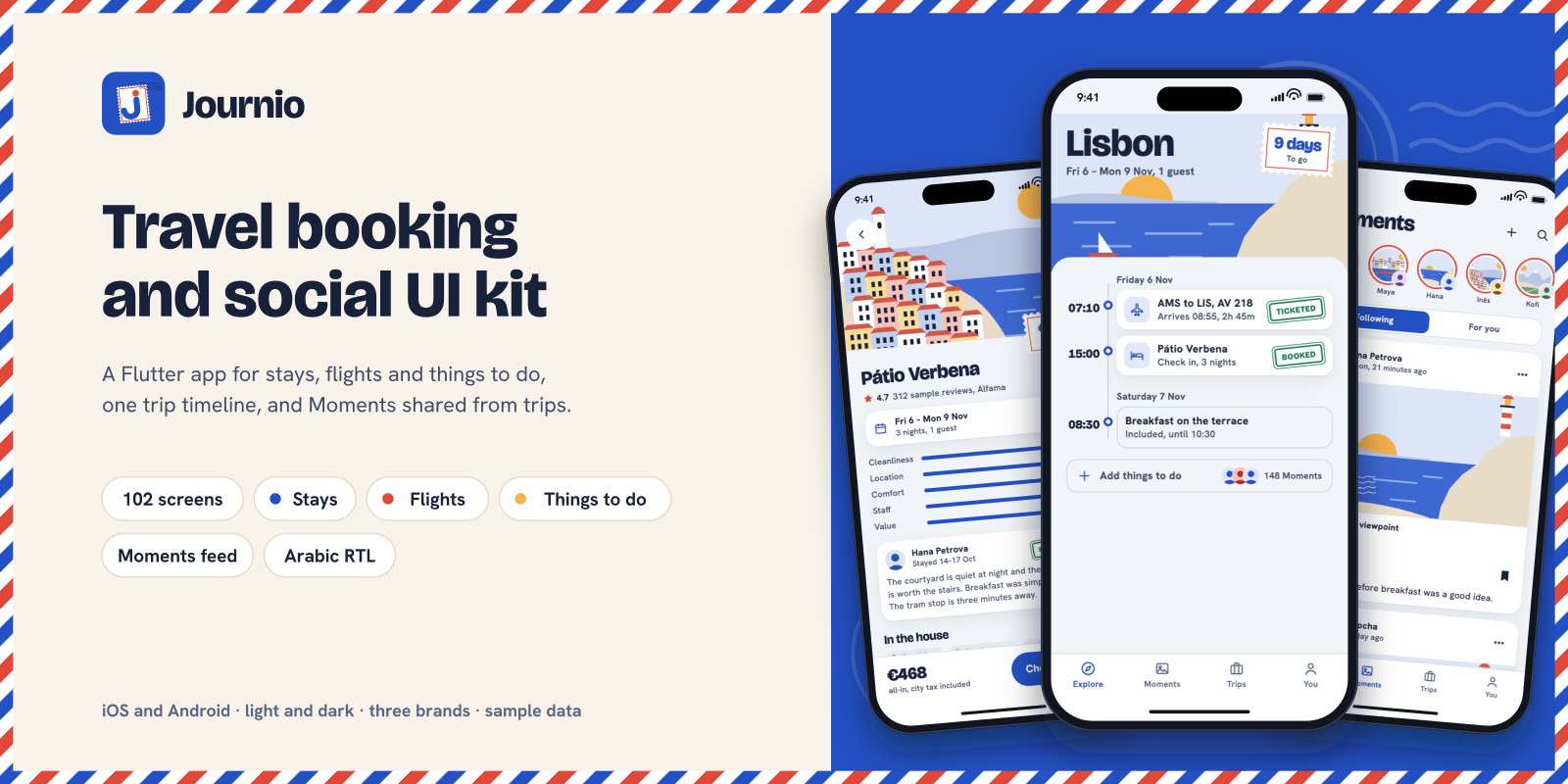
Journio is a Flutter UI kit for a travel app that books stays, flights and things to do, keeps them on one trip timeline, and lets travelers share the trip as Moments. It runs on iOS and Android and has 102 screens in seven groups: start and sign-in, Explore, stays, flights, things to do, Moments, and trips and account. Everything runs on built-in sample data, so every screen works before you connect a backend.
Stays go from search to voucher: destination, dates and guests with child ages, results as a list or on a map, filters with a live count, the stay page with photos, reviews and policies, rooms and rates side by side, guest details, extras, promo codes, a full price breakdown, payment, and a voucher with a QR code. Date changes are priced before anything changes, and cancellation works out the refund from the stay's policy.
Flights cover return and one-way trips: an airport picker with nearby airports, results with a date strip and connections, filters, fares compared item by item, passengers, a seat map with extra-legroom rows and a list view for screen readers, bags and extras, checkout, and a boarding pass for each flight. Times are shown in each airport's local time, with a note when the time zones differ. Bookings can be managed or cancelled under the fare rules.
Things to do suggests activities that fit the free time in the trip. Time slots show the seats left, participants are priced by age, add-ons are optional, the voucher shows the meeting point, and a sold-out time offers a waitlist.
The Explore home follows the trip: destination postcards while planning, a countdown once booked, today's plan while traveling, and a review prompt after. The trip timeline shows every booking in local time, and trips can be copied and shared. A demo simulator in the app moves the sample trip between these phases.
Moments is the social part: a postcard feed with Following and For you tabs, stories, comments, saved lists, a profile with a passport of stamps, copying someone's trip, and following a friend's trip live by their progress on the plan, never their location. Reviews can only be written for finished bookings and carry a "Stayed here" or "Went here" mark. Report, block, mute, hidden words and removed-content screens cover what the App Store and Google Play ask of apps with user content.
Prices are kept in minor units and shown all-in with taxes by default, in four display currencies. Screens read data through five repository interfaces with Riverpod providers; replace the mock implementations with classes that call your API and no screen needs to change. Payment, photos, calendar, sharing and notifications are interfaces with stand-ins. English and Arabic are included (983 strings each) with a full right-to-left layout, along with three brand presets and light and dark themes. Data screens have loading, empty, error and offline states.
Not included: a backend or booking API, real travel inventory, payment processing (checkout runs through a stand-in payment service), a maps SDK (the maps are drawn placeholders), photo storage, or push notifications. Travelers, Moments and reviews are sample data.
Features
- 102 screens in seven groups: start and sign-in, Explore, stays, flights, things to do, Moments, trips and account - Stays from search to voucher: list and map results, filters, rooms and rates, extras, promo codes, price breakdown, payment, QR voucher - Date changes priced before they apply, and cancellation with the refund worked out from the policy - Flights: return or one way, nearby airports, date strip, connections, fares compared item by item, seat map, bags, boarding passes - Local times for every place, with time-zone notes and daylight-saving changes - Things to do matched to free time in the trip: time slots with seats left, participants by age, add-ons, a waitlist - One trip timeline; the Explore home changes with the trip: planning, booked, traveling, back home - Moments: postcard feed, stories, comments, saved lists, a passport of stamps, copy a trip, live trip sharing by plan progress - Reviews only from finished bookings, marked "Stayed here" or "Went here" - Report, block, mute, hidden words and removed-content screens for the app stores' user-content rules - Money in minor units, all-in prices with taxes, four display currencies - English and Arabic interface (983 strings each) with a full right-to-left layout - Three brand presets, each in light and dark - Five repository interfaces and five service interfaces with mock implementations - Loading, empty, error, offline and sold-out states - Screen index, design system gallery and demo simulator inside the app - 484 unit and widget tests; HTML docs with Android and iOS release and reskin steps
Requirements
Flutter 3.44 or later (Dart 3.12). Xcode 16 or later for iOS (deployment target iOS 13). Android Studio with an Android SDK for Android. Packages: flutter_riverpod, go_router, flutter_svg, qr_flutter, intl. No API keys or accounts are needed to run the app.
Instructions
1. Unzip the download. It contains a Journio-UI-Kit folder; open a terminal in the JournioUI project folder inside it (the one with pubspec.yaml). 2. Run "flutter pub get", then "flutter run" with an iOS simulator or Android emulator selected. 3. The app opens on the welcome screens. Any email signs in, and any six-digit code works (000000 shows the wrong-code state). 4. You, then UI kit, lists every screen by its design ID, opens the design system with brand and theme switches, and opens the demo simulator, which moves the sample trip between booked, traveling and back home. 5. You, then Currency and units, switches the currency, all-in prices, language (Arabic shows the right-to-left layout) and appearance. 6. The sample data is in assets/mock (catalog.json, account.json, social.json); MOCK_DATA.md documents every field. 7. To connect your backend, implement the interfaces in lib/data/repositories.dart and override the providers in lib/data/providers.dart. No screen changes are needed. 8. Documentation/index.html covers setup, rebranding (name, colours, fonts, pictures), Android and iOS release steps, connecting an API, payments, maps, moderation, localization and testing.
| Author | oncombalado |
|---|---|
| Category | App Templates / Android |
| Price | $29 |
| Extended License | $87 |
| First Release | Oct 20, 2026 |
| Last Update | Oct 20, 2026 |
| Files included | .html, .json, .dart, pubspec.yaml |
| Operating systems | Android 7.0, Android 8.0, Android 9.0, Android 10.0, iOS 14.0, iOS 13.0, iOS 15.0, Android 11.0, Android 12.0, Android 13.0, Android 14.0, Android 15.0, Android 16.0, iOS 16.0, iOS 17.0, iOS 18.0, iOS 26.0 |
| Programming language | Dart |
| App framework / engine | Flutter |
Categories
Tags
External listing. code.market does not sell this product and does not process payment for it. Pricing, payment, delivery, licensing, refunds, and support are handled by the third-party merchant on its own website. We may earn an affiliate commission from a referral. Details.
Products of the Week.
Submit🥇

Actionbook
It works inside the user's own browser with the accounts already signed in. The user describes the result they need, and the agent reads, clicks and types through the pages, then delivers a dashboard or report where each data links back to its source.
Other · 624 views · 9 clicksOther · Week 44 · 624 views · 9 clicks
🥈

Free social media tools for creators & solofounders
295 free tools for growing your social media: write, plan, grow on local AI models, 100% free forever, No sign-up required, No trial. Write, check and measure posts on LinkedIn, Instagram, TikTok, X, YouTube, Reddit, Product Hunt and more: a free social media scheduler for 17 networks, engagement rate calculators, character counters, best time to post, hook generators and follower growth calculators. No login anywhere, no API or credit usage.
591 views · 6 clicksWeek 44 · 591 views · 6 clicks
🥉

STOP GUESSING WHAT TO POST
AI that learns your brand voice and builds a month of consistent, on-brand social content: carousels, posts and hooks that sound like you, not like everyone else's AI.
SaaS · 1,846 views · 19 clicksSaaS · Week 44 · 1,846 views · 19 clicks
#4

Hand-Placed Backlinks $9.99 per link. Flat rate.
Buy hand-placed forum, Q-A and directory backlinks. Flat $9.99 per link, no subscriptions — you only pay for approved listings.
Website · 1,800 views · 17 clicksWebsite · Week 44 · 1,800 views · 17 clicks
#5

Conversational Backlinks for Busy Founders
Place Backlink Relevant Conversation for your domain across Forums and Conversations
39,262 views · 210 clicksWeek 44 · 39,262 views · 210 clicks
#6

Free Invoice Generator - PDF Invoices in Your Browser, No Sign-Up
A free invoice maker for freelancers and small businesses: fill in the invoice, check the live preview, and download a PDF that looks exactly like it. Any currency, tax per item, three templates, no sign-up, and nothing leaves your device.
550 views · 11 clicksWeek 44 · 550 views · 11 clicks
#7

Merge PDF Files Free - Combine PDFs in Your Browser, No Upload
A free PDF merger for office workers, students, and freelancers: combine PDFs and images into one file in the browser, reorder files and pages, pick page ranges, keep bookmarks, and open password-protected PDFs. Nothing is uploaded, no sign-up, no watermark.
492 views · 4 clicksWeek 44 · 492 views · 4 clicks