
Jetora - Dark Luxury Private Jet Elementor Template Kit
Description
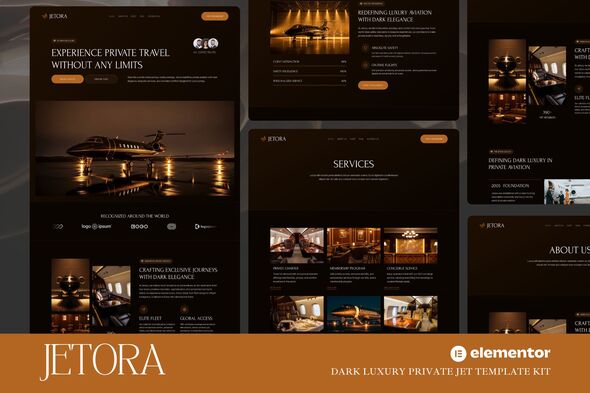
Jetora – Dark Luxury Private Jet Website Template Kit is designed for elite aviation businesses, luxury charters, and private flight services. With a sleek dark aesthetic and premium layouts, Jetora enhances your brand’s exclusivity while ensuring a seamless user experience. Perfect for showcasing fleets, membership programs, concierge services, and luxury travel packages, this Elementor kit makes it easy to build a high-end aviation website. Its fully responsive design ensures flawless performance across devices, while customizable pages allow you to tailor the experience for clients seeking sophistication, comfort, and world-class service. Elevate your private jet business with Jetora.
Features
- True no-code customization with drag and drop visual builder
- Customize fonts and colors in one place or fine-tune on individual elements
- Modern, professional design
- Fast-loading
- Works with most Elementor themes.
Included Pages:
- Homepage
- About Us
- Fleet
- Fleet Details
- Services
- Pricing
- Booking
- Help Center
- 404
- Contact Us
Plugins installed with kit
- Jeg Elementor Kit
- Metform
- The Plus Add-On
* How to Use Template Kits: * This is not a WordPress Theme. Template kits contain the design data for Elementor only and are installed using the envato Elements plugin for WordPress or directly through Elementor.
- Download your kit file from Envato and do not unzip it. If you use Safari browser you may need to ensure “Open safe files after downloading” is disabled in the browser preferences.
- Go to Settings > Permalinks and ensure Post Name is selected
- Go to Appearance > Themes > Add New and ensure Hello Elementor is installed and activated. This will prompt you to install Elementor if you haven’t already.
- Go to Plugins and ensure Elementor and Envato Elements are installed and at the latest version. If your kit requires Elementor Pro, it must be installed now and connected to your account.
- Go to Elements > Installed Kits and click Upload Template Kit Zip (or click your kit to view it)
- Check for the orange banner at the top and click Install Requirements to load any plugins the kit uses. https://envato.d.pr/ughD8Q
- Click import on the Global Kit Styles first. This will setup the site settings.
- Click Import on one template at a time in the order shown. These are stored in Elementor under Templates > Saved Templates and are re-used from here.
Creating pages
- Go to Pages and create a new page and click Edit with Elementor
- Click the gear icon at lower-left of the builder to view page settings and choose Elementor Full Width and hide page title
- Click the gray folder icon to access My Templates tab and then Import the page you’d like to customize.
- The home page is set under Settings > Reading by selecting Static Front Page.
If you have Elementor Pro, headers and footers are customized under Templates > Theme Builder.
Detailed Guide: https://help.market.envato.com/hc/en-us/articles/900000842846-How-to-use-the-Envato-Elements-WordPress-Plugin-v2-0
For further support, go to Elementor > Get Help in WordPress menu.
How to Import Metforms If you have Elementor Pro, skip install of Metform and form blocks.
- Import the metform block templates
- Import the page template where the form appears and right-click to enable the Navigator
- Locate and select the Metform widget and click Edit Form. Choose New, then Edit Form. The builder will appear
- Click ‘Add Template’ grey folder icon.
- Click ‘My Templates’ tab.
- Choose your imported metform template, then click ‘Insert’ (click No for page settings).
- Once the template is loaded, make any desired customizations and click ‘Update & Close’ The form will appear in the template
- Click Update
How to setup header in Jeg Elementor Kit plugin If you have Elementor Pro, headers and footers may be customized under Theme Builder.
- Go to Jeg Elementor Kit menu item > Header Template
- Click Add New Header
- Add condition > All Site and click Create
- Click gray folder icon to access My Templates tab
- Insert the header template.
- Customize and Save. This Template Kit uses demo images from Envato Elements. You will need to license these images from Envato Elements to use them on your website, or you can substitute them with your own.
| Type | Elementor Template Kit |
|---|---|
| Author | Tokotema |
| Category | Template Kits / Elementor / Travel Accomodation |
| Price | $29 |
| Sales | 16 |
| Published | Sep 19, 2025 |
| Last Update | Sep 19, 2025 |
| Template Kit Certified | No |
| Template Kit Software Version | Elementor 3.10.x |
| Template Kit Type | Envato Template Kit |
| Key Features | Optimized for Private Jet Website, SEO friendly and easy to customize, Elementor Pro and Free |
Categories
Tags
External listing. code.market does not sell this product and does not process payment for it. Pricing, payment, delivery, licensing, refunds, and support are handled by the third-party merchant on its own website. We may earn an affiliate commission from a referral. Details.
Products of the Week.
Submit🥇

resumetailorapp.com
ResumeTailorApp helps job seekers create professional, ATS-friendly resumes, improve existing CVs, and tailor their applications to specific job descriptions using AI. It also generates personalized cover letters to help candidates present their qualifications more effectively and simplify the job application process.
Other · 2,300 views · 7 clicksOther · Week 48 · 2,300 views · 7 clicks
🥈

Free GitHub Stars From Real
Get free GitHub stars on your repository from real developers who star by hand. No
Other · 3,883 views · 18 clicksOther · Week 48 · 3,883 views · 18 clicks