
Javascript Image Encrypt Protector Tool by Amazingcode
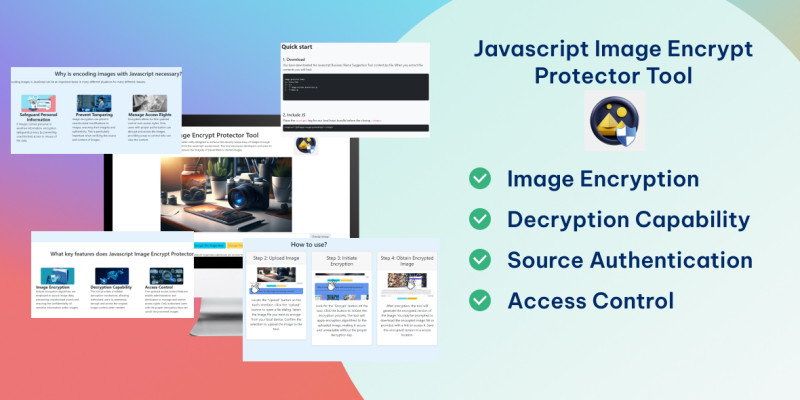
Description
Javascript Image Encrypt Protector Tool
The JavaScript Image Encrypt Protector Tool is a versatile utility designed to enhance the security and privacy of images through seamless encryption and decryption processes, all within the JavaScript environment. This tool empowers developers and users to safeguard sensitive image data, control access, and ensure the integrity of transmitted or stored images.
Why is encoding images with Javascript necessary?
Encoding images in JavaScript can be an important factor in many different situations for many different reasons.
Safeguard Personal Information: If images contain personal or sensitive information, encryption safeguards privacy by preventing unauthorized access or misuse of the data.
Prevent Tampering: Image encryption can prevent unauthorized modifications to images, ensuring their integrity and authenticity. This is particularly important when verifying the source and content of images.
Access Control: Manage Access Rights Encryption allows for fine-grained control over access rights. Only users with proper authorization can decrypt and access the images, providing a way to control who can view the content.
Source Authentication: Control Origin Access Use encryption to control access based on the source. Only users from specific origins or with proper credentials can decrypt and view the images.
Quick start
1. Download
You have downloaded the image-protector-tool.zip file. When you extract the contents you will find:
image-protector-tool/
├── index.html
├── js/
│   └──image-encrypt-protection.js
│   └──main.js
2. Include JS
This theme imports three Javascript files. Bootstrap jQueryPlace the script tag for our JavaScript bundle before the closing body.
https://image-protector-tool-ltdungrs-e603fcb4df970e685cb0f36aa22489d67.gitlab.io/js/image-encrypt-protection.js
3. Encrypt the Image
image = document.getElementById('image');
let { data, map } = encryptImage(image);
4. Decrypt the Image
let data = decryptImage(image, encryptKey);
5. Example
let cookImage = async () => {
    image = document.getElementById('image');
    let { data, map } = encryptImage(image);
    image.src = data;
    let encryptKey = document.getElementById('encryptKey');
    encryptKey.value = JSON.stringify(map);
    document.getElementById('encryptButton').disabled = true;
    document.getElementById('decryptButton').disabled = false;
    document.getElementById('encryptKeyGroup').style.display ="block";
}
let deCookImage = async () => {
    image = document.getElementById('image');
    let encryptKey = document.getElementById('encryptKey').value;
    let data = decryptImage(image, encryptKey);
    image.src = data;
    document.getElementById('encryptButton').disabled = false;
    document.getElementById('decryptButton').disabled = true;
    document.getElementById('encryptKey').value="";
    document.getElementById('encryptKeyGroup').style.display ="none";
}
Changelog:
1.0.0 (20.12.2023)
initial release
Created: 20.12.2023 By: Amazing Code
Thank you for purchasing my theme!
Features
Image Encryption Decryption Capability Access Control User-Friendly Interface Source Authentication Integration Capabilities Compliance and Legal Support Optimization for Performance
Instructions
How to use?
Step 1: Open the Tool Access the JavaScript Image Encrypt Protector Tool through your web browser. This tool should be embedded within your application or available on a designated web page. Step 2: Upload Image Locate the "Upload" button on the tool's interface. Click the "Upload" button to open a file dialog. Select the image file you want to encrypt from your local device. Confirm the selection to upload the image to the tool. Step 3: Initiate Encryption Look for the "Encrypt" button on the tool. Click the button to initiate the encryption process. The tool will apply encryption algorithms to the uploaded image, making it secure and unreadable without the proper decryption key. Step 4: Obtain Encrypted Image After encryption, the tool will generate the encrypted version of the image. You may be prompted to download the encrypted image file or provided with a link to access it. Save this encrypted version in a secure location.
How to Decrypt Image?
Step 1: Open the Tool Navigate to the JavaScript Image Encrypt Protector Tool through your web browser. Access the tool on the designated webpage or within your application. Step 2: Upload Image Locate the "Upload" button on the tool's interface. Click the "Upload" button to open a file dialog. Choose the image file you wish to decrypt from your local device. Confirm the selection to upload the encrypted image to the tool. Step 3: Enter Decryption Key After uploading the encrypted image, look for the "Decryption Key" input field on the tool's interface. Enter the correct decryption key or credentials associated with the encrypted image. This key is necessary to unlock and reveal the original content. Step 4: Initiate Decryption Find the "Decrypt" or "Unlock" button on the tool. Click the button to initiate the decryption process. The tool will use the provided decryption key to decrypt the image and reveal the original content. Step 5: Download Decrypted Image Once the decryption is complete, the tool may provide an option to download the decrypted image file. If prompted, click on the download link or button to save the decrypted image to your local device.
| Author | amazingcode |
|---|---|
| Category | Scripts & Code / JavaScript / Miscellaneous |
| Price | $34 |
| Extended License | $102 |
| Likes | 7 |
| First Release | Dec 20, 2023 |
| Last Update | Dec 20, 2023 |
| Files included | .css, .html, JavaScript .js |
Categories
Tags
External listing. code.market does not sell this product and does not process payment for it. Pricing, payment, delivery, licensing, refunds, and support are handled by the third-party merchant on its own website. We may earn an affiliate commission from a referral. Details.
Products of the Week.
Submit🥇

STOP GUESSING WHAT TO POST
AI that learns your brand voice and builds a month of consistent, on-brand social content: carousels, posts and hooks that sound like you, not like everyone else's AI.
SaaS · 4,276 views · 38 clicksSaaS · Week 45 · 4,276 views · 38 clicks
🥈

Conversational Backlinks for Busy Founders
Place Backlink Relevant Conversation for your domain across Forums and Conversations
Website · 41,985 views · 223 clicksWebsite · Week 45 · 41,985 views · 223 clicks
🥉

upvote.club
Free Social Media Engagement that Helps Boost Your Content. Upvote Club supports 19 social networks with 100+ engagement actions in one dashboard. Add links to your posts and get free engagement from real users.
SaaS · 40,028 views · 117 clicksSaaS · Week 45 · 40,028 views · 117 clicks
#4

Substack Posting API
Onboard your Agent to Substack. Write Publish on Substack via API
SaaS · 59,037 views · 198 clicksSaaS · Week 45 · 59,037 views · 198 clicks
#5

Seenshot App
Free, Fast, MacOS Screenshot app. Make Screenshot cmd+shift+2 and send it via link
Desktop App · 28,409 views · 122 clicksDesktop App · Week 45 · 28,409 views · 122 clicks
#6

Hand-Placed Backlinks $9.99 per link. Flat rate.
Buy hand-placed forum, Q-A and directory backlinks. Flat $9.99 per link, no subscriptions — you only pay for approved listings.
Website · 4,247 views · 19 clicksWebsite · Week 45 · 4,247 views · 19 clicks
#7

Free Invoice Generator - PDF Invoices in Your Browser, No Sign-Up
A free invoice maker for freelancers and small businesses: fill in the invoice, check the live preview, and download a PDF that looks exactly like it. Any currency, tax per item, three templates, no sign-up, and nothing leaves your device.
2,927 views · 17 clicksWeek 45 · 2,927 views · 17 clicks
#8

Merge PDF Files Free - Combine PDFs in Your Browser, No Upload
A free PDF merger for office workers, students, and freelancers: combine PDFs and images into one file in the browser, reorder files and pages, pick page ranges, keep bookmarks, and open password-protected PDFs. Nothing is uploaded, no sign-up, no watermark.
2,703 views · 13 clicksWeek 45 · 2,703 views · 13 clicks