
ParkEase | Mobile Parking Booking App - iOS Swift App
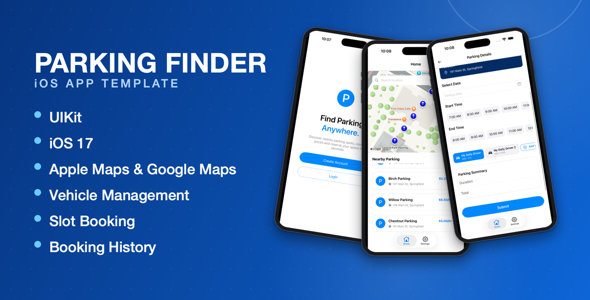
Description
ParkEase | Mobile Parking Booking App – iOS Swift App
ParkEase | Mobile Parking Booking App – iOS Swift App is a modern parking reservation application built with Swift and Firebase. It provides real-time parking slot booking, nearby parking search on Apple Maps or Google Maps, multi-vehicle management, booking history, and a polished, animated UIKit interface. The project is easy to customize and includes comprehensive documentation for setup, deployment, and App Store submission.
Key Features
- Firebase Integration – Store and manage users, parking locations, parking slots, and bookings using Firebase Authentication and Cloud Firestore.
- Real-Time Parking Slot Booking – Browse available parking slots and reserve them in real time.
- Vehicle Management – Users can register multiple vehicles, pick one at booking time, and set a default vehicle.
- Booking History – View upcoming and past parking reservations, including the vehicle used for each booking.
- Google Maps & Apple Maps – Display parking locations using either Google Maps or Apple’s native MapKit.
- Google Places & MKLocalSearch – Search nearby parking locations using the Google Places API or Apple’s MKLocalSearch.
- Map Provider Switch – Easily enable or disable Google Maps and Apple Maps based on your project requirements.
- Firebase Authentication – Secure user sign up and login with Firebase.
- Cloud Firestore – Manage parking locations, parking slots, and bookings with real-time database synchronization.
- Polished UIKit Interface – Clean, modern, easy-to-customize UIKit design with subtle entrance animations, haptic feedback, and custom screen transitions.
- iOS 17 Ready – Built using Swift and optimized for iOS 17 and later.
- Complete Firebase Setup Documentation
- Complete Google Maps Setup Documentation
- Project Customization Support
- App Store Submission Support
Technical Requirements
- Xcode 15 or later
- Minimum iOS Deployment Target: iOS 17.0
- Dependency Manager: CocoaPods
- Required CocoaPods: Firebase/Auth, Firebase/Core, Firebase/Firestore, Firebase/Storage (10.22.0), GoogleMaps, Alamofire, Kingfisher, IQKeyboardManagerSwift, SkyFloatingLabelTextField
Support
If you need assistance with installation, customization, or deployment, please post your questions in the CodeCanyon product comments section. I regularly monitor the comments and will respond as soon as possible.
Important Notice
This application relies on third-party services, including Firebase and Google Maps. You must create and configure your own accounts before using the project.
- Firebase: A Firebase project is required for Authentication, Cloud Firestore, and Storage.
- Google Maps: You must create a Google Cloud project and configure your own API Key to enable Google Maps and Google Places. This is only required if you enable the Google map provider — Apple Maps and MKLocalSearch work out of the box with no extra setup.
- Any costs associated with Firebase or Google services are the responsibility of the buyer and depend on the pricing policies of the respective service providers.
Upcoming Features
- Admin application for managing parking locations and slots
- Advanced parking search filters
- Stripe payment integration
- Apple Pay integration
- Vehicle insurance/registration expiry reminders
Changelog
Version 1.0
- Initial Release
- Firebase Authentication & Cloud Firestore
- Real-Time Parking Slot Booking
- Booking History
- Vehicle Management (multiple vehicles, default vehicle)
- Apple Maps & Google Maps Support
- Google Places & MKLocalSearch
- Polished UIKit Interface with Entrance Animations & Haptics
| Type | iOS App |
|---|---|
| Author | knobapps |
| Price | $9 |
| Sales | 1 |
| Rating | 0 (0) |
| Published | Aug 28, 2024 |
| Last Update | Jul 29, 2026 |
| Compatible Software | iOS 15 |
| Compatible With | Swift |
| Mobile Files Included | .h, .m, .xib/.nib |
Categories
Tags
External listing. code.market does not sell this product and does not process payment for it. Pricing, payment, delivery, licensing, refunds, and support are handled by the third-party merchant on its own website. We may earn an affiliate commission from a referral. Details.
Products of the Week.
Submit🥇

STOP GUESSING WHAT TO POST
AI that learns your brand voice and builds a month of consistent, on-brand social content: carousels, posts and hooks that sound like you, not like everyone else's AI.
SaaS · 7,395 views · 67 clicksSaaS · Week 46 · 7,395 views · 67 clicks
🥈

Conversational Backlinks for Busy Founders
Place Backlink Relevant Conversation for your domain across Forums and Conversations
Website · 46,692 views · 232 clicksWebsite · Week 46 · 46,692 views · 232 clicks
🥉

upvote.club
Free Social Media Engagement that Helps Boost Your Content. Upvote Club supports 19 social networks with 100+ engagement actions in one dashboard. Add links to your posts and get free engagement from real users.
SaaS · 44,628 views · 127 clicksSaaS · Week 46 · 44,628 views · 127 clicks
#4

Substack Posting API
Onboard your Agent to Substack. Write Publish on Substack via API
SaaS · 63,514 views · 206 clicksSaaS · Week 46 · 63,514 views · 206 clicks
#5

Seenshot App
Free, Fast, MacOS Screenshot app. Make Screenshot cmd+shift+2 and send it via link
Desktop App · 32,764 views · 127 clicksDesktop App · Week 46 · 32,764 views · 127 clicks
#6

Hand-Placed Backlinks $9.99 per link. Flat rate.
Buy hand-placed forum, Q-A and directory backlinks. Flat $9.99 per link, no subscriptions — you only pay for approved listings.
Website · 8,381 views · 19 clicksWebsite · Week 46 · 8,381 views · 19 clicks
#7

Free Invoice Generator - PDF Invoices in Your Browser, No Sign-Up
A free invoice maker for freelancers and small businesses: fill in the invoice, check the live preview, and download a PDF that looks exactly like it. Any currency, tax per item, three templates, no sign-up, and nothing leaves your device.
7,010 views · 29 clicksWeek 46 · 7,010 views · 29 clicks
#8

Merge PDF Files Free - Combine PDFs in Your Browser, No Upload
A free PDF merger for office workers, students, and freelancers: combine PDFs and images into one file in the browser, reorder files and pages, pick page ranges, keep bookmarks, and open password-protected PDFs. Nothing is uploaded, no sign-up, no watermark.
6,485 views · 18 clicksWeek 46 · 6,485 views · 18 clicks