
iOS Authentication Template - Firebase, Google & Apple Sign-In | SwiftUI
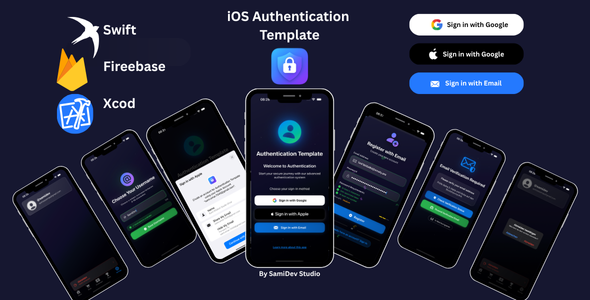
Description
iOS Authentication Template – complete SwiftUI sign-in
A professional, production-ready authentication system for iOS. Email & password, Google Sign-In and Apple Sign-In, email verification, password reset and username selection – all built with SwiftUI and Firebase. Skip weeks of development and start every new app with a secure login.
Documentation: Complete setup guide & documentation
Every sign-in method your users expect
Email and password with real-time validation, Google Sign-In and native Apple Sign-In for maximum privacy. New users verify their email, pick a username with a live availability check, and can reset their password at any time.
Modern SwiftUI design, ready for your brand
A dark theme with smooth animations and a responsive layout for iPhone and iPad. Colors, fonts and settings live in central configuration files, so you can match your brand in minutes.
Built for international apps
English, German and Arabic are included – with full right-to-left support. Add your own languages through the localization files.
Here are the key features of the template:
- Email/password authentication – with real-time validation
- Google Sign-In – seamless Firebase setup
- Apple Sign-In – native iOS experience and privacy
- Email verification – with resend function
- Password reset – secure email flow
- Username selection – real-time availability check
- SwiftUI + MVVM – clean, commented code
- Dark theme – fully customizable colors
- Multi-language – English, German, Arabic (RTL)
- Accessibility – follows iOS guidelines
- Security best practices – input validation
Easy customization
- AppConfig.swift – app settings and features
- AppTheme.swift – colors, fonts and styling
- Localization files – your own translations
- Asset catalog – your logo and icons
What’s included
- Complete Xcode project – ready to build and customize
- Firebase configuration guide – step by step
- Online documentation website with screenshots
- Customization examples and troubleshooting guide
Quick setup
- Open the project in Xcode 15+
- Create your Firebase project following the documentation
- Enable the sign-in providers (Google, Apple)
- Adjust colors and branding in the configuration files
- Build, test and ship
F.A.Q.
- Do I need a Mac?
Yes. iOS apps are built with Xcode, which runs on macOS. - Do I need my own Firebase project?
Yes. The template connects to your own Firebase project – creating one is free and the documentation guides you through every step. - Does it work on iPad?
Yes, iPhone and iPad are supported (iOS 15+). - Can I add this login to my existing app?
Yes. The code is modular (MVVM), so you can use it as the starting point of a new app or move the screens into your project. - Can I change the design?
Yes. Colors, fonts and texts are set in AppTheme.swift, AppConfig.swift and the localization files.
Requirements
- Mac with Xcode 15 or newer (Xcode 16 recommended)
- iOS 15.0+ · Swift 5.9+
- Firebase project (free to create)
- Apple Developer account for Apple Sign-In and App Store publishing
Changelog
v1.0.0 [July 2025]
Initial release on CodeCanyon
Support
Questions before or after buying? Use the Comments tab of this item or write to sami.dev.studioo@gmail.com. More templates: SamiDevStudio portfolio.
| Type | iOS App |
|---|---|
| Author | SamiDevStudio |
| Price | $23 |
| Sales | 4 |
| Rating | 0 (0) |
| Published | Jul 23, 2025 |
| Last Update | Jul 23, 2025 |
| Compatible Software | iOS 15 |
| Mobile Files Included | .h, .m |
Categories
Tags
External listing. code.market does not sell this product and does not process payment for it. Pricing, payment, delivery, licensing, refunds, and support are handled by the third-party merchant on its own website. We may earn an affiliate commission from a referral. Details.
Products of the Week.
Submit🥇

STOP GUESSING WHAT TO POST
AI that learns your brand voice and builds a month of consistent, on-brand social content: carousels, posts and hooks that sound like you, not like everyone else's AI.
SaaS · 7,395 views · 67 clicksSaaS · Week 46 · 7,395 views · 67 clicks
🥈

Conversational Backlinks for Busy Founders
Place Backlink Relevant Conversation for your domain across Forums and Conversations
Website · 46,692 views · 232 clicksWebsite · Week 46 · 46,692 views · 232 clicks
🥉

upvote.club
Free Social Media Engagement that Helps Boost Your Content. Upvote Club supports 19 social networks with 100+ engagement actions in one dashboard. Add links to your posts and get free engagement from real users.
SaaS · 44,628 views · 127 clicksSaaS · Week 46 · 44,628 views · 127 clicks
#4

Substack Posting API
Onboard your Agent to Substack. Write Publish on Substack via API
SaaS · 63,514 views · 206 clicksSaaS · Week 46 · 63,514 views · 206 clicks
#5

Seenshot App
Free, Fast, MacOS Screenshot app. Make Screenshot cmd+shift+2 and send it via link
Desktop App · 32,764 views · 127 clicksDesktop App · Week 46 · 32,764 views · 127 clicks
#6

Hand-Placed Backlinks $9.99 per link. Flat rate.
Buy hand-placed forum, Q-A and directory backlinks. Flat $9.99 per link, no subscriptions — you only pay for approved listings.
Website · 8,381 views · 19 clicksWebsite · Week 46 · 8,381 views · 19 clicks
#7

Free Invoice Generator - PDF Invoices in Your Browser, No Sign-Up
A free invoice maker for freelancers and small businesses: fill in the invoice, check the live preview, and download a PDF that looks exactly like it. Any currency, tax per item, three templates, no sign-up, and nothing leaves your device.
7,010 views · 29 clicksWeek 46 · 7,010 views · 29 clicks
#8

Merge PDF Files Free - Combine PDFs in Your Browser, No Upload
A free PDF merger for office workers, students, and freelancers: combine PDFs and images into one file in the browser, reorder files and pages, pick page ranges, keep bookmarks, and open password-protected PDFs. Nothing is uploaded, no sign-up, no watermark.
6,485 views · 18 clicksWeek 46 · 6,485 views · 18 clicks