
Presetly | Photo Filter App With 966 Presets, StoreKit Paywall, Favorites and Onboarding - SwiftUI
Description
Presetly – Photo Presets App Template for iOS
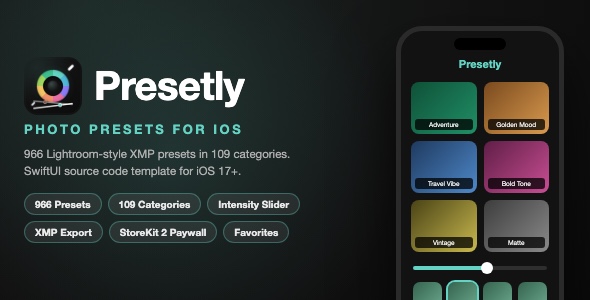
Presetly is a complete, App Store ready photo presets app template built with SwiftUI. It ships with 966 handcrafted Lightroom-style XMP presets organized into 109 categories. Users pick a photo, tap a preset, adjust the intensity with a live slider, and save the edited photo back to their library. The template includes a full freemium business model with a StoreKit 2 auto-renewable subscription paywall, favorite categories, onboarding, and a polished dark design.
Demo Instructions
- This app is 100% offline. There is no login and no demo credentials are needed.
- Download the zip, open the .xcodeproj in Xcode, select an iOS 17+ simulator and press Run.
- On first launch you will see the 3-page onboarding. Tap Continue to reach the main preset grid.
- Tap any preset category, grant photo library access when asked, pick a photo, then tap a preset thumbnail to apply it live.
- Subscriptions require your own StoreKit configuration or App Store Connect products (setup is described in the documentation). Free users can save up to 3 edited photos without any purchase.
Everything the App Does
- 966 included Lightroom XMP preset files across 109 themed categories (portrait, travel, film, wedding, cinematic, moody, food and more)
- One-tap preset application with real-time Core Image rendering
- Intensity slider from 0 to 100 percent that re-renders the preset live with debouncing
- Original vs preset comparison with thumbnail strip of every preset in a category
- Save edited photos to the iOS photo library
- Export any XMP preset file via the iOS share sheet (premium feature)
- Favorite categories with favorites sorted to the top of the grid and highlighted
- Freemium model: 3 free photo saves for free users, unlimited with subscription
- StoreKit 2 auto-renewable subscriptions with monthly and yearly plans, free trial support, savings badge, trial toggle and restore purchases
- Paywall screen with animated hero, feature list and 5 second close cooldown
- 3-page onboarding flow with notification permission request
- Settings screen: manage subscriptions, restore purchase, rate app, contact, terms and privacy links
- In-app rating prompt using StoreKit review dialog after 5 sessions
- CloudKit sync of user preferences and purchase state across devices with automatic duplicate cleanup
- Graceful photo library permission handling with a deep link to the Settings app
- Forced dark mode design system with a custom color asset palette
- Powerful XMP parser: exposure, contrast, highlights, shadows, whites, blacks, clarity, texture, dehaze, vibrance, saturation, temperature, tint, HSL 8-channel adjustments, split toning, color grading, tone curves, grain, vignette, sharpening and noise reduction
Technology
- Language: Swift 5, SwiftUI
- Minimum iOS: 17.0
- Data: SwiftData with optional CloudKit (iCloud) sync
- In-app purchases: StoreKit 2
- Image processing: Core Image with custom XMP-to-CIFilter pipeline
- Photo library: PhotosUI and Photos frameworks
- Third-party dependencies: none
- Project format: Xcode 16 or newer (file-system synchronized groups)
What the Buyer Gets
- Full Xcode source code for the Presetly app (Swift files, asset catalog, 109 preset folders with 966 XMP files)
- Custom app icon (1024×1024) and all artwork
- Step-by-step documentation.html with screenshots: setup, rename, bundle ID, icon replacement, re-skinning, StoreKit products and App Store submission checklist
- Screenshots folder with all preview screens used in the listing
- Clean project: no CocoaPods, no SPM packages, no API keys required
Development Disclosure
Portions of this template’s source code were developed with AI-assisted tools. All code has been reviewed, tested and built successfully with Xcode before publication.
Please note: this is a source code template for developers. Xcode knowledge is required to build, customize and publish the app. You will need an Apple Developer account to run it on a physical device and to configure CloudKit and in-app purchases. The included presets are demo content; replace or extend them with your own to create a unique product.
| Type | iOS App |
|---|---|
| Author | mefjudevllc |
| Price | $14 |
| Sales | 14 |
| Rating | 0 (1) |
| Published | May 23, 2025 |
| Last Update | Sep 11, 2026 |
| Compatible Software | Other |
| Compatible With | Swift |
| Mobile Files Included | .m |
Categories
Tags
External listing. code.market does not sell this product and does not process payment for it. Pricing, payment, delivery, licensing, refunds, and support are handled by the third-party merchant on its own website. We may earn an affiliate commission from a referral. Details.
Products of the Week.
Submit🥇

STOP GUESSING WHAT TO POST
AI that learns your brand voice and builds a month of consistent, on-brand social content: carousels, posts and hooks that sound like you, not like everyone else's AI.
SaaS · 7,345 views · 67 clicksSaaS · Week 46 · 7,345 views · 67 clicks
🥈

Conversational Backlinks for Busy Founders
Place Backlink Relevant Conversation for your domain across Forums and Conversations
Website · 46,623 views · 232 clicksWebsite · Week 46 · 46,623 views · 232 clicks
🥉

upvote.club
Free Social Media Engagement that Helps Boost Your Content. Upvote Club supports 19 social networks with 100+ engagement actions in one dashboard. Add links to your posts and get free engagement from real users.
SaaS · 44,565 views · 127 clicksSaaS · Week 46 · 44,565 views · 127 clicks
#4

Substack Posting API
Onboard your Agent to Substack. Write Publish on Substack via API
SaaS · 63,450 views · 206 clicksSaaS · Week 46 · 63,450 views · 206 clicks
#5

Seenshot App
Free, Fast, MacOS Screenshot app. Make Screenshot cmd+shift+2 and send it via link
Desktop App · 32,701 views · 127 clicksDesktop App · Week 46 · 32,701 views · 127 clicks
#6

Hand-Placed Backlinks $9.99 per link. Flat rate.
Buy hand-placed forum, Q-A and directory backlinks. Flat $9.99 per link, no subscriptions — you only pay for approved listings.
Website · 8,323 views · 19 clicksWebsite · Week 46 · 8,323 views · 19 clicks
#7

Free Invoice Generator - PDF Invoices in Your Browser, No Sign-Up
A free invoice maker for freelancers and small businesses: fill in the invoice, check the live preview, and download a PDF that looks exactly like it. Any currency, tax per item, three templates, no sign-up, and nothing leaves your device.
6,950 views · 29 clicksWeek 46 · 6,950 views · 29 clicks
#8

Merge PDF Files Free - Combine PDFs in Your Browser, No Upload
A free PDF merger for office workers, students, and freelancers: combine PDFs and images into one file in the browser, reorder files and pages, pick page ranges, keep bookmarks, and open password-protected PDFs. Nothing is uploaded, no sign-up, no watermark.
6,432 views · 18 clicksWeek 46 · 6,432 views · 18 clicks