
Internet Optimizer - DNS Changer - Optimize PING
Description
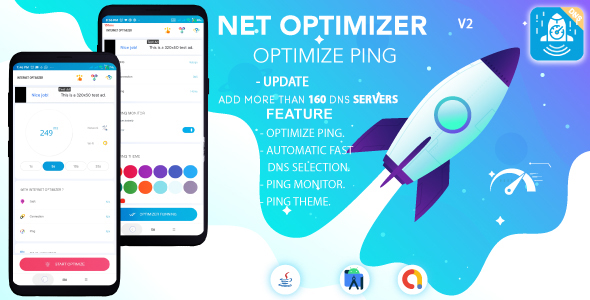
Internet Optimizer – DNS Changer – Optimize PING
(Android 11 Supported)
What does Internet Optimizer do?
It is a special DNS changer application developed for Android devices. It also compares many DNS servers, finds and connects to the fastest DNS service. During this process, instantaneous delay (on the basis of ms) values ??are used. Tested DNS servers are ordered by latency. Its main purpose is to change DNS. It is intended for users to make the fastest DNS connection without hassle.
What is the order of Internet Optimize and DNS Change?
1- Internet connection is checked.
2- There is a connected network type. (Wi-Fi, Mobile Network, 2G, 3G, 4G, 5G)
3- The instantaneous delay of the normal connection is calculated. (Ping time)
4- DNS changer tests 17 different DNS services based on instant latency. (Pings a global server.)
5- DNS servers are sorted on the basis of their latency. (Sorted by ping time)
6- By configuring the fastest DNS server, a connection request is sent. (Note: A VPN connection permission request may be shown to the user during this time.)
7- DNS connection is completed.
8- In the main interface, the connected DNS server, Ping time, network type information are updated.
What is Ping Monitor and how does it work?
This tool is a tool that is constantly updated in one corner of the screen, allowing the user to instantly see the ping time. It aims to let you know if there is lag or lag while playing the game. It can be useful for players to follow in online games. It is calculated by pinging a hub. The latency is based on the ping time. All network types are supported. This feature needs some permissions and internet connection to work properly.
Some special permissions needed for DNS Change :-
These permissions are required for DNS change operation. We need these permissions to calculate ping times and learn network type. Also, we need services so that the DNS changer can run in the background.
Permissions required for Ping Monitor :-
Ping monitor needs display permission on other displays. An internet connection is required for this service to work properly.
Apk Demo
Download DemoChange Log
Version: 1.0.2
— Minor bug fix .
— Add more than 160 DNS servers .

Version: 1.0.3
—  Minor bug fix .
—  Admob ads update .
— Update android studio to the latest version .

Version: 1.0.4
—  Minor bug fix .

Version: 1.0.5
—  Minor bug fix .
— Update android studio to the latest version .
— Android 34 support

Version: 1.0.6
—  Minor bug fix .
| Type | Android App |
|---|---|
| Author | AcsheStudio |
| Price | $24 |
| Sales | 4 |
| Rating | 0 (1) |
| Published | May 17, 2022 |
| Last Update | Sep 17, 2024 |
| Compatible Software | Android 12.0, Android 11.0, Android 10.0, Android 9.0, Other |
| Demo Url | https://mega.nz/file/t7xl0DSa#sDlsFAjrfJg8fVJloOzSoxTGYo2FZm5W1RetJwL84s4 |
| Mobile Files Included | .apk, .java, .xml |
Categories
Tags
External listing. code.market does not sell this product and does not process payment for it. Pricing, payment, delivery, licensing, refunds, and support are handled by the third-party merchant on its own website. We may earn an affiliate commission from a referral. Details.
Products of the Week.
Submit🥇

Perceptle
Perceptle is a daily browser-based game that challenges you to test your sensory intuition through five quick estimation and rhythm-based rounds.
Other · 1 views · 0 clicksOther · Week 47 · 1 views · 0 clicks
🥈

Free LinkedIn Likes From Real
Get free LinkedIn likes on your posts from real members who react by hand. No
SaaS · 124 views · 2 clicksSaaS · Week 47 · 124 views · 2 clicks
🥉

STOP GUESSING WHAT TO POST
AI that learns your brand voice and builds a month of consistent, on-brand social content: carousels, posts and hooks that sound like you, not like everyone else's AI.
SaaS · 7,686 views · 71 clicksSaaS · Week 47 · 7,686 views · 71 clicks
#4

aaas.market
407 reliable micro tools for solo founders, marketers and creators. They work in your browser
SaaS · 122 views · 0 clicksSaaS · Week 47 · 122 views · 0 clicks