
Instagram Journal

Description
Welcome to Instagram Journal
Introducing the most powerful and versatile Instagram plugin you will ever use, Instagram Journal! This is the only Wordpress Instagram feed to truly leverage the full power of the Instagram API. Display everything from your photos, photos you’ve liked, photos of a friends account, photos of a particular hashtag, photos of a location and so much more! Our mission is to deliver the most robust Instagram experience on the market so we’ve included an array of premium gallery designs to allow you to beautifully render your photos with a single click of a button.
Also to take it one step further, this plugin comes standard with the Instagram Journal Wordpress theme. It’s elegant, responsive, super flexible, and pairs perfectly with the plugin. Simply add your userid, and let the selfies roll!


Overview
Instagram Journal is easy to use and has an extensive selection of options. We listened to your feature requests and created a brand new product that includes them all. See the list below for more details!
Key Features
- Refined & Perfected Codebase - After years of providing the best selling Instagram plugins on the Envato Market, we’ve crafted our most powerful Instagram plugin yet!
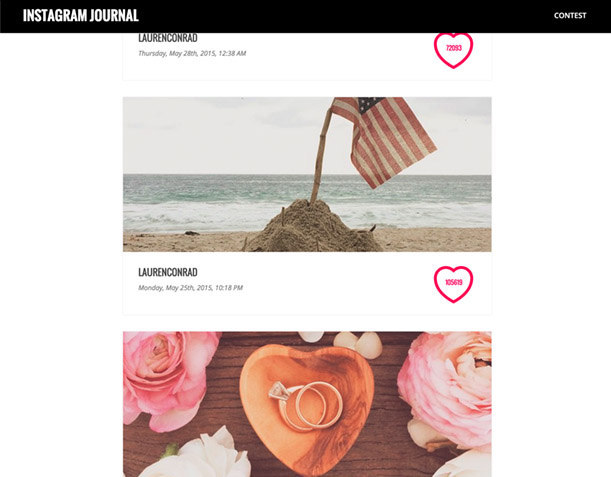
- Instagram Contest Mode - For the first time ever you can now host Instagram contests from your website in just minutes! To take it one step further, you can also moderate photos directly from your mobile device!
- Popular Instagram Feed Mode (Deprecated) - This feed mode pulls in the photos from the Instagram popular feed.
- User Instagram Feed Mode - This feed mode allows you to specify a user id to pull in photos from a specific user.
- Multiuser Instagram Feed Mode - This feed mode allows you to specify multiple user id’s to pull in photos from specific users. Note, this feature does NOT allow load more functionality.
- Tag Instagram Feed Mode - This feed mode allows you to specify a hashtag to search from the Instagram API.
- Multi Tag Instagram Feed Mode - This feed mode allows you to specify multiple hashtags to pull in photos from specific users. Note, this feature does NOT allow load more functionality.
- Location Instagram Feed Mode - This feed mode allows you to specify location id to pull in all photos taken in a given location.
- User Liked Instagram Feed Mode - This feed mode allows you to specify a user id to pull photos that were liked by a specific user.
- Classic View - This view mode creates a unique grid montage of your photos that displays beautifully on all devices.
- Collage Carousel View - This view mode organizes your photos into a collage carousel with lovely transitions to really them sparkle.
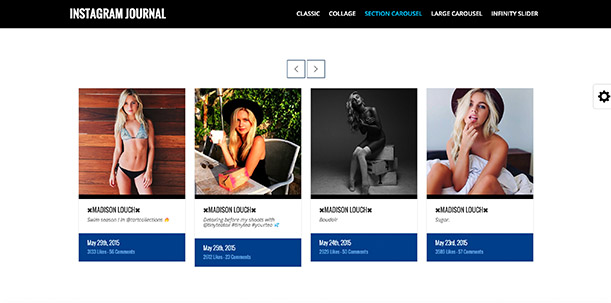
- Section Carousel View - This view mode provides you with a more formal gallery. This is an ideal solution for business templates or anyone striving for a clean professional look.
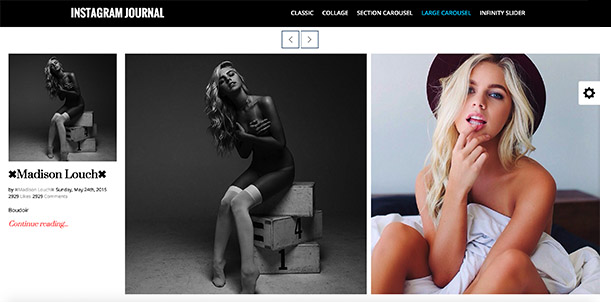
- Large Carousel View - This view mode displays a powerful large carousel that displays photo details the moment a photo is activated.
- Infinity View - This view mode displays a sleek, sexy slider that transitions through your photos infinitely! It renders edge to edge of the full width of your screen and includes beautifully displayed photo details upon hovering.
- Photo Limit Control - After many requests for this feature, we’ve now provided a way to limit the amount of photos loaded in by the API.
- Responsive HD Video - Pull in all of your favorite videos and share them with the world. Each video player is fully responsive and supports fullscreen mode on desktop and mobile devices.
- Fully Customizable Carousels - This plugin features an array of options for your carousels to allow you to control animations, transitions, speed, and easing.
- Instagram Journal Theme (Included!) - Our designers beauty and polish is what makes this plugin really stand out. Take advantage of the included Instagram Journal Wordpress theme($48 value) to completely blow away your audience, and your competition.
- Fancybox 2 (NEW) - fancyBox is a tool that offers a nice and elegant way to add zooming functionality for images, html content and multi-media on your website. This is now fully integrated into Instagram Journal to allow you to display your photos nicely in a stylish popup.
- Mobile Retna Ready - Designed and tested to work well any mobile device including iPhone, iPad, and Android Support.
- Non Conflicting Plugin Design
- Multi-layered design and effects
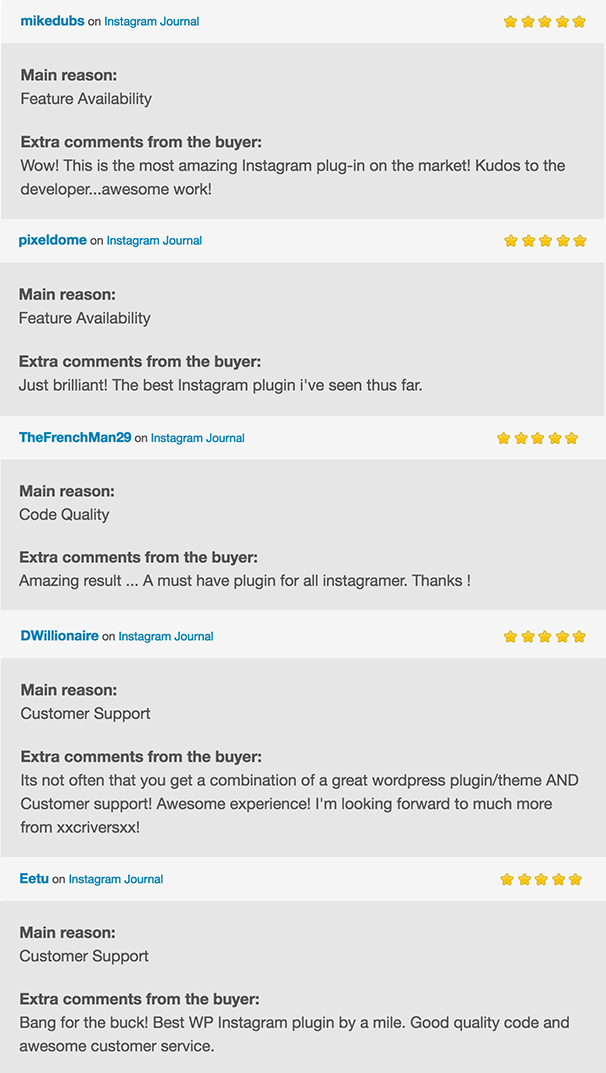
Customer Reviews
Support and Documentation
Support is our mission! – To help you get started, we have provided extensive documentation code examples and screenshots. In addition, you can contact us with any question, issue, or feature request! Support our top priority so don’t hesitate to reach out!
Changelog
Version 2.9.4 – June 8 2021
- Added support for new API calls.
- Upgraded to the latest version of the graph API.
Version 2.9.2 – Dec 16 2020
- Enhanced both the user feed and hashtag feed to leverage a few new optimizations.
Version 2.9 – June 30 2020
- Upgraded to the new Graph API.
- Minor performance enhancements.
Version 2.8 – Oct 1 2019
- Added flexibility for the layout designer.
- Added support for the latest version of Wordpress.
- Removed deprecated logic.
Version 2.7 – April 5 2018
- Support for latest API changes (April 4th 2018).
Version 2.6 – March 8 2018
- Minor Performance Enhancements.
- Minor API Tweaks.
Version 2.5 – Jan 16 2018
- Added For Latest API Updates.
- Added UI Enhancements for Carousels.
Version 2.4 – Sept 4 2017
- API square image enhancements.
- Minor optimizations.
Version 2.4 – July 22 2017
- API updates & performance enhancements.
- Added compression to boost load times.
- Added new location parameters.
- Added additional photo size support.
Version 2.3 – November 1 2016
- New Features Added!
- Fancybox 2.0 Added to All Gallery Types.
- Added Fancybox HTML5 Video Support to All Gallery Types.
- Minor Bug Fixes.
Version 2.2 – September 14 2016
- New Features Added!
- Fancybox 2.0 Popup Feature Added to Classic Gallery.
- Added Fancybox HTML5 Video Support.
- Added Mobile Responsive Fancybox Support.
- Optimized Video Player.
Version 2.1 – August 6 2016
- API performance enhancements.
- Removed deprecated API features.
- Minor bug fixes.
Version 2.0 – March 4 2016
- Added gallery size option.
- Added photo size option.
- Added photo gutter option.
- Added color options for classic gallery.
- Added color options for collage gallery.
- Added color options for section carousel gallery.
- Added color options for large carousel gallery.
- Added color options for infinity carousel gallery.
- Added color options for contest gallery.
- Added carousel navigation toggle option to all carousel galleries.
- Added tutorial videos for Instagram Journal plugin.
- Added tutorial videos for Journal theme.
- Added XML content importer for Journal theme.
- Updated plugin documentation.
- Updated theme documentation.
- Optimized API Calls.
- Minor bug fixes.
Version 1.4 – November 9 2015
- Added support for landscape photos.
- Updated documentation.
- Minor bug fixes.
Version 1.3 – October 26 2015
- Added deep linking to all gallery types
- Added autosaving of settings to the shortcode generator
- Added mirror duplication option to infinity slider
- Added autoplay to videos to the infinity slider
- Performance optimization on Instagram API calls
- Increase support for Wordpress 4.3.1
Version 1.2 – August 15 2015
- Bug fixes
- Added classic logic to contest mode
- Added video logic to classic contest mode
- Bug fixes
Version 1.1 – May 31 2015
- Added easing shortcode select box
- Add link enable/disable option
- Updated the documentation
- Bug fixes
| Type | WordPress Plugin |
|---|---|
| Author | xxcriversxx |
| Category | Wordpress / Social Networking |
| Price | $20 |
| Sales | 2,119 |
| Rating | 4.30 from 106 ratings |
| Published | May 29, 2015 |
| Last Update | Mar 22, 2026 |
| Compatible Browsers | IE6, IE7, IE8, IE9, IE10, IE11, Firefox, Safari, Opera, Chrome, Edge |
| Compatible Software | WordPress 6.0.x, WordPress 5.9.x, WordPress 5.8.x, WordPress 5.7.x, WordPress 5.6.x, WordPress 5.5.x, WordPress 5.4.x, WordPress 5.3.x, WordPress 5.2.x, WordPress 5.1.x, WordPress 5.0.x |
| Compatible With | BuddyPress 9.x.x, Visual Composer |
| Gutenberg Optimized | Yes |
| Source Files Included | JavaScript JS, JavaScript JSON, HTML, CSS, PHP |
Categories
Tags
External listing. code.market does not sell this product and does not process payment for it. Pricing, payment, delivery, licensing, refunds, and support are handled by the third-party merchant on its own website. We may earn an affiliate commission from a referral. Details.
Products of the Week.
Submit🥇

STOP GUESSING WHAT TO POST
AI that learns your brand voice and builds a month of consistent, on-brand social content: carousels, posts and hooks that sound like you, not like everyone else's AI.
SaaS · 3,986 views · 35 clicksSaaS · Week 45 · 3,986 views · 35 clicks
🥈

Conversational Backlinks for Busy Founders
Place Backlink Relevant Conversation for your domain across Forums and Conversations
Website · 41,634 views · 222 clicksWebsite · Week 45 · 41,634 views · 222 clicks
🥉

upvote.club
Free Social Media Engagement that Helps Boost Your Content. Upvote Club supports 19 social networks with 100+ engagement actions in one dashboard. Add links to your posts and get free engagement from real users.
SaaS · 39,661 views · 114 clicksSaaS · Week 45 · 39,661 views · 114 clicks
#4

Substack Posting API
Onboard your Agent to Substack. Write Publish on Substack via API
SaaS · 58,690 views · 198 clicksSaaS · Week 45 · 58,690 views · 198 clicks
#5

Seenshot App
Free, Fast, MacOS Screenshot app. Make Screenshot cmd+shift+2 and send it via link
Desktop App · 28,072 views · 122 clicksDesktop App · Week 45 · 28,072 views · 122 clicks
#6

Hand-Placed Backlinks $9.99 per link. Flat rate.
Buy hand-placed forum, Q-A and directory backlinks. Flat $9.99 per link, no subscriptions — you only pay for approved listings.
Website · 3,930 views · 19 clicksWebsite · Week 45 · 3,930 views · 19 clicks
#7

Free Invoice Generator - PDF Invoices in Your Browser, No Sign-Up
A free invoice maker for freelancers and small businesses: fill in the invoice, check the live preview, and download a PDF that looks exactly like it. Any currency, tax per item, three templates, no sign-up, and nothing leaves your device.
2,607 views · 17 clicksWeek 45 · 2,607 views · 17 clicks
#8

Merge PDF Files Free - Combine PDFs in Your Browser, No Upload
A free PDF merger for office workers, students, and freelancers: combine PDFs and images into one file in the browser, reorder files and pages, pick page ranges, keep bookmarks, and open password-protected PDFs. Nothing is uploaded, no sign-up, no watermark.
2,426 views · 13 clicksWeek 45 · 2,426 views · 13 clicks