
Instagram All in one Grow

Description
Instagram Scraper, Follower Scraper, Message Sender & Instagram Automation Software
Looking for an Instagram scraper and Instagram automation software to simplify repetitive Instagram tasks? This all-in-one Instagram software combines an Instagram follower scraper, Instagram message sender, Instagram auto follow, and bulk Instagram posting features in one desktop application.
You can collect Instagram follower data, send bulk direct messages, automate follow actions, and publish multiple Instagram posts or Reels from a single application.
Cloud-based Instagram tools are also available:
Instagram Follower Scraper
Instagram Bulk Message Sender
Instagram Automation – All-in-One Software
This Instagram automation software is designed to reduce repetitive manual work when managing Instagram accounts. It includes four main features: Instagram Auto Poster, Instagram Message Sender, Instagram Follower Scraper, and Instagram Auto Follow.
- Instagram Auto Poster – Upload and publish multiple Instagram photos, videos, and Reels using bulk posting features.
- Instagram Message Sender – Send Instagram direct messages to imported profiles and automate repetitive messaging workflows.
- Instagram Follower Scraper – Extract follower information from a target Instagram profile and export the collected data.
- Instagram Auto Follow – Automate follow actions based on followers of selected target Instagram profiles, with configurable limits and delays.
Key Instagram Scraper & Automation Features
- Instagram scraper
- Instagram follower scraper
- Instagram follower data export
- Instagram message sender
- Instagram bulk message sender
- Instagram auto follow
- Instagram automation
- Instagram bulk poster
- Instagram Reel automation
- CSV, Excel and TXT export
- Proxy support
- VPN configuration
- Multiple language support
Project Requirements
- .NET Framework / .NET Runtime as required by the application
- Latest Google Chrome browser
- Active Instagram account for Instagram-related operations
Getting Started
After registering and activating your license, start the software. The application provides a simple interface where you can access the Instagram scraper, message sender, auto follow, and auto poster features.
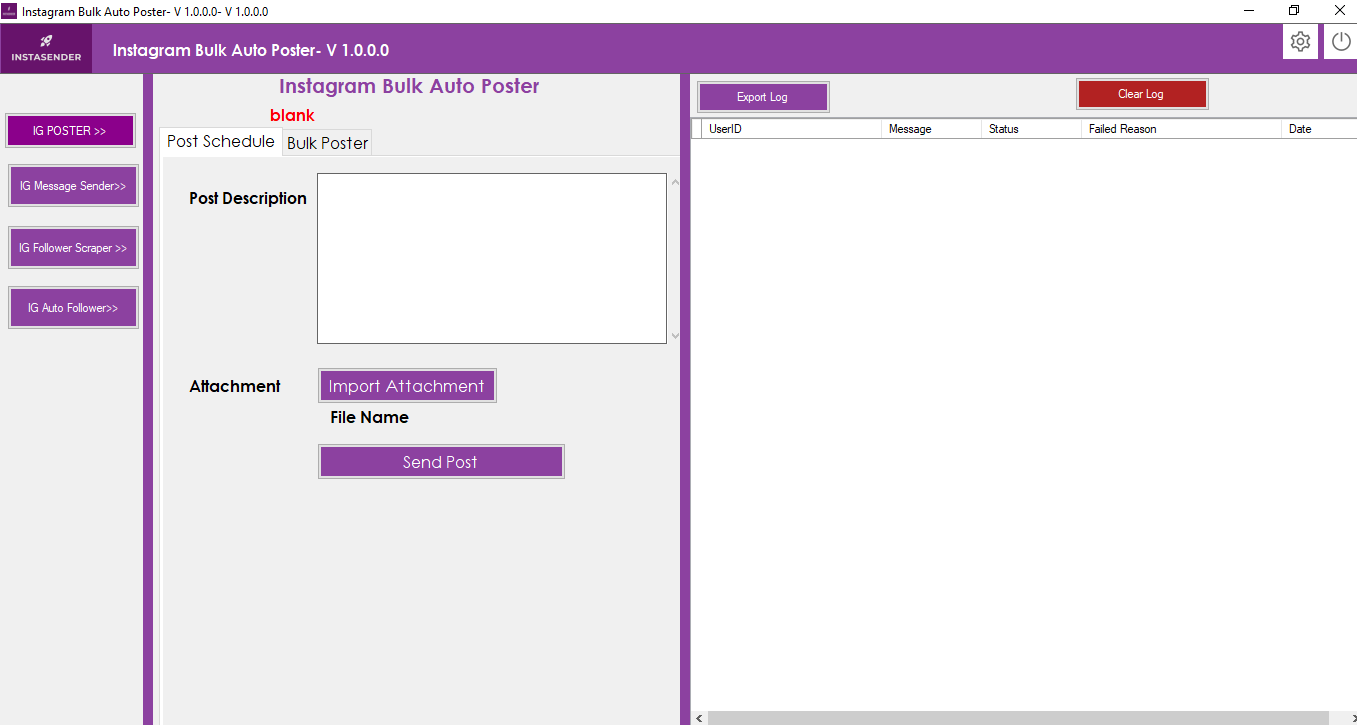
Instagram Auto Poster
The Instagram Auto Poster allows you to publish Instagram photos, videos, and Reels individually or in bulk. This feature is useful when you need to manage multiple posts without uploading every file manually.
Single Instagram Post
Click the Post Scheduler tab to create an individual post.
- Post Description: Enter the caption or description for your post.
- Attachment: Select the Instagram photo or video you want to publish.
Bulk Instagram Posting
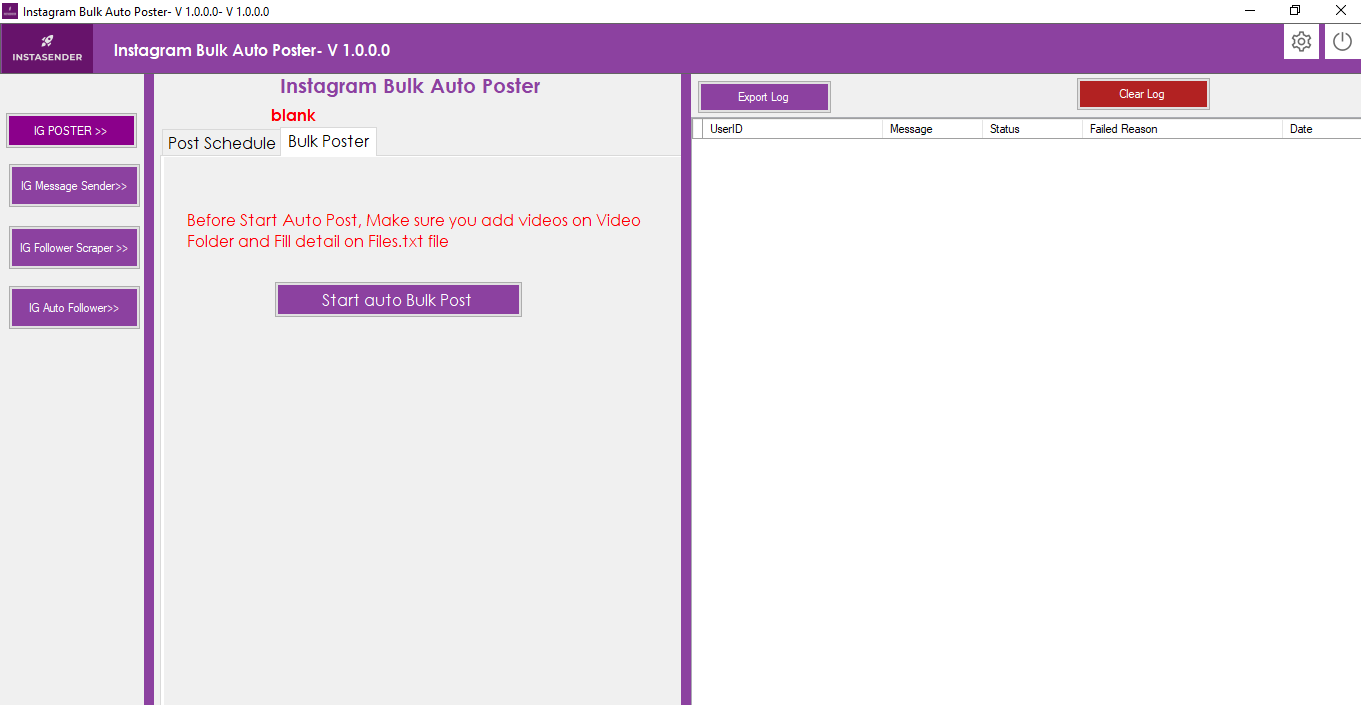
For bulk posting, open the Bulk Poster tab. Add your videos or images to the Video folder and define the corresponding titles and filenames in the Files.txt file.
After adding the required media files, click Start Auto Bulk Post to begin the automated posting workflow.
Demo Video:
https://youtu.be/K_vZPNysnos
Instagram Message Sender
The Instagram Message Sender helps automate repetitive Instagram direct messaging workflows. You can import Instagram profile IDs from a CSV file and send customized messages using your configured message template.
Click the IG Message Sender option from the left menu.
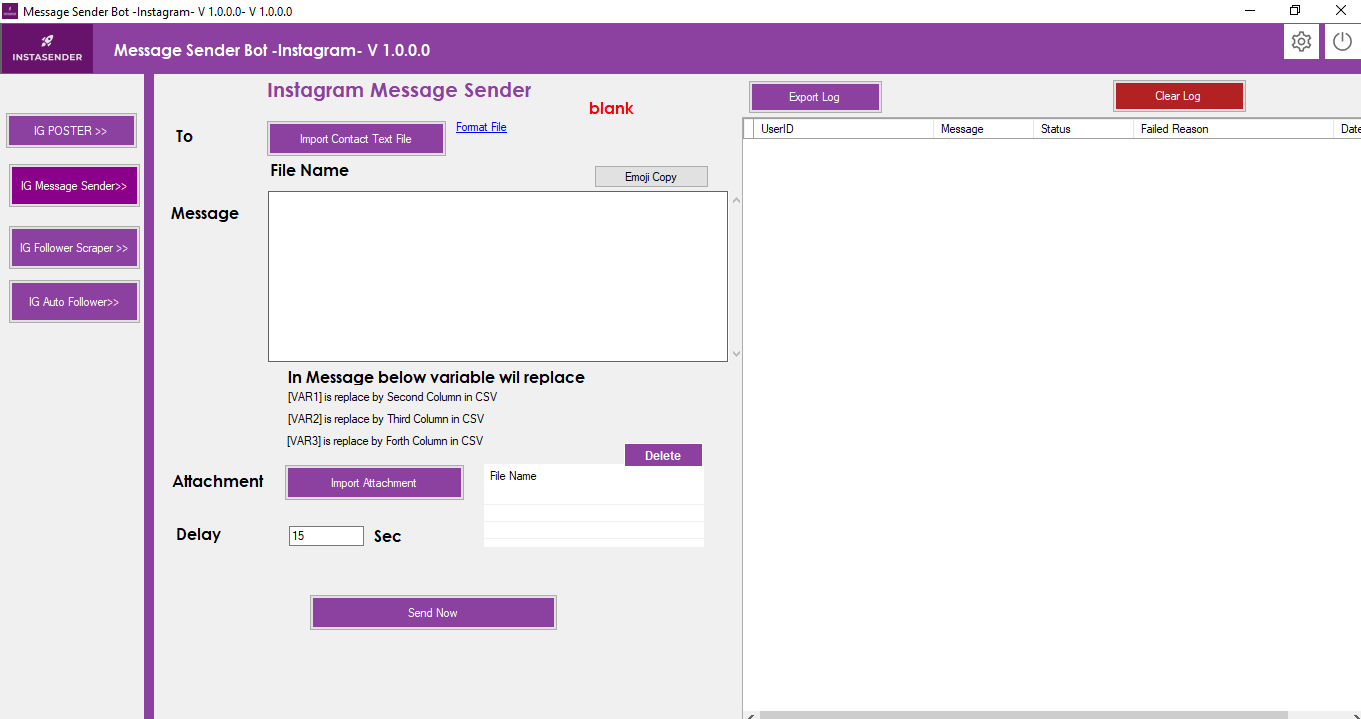
Instagram Bulk Message Features
- Send messages to imported Instagram profiles.
- Import bulk Instagram member/profile IDs using CSV.
- Create customized messages for individual recipients.
- Use message variables such as [VAR1], [VAR2], [VAR3], [VAR4], [VAR5], [VAR6], and [VAR7].
- Import attachments for your messaging workflow.
How the Instagram Message Sender Works
- Import your contact CSV file using the application’s supported format.
- The first column contains the Instagram Member ID or profile identifier.
- Additional columns can contain variables such as VAR1, VAR2, VAR3, and other personalized values.
- Use the message editor to create your customized message.
- Import an attachment if required.
- Click Send Now.
- The Chrome browser opens and you can log in to your Instagram account.
- The software then processes the configured messaging workflow.
Demo Video:
https://youtu.be/sVV4KIrptE0
Instagram Follower Scraper
The Instagram Follower Scraper is designed to collect follower information from a target Instagram profile. Instead of manually opening and recording followers, the software automates the follower data collection process.
Click IG Follower Scraper from the left menu.
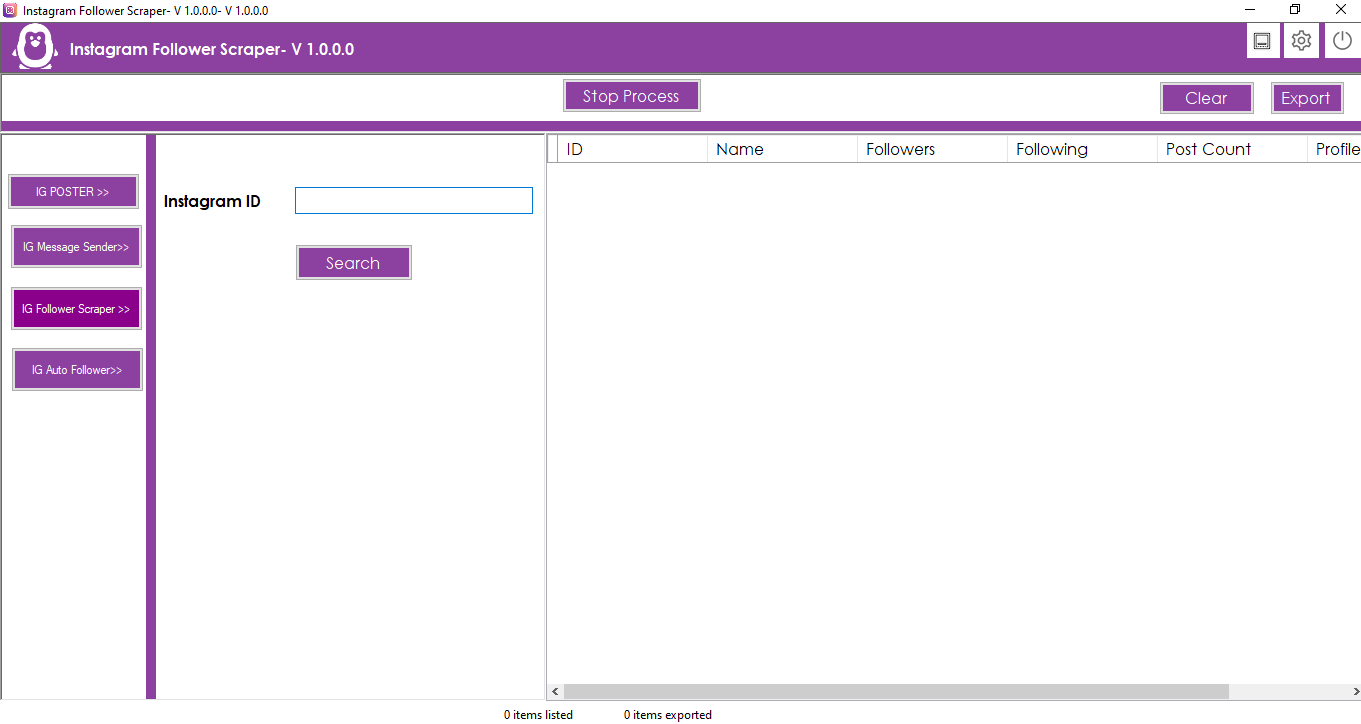
How to Use the Instagram Scraper
- Instagram ID: Enter the username of the Instagram profile whose followers you want to collect.
- Click the Search button.
- The software opens Chrome and navigates to Instagram.
- Log in to your Instagram account when required.
- After the required Instagram page is available, the software starts the follower scraping workflow.
- Export collected information in Excel, CSV, or TXT format.
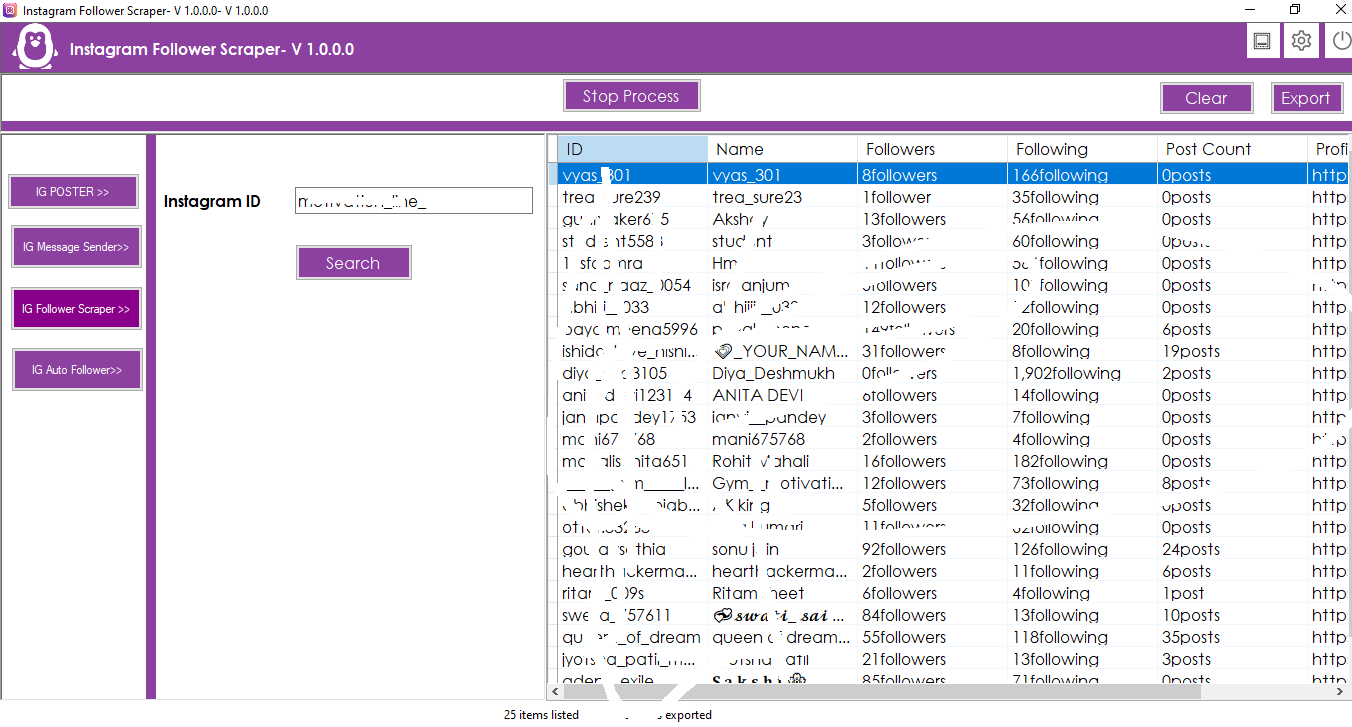
The Instagram follower scraper can be useful for audience research, competitor analysis, marketing research, profile analysis, and other legitimate Instagram data collection workflows.
Demo Video:
https://youtu.be/OECp87cfE7A
Instagram Auto Follow
The Instagram Auto Follow feature automates repetitive follow actions. You can select a target Instagram profile, collect its followers, and configure the software to process follow actions according to your selected limits and delays.
Click IG Auto Follower from the left menu.
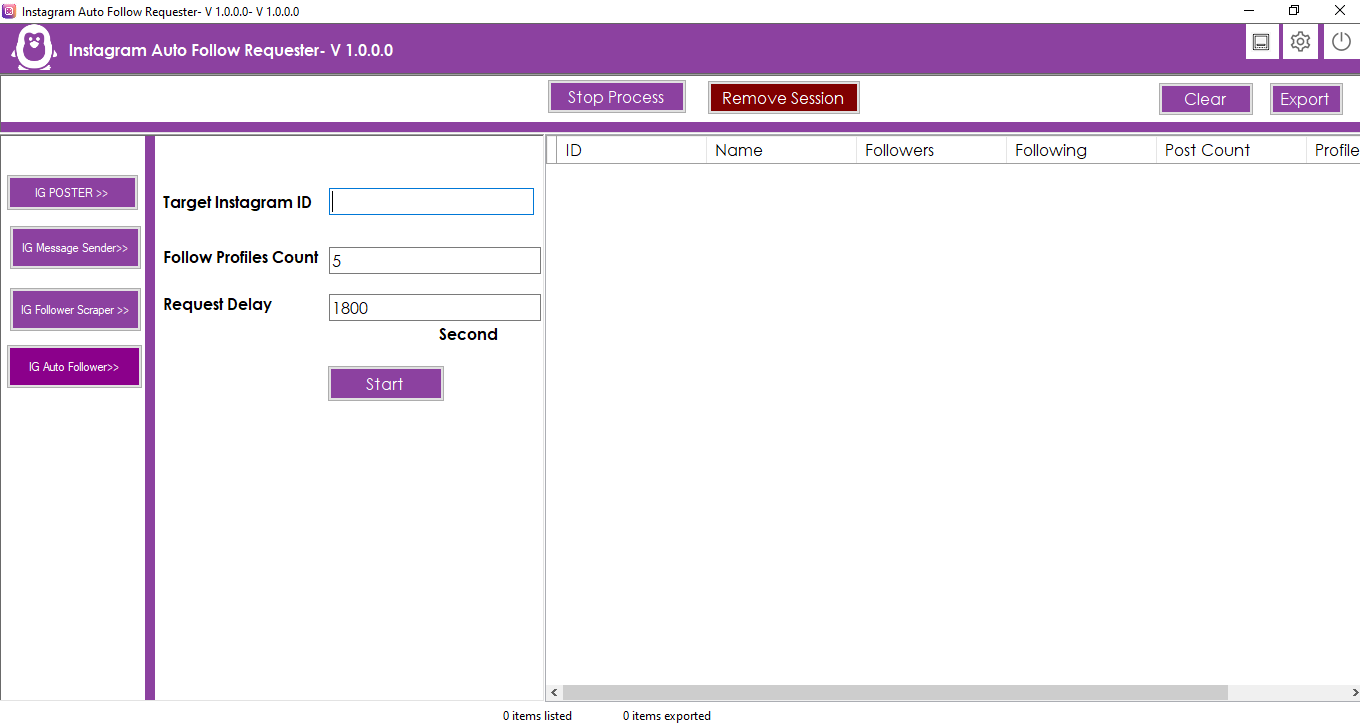
Instagram Auto Follow Settings
- Target Instagram ID: Enter the Instagram profile whose followers you want to use as your target audience.
- Follow Profiles Count: Define how many profiles should be processed during each workflow.
- Request Delay: Configure the delay between follow actions.
- Daily Limits: Control the number of automated actions according to your campaign requirements.
These configurable options provide greater control over your Instagram automation workflow and help reduce repetitive manual actions.
Demo Video:
https://youtu.be/SMmdoTfLgNQ
Proxy, VPN & Export Settings
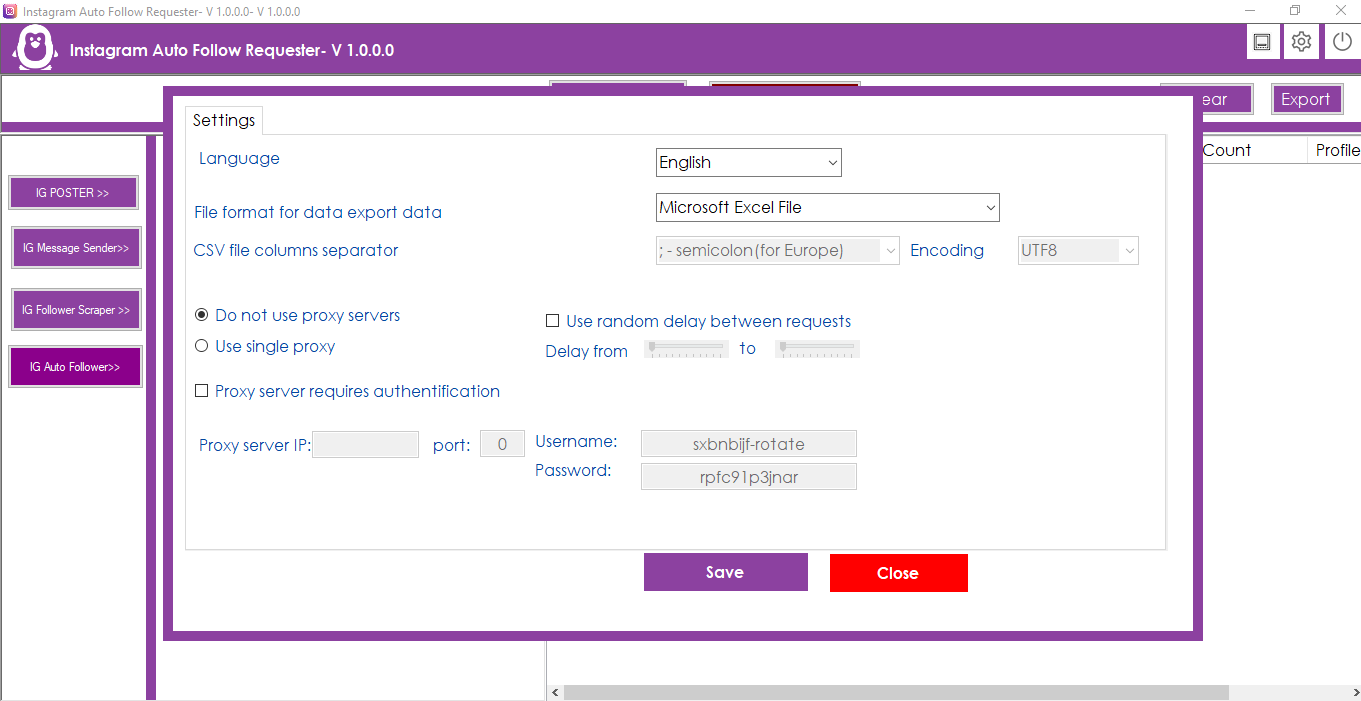
Open the Settings menu to configure additional application options.
- Proxy Support: Configure proxy settings for supported workflows.
- VPN Setup: Configure VPN-related settings within the application.
- Export Formats: Export scraper results in Excel, CSV, or TXT format.
- Multiple Languages: Change the application language according to your preference.
Why Choose This Instagram Automation Software?
If you need more than a basic Instagram scraper, this software combines several Instagram automation functions in one application. You can use the Instagram follower scraper to collect follower information, the Instagram message sender to automate configured messaging workflows, the Instagram auto follow feature for repetitive follow actions, and the Instagram Auto Poster for bulk content publishing.
The combination of scraping, messaging, following, and posting makes this an all-in-one solution for users who want to simplify repetitive Instagram management and automation tasks.
Important
Use Instagram automation features responsibly and comply with Instagram’s Terms of Use, applicable platform policies, privacy requirements, and local laws. Configure appropriate limits and delays for your workflows and use the software only with accounts and data you are authorized to access.
| Type | Windows App |
|---|---|
| Author | bhansalisoft |
| Price | $31 |
| Sales | 26 |
| Rating | 0 (2) |
| Published | Mar 20, 2024 |
| Last Update | Aug 7, 2026 |
| Application Runtime | .NET 4 |
| High Resolution | No |
| Operating System Versions | Windows 10, Windows 8 Metro, Windows 8 Desktop, Windows 7, Windows Vista, Windows XP |
Categories
Tags
External listing. code.market does not sell this product and does not process payment for it. Pricing, payment, delivery, licensing, refunds, and support are handled by the third-party merchant on its own website. We may earn an affiliate commission from a referral. Details.
Products of the Week.
Submit🥇

STOP GUESSING WHAT TO POST
AI that learns your brand voice and builds a month of consistent, on-brand social content: carousels, posts and hooks that sound like you, not like everyone else's AI.
SaaS · 7,329 views · 67 clicksSaaS · Week 46 · 7,329 views · 67 clicks
🥈

Conversational Backlinks for Busy Founders
Place Backlink Relevant Conversation for your domain across Forums and Conversations
Website · 46,597 views · 232 clicksWebsite · Week 46 · 46,597 views · 232 clicks
🥉

upvote.club
Free Social Media Engagement that Helps Boost Your Content. Upvote Club supports 19 social networks with 100+ engagement actions in one dashboard. Add links to your posts and get free engagement from real users.
SaaS · 44,539 views · 127 clicksSaaS · Week 46 · 44,539 views · 127 clicks
#4

Substack Posting API
Onboard your Agent to Substack. Write Publish on Substack via API
SaaS · 63,425 views · 206 clicksSaaS · Week 46 · 63,425 views · 206 clicks
#5

Seenshot App
Free, Fast, MacOS Screenshot app. Make Screenshot cmd+shift+2 and send it via link
Desktop App · 32,671 views · 127 clicksDesktop App · Week 46 · 32,671 views · 127 clicks
#6

Hand-Placed Backlinks $9.99 per link. Flat rate.
Buy hand-placed forum, Q-A and directory backlinks. Flat $9.99 per link, no subscriptions — you only pay for approved listings.
Website · 8,298 views · 19 clicksWebsite · Week 46 · 8,298 views · 19 clicks
#7

Free Invoice Generator - PDF Invoices in Your Browser, No Sign-Up
A free invoice maker for freelancers and small businesses: fill in the invoice, check the live preview, and download a PDF that looks exactly like it. Any currency, tax per item, three templates, no sign-up, and nothing leaves your device.
6,925 views · 29 clicksWeek 46 · 6,925 views · 29 clicks
#8

Merge PDF Files Free - Combine PDFs in Your Browser, No Upload
A free PDF merger for office workers, students, and freelancers: combine PDFs and images into one file in the browser, reorder files and pages, pick page ranges, keep bookmarks, and open password-protected PDFs. Nothing is uploaded, no sign-up, no watermark.
6,408 views · 18 clicksWeek 46 · 6,408 views · 18 clicks