
Instagram Auto Follow/Unfollow/Scraper

Description
- NOTE 1: If you are looking for a more advanced Instagram automation software, check Thunder Social
- NOTE 2: A white-label reseller program available with a License Keys Manager, check our services.
The extension is still working correctly in 2026.
Unlimited accounts and lifetime updates!
Instagram Auto Follow/Unfollow is the perfect automation tool to grow your audience organically, increase your engagement, your followers and your popularity.
This extension will automatically follow and/or unfollow, the Followers or the Following of a specific account and the Likes of a specific post (picture or video). And it is compatible with many web browsers: Google Chrome, Chromium, Brave, Opera, Microsoft Edge, CCleaner Browser and Vivaldi!
It is really easy to use, you will start to increase your number of followers just few minutes after installation. You can start using the extension with few clicks without any knowledge, but you can also configure this automation tool to increase your followers and following faster if you know what you are doing.
If you need this extension on another web browser, or more features, contact us.
You might also like our similar apps:
- Social Bot – Instagram and Twitter Bot – 25% OFF TODAY
- X (Twitter) Auto Follow/Unfollow/Scraper – Web extension
- Skype Bot – Send usssages automatically
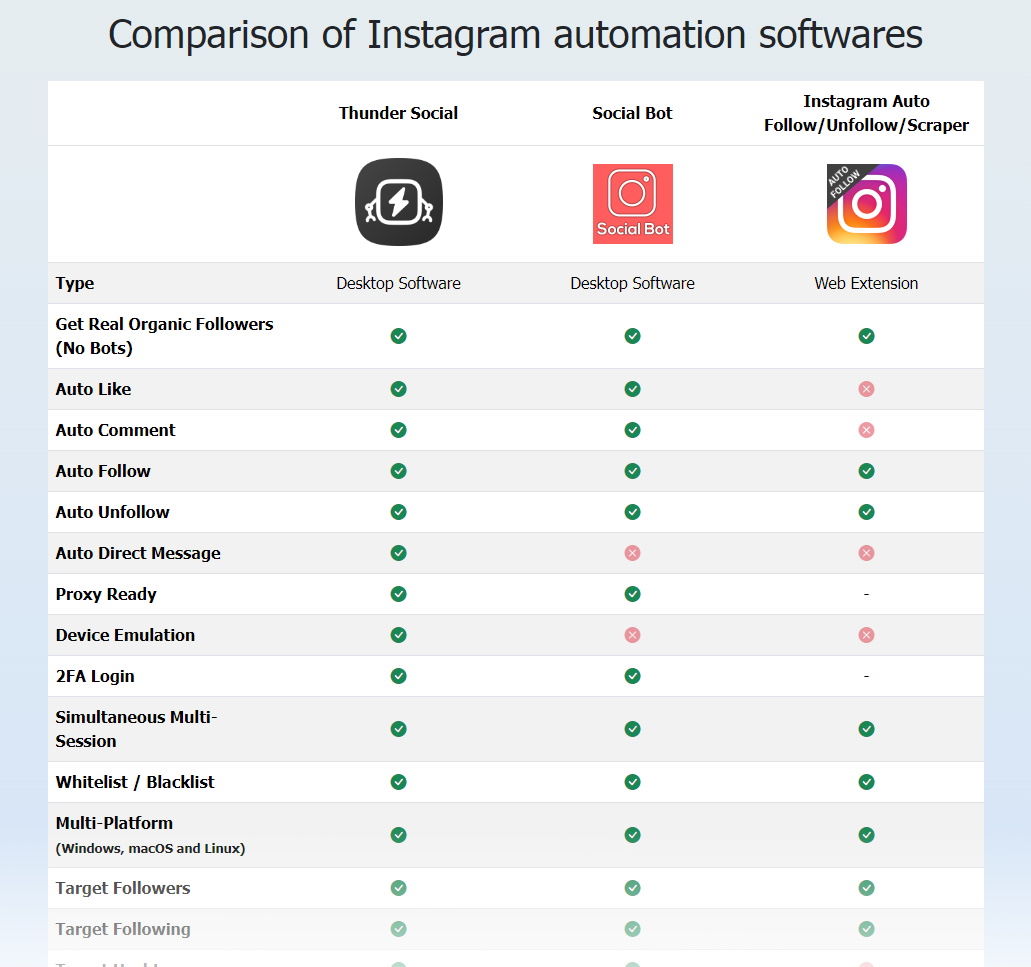
COMPARISON WITH OTHER SOFTWARES
You can find a comparison of all our Instagram automation softwares here:
FEATURES
- Compatible with any Operating System: Windows, Linux, macOS…
- No API needed! It doesn’t use any API.
- Multi-Session up to 6 Instagram accounts at the same time (more details below), and unlimited accounts sequentially
- You can use this extension with all your Instagram accounts, no limit
- You don’t have to use your Instagram password
- Unlimited Follow / Unfollow (up to the Instagram limits)
- Auto Follow the Followers of a specific account
- Auto Follow the Following of a specific account
- Auto Follow the Followers of your account
- Auto Follow the Likes (followers who liked a specific picture)
- *Unfollow users that don’t follow you back
- Auto Unfollow the Followers of a specific account
- Auto Unfollow the Following of a specific account
- Auto Unfollow the Following of your account
- Auto Unfollow the Followers who liked a specific picture
- Blacklist, so you can ignore the accounts you want (not unfollow or not follow)
- Add the accounts you follow (or requested) automatically in your whitelist
- Count the number of follow and the unfollow
- Random delay between every follow or unfollow
- Sleep/break time after a certain amount of follow or unfollow
- Scroll automatically to get more account to follow or unfollow
- Automatically stops when you reach your limit
- Real time logs (time started, stopped, sleeping, accounts followed…)
- Save and load your configuration automatically, you don’t need to setup it all the time
- Start, stop or resume anytime, it will keep your progression (as long as you don’t close the page)
- Fully and easily configurable, you can change the:
- Modes: FOLLOW, UNFOLLOW
- Minimum delay between each follow or each unfollow
- Maximum delay between each follow or each unfollow
- Sleep/break time after a certain amount of follows or unfollows
- Amount of follows or unfollows accounts before the sleep/break
- Maximum follows or unfollows for the current run
CUSTOMERS REVIEWS

HOW IT WORKS
Watch “Video Preview”, but if you prefer text explanations, here a quick guide to start the Follow mode:
- Open Chrome, you need to be connected on your Instagram account
- Go to any account page where you want to get the same Followers, then open the Followers list
- Click on the extension icon (top right corner on Chrome)
- Select “FOLLOW”
- Click on “START”
Then you can enjoy the show! Easy right? You can change all the speed settings. You will get more detailed explanations with screenshots and video in the documentation. If your content matches the selected account, people will likely follow you back and your number of Followers will increase quickly!
This extension does not use bot or fake accounts, it does not magically add a specific number of Followers on your account, the Followers you will get are real and will follow you by themselves if your content is adequate.
INSTALLATION
- Open your compatible web broswer
- Open your Extensions (chrome://extensions/)
- Activate “Developer mode”
- For Microsoft Edge only: Activate “Allow extensions from other stores.”
- Click on “Load unpacked”
- Choose the extension folder that you just downloaded (and unpacked) then click on “OK”
- Restart your browser
WHAT’S INCLUDED
- The Chrome extension “Instagram Auto Follow/Unfollow” (sources: obfuscated javascript + html + css + png images)
- Documentation with rules to get the best results, with videos tutorials from the installation to the use of the features
- One license key allows you to install the extension up to 3 installations (up to 3 computers or 3 different web browsers), if you need more, contact us
- 6 months support for free by email, not in the comments
(Optional) The codecanyon Extended License grants you the right to create only 1 End Product, you will be only able to change the visual elements (HTML and CSS) and add your own code, you won’t be able to edit the actual main javascript code and won’t have our licensing system. If you want us to create a custom version for you or your customers (with your own branding: logo, name, texts..), contact us directly.
NEWSLETTER – CONTACT

SUPPORT
Please read the documentation first. Send us an EMAIL for any support request after your purchase, DO NOT POST A COMMENT. For other enquiries, you can also send us an email or just post a comment on the item’s page. You can find our email in the documentation or on the newsletter. If a feature doesn’t work, we will fix it as soon as possible.
NOTE AND DISCLAIMER
- This extension or software is not associated with Instagram, Twitter or any social network.
- We are not responsible of the use you make of this extension, if you get banned, it is your own responsibility.
- You are free to change all the settings but we recommend you to not follow too many accounts per day, more details in the documentation.
- This extension automates the process that you usually can do manually (example: click on follow/unfollow), so the limitations are the same.
- Any major modification of the platform’s website may affect the extension features, we will update the extension as fast as possible for free.
- You cannot sell or distribute this extension or software with the “Regular License” or “Tools License”, for commercial purposes please contact us.
UPDATES
All the changes from the updates are available here: CHANGELOG
| Author | Automatize |
|---|---|
| Category | Plugins / Miscellaneous |
| Price | $29 |
| Sales | 606 |
| Rating | 4.54 from 37 ratings |
| Published | Dec 28, 2018 |
| Last Update | Aug 21, 2025 |
| Compatible Browsers | Opera, Chrome, Edge, Opera, Chrome |
| Source Files Included | JavaScript JS, HTML, CSS, JavaScript JS, HTML, CSS, .png, .mp4 |
| Video Preview Resolution | 1732x1032 |
Categories
Tags
External listing. code.market does not sell this product and does not process payment for it. Pricing, payment, delivery, licensing, refunds, and support are handled by the third-party merchant on its own website. We may earn an affiliate commission from a referral. Details.
Products of the Week.
Submit🥇

STOP GUESSING WHAT TO POST
AI that learns your brand voice and builds a month of consistent, on-brand social content: carousels, posts and hooks that sound like you, not like everyone else's AI.
SaaS · 4,306 views · 38 clicksSaaS · Week 45 · 4,306 views · 38 clicks
🥈

Conversational Backlinks for Busy Founders
Place Backlink Relevant Conversation for your domain across Forums and Conversations
Website · 42,033 views · 223 clicksWebsite · Week 45 · 42,033 views · 223 clicks
🥉

upvote.club
Free Social Media Engagement that Helps Boost Your Content. Upvote Club supports 19 social networks with 100+ engagement actions in one dashboard. Add links to your posts and get free engagement from real users.
SaaS · 40,077 views · 117 clicksSaaS · Week 45 · 40,077 views · 117 clicks
#4

Substack Posting API
Onboard your Agent to Substack. Write Publish on Substack via API
SaaS · 59,085 views · 198 clicksSaaS · Week 45 · 59,085 views · 198 clicks
#5

Seenshot App
Free, Fast, MacOS Screenshot app. Make Screenshot cmd+shift+2 and send it via link
Desktop App · 28,459 views · 122 clicksDesktop App · Week 45 · 28,459 views · 122 clicks
#6

Hand-Placed Backlinks $9.99 per link. Flat rate.
Buy hand-placed forum, Q-A and directory backlinks. Flat $9.99 per link, no subscriptions — you only pay for approved listings.
Website · 4,292 views · 19 clicksWebsite · Week 45 · 4,292 views · 19 clicks
#7

Free Invoice Generator - PDF Invoices in Your Browser, No Sign-Up
A free invoice maker for freelancers and small businesses: fill in the invoice, check the live preview, and download a PDF that looks exactly like it. Any currency, tax per item, three templates, no sign-up, and nothing leaves your device.
2,967 views · 17 clicksWeek 45 · 2,967 views · 17 clicks
#8

Merge PDF Files Free - Combine PDFs in Your Browser, No Upload
A free PDF merger for office workers, students, and freelancers: combine PDFs and images into one file in the browser, reorder files and pages, pick page ranges, keep bookmarks, and open password-protected PDFs. Nothing is uploaded, no sign-up, no watermark.
2,740 views · 13 clicksWeek 45 · 2,740 views · 13 clicks